


What Are Google Search Ads and How Do They Work? (2026 Guide)

Google search ads are text ads that appear on Google's results pages, marked as sponsored, when someone searches for terms related to the keywords an advertiser has chosen. Advertisers usually pay only when someone clicks, and a fresh auction held for every single search decides whether an ad shows at all and in which position.
What makes search advertising so effective is intent: your message reaches someone who has just typed their need into a search box. This guide explains where search ads appear, how the auction and Ad Rank work, what Quality Score really tells you, match types, negative keywords, assets and the bidding options available in 2026.
If you are new to the platform, start with our Google Ads guide for beginners, which covers account structure, budgets and first steps; this article focuses on the mechanics of Search campaigns.
Where do search ads appear?
The Google Search Network combines Google's own search surfaces with its search partners:
- Google Search results: Text ads sit above or below the organic results. Since a redesign Google announced in October 2025, they are grouped under a single "Sponsored results" label that stays visible as people scroll; users can collapse the group with one click, and a group never contains more than four text ads.
- Other Google surfaces: the Shopping tab, Google Images, Google Maps and the Maps app.
- Search partners: third-party search sites and additional placements such as YouTube search results. They are included by default and can be switched off in campaign settings; Google notes that this traffic is not always as targeted.
Search campaign settings also include a Display Network checkbox, which Google calls Display Expansion: when the system predicts that part of your Search budget will go unspent, it can show your ads on the Google Display Network as well. If you want to keep your search data clean and separate, make ticking or unticking this box a deliberate decision.
What makes up a search ad?
The standard format in Search campaigns is the responsive search ad (RSA). You provide 3 to 15 headlines of up to 30 characters and 2 to 4 descriptions of up to 90 characters; Google assembles a combination for every search and shows up to three headlines and two descriptions at a time, alongside your final URL, two optional display path fields of up to 15 characters each and any eligible assets. For headline formulas, pinning and Ad Strength, read our guide on how to write Google Ads ad copy.
How the auction and Ad Rank work
When someone searches, Google first works out which ads are eligible to compete. Keyword matching, location and language targeting, ad schedule, budget, negative keywords and approval status all play a part. For every ad still in the running, Google then calculates Ad Rank, which decides whether the ad shows at all and, if it does, in which position.
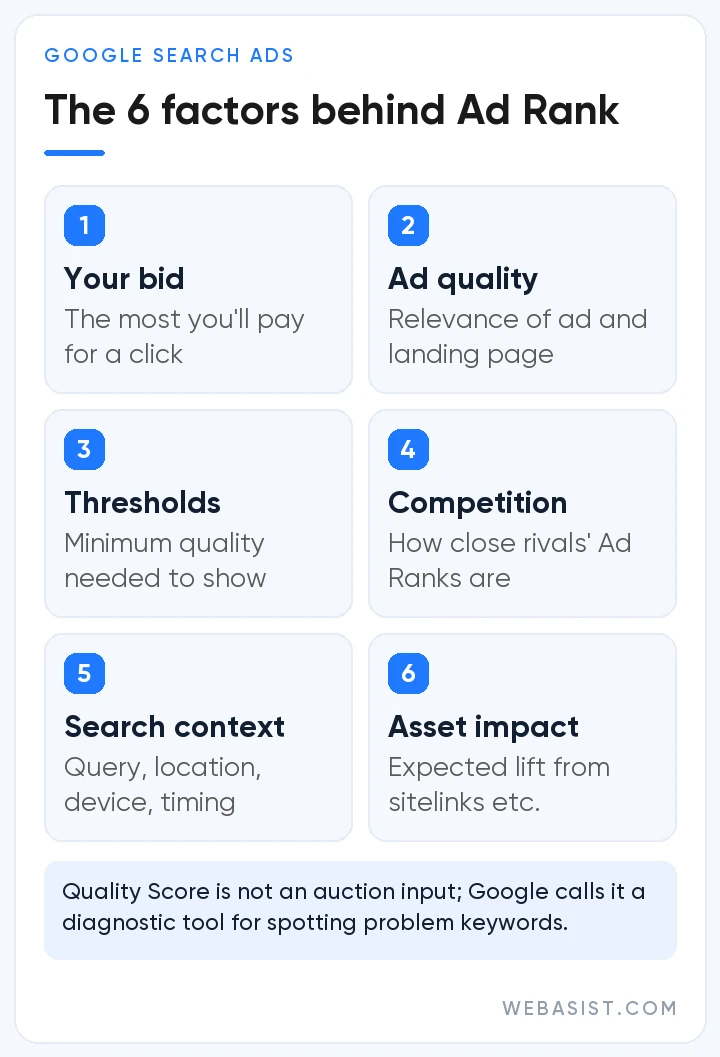
According to Google, Ad Rank is based on six factors:
- Your bid: the most you are willing to pay for a click; with Smart Bidding, the system sets it.
- Ad and landing page quality: how relevant and useful your ad and page are to the searcher.
- Ad Rank thresholds: the minimum quality an ad must reach to show at all.
- Auction competitiveness: close competitors affect your position and your price.
- The context of the search: the query, location, device, time of day and other signals.
- The expected impact of assets: how sitelinks, call buttons and similar additions are likely to lift performance.
In practice, thresholds mean that an ad which falls short of the quality bar will not appear, even when no other advertiser is bidding on the same term. A higher bid on its own cannot guarantee a place on every search.
What do you actually pay?
The price you pay is your actual cost per click (CPC), and it is usually lower than your maximum bid. Google explains that you pay only what is needed to clear the Ad Rank thresholds and beat the Ad Rank of the advertiser directly below you; if there is no competitor below you, you pay only the reserve price. That is why improving quality is the most sustainable way to hold the same position for less. Google's own explanation of Ad Rank goes into more detail.
Quality Score: a diagnostic, not an auction input
Quality Score is a keyword-level rating from 1 to 10 that summarises how relevant your ads are compared with other advertisers. Google is explicit that it is not an input to the auction but a diagnostic tool for spotting problem keywords. Its three components are still worth watching, because they point the same way as the quality signals used at auction time; each is rated "Above average", "Average" or "Below average".
| Component | What it tells you | How to improve it |
|---|---|---|
| Expected click-through rate | How likely your ad is to be clicked when it shows | Headlines that answer the need behind the query, a clear offer and a specific call to action |
| Ad relevance | How closely your copy matches the intent of the search | Tightly themed ad groups and natural use of the keyword in headlines |
| Landing page experience | Whether people find what the ad promised after they click | Content that delivers on the ad, fast loading, mobile usability and easy contact options; where needed, a landing page redesign |
Keyword match types
Match types control which searches can trigger your ad. Google now matches on meaning and intent rather than exact strings of words, so treat the examples below as guidance rather than a rulebook.
| Match type | Syntax | Which searches can it match? | When to use it |
|---|---|---|---|
| Broad match | boiler service | Related searches, including some that don't contain its words | Campaigns with reliable conversion tracking and Smart Bidding that want to discover new queries |
| Phrase match | "boiler service" | Searches that include its meaning, often more specific ones (for example "annual boiler service cost") | A balance between reach and control |
| Exact match | [boiler service] | Searches with the same meaning or intent | Your most valuable queries and tight budgets |
Google treats Smart Bidding as essential with broad match: the wider the pool of queries, the more you need a bidding system that can judge which searches are worth paying for. With weak conversion data, broad match can spread budget across irrelevant searches.
Which keyword wins when several match?
One search can match several keywords in your account. Google looks first for keywords identical to the search term, and an identical exact match keyword comes first; if nothing is identical, relevance decides, and Ad Rank breaks any remaining ties. The same logic applies alongside Performance Max: when a search is identical to an eligible exact match keyword in a Search campaign, the Search campaign takes priority. For an overall comparison, see our overview of Google Ads campaign types.
Negative keywords: insurance for your budget
Negative keywords stop your ads from showing on searches you don't want. For a boiler repair business, terms such as "jobs", "manual" or "second hand" are typical candidates. There are three types:
- Negative broad match: the ad won't show if the search contains all of the negative terms, in any order.
- Negative phrase match: the ad is blocked when the terms appear in the same order, even with other words around them.
- Negative exact match: the ad is blocked only when the search is exactly the negative term.
One rule catches many advertisers out: regular keywords also match close variants, but negatives do not. To block a term properly you have to add its plural, common misspellings and synonyms one by one. In heavily inflected languages such as Turkish, where a single root word can take many suffixes, this matters even more.
You can add negatives at ad group, campaign or account level, or through shared negative keyword lists. Your best source of new negatives is the search terms report; check it often in the first weeks and at least weekly after that. Because of privacy thresholds, not every query appears there.
Assets: more space, more information
Assets, formerly known as ad extensions, add information and clickable space to your ad. Because Google factors their expected impact into Ad Rank, they are more than decoration. The most common ones in Search campaigns are:
- Sitelink assets: take people straight to pages such as pricing, service areas or contact details.
- Callout assets: short, non-clickable benefit phrases such as "Free site survey" (up to 25 characters).
- Structured snippet assets: list values under a predefined header such as Service catalog, Brands or Types.
- Call and location assets: a call button, address and map details, especially valuable for local businesses.
- Price and promotion assets: highlight prices or time-limited offers.
- Image, business name and logo assets: add visuals and brand recognition to a text ad.
- Lead form assets: let people leave their details without visiting your website.
An approved asset will not show every time: Google displays it when it predicts the asset will improve performance and your ad ranks high enough.
Bidding strategies for Search campaigns in 2026
Your bid strategy tells Google what to aim for in every auction. Smart Bidding strategies weigh signals such as device, location, time of day and the query to set bids automatically, and none of them works properly without conversion tracking.
| Strategy | What it maximises | When it makes sense |
|---|---|---|
| Maximize conversions | Most conversions within budget | Tracking is live but the target cost is still unknown |
| Target CPA | Conversions at an average cost near your target | Conversion history and a clear acceptable cost |
| Maximize conversion value | Total conversion value within budget | You measure order or lead value |
| Target ROAS | Conversion value at your target return on ad spend | E-commerce campaigns with established value data |
| Maximize clicks | Clicks within budget | Short launch periods without conversion data |
| Target impression share | How often you appear anywhere on the page, at the top or in the absolute top position | Visibility goals such as brand searches |
| Manual CPC | Full manual control over bids | Very small or specialist test campaigns |
Three changes from 2025 and 2026 stand out:
- Enhanced CPC was retired for Search and Display campaigns from the week of 31 March 2025; campaigns that were not moved now run on Manual CPC.
- From June 2026, "Maximize conversions with a Target CPA" and "Maximize conversion value with a Target ROAS" are labelled simply Target CPA and Target ROAS again. Google stresses that this is a naming change only: both labels work in exactly the same way.
- Since a change that began on 17 August 2026, campaigns that are limited by budget and use Target CPA or Target ROAS are optimised to the target you set rather than beating it. A campaign that used to outperform its target may therefore drift towards it, so Google recommends reviewing these campaigns and updating targets to match recent performance. Your budget limits are still respected.
After a switch to Smart Bidding or a major target change, the strategy goes through a learning period. Google suggests allowing one to two conversion cycles (the usual time from click to conversion) for the system to settle after big changes, and judging performance over at least two full conversion cycles, ideally a month or a period with 50 or more conversions.
AI Max for Search campaigns
Announced by Google in May 2025, AI Max for Search campaigns is a suite of features you switch on inside an existing Search campaign. It has three core parts:
- Search term matching: uses broad match and keywordless technology to reach relevant new searches.
- Text customization: generates headlines and descriptions tailored to the query from your ads, landing pages and assets (the feature formerly known as automatically created assets).
- Final URL expansion: can send people to the page on your site that best fits their intent.
Controls include brand inclusions and exclusions, locations of interest and URL rules, and AI Max matches are labelled separately in the search terms report. Under Google's published timeline, campaigns using automatically created assets or the campaign-level broad match setting are being upgraded to AI Max automatically from September 2026. For Dynamic Search Ads, Google's June 2026 update says the sunset and automatic upgrade will begin in February 2027.
Google also notes that AI Max won't be effective in campaigns that are limited by budget. Our advice: switch it on in a controlled way in campaigns with trustworthy conversion measurement and room in the budget, then watch the search terms and landing page reports closely in the first weeks.
Search campaign checklist
Run through these points before a new Search campaign goes live. Most settings can be changed later, but getting them right from day one makes your first weeks of data far more useful.
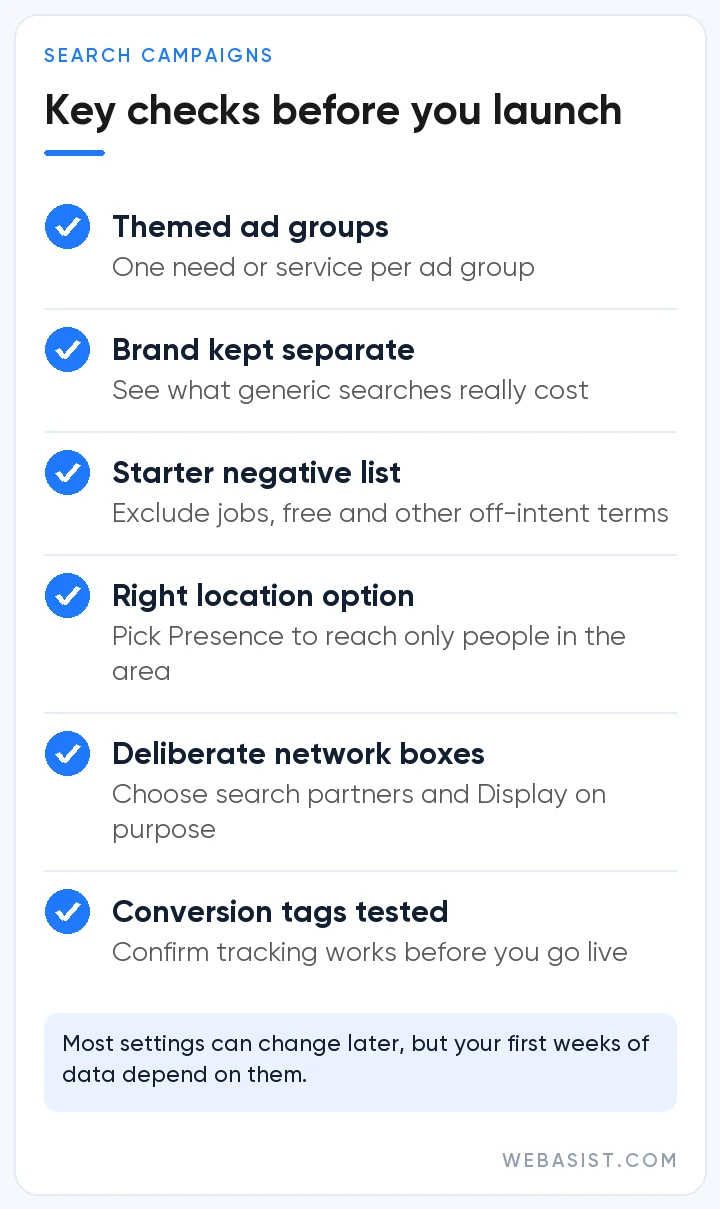
- Build each ad group around a single need or service. Google's current account structure guidance also favours themed ad groups over single-keyword ones.
- Don't split the same keyword into separate ad groups by match type; Google says this duplication fragments the data Smart Bidding learns from.
- Keep searches for your brand name in a separate campaign, so you can see what generic searches really cost you.
- Prepare a starter negative list before launch: terms with a different intent, such as jobs, free or second hand, are a good place to begin.
- The default "Presence or interest" location setting also reaches people elsewhere who show interest in your area; if you only serve people who are physically there, consider "Presence".
- Don't leave the search partners and Display Network boxes on autopilot; switch each one on or off deliberately.
- Align your ad schedule with the hours when someone can answer the phone.
- Test that your conversion tags fire before launch; Smart Bidding can only make good decisions with accurate data.
Frequently Asked Questions
What is the difference between search ads and display ads?
Search ads respond to the query someone types and capture existing demand, mostly with text. Display ads appear as visuals on websites and apps based on audience and content signals, and they are typically used for awareness and remarketing. In June 2026 Google also began moving Display campaigns under the Demand Gen umbrella.
Will my ad stop showing if my Quality Score is low?
Quality Score itself isn't used in the auction, but a low score signals weak ad or landing page quality. That can mean higher costs, lower positions or, below the Ad Rank thresholds, not showing at all. Fixing the weakest component is usually more efficient than raising bids.
Which match type should a new Search campaign start with?
If your conversion tracking is solid and you plan to use Smart Bidding, broad match is a good way to discover new queries. With a small budget or no conversion data yet, start with exact and phrase match for your most valuable services and expand based on the search terms report.
Should I turn off search partners?
There is no universal answer. Segment your campaign report by network and compare the conversion rate and cost of partner traffic with Google Search. If partners perform clearly worse, you can opt out in the campaign settings.
Does AI Max make keywords unnecessary?
No. AI Max learns from your existing keywords, ads and landing pages to widen your reach, so well-structured keywords and negative lists still steer the system. Exact match keywords that are identical to a search also keep their priority.
Conclusion
Built on sensible match types, disciplined negative keyword management, strong assets and bidding grounded in real conversion data, search ads remain one of the most measurable ways to win customers wherever demand already exists. AI Max and the new bidding rules add automation, yet account structure and data quality still decide what the system learns.
If you would like help building Search campaigns from scratch or reviewing an existing account, the WebAsist team, a Google Partner agency, is happy to take a look. Explore our search ads management service or get in touch with us.














