


Google Ads AI: When to Turn On AI Max and PMax, and When Not To
Our short answer on Google Ads AI tools: for bidding, they work in most accounts; for campaign types (Performance Max) and search expansion (AI Max), only when three conditions are met. Your conversion tracking must be clean, you should see around 30 conversions a month or more, and control over brand, search terms and budget must stay with you. Without those conditions, AI does not bring you more conversions; it brings broader and more expensive traffic.
Google's AI story is built on "more conversions at a similar cost". That is partly true, but it skips one thing: the system chases the target you give it and knows nothing about your margin, your stock, or whether the person filling in the form is a real customer. Below we explain where we switch Smart Bidding, PMax, AI Max and automated recommendations on in the accounts we manage, where we switch them off, and which controls we never hand over.
Google Ads AI tools: which ones work and which ones eat budget?
AI makes decisions in four places in Google Ads: the bid in every auction, which channel the ad shows on, which searches it matches, and what the ad text says. We do not trust all four equally. Handing bids to the machine is usually right, because no person can weigh device, time, location and past behaviour at once for every search. Handing over which searches you appear on and what your ad says is another matter; that puts your brand and your budget in someone else's interpretation.
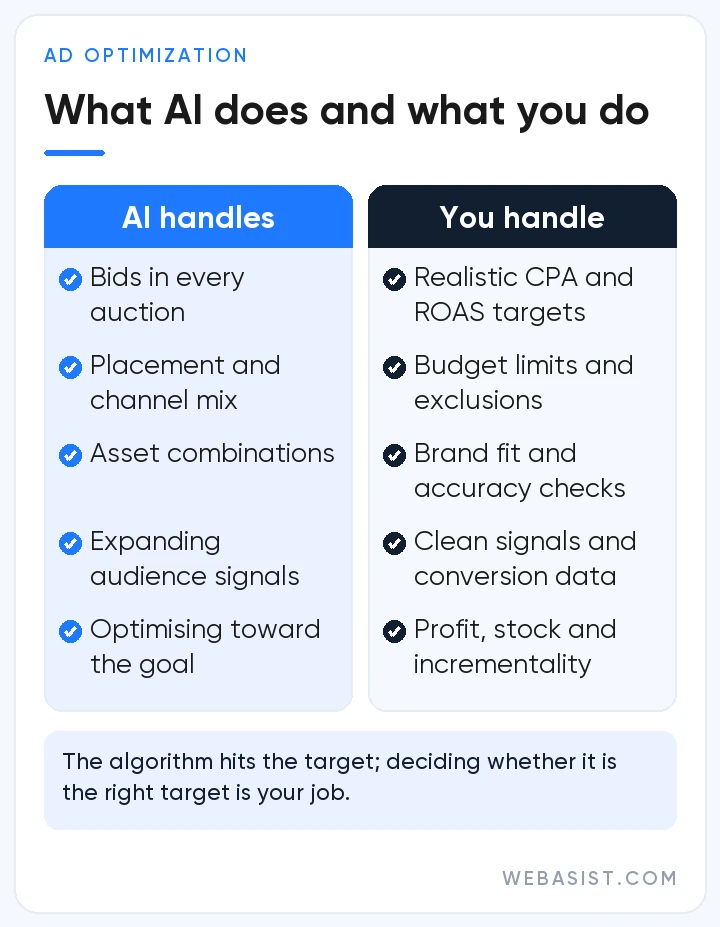
The table below sums up how we treat each tool in the accounts we take over. Red does not mean "never"; it means "not in this account for now". When the conditions change, so does the decision.
Smart Bidding: where Google's AI is genuinely good
Smart Bidding is the umbrella name for Maximize conversions, Target CPA, Maximize conversion value and Target ROAS. In every auction the system looks at signals such as device, location, time, the search query and whether the person has visited your site before, and sets a separate bid. This is the job where AI is genuinely better than people; in accounts with conversion data we do not go back to manual bidding.
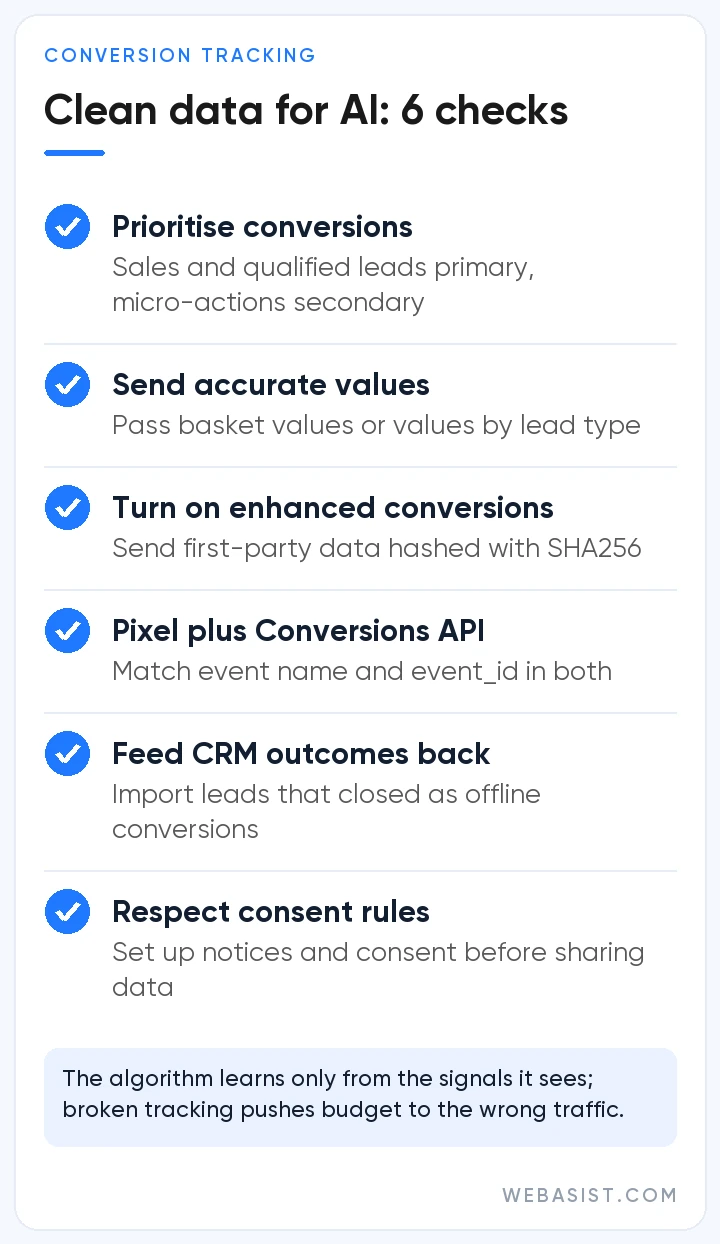
But Smart Bidding runs on conversions. Results should be read over periods with at least 30 conversions (50 for Target ROAS), usually a month or longer. The arithmetic is simple: if your target CPA is 400 TL, the campaign needs to be able to spend 30 × 400 = 12,000 TL a month to get 30 conversions. Give it the same target on 5,000 TL a month and you will see around 12; the system learns, but slowly, and changing the target every week sends it back to the start.
Our rule: if conversion tracking is newly set up, or you are under 15 to 20 conversions a month, we start with Maximize conversions and add a target CPA once data builds up. When to choose which strategy is covered in our bidding strategies guide.
Performance Max (PMax): when to switch it on and when to switch it off
Performance Max (PMax) is the campaign type that serves across Search, Shopping, YouTube, the Display Network, Gmail, Discover and Maps from a single campaign. The audience you give it is a hint, not a rule, and it assembles your images, headlines and videos for each placement itself. We see it working well for e-commerce sites with a properly set up Merchant Center and enough conversions.
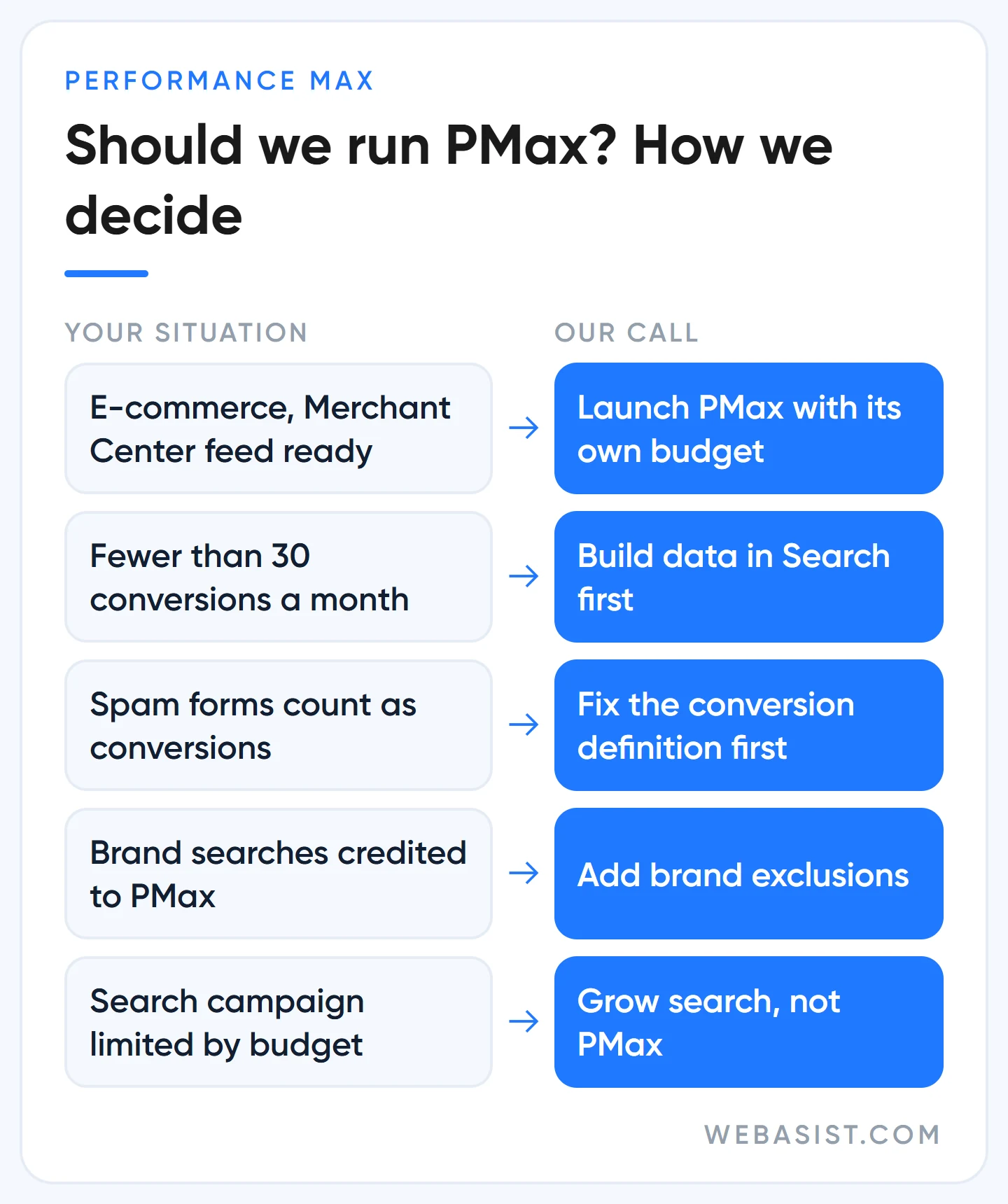
The problem is that PMax credits itself with the easiest conversions. Someone searching for your brand, someone who abandoned a basket, someone who is already a customer: to PMax they are cheap, fast conversions. The report looks great, but many of those sales would have come without the ad.
So in every account where we run PMax we add brand exclusions and check the channel performance report and the PMax search terms report weekly. You can now add irrelevant searches as negative keywords to PMax too; they apply to Search and Shopping inventory only.
There is also the overlap question. If your Search campaign has an exact match keyword identical to the search, the Search campaign takes priority; but if that Search campaign is limited by budget, PMax may still serve on those searches. How to protect brand traffic is in our competitor brand bidding guide, and setup is in our Performance Max guide.
What is AI Max? The AI layer inside your Search campaign
AI Max is not a separate campaign type but a set of features switched on inside a Search campaign. It has three parts: search term matching (opens you up to searches beyond your keywords), text customization (writes new headlines and descriptions from your site and ads) and final URL expansion (sends the ad to a page Google finds more relevant). AI Max is on by default in new Search campaigns; if you did not untick it at setup, it is on.
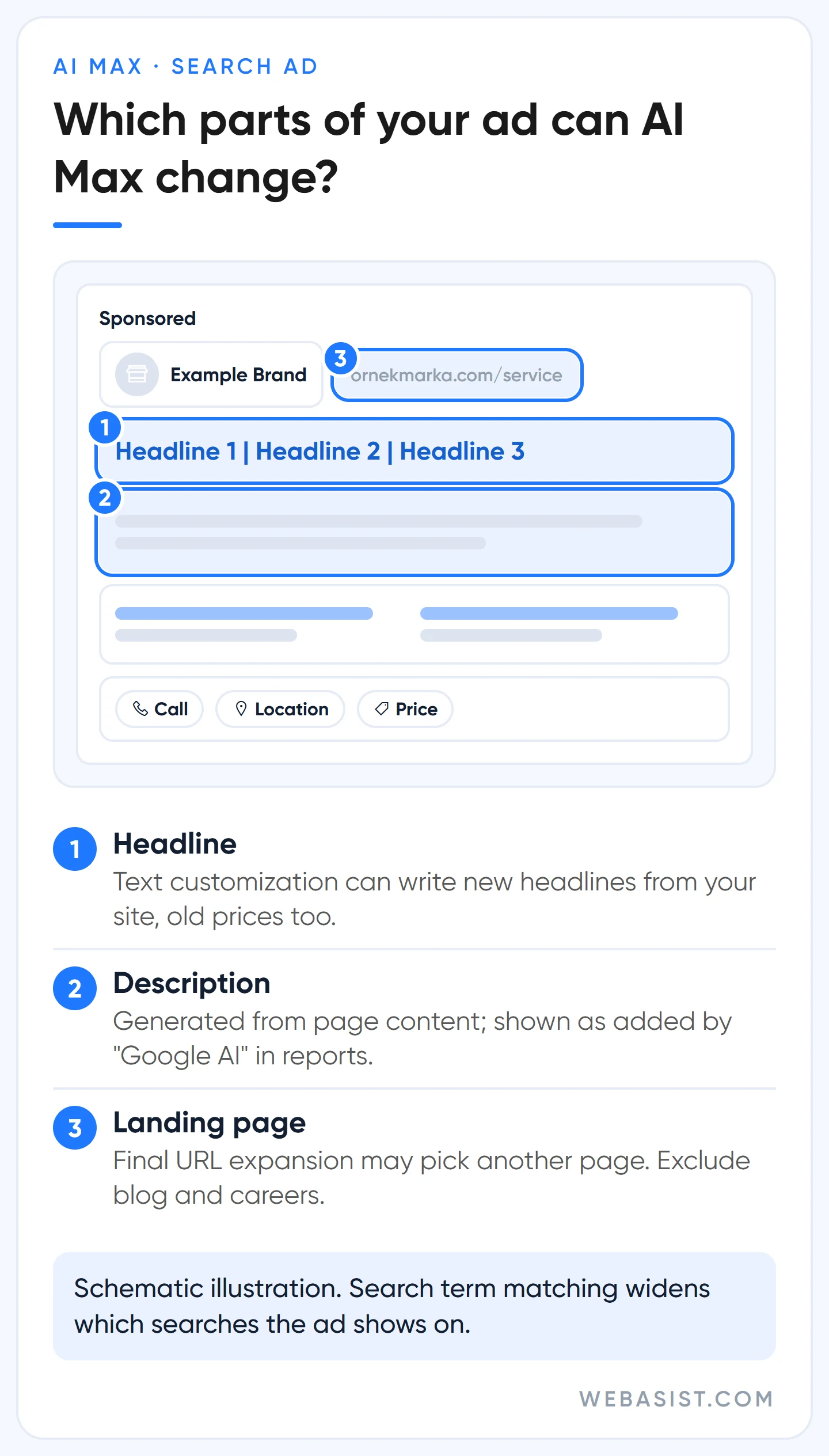
It needs conversion-based Smart Bidding to work and is not effective in campaigns limited by budget. Google's own data says advertisers who turn on AI Max typically see 14% more conversions or conversion value at a similar CPA or ROAS. That is an average, measured by Google; what it means for us is that a test in your own account is worth running, nothing more.
The risks are concrete. Search term matching can take your "boiler repair" campaign onto "boiler prices" and "how to reset a boiler" searches. Text customization can turn an old promotional price on your site into an ad headline. With final URL expansion on, your pinned headlines are not used on every impression and the ad may land on your blog post or careers page.
Every one of these has a control: brand lists, URL exclusions, text guidelines and negative keywords. The problem is that nobody sets them up.
Who should not turn on AI Max?
- Accounts on Manual CPC or Maximize clicks, without conversion tracking.
- Campaigns that hit their budget cap every day. Expansion spreads a budget that is already too small across less relevant searches.
- Sectors that must carry mandatory legal wording in ads (health, finance) and businesses that do not keep prices on their site up to date.
- Local service businesses running search on under 10,000 TL a month. At that budget we prefer to keep control with exact and phrase match.
The DSA to AI Max timeline: what to do and when
If you use Dynamic Search Ads (DSA), your campaign will move to AI Max. Google first set the automatic DSA upgrade for September 2026, then on 11 June 2026 moved it to February 2027. Campaigns using automatically created assets or the campaign-level broad match setting started being upgraded in September 2026. The dates come from the migration announcement on Google's Ads blog.
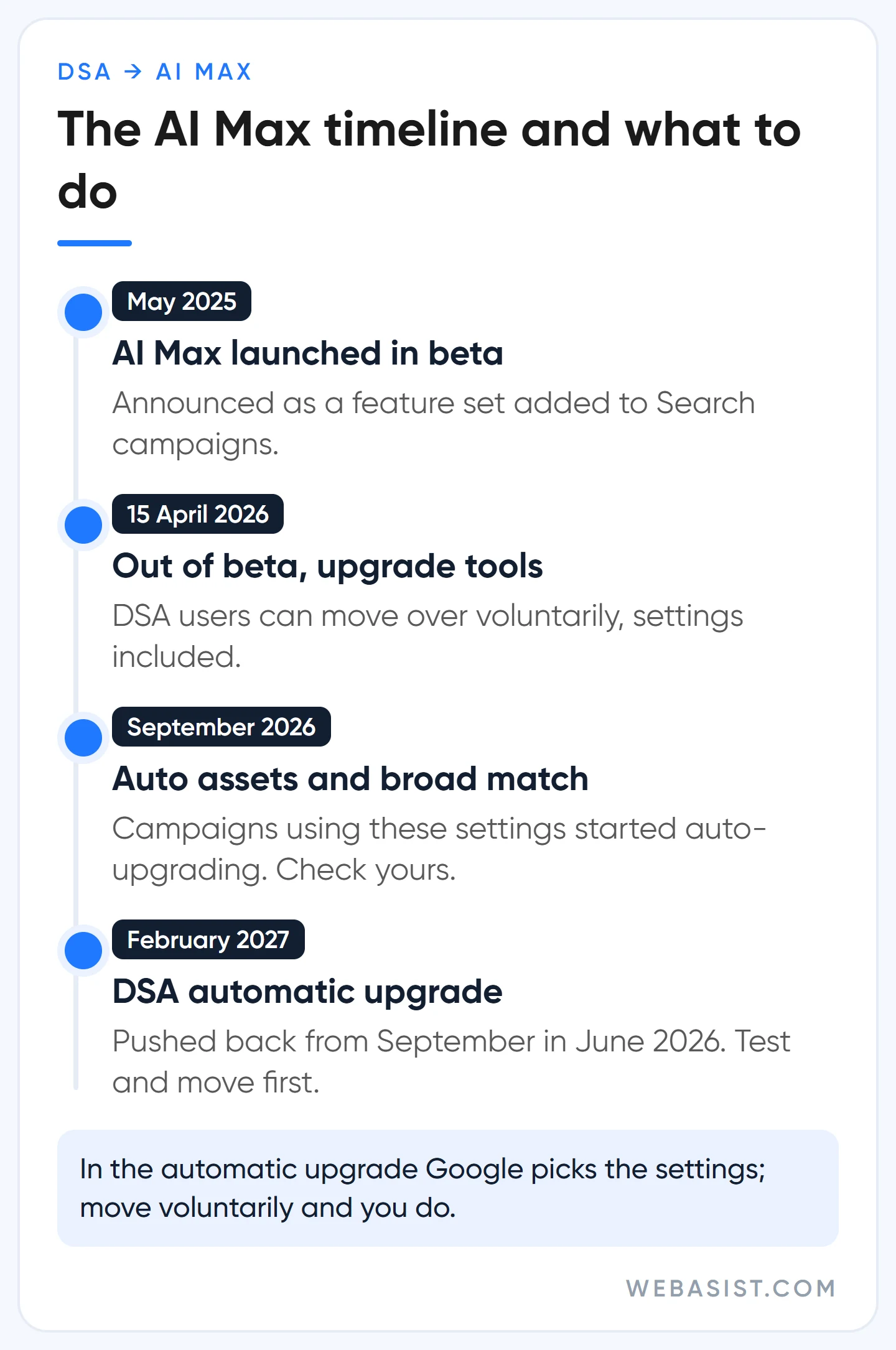
For you this means two jobs. First, since September AI Max may have been switched on in some of your Search campaigns without you noticing; check which features are on in the AI Max section of the campaign settings. Second, if you have a DSA campaign, do not wait for February 2027. We split traffic with an AI Max experiment, compare for two or three weeks and move over with settings we choose ourselves; in the automatic upgrade, Google chooses them.
The detail most often missed in the move is prioritisation: once the campaign-level broad match setting is off or the campaign moves to AI Max, broad match keywords are no longer treated like exact match in prioritisation. Add exact match copies for your important searches. Which searches to keep out is covered in our negative keywords guide.
Google recommends it, but: the controls we never hand over
Google's recommendations are not always wrong, but they are not always in your favour either. Google sells advertising, and many recommendations push towards broader match, more channels and higher budgets. In the accounts we manage, we never hand these controls to the AI:
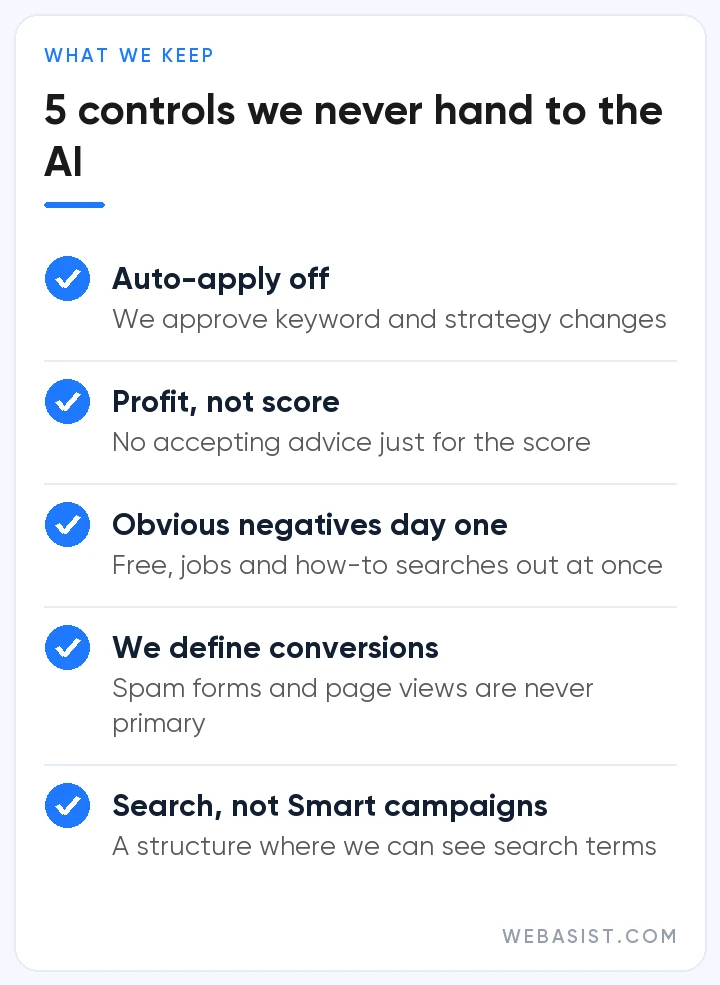
- Auto-applied recommendations: If left on, the system adds keywords, changes match types and changes bid strategies on your behalf. It does not raise the budget itself, but the budget recommendation keeps sitting in the panel. We switch it off on day one.
- Optimization score: The score measures how closely you follow recommendations, not your profit; dismissing a recommendation also raises it. We have seen accounts at 100% losing money and accounts at 60% making a profit.
- Negative keywords from day one: Google suggests waiting at least two weeks after turning on AI Max before adding negatives. We add obvious waste ("free", "jobs", "how to") on day one and keep the two weeks for fine-tuning. Paying for irrelevant clicks for two weeks does not buy enough learning to be worth the money.
- What counts as a conversion: We decide that. If page views or spam forms are primary conversions, the AI learns to grow the cheapest and most useless traffic. Setup is in our conversion tracking guide.
- Smart campaigns: The simple mode offered when opening a new account takes away almost all control over search terms and targeting. It is tempting for small businesses, but we start with a standard Search campaign.
We go through these controls one by one in the first week after taking over an account; the order is listed in our account audit guide.
Making ad images and videos with AI: does it work?
Most people searching for "making ads with AI" actually want images or video. Google Ads' Asset Studio can now generate image and video assets inside the account, and for Demand Gen it can also create video variations from still images. The speed is real: testing ten image variations in an afternoon used to be a week of design work.
We use it at draft level. We try backgrounds, lighting and composition with AI, but the product itself, its colour and features stay as they are in reality, because a product shown differently from reality comes back as returns and complaints.
Google's tools add an invisible watermark called SynthID to generated images. For Turkish copy we also fix by hand the sentences that read like translations and any exaggerated promises. Image sizes are in our Google Ads image sizes guide, and video in our YouTube ads guide.
The overhyped: do not believe everything you hear about AI
As every year, some AI topics are talked up far beyond reality. These are the four claims our clients bring us most often, and our answers:
- "AI has replaced the ad manager." It took over jobs like adjusting bids one by one, yes. Setting the goal, deciding what counts as a conversion and checking reports against your own sales data are still human work.
- "You need AI Max to show ads in AI Overviews." Ads inside AI Overviews are currently available only in English and in 12 countries, Turkey not among them. In Turkey ads can show above or below AI Overviews, and you do not need to switch anything new on for that.
- "AI agents have taken over shopping." Agent-based shopping is much discussed but is not yet decisive in consumer behaviour, and in-chat checkout experiments have gone back to sending the purchase to the retailer's site. Keep your product data clean and wait for the rest.
- "SEO is dead." It is not. AI summaries reduce clicks on some searches, but search is still the channel where people discover new products and brands most. We discuss the balance between ads and SEO in Google Ads vs SEO.
One last warning: Google's 14% or 7% figures are averages across millions of accounts. Only a controlled experiment tells you what a change will do in yours, which is why we test every major automation change on half the traffic first.
Frequently Asked Questions
What is Performance Max (PMax)?
A campaign type that serves across all of Google's ad inventory (Search, Shopping, YouTube, the Display Network, Gmail, Discover, Maps) from a single campaign, with bids, placements and ad combinations decided by AI. It is strong for e-commerce with a product feed; launched without brand exclusions and search term control, it credits itself with the easiest sales.
Is a low Google Ads optimization score a problem?
Not on its own. The score shows how closely you follow Google's recommendations; both applying and dismissing a recommendation raise it. We look at cost per conversion and profit, not the score; dismiss recommendations that do not suit you and note why.
I never turned on AI Max. Why is it on in my campaign?
There are two likely reasons: AI Max is ticked by default in new Search campaigns, and campaigns using automatically created assets or the campaign-level broad match setting have been upgraded automatically since September 2026. You can see which features are on in the AI Max section of the campaign settings and switch off what you do not want.
Do AI-powered campaigns work on a small budget?
Smart Bidding does, but it learns slowly. We do not recommend PMax or AI Max for accounts that cannot see around 30 conversions a month; one Search campaign, a clean conversion definition and a tight negative list bring more customers on a small budget.
Conclusion
Hand bidding to the AI; do not hand over the goal and the limits. Turn on PMax and AI Max with an experiment in accounts where conversion data, brand exclusions and negative lists are ready, and if you use DSA, move over with your own settings before February 2027.
Give us read-only access to your account and write to us: together we will work out which of your campaigns have AI Max switched on, how much of your brand searches PMax is taking, and what auto-applied recommendations changed over the last three months. If you want us to run the account on an ongoing basis, the scope is in our Google Ads packages; the ad budget is not included in the management fee.














