


How to Write Google Ads Ad Copy: Headlines, Descriptions, Examples
Google Ads ad copy is the part of a search ad people actually read: the headlines, descriptions and display URL. In Search campaigns today, that copy is written as a responsive search ad: you supply up to 15 headlines and 4 descriptions, and Google picks the combination most likely to perform for each search.
That changes how you write. Instead of one perfect ad, you are building a set of interchangeable pieces that must make sense in any order and any combination. This guide covers character limits, headline formulas, descriptions, pinning, Ad Strength, dynamic text, policy pitfalls and testing, and ends with an example set you can adapt.
If you want to understand how ads are ranked in the auction, how Quality Score works and which match types to use, read our guide on how Google search ads work as well.
Responsive search ad structure and character limits
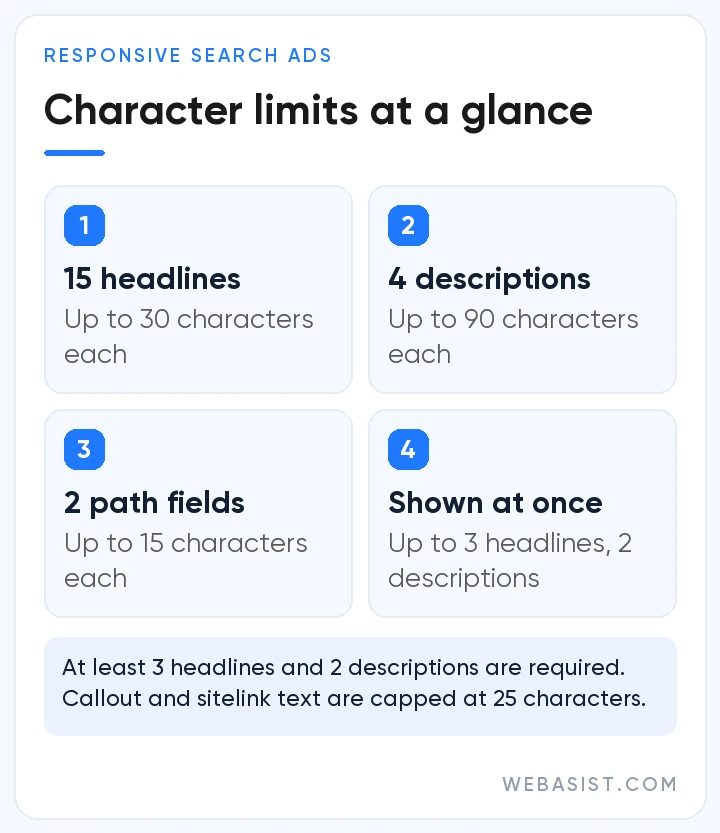
Every text field in a responsive search ad has both a count limit and a character limit. The table below brings together the limits you will check most often while writing.
| Field | How many | Character limit | Note |
|---|---|---|---|
| Headline | 3 to 15 | 30 | Up to 3 can show at once |
| Description | 2 to 4 | 90 | Up to 2 can show at once |
| Display URL path | 2 optional fields | 15 each | The domain comes from your final URL |
| Sitelink text | At least 2 to show | 25 | Google recommends at least 6 sitelinks to reach Good or better Ad Strength |
| Callout | Several | 25 | Short, non-clickable benefit phrases |
In double-width languages such as Chinese, Japanese and Korean, each character counts as two; accented or Turkish letters such as é, ç or ş count as one. Wide letters like "m" and "w" can still push a headline past the available space on some screens, and Google may then shorten it with an ellipsis. Text in the Headline 1 and Description 1 positions usually appears, while the second and third headlines and the second description show depending on predicted performance and available space. You can check the current limits on Google's responsive search ads help page.
Before you write: four questions
- Which search is this ad group answering? Sum up the shared intent of its keywords in one sentence; if there are several intents, split the group first.
- What is the concrete reason to choose you? Speed, coverage, guarantees, experience or pricing model: note only the differences you can prove.
- Why might the customer hesitate? Unclear pricing, trust, timing or cancellation terms. A good ad removes at least one objection before the click.
- What does the landing page promise? Every claim in the ad needs a counterpart on the page. Message match affects both conversion rate and landing page experience; if your page can't carry it, a landing page redesign belongs on the list too.
Good raw material comes from real queries in the search terms report, sales calls, customer reviews and competitors' ads on the results page. The words customers use often make better headlines than your own corporate vocabulary.
Headline formulas that work
Rather than inventing 15 headlines one at a time, plan them in families; a few headlines from each family give Google different angles to test. The examples below come from different industries and all fit the 30-character limit:
| Headline family | Template | Example |
|---|---|---|
| Keyword | [Service] + [Location] | Boiler Service Istanbul |
| Benefit | [Outcome] + [Speed or ease] | Same-Day Service Slots |
| Proof | [Credential] + [Service] | Invoiced, Guaranteed Work |
| Offer | [Advantage] + [Condition] | Free Delivery on First Order |
| Call to action | [Verb] + [Ease] | Book Your Visit Online |
| Objection handler | [Concern] + [Answer] | No-Commitment Monthly Plan |
| Question | [Problem] + ? | Is Your Boiler Leaking? |
| Brand | [Brand] + [Positioning] | [Brand] Official Site |
A few principles make headline writing easier:
- Make every headline stand on its own. Google combines headlines in different orders, so a line that leans on the previous one will read as a fragment.
- Avoid repetition. Small variations of the same sentence don't create meaningfully new combinations, and they lower Ad Strength.
- Use keywords naturally. Google suggests including text from your keywords in headlines and descriptions to improve relevance, and a few headlines that carry your main term are enough. Stuffing every headline with the same keyword leaves fewer angles to test.
- Mix lengths. Short headlines slot into combinations easily, while longer ones carry more information.
- Be specific. Replace "quality service" with a verifiable detail such as timing, scope, a number or a guarantee.
Descriptions: deliver on the headline's promise
Descriptions expand on what the headline opens and make the decision to click easier. Give each of your four descriptions a different job: your core value proposition with a call to action, the scope and process of the service, the offer and its conditions, and trust or objection handling. That way the ad carries a complete message whichever combination is shown. Rather than repeating a headline, use each description to answer a question the headlines leave open, and make sure every line reads well on its own.
Pinning: when and how
Pinning locks a headline or description to a specific position. Headlines can be pinned to positions 1, 2 and 3, and descriptions to positions 1 and 2. According to Google, text pinned to Headline 1, Headline 2 or Description 1 always shows, while text pinned to Headline 3 or Description 2 is not guaranteed to appear in every ad.
Google recommends not pinning unless you need to, because every pin reduces the combinations the system can try and can lower Ad Strength. Pinning usually makes sense when:
- your industry requires a legal notice or disclosure in every ad,
- you want your brand name to always appear in the first headline of a brand campaign,
- a specific offer must be visible throughout a promotion period.
If you do need to pin, pin two or three alternative headlines to the same position rather than a single one. The required message stays in place, and the system can still test.
If you use AI Max, note one more thing: with final URL expansion switched on, pinned assets may not be used when the system picks a more relevant landing page. If a legal line must appear in every ad, plan that setting and your URL rules accordingly.
What Ad Strength measures, and what it doesn't
Ad Strength is feedback on how relevant, plentiful and varied the assets in your responsive search ad are. The ratings are Incomplete, Poor, Average, Good and Excellent. They reflect factors such as whether your keywords appear in headlines, how distinct the headlines are from one another and whether you have enough sitelinks (Google suggests at least 6).
Keep two points in mind together. First, Google says Ad Strength does not directly affect whether an ad is eligible to serve. Second, it is still worth improving: according to internal data from August 2025 published on Google's responsive search ads help page, advertisers who raise Ad Strength from Poor to Excellent see 15% more clicks and conversions on average. Google also recommends at least two responsive search ads rated Good or Excellent in each ad group.
You can also add up to 3 headlines and 2 descriptions at campaign level so they are used across all responsive search ads in that campaign; however, these campaign-level text assets are not currently counted in Ad Strength.
Dynamic text: keyword insertion, countdowns and location insertion
Responsive search ads offer four tools that adapt your text to the search. Each one is added to a text field as a short code in curly brackets:
- Keyword insertion: written as {KeyWord:Default text}; the keyword that triggered the ad is inserted, and the default text appears if it doesn't fit. How you capitalise the word "keyword" in the code controls the capitalisation of the inserted text.
- Countdowns: automatically update the time left until a promotion or deadline ends.
- Location insertion: adds location details, such as the city where a user is located or which they are interested in.
- Ad customizers: pull values such as prices, stock levels or discount rates from attributes you define.
The IF function, which shows different text when a condition is met, is not currently supported in responsive search ads.
If you also advertise in Turkish or another suffix-heavy language, take extra care: suffixes change with vowel harmony, so a template that reads correctly with one inserted city ("İstanbul'da") produces an error with another ("İzmir'da" instead of "İzmir'de"). Place dynamic fields where nothing needs to attach to them, and preview how capital letters such as the Turkish "İ" and "I" are displayed.
Policy notes to avoid disapprovals
- Punctuation and symbols: punctuation or symbols not used for their intended purpose (repeated marks such as "!!", numbers or symbols in place of letters) and unsupported characters such as emoji won't be approved.
- Capitalisation: capitals that aren't used correctly, such as whole words in upper case just to grab attention, can be disapproved; correct uses such as abbreviations and brand names are fine.
- Phone numbers: numbers don't belong in ad text; use a call asset instead.
- Repetition and spacing: unnecessary repetition and missing or extra spaces are editorial reasons for disapproval.
- Unsupported claims: superlatives such as "the best" or "number one" undermine trust and need evidence, and consumer advertising rules in many markets, including Türkiye, expect claims to be provable.
Sensitive sectors such as healthcare and financial services face extra restrictions, so check the relevant Google Ads policies before writing copy in those areas.
Testing and improving your copy
Asset reports show impressions, clicks, conversions, conversion value and cost for each headline and description. Because full statistics are now available for every asset, Google has retired the old "Performance label" column that rated assets relative to one another, so you now judge them directly on the numbers. Full statistics are available for dates from 5 June 2025 onwards. The combinations report lists which headline and description combinations were shown.
- Let an asset collect enough impressions before judging it; in low-volume ad groups this can take weeks.
- Click-through rate alone can mislead, so make decisions together with conversions and cost per conversion.
- Change a few assets at a time; rewriting the whole ad makes it hard to see what worked.
- Use ad variations and experiments to test different messages in a controlled way.
In campaigns where AI Max text customization is on, Google also generates headlines and descriptions tailored to the search from your ads and landing page; under Google's timeline, campaigns that used the old automatically created assets are moving to AI Max from September 2026. Review this generated text regularly in the asset report and remove anything that doesn't fit your brand or your actual offer. Because the system draws on the wording of your landing page, keeping that page accurate also keeps your ads accurate.
Example set: headlines and descriptions for one ad group
The draft below was written for a hypothetical business offering commercial office cleaning in Istanbul. Replace the bracketed fields with your own details, and only use benefits you genuinely offer.
Headlines (up to 30 characters each):
- Office Cleaning Istanbul
- Commercial Office Cleaning
- Cleaned After Office Hours
- Daily or Weekly Plans
- Free Site Survey and Quote
- Insured, Trained Cleaners
- No Long-Term Contracts
- Get a Quote in 2 Minutes
- [Brand] Commercial Cleaning
- Clear Pricing After Survey
Descriptions (up to 90 characters each):
- Value and call to action: Your office is cleaned after hours, so your team starts every day fresh. Get a quote.
- Scope: Desks, floors, kitchens and washrooms in one plan, with daily or weekly visits.
- Offer: The site survey is free; pricing depends on floor area and frequency. No hidden fees.
- Trust: Insured, trained staff and a regular team. End your monthly plan whenever you like.
Before you publish: an ad copy checklist
Before you save a new responsive search ad, run the copy through this list once more. Most of these points affect both Ad Strength and approval.
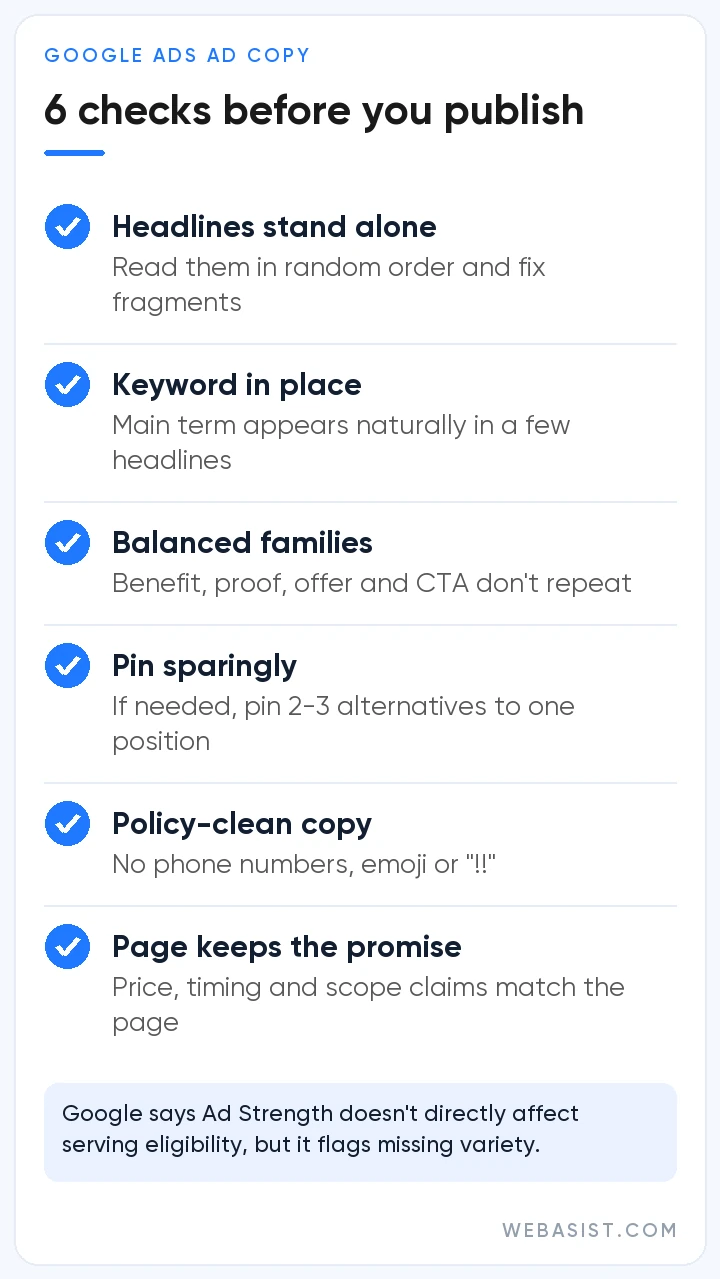
- Does every headline stand on its own? Read the headlines in random order and rewrite any that lean on the one before.
- Does your keyword appear in a few headlines? The main term should show up naturally in some headlines, not in all of them.
- Are the headline families balanced? Benefit, proof, offer, call-to-action and objection-handling lines shouldn't repeat each other.
- Is pinning really necessary? If it is, pin two or three alternatives to the same position.
- Have you cleared the policy traps? No phone numbers, emoji, repeated exclamation marks or gimmicky capitals.
- Does the landing page keep the promise? Every claim about price, timing or scope needs a counterpart on the page.
Frequently Asked Questions
How many characters can a Google Ads headline have?
In responsive search ads, each headline can have up to 30 characters and each description up to 90. The two display URL path fields are limited to 15 characters each. Wide letters can still cause text to be shortened on some screens.
How many headlines should a responsive search ad have?
Three headlines are the minimum, but filling as many of the 15 slots as possible with genuinely different angles gives the system more combinations to work with. Variety matters more than volume, so balance keyword, benefit, proof, offer and call-to-action headlines.
Does pinning headlines hurt performance?
It can, because pinning reduces the combinations that can be tested and may lower Ad Strength. If you have a reason such as a legal requirement or brand rule, pinning two or three alternatives to the same position softens the impact.
Will an ad with "Poor" Ad Strength still run?
Yes. According to Google, Ad Strength does not directly affect an ad's eligibility to serve. A low rating usually points to a lack of variety or relevance, though, so improving it can open up more clicks and conversions.
Can I put a phone number in my ad text?
No. Google's editorial policies don't allow phone numbers in ad text. Add a call asset instead, which also gives mobile users a direct call button.
Conclusion
Good Google Ads ad copy is a set of specific, verifiable messages that read the search intent correctly and make sense in every combination. Knowing the character limits and the balance between pinning and Ad Strength takes care of the technical side; the real difference comes from copy that uses your customers' language and stays consistent with your landing page.
If you would like help with your ad copy and your Search campaigns as a whole, the WebAsist team is here to help. Take a look at our search ads management service, read our Google Ads guide for the bigger picture, or contact us.














