


Google Ads Guide for Beginners: How It Works and How to Start (2026)
Google Ads is Google's auction-based advertising platform, which lets businesses show ads on Google Search, YouTube, Gmail, Google Maps and partner websites and apps. You decide the budget, the audience and where and when your ads appear, and with search ads you usually pay only when someone clicks.
Known as Google AdWords until 2018, the platform has since become far more automated, with AI-driven bidding and campaign types doing much of the heavy lifting. The more automated it gets, the more the initial setup matters: two accounts with the same budget can produce very different results, one bringing in profitable customers and the other simply buying clicks.
This guide is a starting point for beginners. It explains how the system works, how an account is structured, what drives cost, how to set up a first campaign and how to measure results, with links to our deeper guides along the way.
Who is Google Ads right for?
Google Ads is strongest at capturing demand that already exists. If your customers search for what you offer, whether that is a plumber, a lawyer, software, spare parts, a course or a hotel, search ads put you in front of them at exactly that moment. With YouTube and Demand Gen campaigns you can also build interest among people who are not searching for you yet.
In some situations it pays to keep expectations realistic. If your product category is brand new and nobody is searching for it, search ads alone will struggle to generate volume. And if your landing page is slow, calls go unanswered or your offer lags behind competitors, advertising will not fix those problems; it will only make them more visible.
Google Ads or SEO?
| Criterion | Google Ads | SEO |
|---|---|---|
| Speed | Ads can appear shortly after approval | Organic rankings usually build over months |
| Cost model | Pay per click or impression; visibility stops when spending stops | Investment in content and technical work; no cost per click |
| Control | High control over keywords, location, timing, devices and budget | No direct control over rankings |
| Measurement | Detailed conversion data at keyword and ad level | More indirect, longer-term measurement |
The two channels are not rivals: ad data quickly shows which keywords drive sales, and SEO builds lasting visibility for those same terms.
How does Google Ads work?
Every time there is an opportunity to show an ad, a quick auction takes place. Google does not look at your bid alone; it combines ad and landing page quality, the context of the search and the expected impact of your assets to calculate Ad Rank. That is how a more relevant ad can outrank a competitor with a higher bid, and why the price you actually pay is often below your maximum bid.
How you pay depends on the campaign type: per click for search ads, and per impression or per view for some display and video campaigns. For the details of Ad Rank, Quality Score, match types and bidding strategies, read our article on how Google search ads work.
Account structure: account, campaigns, ad groups
A Google Ads account is built from nested layers, and each setting lives at a specific level. Knowing where each setting sits also tells you when you need a separate campaign.
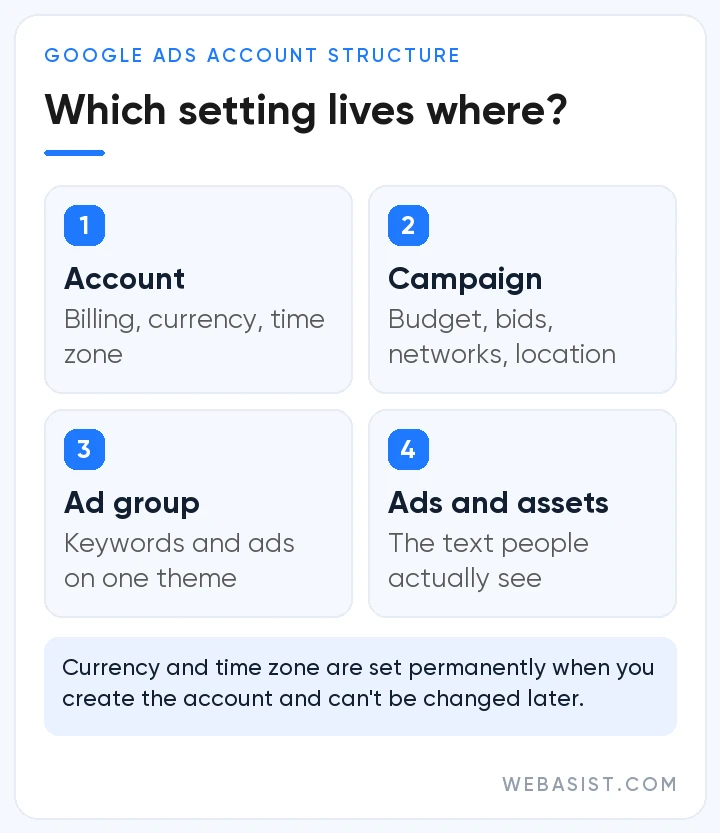
- Account: payment details, user access, currency and time zone.
- Campaign: budget, bid strategy, networks, location and language targeting, and ad schedule. If any of these needs to differ, you need a separate campaign.
- Ad group: keywords that share one theme, plus the ads written for them.
- Ads, keywords and assets: the text people see and the terms that trigger it.
Take a heating and air-conditioning company serving one city. It might run one campaign for brand searches and a separate campaign for its air-conditioning service, with "AC maintenance", "AC repair" and "AC installation" in their own ad groups. Each search is then met by an ad and a landing page written for that exact topic. Plan the structure up front: Google itself warns that reorganising an account after you have built several campaigns and ad groups can wipe out the performance data you have accumulated.
Splitting has its limits, though. Google's current guidance is to use themed ad groups rather than single-keyword ones and to avoid fragmenting the account unnecessarily, because simpler, consolidated structures don't split the data Smart Bidding learns from. In short: work that needs a different budget, target or location gets its own campaign, while different ways of phrasing the same need belong in the same ad group.
Campaign types at a glance
- Search: text ads for people searching on Google; the most sensible starting point for most businesses. Optional AI Max features can extend reach to relevant searches beyond your keyword list.
- Performance Max: one AI-managed campaign that runs across Google's channels; it needs solid conversion data.
- Demand Gen: visual and video-led ads on YouTube (including Shorts), Discover, Gmail, Maps and the Google Display Network to build interest. Display campaigns are moving under the same umbrella: since June 2026 eligible advertisers can move existing campaigns with a migration tool, and later new display campaigns will only be created within Demand Gen.
- Video, Shopping and App: for YouTube, product listings and app installs respectively.
For a side-by-side comparison of which type fits which goal, see our guide to Google Ads campaign types.
Google Ads cost and budget planning
What drives your costs
There is no fixed price list in Google Ads; the cost of a click is set anew in every auction. The biggest factors are:
- Competition: how many advertisers bid on the same terms and how aggressively.
- Quality: the relevance of your ad and landing page; higher quality can make the same position cheaper.
- Targeting: your choice of location, language, device and time of day.
- Seasonality and intent: searches close to a purchase and peak periods tend to be more competitive.
- Your conversion rate: at the same cost per click, a site that converts better wins each customer for less.
Work your budget backwards from your goal
A healthy budget starts less with "How much can I spend?" and more with "How many customers do I want, and what is the most I can pay to win one?" Roughly: monthly target conversions × acceptable cost per conversion ≈ monthly budget. To estimate cost per conversion, combine the bid ranges shown in Keyword Planner with your site's expected conversion rate. If you assume, for example, that around one in twenty clicks turns into an enquiry, each lead costs roughly twenty clicks. Treat this as a starting estimate; the first weeks of data will show the real numbers.
How the daily budget works
You set an average daily budget for each campaign. On days when clicks and conversions are more likely, Google may spend up to twice that amount, but in any month you are not charged more than 30.4 times your average daily budget. For campaigns that run between fixed dates there is also a campaign total budget: in January 2026 Google expanded this option to Search, Performance Max and Shopping campaigns, where you can set one total for a period of 3 to 90 days and let the system pace spend towards your end date.
Billing and extra charges
The currency and time zone you choose when you open the account cannot be changed later. Available payment methods and settings vary by country and currency. Google also adds jurisdiction-specific surcharges to ads served in certain countries. Fee note: according to Google's page on jurisdiction-specific surcharges, ads served in Türkiye carry a 4.5% Regulatory Operating Cost as of 1 January 2026. Rates do change from time to time, so check the current figure on that page when you plan your budget.
Step by step: setting up your first campaign
The sequence below assumes a Search campaign, the most sensible starting point for most businesses. Don't skip ahead: conversion tracking in particular needs to be ready before the campaign goes live.
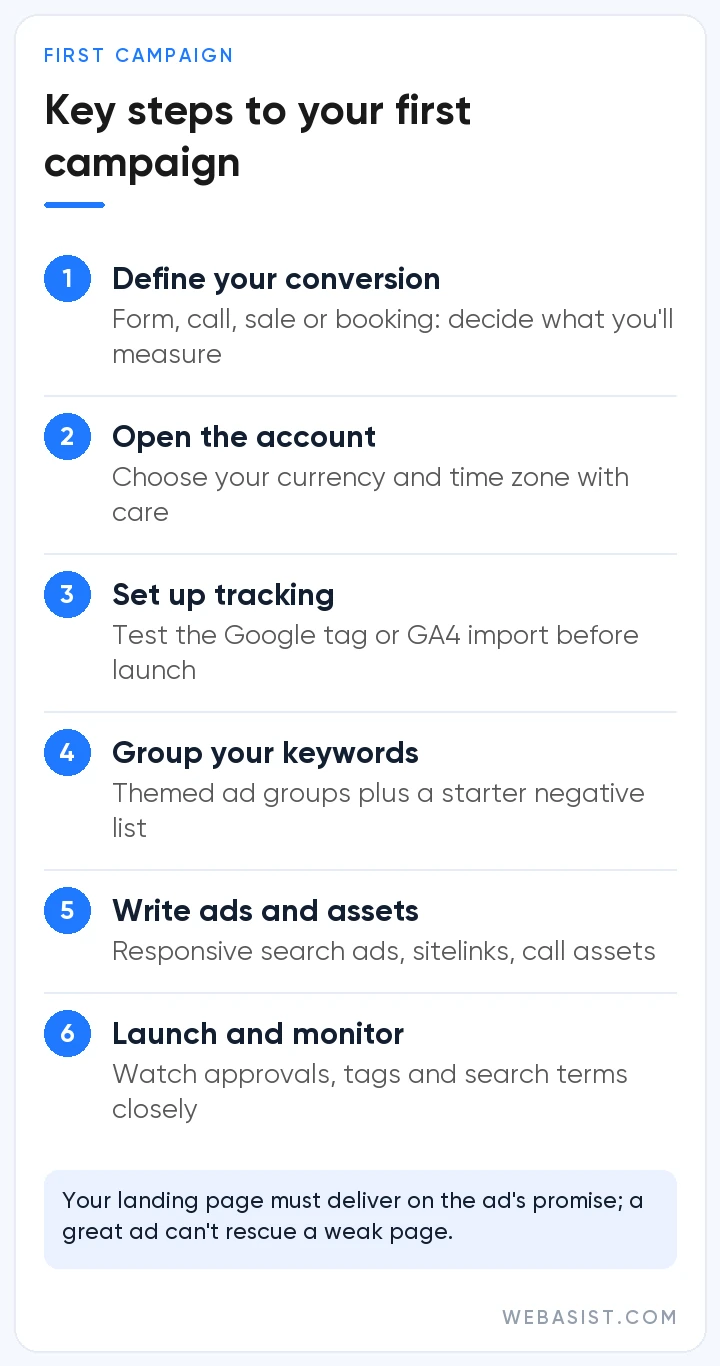
- Define the goal: what counts as a conversion for you: a form, a phone call, a purchase or a booking? Don't build a campaign around a goal you cannot measure.
- Open the account: sign up at ads.google.com with your Google account. If the setup steers you into the simplified Smart campaign flow, switch to Expert Mode to access every campaign type and setting, and choose your currency and time zone carefully.
- Set up conversion tracking: use the Google tag to measure on-site actions and calls, or import key events from Google Analytics 4, and enable enhanced conversions where you can.
- Research keywords: use Keyword Planner to review search volumes and bid ranges, group keywords by intent and prepare a starter list of negative keywords.
- Configure campaign settings: networks (search partners and Display Network options), location option, language, ad schedule, budget and bid strategy.
- Create ad groups and ads: one ad group per theme, each with responsive search ads. For writing headlines and descriptions, see our guide on how to write Google Ads ad copy.
- Add assets: sitelinks, callouts, call and location assets make your ad bigger and more informative.
- Prepare the landing page: one that delivers on the ad's promise, loads fast on mobile and makes contact easy.
- Launch and check: in the first days, keep a close eye on approval status, whether conversion tags fire and the first search terms.
Measurement: what to track and how
Without conversion tracking, you can't see which spend is working and the bidding system doesn't know what to optimise for. You can measure website actions such as purchases and form fills, calls from ads or your site, app events and offline sales imported from your CRM. Enhanced conversions add hashed first-party data, such as an email address entered in a form, sent in a privacy-safe way using SHA256, which improves measurement accuracy.
If you show ads to users in the European Economic Area, Google's EU user consent policy applies: to keep using measurement and personalisation features you need to pass users' consent choices to Google, which usually means setting up consent mode. Elsewhere, align cookie consent and data handling with local law, for example KVKK in Türkiye, together with your legal adviser.
| Metric | What it tells you |
|---|---|
| Impressions and impression share | How often your ad shows and what share of the available opportunities you capture |
| Click-through rate (CTR) | How well your message fits what people are searching for |
| Average CPC | What you pay for a click on average |
| Conversion rate | The share of clicks that complete your goal; a mirror of landing page quality |
| Cost per conversion | What each lead or sale costs you |
| ROAS | Revenue generated per unit of ad spend; the core profitability metric in e-commerce |
The first 90 days: a management rhythm
- First two weeks: check spend, approvals and search terms daily, test that conversions are recorded correctly and add obviously irrelevant searches as negatives.
- Learning period: when you switch to Smart Bidding or change a target, the strategy goes through a learning period. Google suggests allowing one to two conversion cycles (the usual time from click to conversion) for the system to settle after major changes, so avoid frequent budget and target changes during this time.
- Weekly: search terms, budget allocation, device and location performance, and ad and asset statistics.
- Monthly: judge results over periods that cover at least two full conversion cycles and include enough conversions, shift budget towards what works, refresh weak ad copy and plan landing page tests.
The Recommendations page and optimisation score offer useful ideas, but not every recommendation fits your business goals. It is safer to review them one by one before turning on auto-apply.
Common beginner mistakes
- Choosing a conversion-based bid strategy without conversion tracking in place.
- Putting every keyword into a single ad group.
- Leaving network and location settings on their defaults without checking them.
- Ignoring the search terms report and never adding negative keywords.
- Sending all traffic to the homepage.
- Reacting to early fluctuations by changing the campaign constantly.
Should you manage it yourself or work with an agency?
A business advertising a single service on a modest budget, with time to learn the platform, can manage its own account. As budgets grow and several campaign types and more complex measurement come into play, specialist support becomes more worthwhile. When choosing an agency, the Google Partner badge is a sensible first filter, as it shows the agency meets Google's performance, spend and certification requirements. Also ask about reporting transparency, whether you keep ownership of the ad account, and how communication will work.
Frequently Asked Questions
Is there a minimum budget for Google Ads?
In Google's own words, there is no minimum ad spend; you set a daily or monthly cap that suits your business. Your budget still needs to generate enough clicks and conversions for the system to learn, so the healthiest approach is to calculate it from your target number of customers and the acquisition cost you can accept.
Does it cost anything to open a Google Ads account?
No, opening an account is free. You only pay for ads that run, per click, impression or view depending on the campaign type. Invoices may also include country-specific surcharges and taxes on top of your ad spend.
How long does Google Ads take to work?
Ads can start showing soon after approval, and the first clicks often arrive on the same day. Meaningful optimisation decisions need data, though, and Google suggests waiting one to two conversion cycles after major Smart Bidding changes before drawing conclusions. Look at the trend over several weeks rather than the first few days.
How do you pay for Google Ads?
Payment settings include options such as automatic payments, charged after costs accrue, and manual payments, where you add funds in advance; which methods are available depends on your country and currency. Because the account currency cannot be changed later, choose it carefully at setup.
Are Google AdWords and Google Ads the same thing?
Yes. Google renamed its advertising platform from AdWords to Google Ads in 2018. Some older terms changed too; ad extensions, for example, are now called assets.
Conclusion
Set up well, Google Ads is one of the most measurable ways to reach customers at the very moment they are looking for what you offer. Success comes from a clear conversion goal, a tidy account structure, a realistic budget and ongoing care, and as automation grows, feeding the system the right goals and the right data matters more than ever.
As a Google Partner digital marketing agency, WebAsist helps businesses set up, measure and manage their Google Ads accounts. Explore our Google Ads management service and Google Ads advertising packages, or contact us to discuss the right plan for your business.














