


LinkedIn Ads Guide: B2B Targeting, Ad Formats and Budgets
LinkedIn ads are paid placements built in LinkedIn Campaign Manager and targeted with professional profile data such as job title, company, industry, seniority and skills. They can run in the feed, in LinkedIn messaging and on third-party apps and sites in the LinkedIn Audience Network, which makes LinkedIn one of the most direct ways to reach B2B decision-makers.
LinkedIn says it has more than 1.3 billion members. For Türkiye, DataReportal's Digital 2026 report, based on LinkedIn's advertising resources, counts about 21 million registered members in late 2025, a total-membership figure rather than active users. Because these audiences are narrow and valuable, costs often run higher than on consumer platforms, so judge LinkedIn by cost per qualified lead and pipeline impact rather than cost per click.
Below we cover the current Campaign Manager structure, objectives, ad formats, B2B targeting, Lead Gen Forms, and how budgets and bids work.
Campaign Manager and Account Structure
To advertise you need a LinkedIn Page for your company and a Campaign Manager ad account linked to it. Once the account is open, add a payment method and give teammates the access their role requires.
Starting in October 2025, LinkedIn renamed the levels in Campaign Manager to match other ad platforms:
- Campaign (formerly campaign group): groups related ad sets; overall budget, schedule and the optional Dynamic Group Budget live here. With Dynamic Group Budget on, individual ad sets don't get their own budgets.
- Ad set (formerly campaign): where you set the objective, audience, ad format, budget and bid.
- Ad: the creative people see.
URL tracking changed too: CAMPAIGN_GROUP_ID became CAMPAIGN_ID, and the old CAMPAIGN_ID became AD_SET_ID. New or edited ad sets must use the new parameters, so check your analytics mappings.
When you build an ad set you can choose Accelerate, LinkedIn's AI-powered option that uses product details from your URL, audience signals and account history to propose a setup and keep optimizing delivery, or Classic, which keeps targeting, bidding and creative in your hands. Accelerate suits fast launches; Classic gives more control for account-based marketing and detailed exclusions.
LinkedIn Ad Objectives
Objectives follow the funnel, and the one you choose controls the formats, optimization goals and billing options available.
| Stage | Objective | Typical use | Billing options |
|---|---|---|---|
| Awareness | Brand awareness | Getting known inside target accounts | Impressions (CPM); per send for message ads |
| Consideration | Website visits | Traffic to content, product or landing pages | CPM or CPC; per send for message ads |
| Consideration | Engagement | Post engagement, followers, event sign-ups | CPM, engagement clicks or per send |
| Consideration | Video views | Product demos and brand stories | Per view or CPM |
| Conversions | Lead generation | Collecting leads with Lead Gen Forms | CPM, CPC or per send |
| Conversions | Website conversions | Demo requests, sign-ups and downloads on your site | CPM, landing page clicks or per send |
| Conversions | Job applicants | Applications for open roles | CPM or CPC |
Accounts with an active LinkedIn Recruiter contract can also use the Talent leads objective. With a Conversions API integration, lead generation ad sets default to the qualified leads goal, which optimizes toward leads your CRM marks as qualified rather than every form fill; it only supports maximum delivery.
LinkedIn Ad Formats
LinkedIn's Help Center objective-to-format table covers single image, carousel, video, event, text, conversation, message, follower, spotlight, job, document, article and newsletter, and thought leader ads. Availability depends on the objective.
Sponsored Content: Image, Video, Carousel, Document and Event Ads
Sponsored Content appears natively in the feed and offers the broadest reach. Single image and video ads work for awareness and traffic, while carousels walk people through several products, features or case highlights. Document ads let people read a PDF or deck right in the feed, and you can gate the full file behind a Lead Gen Form to trade content for contact details. Event ads promote your LinkedIn Events and webinars, and article and newsletter ads promote long-form content published on LinkedIn.
Thought Leader Ads
Thought Leader Ads sponsor posts from people instead of your company page. Besides employees, you can promote public posts from creators and other LinkedIn members, as long as the author approves. Text, single image, video, article and newsletter posts qualify; celebrations, documents, polls, multi-image posts and reposts currently don't. They support brand awareness, engagement and, for video, video views objectives. The single image and video versions carry no call-to-action button, though you can add a URL to the intro text. Their personal voice makes them a natural trust builder in B2B.
Sponsored Messaging: Message and Conversation Ads
Message ads carry a single call to action, while conversation ads offer several reply paths. Both land in LinkedIn messaging and are billed per send. LinkedIn strictly limits how often one member receives them and automatically adds a “Not interested” option. In the European Economic Area and Switzerland, only members who opted in to sponsored messages can receive them, which matters for exporters targeting Europe.
Dynamic, Text and Job Ads
Follower and spotlight ads are dynamic formats personalized with the viewer's profile data; the first grows Page followers, the second highlights an offer or event. Text ads are small, quick-to-build placements that appear only on desktop, in the right rail or top banner. Job ads show your open roles to relevant candidates.
Video also has two premium options: BrandLink runs your ad before publisher and creator videos in the feed, and connected TV (CTV) ads run in shows and movies streamed on TV screens. CTV uses the brand awareness objective only and currently targets English-language audiences in the US and Canada.
B2B Targeting: LinkedIn's Real Advantage
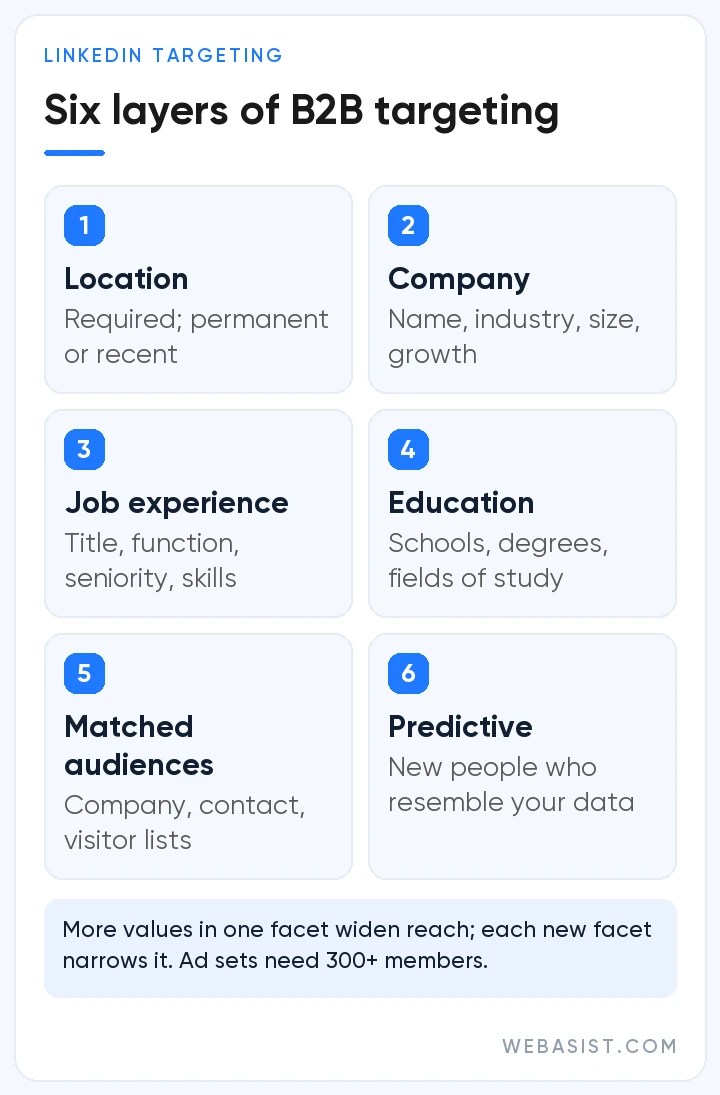
Location is mandatory, based on permanent location, recent location or both. On top of that you can layer the professional attributes summarized in the table below.
| Category | Example facets |
|---|---|
| Company | Company name, industry, size, category, growth rate, followers and connections |
| Job experience | Job title, function, seniority, skills, years of experience |
| Education | Schools, degrees, fields of study |
| Demographics | Age and gender (gender may be limited in the EEA and Switzerland) |
| Interests and traits | Member groups, interests, member traits |
Picking several values in one facet widens the audience because a member only needs to match one of them (OR), while each facet you add under “Narrow audience further” shrinks it (AND). A practical tip: job titles are messy. The same role goes by different names from company to company, and in markets like Türkiye many professionals list their titles in English. Pairing job function with seniority usually captures the right people more reliably than titles alone.
Matched Audiences and Predictive Audiences
- Company lists: upload target accounts for account-based marketing (ABM).
- Contact lists: reach or exclude members who match your CRM customers or prospects.
- Retargeting: re-reach website visitors through the Insight Tag, plus video viewers, Lead Gen Form openers, Company Page visitors and event attendees.
- Predictive Audiences: AI-built audiences of people likely to convert, seeded from Lead Gen Form responses, Insight Tag or Conversions API conversions, or contact lists. LinkedIn stopped the creation of lookalike audiences on February 29, 2024, pointing advertisers to Predictive Audiences and Audience Expansion instead.
Audience Size
An ad set needs at least 300 members to run. LinkedIn generally suggests at least 50,000 to drive results, and a minimum of 300,000 for Sponsored Content and Sponsored Messaging. Very small audiences push costs up, so starting broader and narrowing with demographic reporting usually works better. The full list of facets is on LinkedIn's targeting options page.
Lead Gen Forms: Capturing Leads Without Leaving LinkedIn
Lead Gen Forms open a form pre-filled with the member's LinkedIn profile data, so people can submit in a few taps without visiting your site.
Key specs:
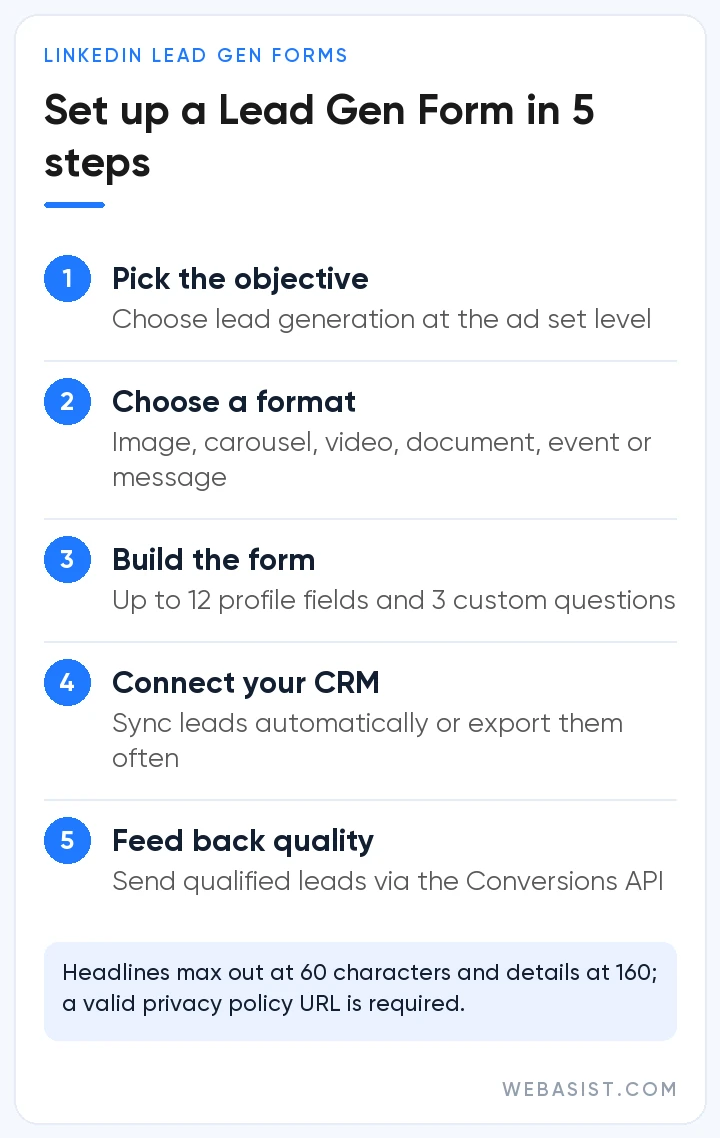
- Up to 12 profile fields plus up to 3 custom questions of 100 characters each.
- Up to 20 hidden fields to pass campaign, source or product details that members never see.
- A 60-character headline and 160-character details text; a valid privacy policy URL is required for form approval.
- A thank-you message of up to 300 characters and an optional button linking to a web page after submission.
Setting one up:
- Choose the lead generation objective for your ad set.
- Pick a format: single image, carousel, video, document, event, message or conversation ad.
- Create a new form or attach an existing one, then choose fields and custom questions.
- Connect the form to your CRM or marketing automation tool, or export leads regularly.
- Where possible, send leads your sales team qualifies back to LinkedIn through the Conversions API.
Longer forms rarely buy better quality; they mostly cut conversions. A few fields plus one qualifying question, such as company size or project timeline, is enough for most B2B campaigns. Above all, follow up fast.
How LinkedIn Budgets and Bidding Work
LinkedIn sells ads in an auction, and your ad's relevance score matters alongside your bid. LinkedIn calculates relevance from signals such as click-through rate, comments, likes and shares, and more relevant ads cost less to deliver. There are three bidding strategies:
- Maximum delivery: LinkedIn sets bids automatically to get the most results from your budget, charging per impression for most objectives and per send for message ads.
- Cost cap: you set an average cost per result and LinkedIn bids with that ceiling in mind. It's available for brand awareness, website visits, engagement, video views and lead generation, and LinkedIn recommends running it for at least 15 days.
- Manual bidding: you set the bid and pay per click, impression, view or send, depending on objective and format.
Budgets can be daily, lifetime or both. A daily budget is an average: spend can reach up to twice the daily amount on a given day, but weekly spend won't go past seven times the daily budget, and a lifetime budget is a hard cap. According to LinkedIn's budget guidance, the minimum daily budget is $10 for any ad format, and new campaigns that haven't launched yet need a lifetime budget of at least $100. If your account runs in another currency, go by the minimum Campaign Manager shows in the budget field.
A simple way to plan:
- Define the monthly target: how many qualified leads or demo requests do you need?
- Work out an acceptable cost from average deal value and close rate.
- Compare audience and budget scenarios in Campaign Manager's forecasting panel.
- Run at least four ads per ad set and keep ad sets live for at least seven days, as LinkedIn recommends.
- Judge results by cost per qualified lead and pipeline, not cost per click.
Enterprise buying cycles are long, so don't kill a campaign in its first weeks just because lead volume looks thin.
Measurement: Insight Tag and Conversions API
The LinkedIn Insight Tag is a JavaScript snippet that measures website conversions and feeds retargeting audiences. The Conversions API sends data from your CRM or server, tying offline sales and qualified leads back to campaigns. Using both gives the sturdiest setup. If you upload conversions by CSV, rows older than 90 days aren't processed. Keep the Insight Tag off pages with sensitive data, such as consumer pages for specific medications or pages where people manage financial accounts.
Demographic reports show which companies, industries and seniority levels engage with your ads. For website conversion campaigns, landing page speed and clarity directly shape results, so a conversion-focused website design protects your ad budget.
Which Businesses Benefit Most from LinkedIn Ads?
- Software, SaaS and IT services with clearly defined buyers
- Consulting, legal, financial and corporate service firms
- Manufacturers and exporters selling abroad
- Graduate, certificate and corporate training programs
- Employers building their brand or hiring specialized talent
- Organizers of industry events, trade shows and webinars
For low-priced impulse purchases, LinkedIn's cost structure rarely pays off. Even in B2B, LinkedIn doesn't have to work alone: Google Ads captures existing search demand and X ads help you join industry conversations. For video and thought leadership content, professional video production is a quick way to raise creative quality.
Frequently Asked Questions
How much do LinkedIn ads cost?
There's no fixed price. Costs come from an auction and depend on audience size, competition, your bid and your ad's relevance score. LinkedIn's budget guidance sets a $10 minimum daily budget and a $100 minimum lifetime budget for new campaigns, but most advertisers need more than the minimum to gather meaningful data.
How do I start advertising on LinkedIn?
Create a Campaign Manager account linked to your LinkedIn Page and add a payment method. Then build a campaign and an ad set, choose the objective, audience, format, budget and bidding strategy, add your ads and launch. Set up the Insight Tag or Conversions API first if you're optimizing for website conversions.
Should I use Lead Gen Forms or a landing page?
Lead Gen Forms reduce friction because they're pre-filled from the member's profile and keep people on LinkedIn. A landing page is better when you need to explain more, collect extra detail or track on-site behavior. Many B2B advertisers test both side by side.
What is the ideal audience size for LinkedIn ads?
An ad set needs at least 300 members to run. LinkedIn generally suggests 50,000 or more, and at least 300,000 for Sponsored Content and Sponsored Messaging. Narrower account-based setups can work, but expect higher costs and slower learning.
What are LinkedIn Thought Leader Ads?
They let you sponsor a post from a person, such as your CEO, an in-house expert or a creator you work with, rather than from your company page. The author has to approve the request, and the format supports brand awareness, engagement and video views objectives.
Can LinkedIn message ads reach members in Europe?
Only partly. In the EEA and Switzerland, members see message and conversation ads only if they've opted in to sponsored messages, so reach there is limited. Sponsored Content and document ads are broader alternatives.
Conclusion
LinkedIn ads work when the right objective meets a balanced audience that describes your buyer, an offer worth their time, a short form and tracking that connects to sales. Clicks that look expensive often become some of your best investments when they reach the right person.
WebAsist manages LinkedIn campaigns end to end, from targeting strategy and Lead Gen Form design to creative production, CRM integration and reporting. Visit our LinkedIn advertising service page or contact us to plan a campaign around your B2B goals.














