


Types of Instagram Ads: Formats, Placements and Specs (2026)

Every brand that starts advertising on Instagram runs into the same question: which ad type should we use? The answer has two layers. Types of Instagram ads are defined by the ad format (single image, single video, carousel or collection) and by the placement where the ad appears (Feed, profile feed, Stories, Reels, Explore home or search results). The right mix depends on your campaign goal, the creative you have and how people behave in each part of the app.
Below, we cover what each format is for, how it looks in each placement and which specs Meta's current Ads Guide recommends, so your design team knows exactly which ratio and resolution to use.
If you are looking for the strategy side, including campaign setup, targeting, budgets and measurement, read our companion piece: Instagram ads strategy guide.
Format vs. placement: two different decisions
In Meta Ads Manager, formats and placements are chosen at different levels. The format is set at the ad level and describes how the creative is built: one image, a set of swipeable cards or a storefront linked to products. The placement is set at the ad set level and decides which surface of Instagram shows that creative. A well-prepared video ad can run in Stories, Reels and Feed at the same time, but each surface has its own screen ratio, interface elements and viewing habits.
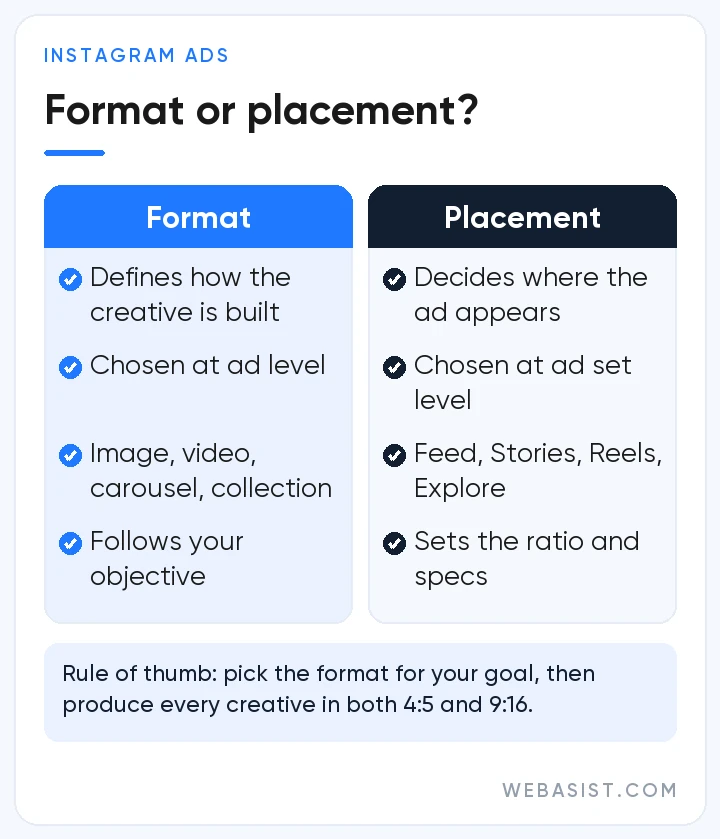
The practical rule: pick the format that suits your objective first, then produce it to the specs of the placements you are targeting. Meta recommends Advantage+ placements, and its Help Center notes that adding placements does not raise the cost of your ad; delivery simply shifts toward the surfaces most likely to drive results. That is why preparing both a 4:5 and a 9:16 version of every creative is usually the safest approach.
Instagram ad formats
Single image ads
The simplest format: one photo or graphic. It works well for a clear product shot, a campaign announcement or a single, focused offer. Because images are quick to produce, they are also the most economical way to test different messages and visual angles.
- File type: JPG or PNG, up to 30 MB
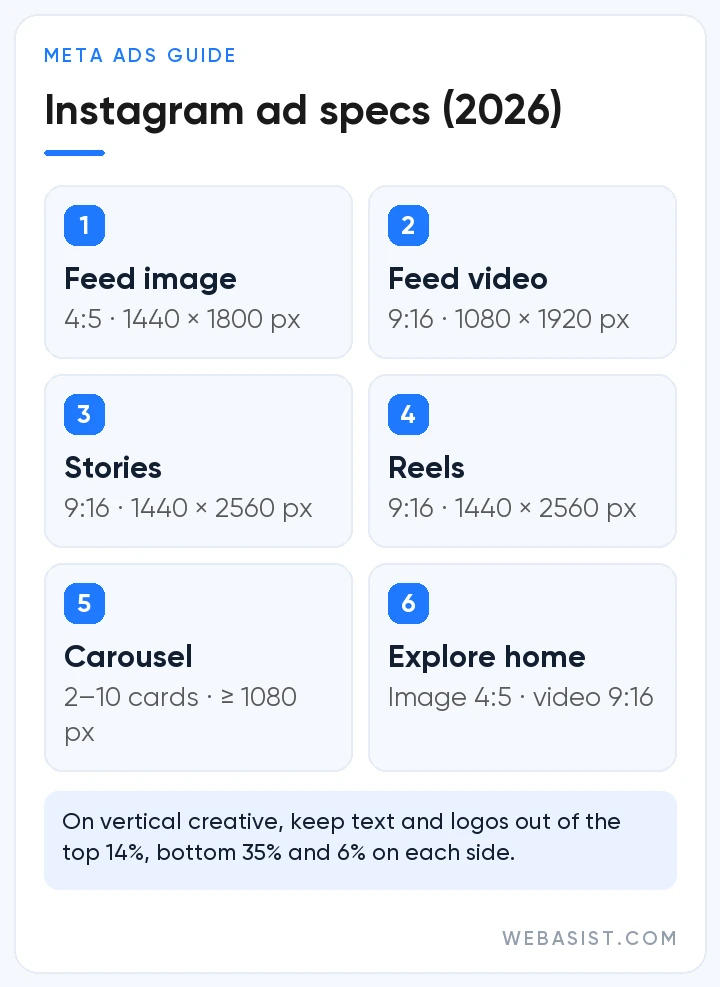
- Recommended ratio and resolution (Feed): 4:5 at 1440 × 1800 pixels
- Accepted range: from 1.91:1 landscape to 4:5 portrait, minimum width 500 pixels
- Text: the guide recommends 125 characters of primary text and a 40-character headline
Single video ads
Video is the natural choice when your message needs motion, sound or a short story: showing a product in use, explaining a service or building brand awareness. Meta's Ads Guide accepts MP4, MOV and GIF files for Feed video, with files up to 4 GB and running times from 1 second to 60 minutes. The technical ceiling is not a target, though; on mobile, attention is won or lost in the opening seconds.
For Feed, the guide recommends a vertical 9:16 file at 1080 × 1920 pixels, with captions and sound optional but recommended. Keep headlines, products and logos near the center of the frame and the same edit can run in Reels and Stories without awkward cropping.
Carousel ads
A carousel contains 2 to 10 images or videos that people swipe through, and each card can have its own headline and link. It suits product ranges, step-by-step explanations, before-and-after comparisons or a wide image split across cards to spark curiosity.
- Cards: 2–10
- Ratio: 4:5 for image-only carousels; Meta currently supports only 1:1 for carousels that include video
- Resolution: at least 1080 × 1080 pixels
- Video card length: 1 second to 2 minutes
- Landing page URL: required
Keep all cards in the same ratio. According to Meta's guide, delivery can show each person the card they are most likely to respond to first while keeping the overall order, so every card should make sense on its own.
Collection ads
A mobile-first storefront: a cover image or video on top and three product images beneath it. Tapping the ad opens a full-screen Instant Experience where people can browse products without leaving Instagram. Because it shortens the path from discovery to purchase, the collection format is especially popular with e-commerce brands.
- Requirements: an Instant Experience is mandatory; you can use Meta's Storefront or Customer Acquisition templates or build a custom one
- Cover media: the first media asset of your Instant Experience becomes the cover; image (JPG/PNG, up to 30 MB) or video (MP4/MOV/GIF, up to 4 GB), ratio between 1.91:1 and 1:1, at least 1080 × 1080 pixels recommended
- Text: 125 characters of primary text and a 40-character headline are recommended
Instagram ad placements
Placement determines exactly where your ad shows up, and people are in a different mindset on each surface: in Feed they catch up with accounts they follow, in Stories they tap through quickly, in Reels they watch to be entertained and in Explore they look for something new. These are the Instagram placements in Meta's current Help Center list.
Instagram Feed and profile feed
Feed is the main scroll of posts from followed accounts and recommended content. Your ad appears like a regular post with a “Sponsored” label. Image, video, carousel and collection formats all run here, and it is a strong surface for product detail and for building social proof through comments.
With the profile feed placement, ads appear in the feed view of public profiles belonging to people aged 18 and over; your Feed creative works here too.
Instagram Stories
Stories ads appear full screen and vertical between people's stories. They suit short promotions, sale announcements, event reminders and retargeting. People can tap past a story in an instant, so the message has to land in the very first frame.
- Ratio and resolution: 9:16, 1440 × 2560 pixels recommended
- Files: JPG/PNG images up to 30 MB; MP4/MOV/GIF video up to 4 GB
- Length: videos shorter than 16 seconds play in full; videos of 16 seconds or longer may be split into one to three Stories cards depending on the viewer. Image ads stay on screen for 5–16 seconds or until the person swipes away.
- Safe zone: Meta advises keeping text, logos and key elements out of roughly the top 14%, the bottom 35% and 6% on each side, where the profile icon and call-to-action button can overlap
Instagram Reels
Reels ads are inserted full screen between organic Reels as people swipe through short videos. According to the guide, they also appear in the vertical Reels viewer that opens when someone taps a Reel from Feed, Stories, the Reels tab or Explore. Ads that feel native, with natural editing and a hook in the first second, fit best.
- File, ratio and resolution: MP4 or MOV, 9:16, 1440 × 2560 pixels recommended
- Length: up to 15 minutes according to the guide, although Reels is built around short edits
- Safe zone: same as Stories (top 14%, bottom 35%, sides 6%)
- Text: only a short part of the primary text is visible; the guide recommends 44 characters
- Not allowed: licensed music, media with face or camera effects, GIFs and media with product tags; Meta suggests original audio or royalty-free tracks from the Meta Sound Collection
Explore home
Explore is where people discover content from accounts they do not follow yet. With the Explore home placement, your ad appears as a tile in the Explore grid alongside other recommended content, which makes it useful for reaching new audiences through interest-led discovery.
- Image: 4:5, 1440 × 1800 pixels (JPG/PNG, up to 30 MB)
- Video: 9:16, 1080 × 1920 pixels (MP4/MOV/GIF, up to 4 GB)
A 2026 change: the separate “Instagram Explore” placement, which covered the scrollable feed that opened after tapping a post in Explore, is no longer offered. According to Meta's Marketing API v26.0 changelog of 29 July 2026, its delivery shifts to other eligible placements. When older guides talk about “Explore ads”, today's equivalent is Explore home plus the Reels placement, which also covers Reels opened from Explore.
Search results
These ads appear among the results when someone types a keyword into the Instagram search bar. Because they reach people who are actively researching a topic, they tend to catch high intent. The 4:5 images and vertical videos you prepare for Feed can be reused here.
Beyond Instagram itself, the feed of Threads, whose profiles are tied to Instagram accounts, can be selected as a placement in the same campaign; Meta's Ads Guide has a separate section for its specs.
Ad experiences built on these formats
Some ad types are not separate formats but experiences that combine the formats above with a specific goal:
- Partnership ads: formerly known as branded content ads, these run under both the creator's and the brand's names with a “Paid partnership” label. A voice followers already know makes the message feel more natural. The creator has to grant the brand permission first.
- Lead ads: tapping the ad opens a form inside Instagram (Instant Forms) that collects contact details. They suit service businesses that want applications, quote requests or bookings without sending people to a website.
- Messaging ads: the call to action opens a conversation with you in Instagram Direct, Messenger or WhatsApp. They work well for products and services people like to ask about before buying.
- Catalog ads: these pick products from your catalog automatically based on each person's interests and actions (Advantage+ catalog ads). In the current interface the catalog is connected at campaign level in a Sales campaign. A common use is showing site visitors the products they viewed but did not buy.
Instagram ad specs at a glance
The table below summarizes the recommended values in Meta's Ads Guide. Because the guide is updated from time to time, check the official Meta Ads Guide before starting a large production.
| Placement / format | Recommended ratio | Recommended resolution | Best used for |
|---|---|---|---|
| Feed – single image | 4:5 | 1440 × 1800 | Product and offer announcements |
| Feed – video | 9:16 | 1080 × 1920 | Product demos, brand stories |
| Feed – carousel | 4:5 (images) / 1:1 (with video) | At least 1080 × 1080 | Product ranges, step-by-step content |
| Feed – collection cover | 1.91:1 – 1:1 | At least 1080 × 1080 | Catalog storefronts, e-commerce |
| Stories | 9:16 | 1440 × 2560 | Short promotions, retargeting |
| Reels | 9:16 | 1440 × 2560 | Awareness, discovery, traffic |
| Explore home | 4:5 (image) / 9:16 (video) | 1440 × 1800 / 1080 × 1920 | Reaching new audiences |
Which ad type for which goal?
Format choice should follow the campaign objective. These pairings are sensible starting points for testing rather than hard rules:
- Awareness and reach: vertical video in Reels and Stories; a striking single image in Feed
- Traffic: single image or carousel with a clear call to action that matches the look of your landing page
- Engagement and messages: videos that ask a question or invite comments, plus messaging ads
- Leads: image or video ads connected to Instant Forms
- Sales: collection, carousel and catalog ads, with Stories for cart abandoners
For all six campaign objectives, the Meta Pixel and Advantage+ options, see our Facebook (Meta) ads guide.
Technical checklist for your creative
- Prepare at least two versions of every creative: 4:5 for Feed and 9:16 for Stories and Reels.
- Keep critical elements such as text, logos and products inside the safe zone on vertical creative.
- Add captions and short on-screen text so the video makes sense with the sound off.
- Show the brand or product in the first seconds; do not hold the main message back for the ending.
- For Reels, avoid licensed music, GIFs, face or camera effects and product-tagged media; use original audio or the Meta Sound Collection.
- Check the preview for every placement in Ads Manager and assign different media per placement where needed.
If you need vertical video on a regular basis, planning shoots around ad specs from day one saves a lot of time; our video production team plans this alongside your campaign calendar.
Conclusion
No single Instagram ad type fits every objective. What works is a combination of format and placement that matches your goal, your creative and the way your audience behaves in that moment. Getting the specs right from the start lets you reuse the same creative across several surfaces and gives Meta's automated delivery more room to work.
As a Meta Business Partner, WebAsist provides Instagram advertising management from format selection and creative production to launch and reporting. To start with a ready-made framework, browse our social media advertising packages, or contact us for a plan tailored to your brand.
Frequently Asked Questions
What are the Instagram ad sizes?
Meta's current guide recommends a 4:5 ratio at 1440 × 1800 pixels for Feed images and a 9:16 ratio at 1440 × 2560 pixels for Stories and Reels. Images can be up to 30 MB and videos up to 4 GB.
Are Instagram Explore ads still available?
Yes, but the setup has changed. The Explore home placement, which shows ads as tiles in the Explore grid, is still available. The separate “Instagram Explore” placement for the feed that opened after tapping a post was removed in 2026, and ads in Reels opened from Explore are served through the Reels placement.
How long should an Instagram Reels ad be?
Meta's guide allows Reels ads of up to 15 minutes, but the technical limit is not an ideal length. Reels is a fast-moving environment, so deliver the message in the first seconds and keep the edit tight. The best way to find the right length is to test shorter and longer cuts of the same video.
How long do Instagram Stories ads show?
According to the guide, video ads shorter than 16 seconds play in full in Stories, while longer videos may be split into one to three cards depending on the viewer. Image ads stay on screen for 5 to 16 seconds or until the person swipes away. Putting the key message on the first card is therefore the safest approach.
Can the same ad run in both Stories and Reels?
Yes. Both placements use the vertical 9:16 format with the same safe zone guidance, so one vertical creative works in both; just respect Reels restrictions such as no licensed music or GIFs. With Advantage+ placements on, Meta distributes the ad between them based on performance; with manual placements you can choose just one.














