


X (Twitter) Ads Guide: Objectives, Formats and Targeting

X (Twitter) ads are paid posts and placements built in X Ads Manager (ads.x.com) that appear in the Home timeline, search results, video surfaces and the Explore tab, always labeled as ads. Each campaign is optimized toward the objective you pick, and you are usually billed for the action that matches it: an impression, a video view, a click or an engagement.
The platform's edge is timing. When a product launches, a match kicks off or industry news breaks, people react on X first, and a well-built campaign can join that moment instead of chasing it. The audience is far from marginal in markets like Türkiye: DataReportal's Digital 2026 Türkiye report, citing X's own ad tools, puts X's ad reach there at about 18.5 million people in late 2025. That's ad reach, not monthly active users.
Before You Start: Account Eligibility
X's ads policies set a few conditions for advertising accounts:
- Verification: businesses and organizations need Verified Organizations, and individuals need X Premium.
- Public posts: the advertising account can't have protected posts.
- Profile compliance: no GIF profile or header images, and the bio, handle and bio link must meet X's ads policies.
- Local language: ads that target certain countries must be written in that country's language.
Self-serve advertisers can only target countries where X Ads is available; the full rules and country list are on X's ads eligibility page. Ads Manager has been rebuilt, so some labels may differ between accounts.
How X Campaigns Are Structured
- Campaign: one campaign, one objective. With campaign budget optimization (CBO) on, you set a daily budget here and X splits it across ad groups.
- Ad group: where spending decisions live, including the optimization goal, bid, targeting, placements and flight dates, plus the budget when CBO is off.
- Ads: the posts inside an ad group. X automatically shifts delivery toward the best-performing creative in each group.
Posts created as Promoted-only in Ads Manager stay off your followers' timelines unless you target those followers, so you can test several angles without crowding your profile. They are still live posts, though, and any account you mention gets notified.
X Ads Campaign Objectives
X groups its objectives into three funnel stages: awareness, consideration and conversion. Your choice decides which formats are available, whom the algorithm prioritizes and what you're charged for.
| Stage | Objective | Best for | What you pay for |
|---|---|---|---|
| Awareness | Reach | Showing your ad to as many unique people as your budget allows | Impressions (CPM) |
| Consideration | Video views | Getting your video in front of likely viewers; also used for Vertical Video Ads | Impressions or video views |
| Consideration | Pre-roll views | Running your video before publisher content | Video views |
| Consideration | Engagement | Driving clicks, likes, replies and reposts | Engagements |
| Consideration | Website traffic | Sending people to a site or landing page | Impressions or link clicks (CPC) |
| Consideration | App installs | Driving downloads from your app store listing | Impressions or app clicks |
| Conversion | App re-engagements | Bringing existing app users back to take an action | Depends on goal and bid |
| Conversion | Website conversions | Purchases, sign-ups, leads and other on-site actions | Impressions or link clicks |
In the new Ads Manager, website conversion campaigns sit under the Sales objective and require at least one of the X Pixel or the Conversion API. X's Ads API documentation also lists a separate followers objective, which may not appear in every account.
X Ad Formats
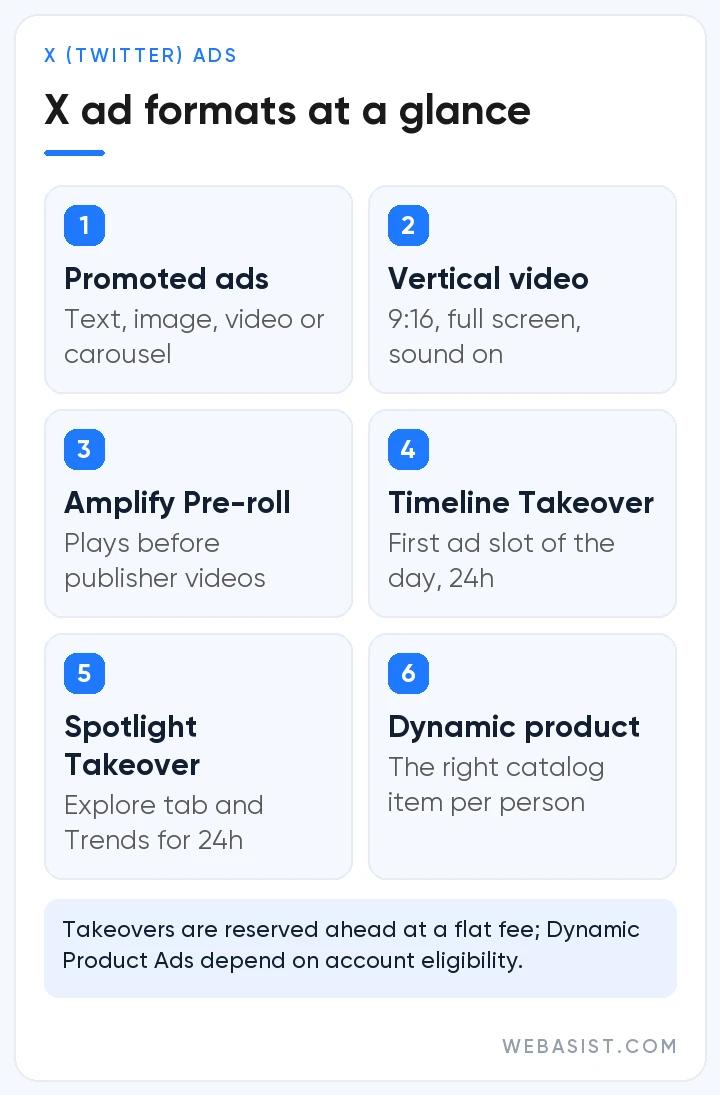
Most formats are self-serve in Ads Manager, while takeovers are reserved in advance. Here are the ones you'll use most.
Promoted Ads
The core unit looks like a regular post but carries an ad label. You can run text, a single image, video or a carousel of 2 to 6 cards, and attach a website or app card. Copy is capped at 280 characters, with each link using 23 of them. PNG and JPEG are the recommended image types, MP4 and MOV are accepted for video, and X recommends keeping video creative under 15 seconds.
Vertical Video Ads
These full-screen ads play in X's immersive video experience with sound on by default. A 9:16 video fills the screen, and campaigns are built under the Video views objective. If you choose a website destination, the call-to-action button appears after the viewer has watched one second. Vertical assets made for Reels or Shorts are often a quick starting point.
Amplify Pre-roll and Sponsorships
With Amplify Pre-roll, your video plays before content from one of X's 200-plus publisher partners. You can opt out of content categories and exclude individual publisher handles. Ads longer than six seconds show a skip button at the six-second mark. Amplify Sponsorships are a different animal: a one-to-one partnership with a single publisher of your choice, usually built around major events.
Timeline Takeover and Spotlight Takeover
Timeline Takeover gives your brand the first ad slot people see when they open X for the first time that day, over a 24-hour window, with each person seeing it at most three times a day. Spotlight Takeover owns the top of the Explore tab and the Trends list for 24 hours, and only one advertiser per country can hold it on a given day. The trend name can run to 20 characters and the optional description to 30, with companion posts carrying it into the Home timeline. Both are planned ahead at a flat fee and suit launch days that need mass visibility.
Dynamic Product Ads
Dynamic Product Ads pull the most relevant product from your catalog for each person, which makes them ideal for bringing back shoppers who viewed items without buying. They need the X Pixel or the Conversion API sending product parameters, plus a catalog uploaded to X Shopping Manager. X's shopping products are currently open to select merchants and managed partners, so confirm the format is enabled in your account first.
Targeting Options on X
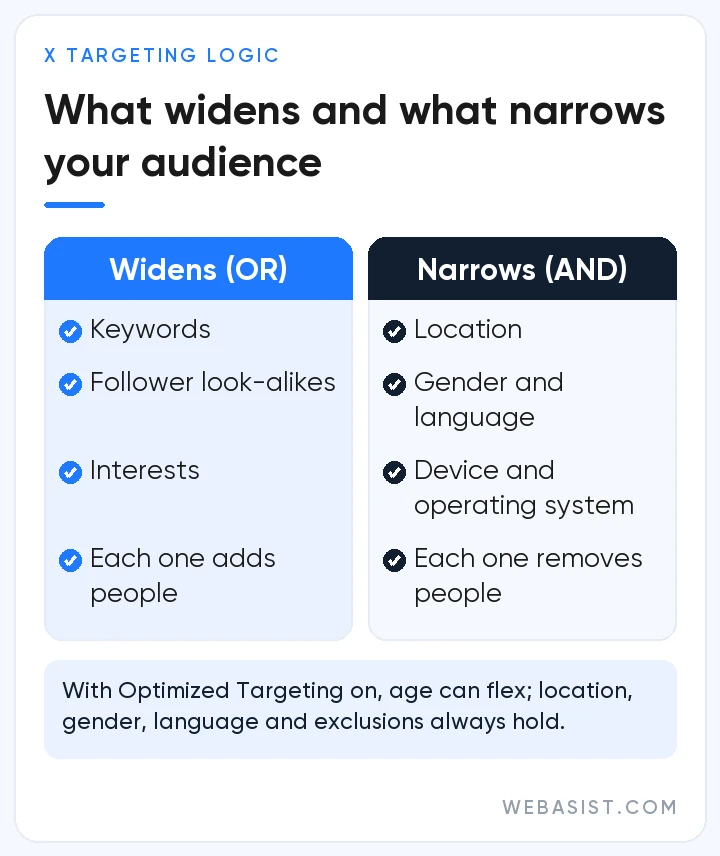
Good targeting on X starts with one rule. Keywords, follower look-alikes and interests are additive (OR logic): a person only has to match one of them, so every addition grows the pool. Location, gender, language, age, device and platform are restrictive (AND logic): each one you add shrinks the audience.
Demographics, Location and Device
You can target countries, regions, metro areas, cities and postal codes; check in Ads Manager which granular levels are offered in your market. Add age, gender and language, which X infers from the posts people write and engage with. Device, operating system and carrier targeting is especially handy for app campaigns.
Keyword Targeting
Keyword targeting reaches people who search for your terms or post and engage with posts that contain them. X suggests starting with at least 25 relevant keywords. Hashtag versions are included automatically, and matches can cover different word orders, misspellings and synonyms. People who post or engage with an excluded keyword drop out of your audience, and your ads won't serve in search results for those terms. Keep in mind that keyword targeting decides who sees your ad; brand safety settings control which content it appears next to.
Follower Look-alikes and Interests
Enter an account handle and X finds people similar to that account's followers. Competitors, trade media and respected voices in your field make good seeds, while celebrity accounts with millions of followers rarely map to a relevant topic. X recommends around 30 handles per campaign, splitting competitors and media into separate campaigns, and leaving interest targeting out of handle campaigns, so test interests on their own. Contextual options such as conversation topics, events, and movies and TV shows are available too.
Custom Audiences and Retargeting
- List audiences: built from your customer lists. For privacy reasons an audience needs at least 100 matched users before you can use it; X suggests files of 2,000 or more handles to clear that bar.
- Website and app audiences: built from events sent by the X Pixel, the Conversion API or your mobile measurement partner.
- Post engager targeting: re-reach people who saw or engaged with your posts. Lookback windows are 15 days for organic impressions, 30 for promoted impressions, 45 for organic engagements and 90 for promoted engagements.
Optimized Targeting and Audience Expansion
With Optimized Targeting on, X may treat some of your selections flexibly when it predicts better results. Location, gender, language, operating system, device and exclusions (keywords, audiences and Do Not Reach lists) are always respected, while age can flex, though only within the 25-and-over range. Audience Expansion adds similar people at three levels, Defined, Expanded and Broad, and keeps demographic selections including age. For a tight B2B audience, watch the audience breakdown in your reports. We explain how this kind of automation works in our guide to AI-powered ad optimization.
Budgets, Bidding and What Drives Cost
X has no minimum spend. You give each ad group a daily budget, an optional total spend cap and a date range, and X says it won't exceed the daily budget. Every impression is sold in an auction, but X weighs ad quality alongside your bid: whether people engage with the ad, how well it matches the audience's interests and how fresh the post is. The winner pays only slightly more than the second-highest bidder. There are four bid types:
- Automatic bid: aims for the most results at the lowest price within your budget; X's pick if you're unsure.
- Maximum bid: you set the most you'll pay per result, and you won't be charged above it.
- Target cost: you name the cost per action you want, and X aims to keep the daily average at or below it, without a guarantee. X notes that it needs roughly 10 conversions before the algorithm can pace toward your target.
- Target cost per action: offered in website conversion campaigns and built around cost per conversion; for X's newer optimization model, X recommends autobid and paying by impressions.
What you actually pay depends on how engaging the ad is, the size of the audience, how many advertisers compete for it and your bid, which is why fixed cost-per-click figures quoted online are rarely useful. For reach, engagement, video views and pre-roll campaigns, a frequency cap set per 24 hours, 7 days or 30 days keeps you from over-serving the same people.
Measurement: X Pixel and Conversion API
X offers two tracking methods: the X Pixel, a tag on your website, and the Conversion API, a server-to-server connection. X recommends the Pixel for most advertisers because it's the simplest place to start, and the Conversion API when you can't add JavaScript to your site or prefer to send data server-side.
- Place the base code on every page and event code at key steps such as add to cart and purchase.
- If you run the Pixel and the Conversion API together, send a conversion_id so conversions aren't counted twice.
- Skip redirects and URL shorteners in ad links; they strip X's click ID, twclid, and part of your conversions go unmeasured.
- Post-engagement attribution windows can be 1, 2, 3, 5, 7, 14 or 30 days, with 30 as the default.
- Before launch, check that events show as Active in Events Manager.
Who Should Advertise on X?
X isn't every brand's first channel, but for the right business it offers a place in the conversation while it's happening. It works especially well for:
- Launches, events and other time-sensitive campaigns
- Sports, entertainment, media, gaming and technology brands
- App install and re-engagement goals
- Companies whose executives or experts share industry views
A local business serving a small area usually gets more direct results from search and maps. Restricted categories such as financial services, alcohol and gambling must also follow X's extra policies and country rules. If you need precise job-title and company targeting, read our LinkedIn ads guide as well.
Pre-Launch Checklist for X Campaigns
Wasted budgets usually trace back to small setup mistakes. Check these before you hit publish:
- Pick the objective that matches the business result you'll report on; an engagement campaign isn't optimized for sales.
- Run more than one creative in each ad group and refresh the weakest ones regularly.
- Keep videos short and captioned, and show the brand and product in the first seconds.
- Test competitor handles, trade media and interests in separate campaigns.
- Test your Pixel or Conversion API events and link to a landing page without redirects.
- Configure brand safety options such as adjacency controls, placements and sensitivity settings during setup.
Because short vertical video does so much of the work on X, professional video production is often as important an investment as the media budget itself.
Frequently Asked Questions
Do you need a verified account to advertise on X?
Yes. Under X's current eligibility rules, an advertising account must be verified through Verified Organizations for businesses or X Premium for individuals. The account also needs public posts and a profile that meets X's ads policies.
Is there a minimum budget for X ads?
No. X has no minimum spend, and you set the daily budget yourself. X's pricing page says bids can start at $0.01 per desired action, but real costs come out of the auction and move with audience size, competition and how engaging the ad is. Budget enough for each ad group to deliver steadily for several days.
How do I create an ad on X (Twitter)?
Sign in at ads.x.com with your X account, set your country, time zone and currency, and add billing details. Then create a campaign, choose an objective, set the budget, bid, targeting and placements in the ad group, pick an existing post or create a new ad, review and launch.
Should I use the X Pixel or the Conversion API?
For most advertisers the Pixel, which is simpler to set up, is enough. The Conversion API suits sites that can't run JavaScript or teams that prefer server-side data; if you use both, send a conversion_id to deduplicate.
Are X ads good for B2B?
They're useful for joining industry conversations and amplifying thought leadership from your team. For strict targeting by job title, company and seniority, LinkedIn is more direct, and the two channels often work best together.
Can I buy a Timeline Takeover or Spotlight Takeover in Ads Manager?
Both are premium placements planned ahead at a flat fee, so you'll need to talk to X's sales team about reservations and pricing. Pre-roll views and vertical video campaigns, on the other hand, can be set up yourself in Ads Manager.
Conclusion
X ads perform best when a verified account, a well-chosen objective, layered targeting and reliable tracking come together. For brands that want to be part of today's conversation it's a strong channel, and steady creative and audience testing usually beats one-off big spends.
WebAsist can run your X campaigns end to end, from setup and creative production to reporting. See our X (Twitter) advertising service, compare our social media advertising packages, or contact us for a plan built around your goals.














