


Facebook Ads Guide 2026: How to Use Meta Ads Manager
This Facebook ads guide starts with the basics. Facebook ads are paid campaigns built in Meta Ads Manager that can run on Facebook as well as on Instagram, Messenger, WhatsApp, Threads and the Audience Network. Every campaign combines decisions about an objective, an audience, a budget, placements and creative, and website results are measured through the Meta Pixel and the Conversions API.
Below we cover everything from account setup and campaign objectives to targeting, Advantage+ automation, measurement and budget logic, in the order you will need it. For Instagram-specific strategy, see our Instagram ads guide.
What you need before you start
- A Facebook Page: ads on Facebook run on behalf of a business Page.
- A business portfolio: the business portfolio in Meta Business Suite (formerly Business Manager) keeps your Page, Instagram account, ad accounts, data sources and team permissions in one place. When ownership sits with the portfolio instead of a personal profile, a departing employee or a new agency does not take your access with them.
- An ad account and payment method: choose the currency and time zone carefully when you create the ad account; changing them later means creating a new ad account.
- Domain verification and measurement: verify your website's domain in the business portfolio and set up the Meta Pixel and the Conversions API.
- Policy-compliant content: misleading claims, prohibited products and wording that directly references personal attributes are common reasons for rejection under Meta's Advertising Standards.
How Meta Ads Manager is structured
Ads Manager uses three levels. Understanding the hierarchy makes it clear where each setting lives and what a change will affect.
| Level | What you decide there |
|---|---|
| Campaign | Objective and special ad category declaration; budget and bid strategy if you use Advantage+ campaign budget |
| Ad set | Conversion location, performance goal, audience, placements and schedule; budget and bid strategy if you do not use a campaign budget |
| Ad | Identity (Facebook Page and Instagram account), format, image or video, copy, link and tracking settings |
Facebook campaign objectives
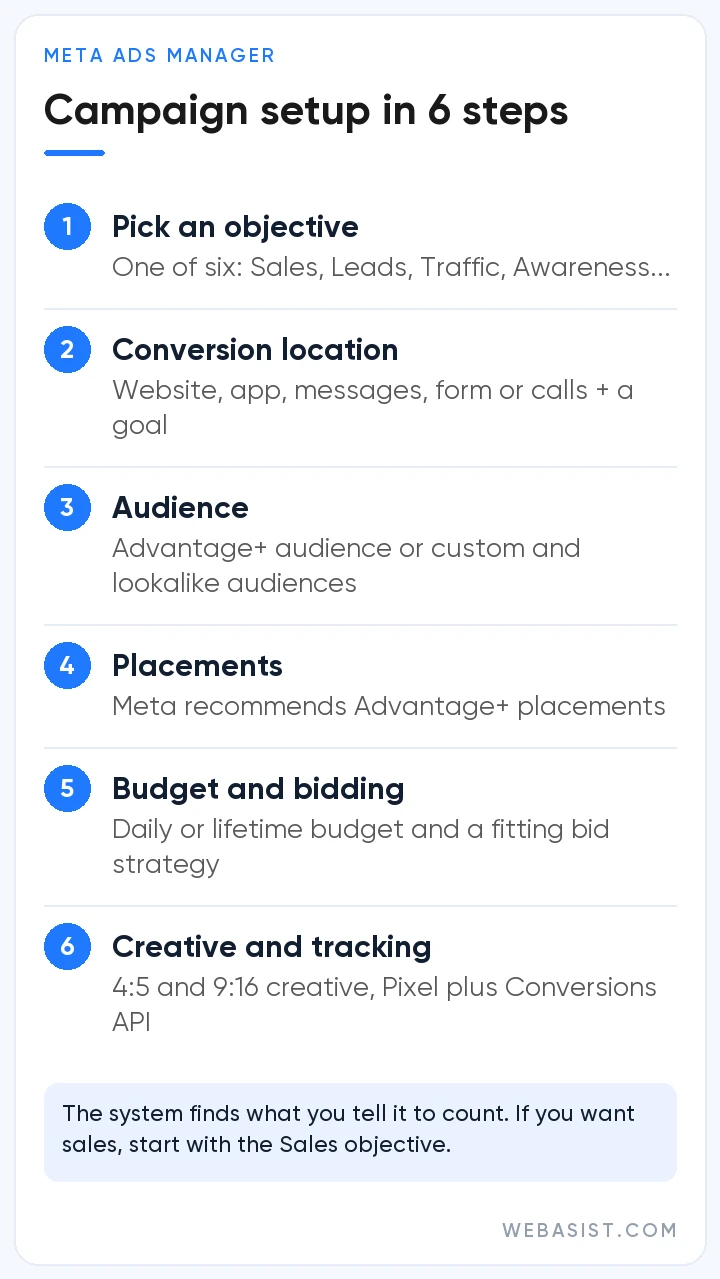
Meta's Help Center groups campaign objectives into six simplified options. The objective is the most fundamental decision you make: it tells the system who to show your ad to and which result to optimize for. Pick the wrong one and no other setting will steer the campaign toward the outcome you actually want.
| Objective | Use it to | Example results |
|---|---|---|
| Awareness | Reach the most people likely to remember your ad | Reach, ad recall, video views |
| Traffic | Send people to a website, an app, your Facebook Page or a conversation | Link clicks, landing page views |
| Engagement | Drive messages, video views, post engagement or specific on-site actions | Conversations started, video views, engagements |
| Leads | Collect leads through messages, phone calls or sign-ups | Form submissions, messages, calls, sign-ups |
| App promotion | Get app installs and in-app actions | Installs, app events |
| Sales | Find people likely to buy; can also optimize for actions such as add to cart | Purchases, adds to cart, conversion value |
Once you choose an objective, the ad set asks for a conversion location (website, app, messaging apps, Instant Forms or calls) and a performance goal (for example, maximize the number of conversions or the value of conversions). The rule is simple: the system finds what you tell it to count. Buying cheap likes with an Engagement campaign when you really want sales produces reports that look good and a till that stays empty.
Targeting options
Advantage+ audience
Advantage+ audience, the default for new campaigns, lets the system find your audience from signals such as past conversions, pixel data and interactions with previous ads. You can add age ranges, interests, custom audiences or lookalikes as audience suggestions; Meta prioritizes people who match them first and goes beyond them where it expects better results. Location, minimum age, language and excluded custom audiences work as audience controls, which are hard limits.
Custom and lookalike audiences
Custom audiences are built from website visitors, customer lists, app users and people who engaged with your Facebook Page or Instagram account. They are the foundation of retargeting and of excluding existing customers from acquisition campaigns. Lookalike audiences use these sources to find new people who resemble them. When uploading a customer list, make sure the data was collected in line with applicable data protection law.
Location, demographics and detailed targeting
With a manual setup you can choose location, age, gender, language and detailed targeting (interests, demographics and behaviors). When you want to leave certain people out, such as existing customers, do it with custom audience exclusions rather than interests. Ads about financial products and services, employment, housing, or social issues, elections and politics require a special ad category declaration, which narrows the targeting options available.
Advantage+ options: when to use automation
Advantage+ is the umbrella name for Meta's AI-powered automation products, which come in two groups:
- End-to-end campaigns: Advantage+ sales campaigns (formerly Advantage+ shopping campaigns), Advantage+ app campaigns and Advantage+ leads campaigns. When you choose the Sales, App promotion or Leads objective, Ads Manager shows the Advantage+ setup, which applies AI across audience, placements and budget. Manual campaign features remain available.
- Single-step tools: these automate one part of the campaign: Advantage+ audience, Advantage+ placements, Advantage+ campaign budget, Advantage+ creative, Advantage+ catalog ads and Advantage+ destination, which drives conversions on both your website and your app.
How well automation performs depends on the quality of the signals you feed it. For accounts with reliable conversion tracking, steady results and enough creative variety, Advantage+ setups are usually a good starting point. Manual settings still make sense for businesses with incomplete measurement, a very niche audience or brand-safety needs that require placement control, and Meta notes that campaigns about social issues, politics or pharmaceuticals may not have access to every Advantage+ feature. Before switching on Advantage+ creative features, check in the preview that the automatic changes fit your brand voice. We look at the strengths and limits of AI-driven ad tools in our article on AI-powered ad optimization.
Where your ads appear
According to Meta's current Help Center list, Facebook placements include Feed, Stories, Reels, Marketplace, notifications, search results, the right column on desktop and ads within Reels. The same campaign can also extend to Instagram (Feed, profile feed, Stories, Reels, Explore home and search results), Messenger, WhatsApp Status, Threads and the Audience Network.
Meta recommends Advantage+ placements and states that adding placements does not increase the cost of your ad; the system looks for the most cost-effective opportunities. That is why preparing creative in at least two ratios (4:5 for feeds, 9:16 for Stories and Reels) matters for efficient delivery. You will find detailed specs for Instagram placements in our guide to types of Instagram ads.
Meta Pixel and Conversions API
To measure website results such as purchases, sign-ups or form submissions and to optimize delivery toward them, Meta recommends using two tools together: the Meta Pixel on the browser side and the Conversions API on the server side.
What does the Meta Pixel do?
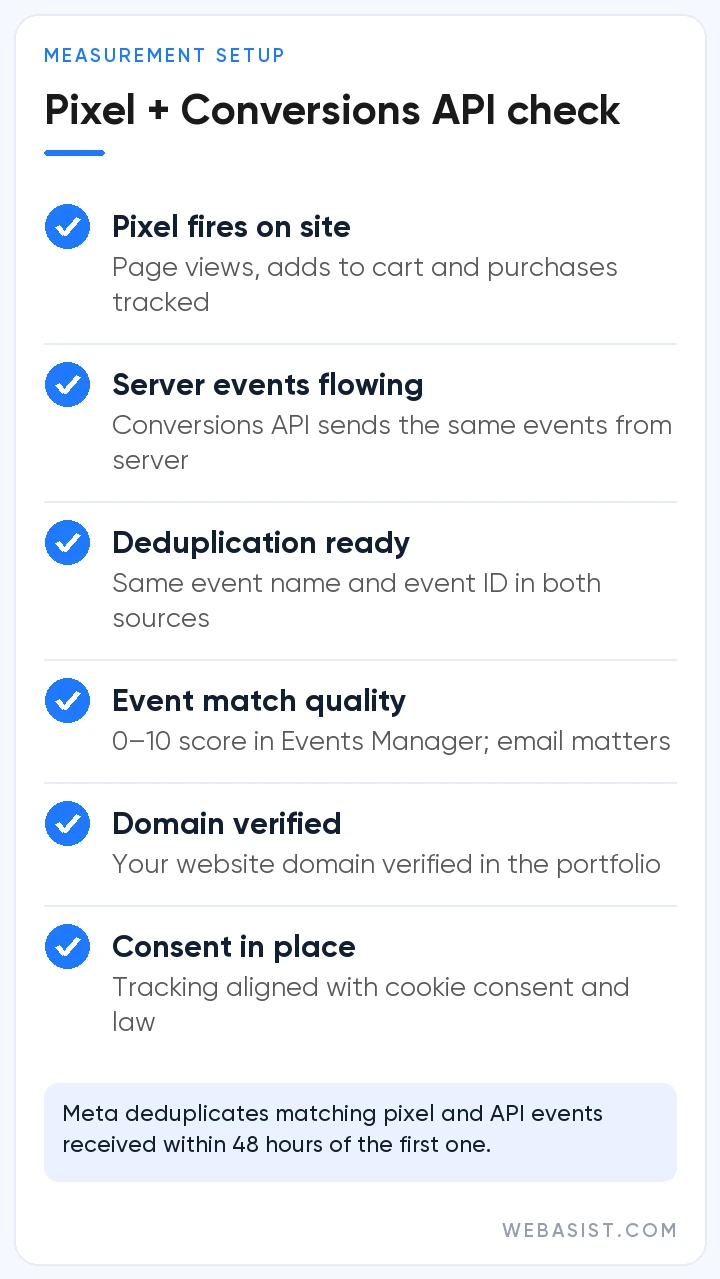
The Meta Pixel is a piece of JavaScript added to your website that sends events such as page views, adds to cart and purchases from the visitor's browser to Meta. That data serves three purposes: reporting conversions, optimizing ad delivery toward those events and building retargeting audiences from site visitors.
Why do you need the Conversions API?
Browser-based tracking can miss events because of ad blockers, cookie restrictions, browser privacy features and connection issues. The Conversions API sends the same events directly from your server to Meta. Meta's developer documentation describes sending events through both channels as a redundant setup; for technical details, see Meta's Conversions API documentation.
Setup and data quality
- Setup options: built-in integrations for platforms such as Shopify or WooCommerce; the Conversions API Gateway, which needs no coding but runs in a cloud account your business owns (AWS or Google Cloud); or a direct server-side integration built by your developers.
- Deduplication: if the same purchase arrives from both the pixel and the API, send the same event name and event ID (eventID in the pixel, event_id in the API) so it is not counted twice. Meta deduplicates matching events received within 48 hours of the first one.
- Event match quality: shown in Events Manager as a score from 0 to 10 for web events sent through the Conversions API, calculated from the last 48 hours of data. Email and click ID are high-priority parameters in Meta's list, and contact details must be hashed as described in Meta's documentation.
- Consent management: work through cookie consent and data protection obligations (such as KVKK in Türkiye or GDPR in the EU) with your legal adviser, and design tracking to respect your consent setup.
If your site lacks proper tracking or your landing pages struggle to convert ad traffic, planning pixel and event setup during website design is the cleanest fix.
Budgets, bidding and what drives cost
Facebook ads have no fixed price per click or impression; every impression is decided in an auction. The highest bid alone does not win Meta's auction, because the bid is weighed together with estimated action rates and ad quality. That is why engaging creative and a strong landing page are the most direct ways to get more results from the same budget.
Budget types
- Daily budget: sets your average daily spend over a Sunday-to-Saturday calendar week. Meta may spend up to 75% more than this amount on days with better opportunities, but never more than 7 times the daily budget across the week.
- Lifetime budget: sets the total spend for a date range and suits launches and seasonal campaigns.
- Advantage+ campaign budget: sets the budget at campaign level and distributes it across ad sets based on performance.
Bid strategies
- Highest volume: aims for the most results your budget allows; the usual starting point for most campaigns.
- Highest value: spends the budget while focusing on the highest-value purchases rather than the number of results.
- Cost per result goal: tries to keep your average cost near a level you set.
- ROAS goal: aims to keep return on ad spend near a target average for accounts that track conversion value.
- Bid cap: limits the maximum bid in each auction; it is meant for advertisers who know their predicted conversion rates well.
For goal-based strategies, Meta recommends 50–100 or more weekly conversions for best performance and does not guarantee the goal will be met. Accounts with low conversion volume are usually better off starting with spend-based strategies.
Learning phase and location fees
According to Meta, an ad set leaves the learning phase once it can deliver stably, which usually happens after about 50 results in the week following its last significant edit. Ad sets that cannot get there show a “Learning limited” status. Every extra ad set dilutes the same budget and data, so merging similar ad sets pools their learning as well.
Location fees are another line to plan for. Meta adds them to ads delivered in jurisdictions with digital services taxes and similar levies; its Help Center lists 5% for Türkiye and Austria, 3% for France, Italy and Spain and 2% for the United Kingdom. Fees are based on where your audience is, not where your business is, sit outside your campaign budget, appear as a separate line on your invoice and do not show up in Ads Manager reporting.
The main factors that influence cost are:
- Audience size and how many competitors are trying to reach the same people
- Seasonality and key shopping dates, when competition intensifies
- The objective and optimization event (a purchase is rarer and more valuable than a link click)
- How delivery is spread across placements and how well the creative fits them
Measurement and optimization
- Metrics that match the objective: track reach and frequency for awareness, cost per landing page view for traffic, cost and quality per lead for leads, and cost per purchase and ROAS for sales.
- Attribution setting: under the change Meta announced in March 2026, click-through attribution for website and in-store conversions counts link clicks only, with a 1-day or 7-day window. View-through covers 1 day after an impression. Conversions within 1 day of non-link interactions such as likes, comments or saves (or, for video, a play of at least 5 seconds) are reported separately as engage-through. Because the change rolled out gradually, make sure you compare periods using the same setting.
- Independent validation: use UTM parameters to compare results with Google Analytics 4 and your CRM.
- Testing culture: use A/B tests to compare one variable at a time (creative, audience, placement or bid) and give each test enough time.
- Creative fatigue: when frequency rises while click-through rate falls and costs climb, it is time to add fresh creative.
Conclusion
Success with Facebook ads rests on a campaign structure built around the right objective, solid measurement, a budget that respects how the algorithm learns and creative that is refreshed regularly.
As a Meta Business Partner, WebAsist handles Facebook advertising management from pixel and API setup to campaign structure, creative testing and reporting. To review where your account stands today, reach us through our contact page.
Frequently Asked Questions
How much budget do I need for Facebook ads?
There is no fixed amount; costs vary by industry, competition, audience and creative. A practical approach is to combine the cost per result you can accept with Meta's learning-phase guidance of about 50 results a week. If your ads reach people in a country with location fees, such as Türkiye at 5%, include that fee as well.
How long does it take for Facebook ads to be approved?
Meta says most ads are reviewed within 24 hours, although some take longer, and live ads can be reviewed again. Changes to targeting, creative, optimization or billing event trigger a new review, while changes to budget, bid amount or schedule do not. If you believe an ad was rejected by mistake, you can request another review through Meta Business Support Home.
Can I run Facebook ads without the Meta Pixel?
Yes. Awareness, engagement, messaging and Instant Forms lead campaigns can run without a pixel. To optimize for website conversions such as purchases or sign-ups, retarget site visitors and measure results accurately, however, you need the Meta Pixel together with the Conversions API.
Are Facebook and Instagram ads managed in the same place?
Yes. Ads for both platforms are managed in Meta Ads Manager, and one campaign can run across both apps. Placement settings let you decide which app and surface show your ad, and you can review results broken down by platform.
Why do Facebook ads get rejected?
The most common reasons are misleading or exaggerated claims, prohibited or restricted products, a mismatch between the ad and its landing page, and wording that directly references a person's attributes (for example, questions implying someone's health condition). Review covers targeting and the destination page as well as the creative, and fixing the ad according to the policy reason before resubmitting usually resolves the issue.














