


YouTube Ads in Google Ads: Formats, Specs and Step-by-Step Setup

To run YouTube ads in Google Ads, you upload your video to YouTube, create a Video campaign (or a Demand Gen campaign if you want sales or leads), choose the subtype and bid strategy that match your goal, set budget and targeting, then add the video URL as an ad. It starts serving once it passes Google's policy review.
This guide covers the hands-on side of that process: which video ad formats exist in 2026, where each one appears, how to prepare your files, how to build the campaign screen by screen and which bid strategy each subtype uses.
If you are still deciding on audiences, messaging and budget, read our YouTube ads strategy guide first and come back here for the build.
Before you start: a setup checklist
Having these ready before you open the campaign flow saves you from backtracking halfway through. If Google Ads itself is new to you, our Google Ads beginner's guide explains account structure and billing.
- A Google Ads account with billing set up. Campaigns will not serve until payment details are complete.
- Your video on YouTube. Video ads are built from videos hosted on YouTube. Unlisted videos work fine; private, deleted or members-only videos are disapproved.
- A linked YouTube channel (recommended). Linking is not required to run ads, but it lets you see organic metrics, build data segments (formerly remarketing lists) from people who engaged with your channel and track subscriptions as conversions. You need administrative access in Google Ads to link.
- Conversion tracking. For sales, leads or website traffic goals, set up and test conversion actions through the Google tag or Google Analytics 4.
- Videos in several orientations. Horizontal (16:9), vertical (9:16) and ideally square (1:1) versions make your ads eligible for every placement.
YouTube ad formats in 2026
A format is the ad experience the viewer sees on screen; a campaign subtype decides which formats run together, towards which goal and with which bidding. Google keeps the official list on its video ad formats help page. Summary:
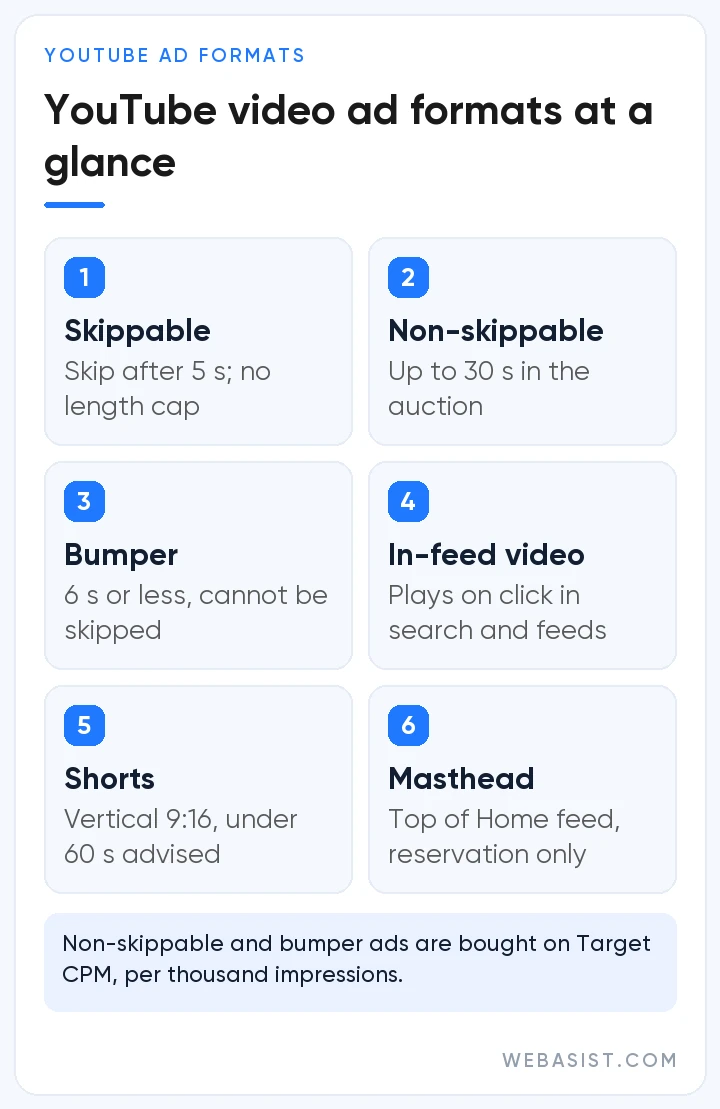
| Format | Where it appears | Length | Skippable? | How you pay |
|---|---|---|---|---|
| Skippable in-stream | Before, during or after videos; Google video partners | No maximum (under 3 minutes recommended) | After 5 seconds | CPV, CPM or conversion-based bidding |
| Non-skippable in-stream | Before, during or after videos; Google video partners | Up to 30 seconds in auctions (16–30 s on TV screens only); up to 60 seconds on reservation | No | Target CPM |
| Bumper | Before, during or after videos; Google video partners | 6 seconds or less | No | Target CPM |
| In-feed video | YouTube search results, watch next, Home and Subscriptions feeds | No maximum | Viewer clicks the thumbnail | Click to watch, or 10+ seconds of autoplay |
| YouTube Shorts | Between organic videos in the Shorts feed | Under 60 seconds recommended | Swipe away at any time | CPV, CPM or conversion-based bidding |
| Masthead | Top of the YouTube Home feed | No maximum; autoplays up to 30 seconds on computers | Not applicable | Reservation only: CPM or cost per hour |
Skippable in-stream ads
Once branded TrueView in-stream, this format plays before, during or after the chosen video, and viewers can skip after 5 seconds. With cost-per-view (CPV) bidding you pay only when someone watches 30 seconds (or the whole ad if it is shorter) or interacts, so early skips cost nothing. There is no hard length limit, though Google notes that videos under three minutes usually perform better.
Non-skippable in-stream and bumper ads
Non-skippable ads make sure the whole message is seen. In auction campaigns the standard version runs 7 to 15 seconds, while 16 to 30 second versions serve only on connected TV (CTV) screens and only as horizontal video. Google's video ad policy does not allow non-skippable ads longer than 30 seconds in the auction or 60 seconds in reservation campaigns.
Bumpers are non-skippable spots of six seconds or less. Both formats are bought on Target CPM, so you pay per thousand impressions rather than per view.
In-feed video ads
Formerly video discovery ads, in-feed ads do not autoplay into a watch session; they show a thumbnail and short text that invite people to click. They appear in YouTube search results, alongside watch-next videos and in the Home and Subscriptions feeds. You are charged when someone clicks to watch, and in Video views campaigns 10 seconds of autoplay also counts as a view. Because they meet people while they search, they suit reviews and how-to content.
YouTube Shorts ads
Shorts ads run full screen and vertical between organic Shorts, and viewers can swipe past them at any moment. Under CPV bidding a view counts after 10 seconds or at the end of the video, whichever comes first, or when someone taps the call-to-action; looping videos are charged once per impression. Ads can be up to three minutes long, but only the first 60 seconds play in the Shorts feed.
There is no dedicated Shorts campaign type. Vertical videos in Video views, Video reach (Efficient reach and Target frequency), Demand Gen, Performance Max, App and reservation campaigns can all serve on Shorts.
Masthead, audio ads and reservation buys
The Masthead sits at the top of the YouTube Home feed and is sold only on reservation. A CPM Masthead can be booked through a Google representative or a Google Ads reservation campaign, while the cost-per-hour Masthead, which delivers all eligible impressions during the booked hours, is available only through a Google representative. Reservation buying also includes fixed-CPM options such as Shorts and pause ads. If your message is sound-led, the Audio reach subtype reaches people listening to content on YouTube.
YouTube video ad specs: sizes, lengths and file rules
Because video ads are built from videos hosted on YouTube, file preparation starts with the YouTube upload. The dimensions Google recommends in its video ad specs:
| Orientation | Aspect ratio | Recommended resolution | Where it matters most |
|---|---|---|---|
| Horizontal | 16:9 | 1920×1080 px | In-stream, in-feed, TV screens |
| Vertical | 9:16 | 1080×1920 px | YouTube Shorts |
| Square | 1:1 | 1080×1080 px | Mobile feeds |
| Vertical (Demand Gen) | 4:5 | 1080×1350 px | Demand Gen feed placements |
- File types and size: Google recommends .MPG files with MPEG-2 or MPEG-4 encoding; MP4, MOV, AVI, WMV, FLV, WebM, MPEG-PS, 3GPP, ProRes, DNxHR, CineForm and HEVC (H.265) are also accepted. Files must be under 256 GB.
- Demand Gen minimums: at least 5 seconds; videos under 10 seconds cannot serve in-stream. Google recommends videos longer than 15 seconds to maximise reach across formats.
- Thumbnails: 16:9 at 1280×720 px, JPG, GIF or PNG, under 2 MB.
- Companion banner: computers only, 300×60 px, JPG, GIF or PNG, up to 150 KB. Skippable, non-skippable and bumper ads support it.
Formats and video set per subtype
| Campaign subtype | Formats it uses | Videos to prepare |
|---|---|---|
| Video views | Skippable in-stream, in-feed, Shorts | Google recommends one 60-second to 3-minute horizontal, one 15-second horizontal and one 10 to 60 second vertical video |
| Efficient reach | Bumper, skippable in-stream, in-feed, Shorts | A bumper of up to 6 seconds, a longer horizontal cut and a vertical version for Shorts |
| Non-skippable reach | Bumper and non-skippable in-stream | A bumper of up to 6 seconds, a 7 to 15 second standard cut and a 16 to 30 second horizontal cut for TV screens |
| Target frequency | Bumper, skippable and non-skippable in-stream; in-feed and Shorts in multi-format setups | Several short and long variations, since the same people see the ad repeatedly |
| Ad sequence | Skippable, non-skippable in-stream and bumper | Videos that build on each other in the order you set (runs on YouTube only) |
In Video reach campaigns, "Get vertical versions of your videos" is on by default for new campaigns, so Google creates 9:16 versions from horizontal video. Always preview them, because products, logos and text can get cropped. Our video production team can shoot and edit a native set for every placement.
How to set up YouTube ads in Google Ads, step by step
The flow below is for an awareness or views-focused Video campaign; menu names follow the English Google Ads interface.
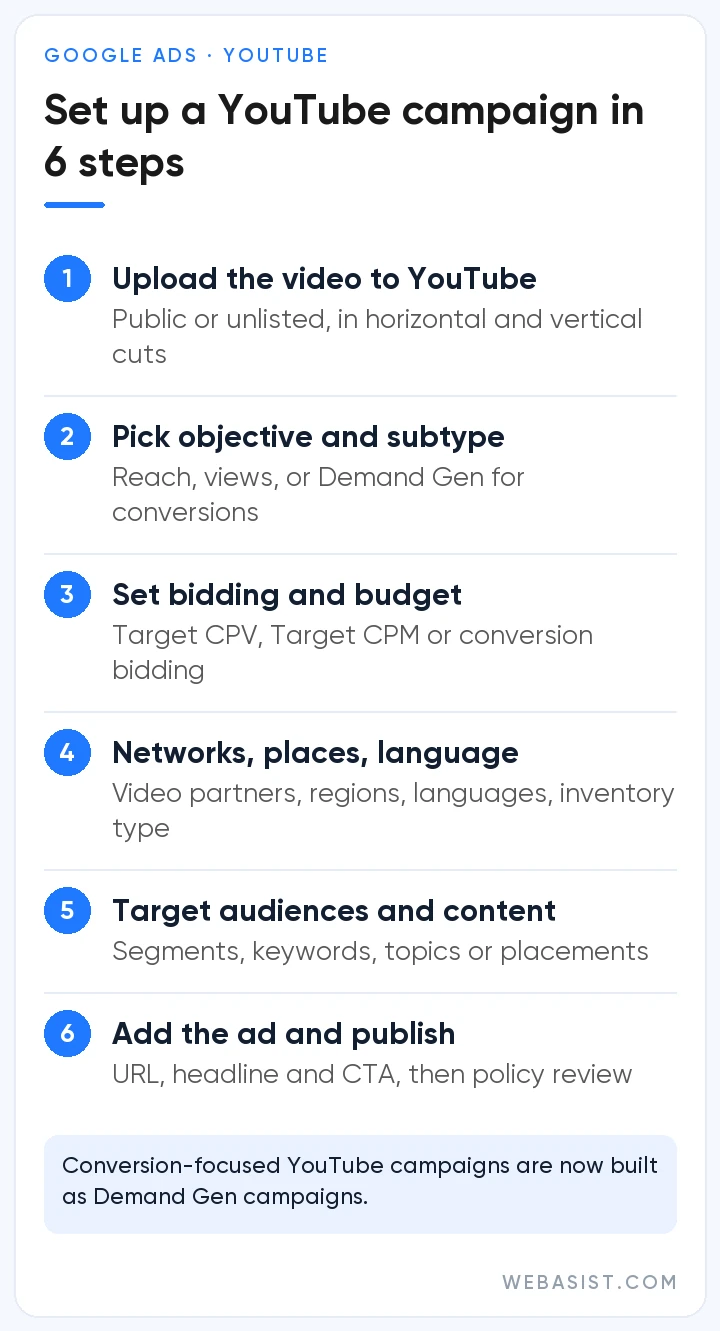
- Start a new campaign: in Campaigns, click the plus (+) button.
- Choose your objective: for awareness and views, select "YouTube reach, views, and engagements". For sales, leads or website traffic, see the Demand Gen section below.
- Pick a subtype: Video views, Video reach (Efficient reach, Non-skippable reach, Target frequency), Ad sequence, YouTube subscriptions and engagements, or Audio reach. The subtype sets the available formats and bid strategies.
- Set bidding and budget: choose a bid strategy, then a daily budget or a campaign total budget. A total budget is paced between your start and end dates.
- Choose networks: decide whether to add Google video partners, the publisher sites and apps outside YouTube.
- Locations and languages: set where ads show and which languages your audience uses.
- Content suitability: the inventory type setting controls, on three levels, how close ads can appear to sensitive content; accounts start on the middle level Google recommends. You can also exclude embedded videos and live streams.
- Additional settings: devices (computers, mobile, tablets, TV screens), frequency capping and ad scheduling.
- Build the ad group: add demographics, audience segments and content targeting such as keywords, topics or placements.
- Create the video ad: paste the YouTube URL, then add the final URL, call-to-action and headline, plus a long headline and description for in-feed, a companion banner and a tracking template for UTMs.
- Review and publish: click "Create campaign". The ad serves once it passes policy review.
Running YouTube ads for sales and leads: Demand Gen
Conversion-focused YouTube advertising used to run through Video action campaigns. Google removed the option to create new ones in April 2025, began upgrading existing campaigns to Demand Gen automatically in July 2025 and finished upgrading the remaining ones by April 2026. For purchases, sign-ups or site visits from YouTube, Demand Gen is now the campaign type to use.
- Placements: YouTube (in-stream, in-feed and Shorts), Discover, Gmail and the Google Display Network.
- Channel controls: at ad group level you can swap "All Google channels" for a manual selection, such as YouTube Shorts only. Creative preferences, which pin individual videos to in-stream, in-feed or Shorts, are available only in Demand Gen.
- Assets: video, image and carousel ads can share a campaign; video-only is allowed.
- Bidding: Maximize conversions, Target CPA, Maximize conversion value, Target ROAS, Maximize clicks and Target CPC.
Demand Gen is becoming Google's main home for visual ads: from June 2026, eligible advertisers can also move existing Display campaigns into it with a migration tool. Performance Max can serve your videos on YouTube too, but with far less control over formats and placements. Our Google Ads advertising models comparison puts every campaign type side by side.
YouTube bid strategies by campaign subtype
| Campaign / subtype | Bid strategy | What you pay for |
|---|---|---|
| Video views | Target CPV | TrueView views (watch threshold or interaction) |
| Efficient reach, Non-skippable reach, Target frequency | Target CPM | Thousand impressions |
| Ad sequence | Target CPM (recommended) | Thousand impressions |
| YouTube subscriptions and engagements | Target CPA | Optimised for channel actions such as subscriptions |
| Audio reach | Target CPM | Thousand impressions |
| Demand Gen | Conversion, value and click-based bidding | Impressions or clicks, by surface and format |
- Target CPV: you set the average you want to pay per view; individual views vary, but the system keeps the average near your target.
- Target CPM: bids are per thousand impressions, so cost does not depend on whether viewers watch to the end.
- Naming change: since October 2025 Google Ads reports "Views" as "TrueView views".
Pre-launch: common mistakes and final checks
Most set-up problems come from the same handful of oversights. Check these before you publish:
- Video status: the video is public or unlisted; switching it to private later gets the ad disapproved.
- Missing orientations: the subtype's length and orientation set is uploaded, including a vertical version, and any auto-generated vertical cut has been previewed.
- Short-video trap: Demand Gen videos meant for in-stream run longer than 10 seconds.
- Broken measurement: conversion actions are tested, the right primary conversion is selected and UTM parameters show correctly in Google Analytics 4.
- Landing page: the final URL loads fast on mobile and matches the promise in the ad.
- Budget and naming: a total budget has the right end date, and the campaign name includes objective, subtype and date.
Frequently Asked Questions
Do I need a YouTube channel to advertise on YouTube?
Indirectly, yes. Video ads are built from videos hosted on YouTube, and uploading requires a channel. The video can stay unlisted, and linking the channel to Google Ads is optional but recommended for organic metrics, channel engagement conversions and remarketing.
Do I pay if a viewer skips my ad?
With CPV bidding on skippable in-stream ads, no: if the viewer skips before 30 seconds (or before the end of a shorter ad) without interacting, you are not charged. On Target CPM subtypes you pay per impression, so skipping does not change the cost.
How do I run ads on YouTube Shorts?
No special campaign type is needed. Add a 9:16 vertical video to a Video views, Efficient reach or Demand Gen campaign and your ad becomes eligible for the Shorts feed. For Shorts-only delivery, use Demand Gen channel controls or a Shorts reservation.
How long should a YouTube video ad be?
It depends on the format. Bumpers are capped at 6 seconds, and non-skippable ads at 30 seconds in the auction, with anything over 15 seconds shown only on TV screens. Skippable ads have no limit, though under three minutes is recommended, and Shorts ads should stay under 60 seconds. Whatever the length, make the brand and message clear in the opening seconds.
How do I buy a YouTube Masthead ad?
Not through the auction: the Masthead is sold only on reservation. A CPM Masthead can be booked through a Google representative or a Google Ads reservation campaign, and a cost-per-hour Masthead only through a representative. It suits launches that need very high reach in a short window.
Conclusion
Building a YouTube campaign in Google Ads takes only a few screens, but results depend on matching the format to the goal, the video set to the subtype and the bid strategy to the outcome you measure.
If you would like a Google Partner team to handle the build, prepare your video set or audit an existing account, see our YouTube advertising service or contact us for a quote.














