


Instagram Ads Guide: How to Advertise on Instagram (2026)

When it comes to how to advertise on Instagram, there are two routes: boost an existing post, Reel or story from the Instagram app, or build a campaign in Meta Ads Manager where you choose the objective, audience, budget and placements yourself. Boosting is fine for quick visibility; if you want sales, leads or growth you can measure, Ads Manager is the right tool.
This guide covers the strategy side of Instagram ads: which route to take, who to show your ads to, how to plan a budget, how to shape creative and how to measure results. For format specs and placements such as Stories, Reels and carousels, see our guide to types of Instagram ads and their specs.
Before you start: a quick setup checklist
Sorting out a few basics before your first ad saves you from measurement, access and billing headaches later:
- Business account: Instagram's Help Center asks you to switch your profile to a business account before boosting from the app; switching is free and done in your profile settings.
- Business portfolio and ad account: to use Ads Manager, connect your Instagram account to your Meta business portfolio (formerly Business Manager) and to your ad account. If you work with an agency, grant partner access instead of sharing passwords.
- Payment method: add a valid payment method and correct billing details to the ad account.
- Measurement: if you are driving website traffic or sales, install the Meta Pixel and the Conversions API. We cover the technical setup in our Facebook (Meta) ads guide.
- One primary goal: “more followers” and “a lower cost per lead” call for completely different campaigns. Decide up front which metric defines success.
Boost a post or use Ads Manager?
Both routes run on the same ad system and enter the same auction; the difference is how much control you get.
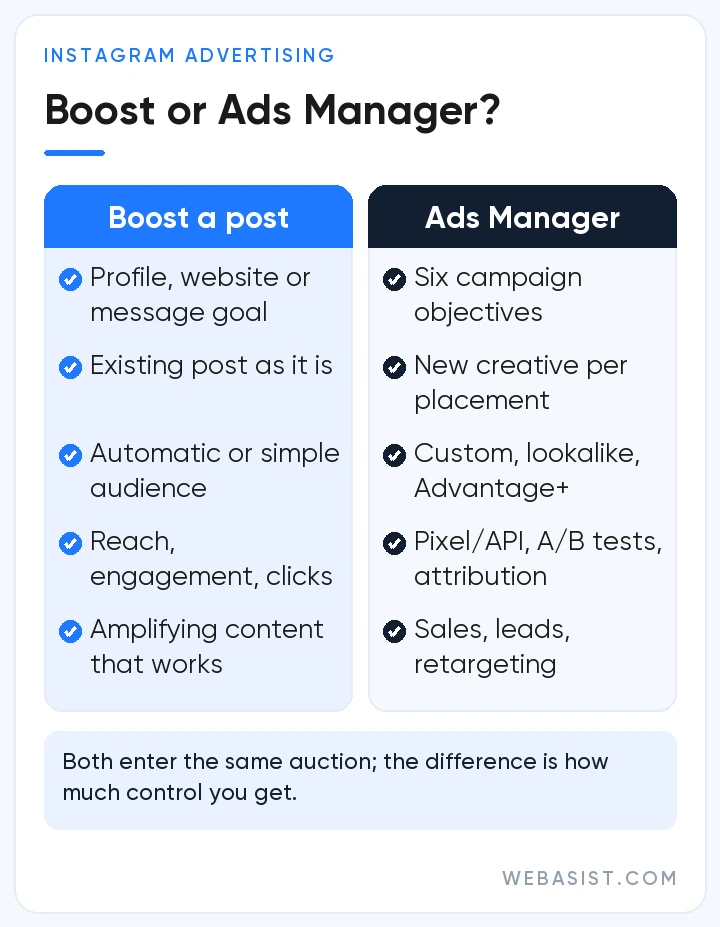
| Criteria | Boosting a post | Meta Ads Manager |
|---|---|---|
| Where you set it up | Instagram app, instagram.com or Meta Business Suite | Ads Manager (web or mobile app) |
| Goal options | Profile visits, website visits, messages | Six campaign objectives with their own performance goals |
| Creative | An existing post, Reel or story, as it is | New creative, multiple versions, different media per placement |
| Targeting | Automatic audience or a simple audience by location, age and interests | Custom and lookalike audiences, Advantage+ audience, exclusions |
| Measurement | Basic results such as reach, engagement and clicks | Pixel and API conversions, attribution settings, A/B tests, detailed breakdowns |
| Best for | Quickly amplifying content that already performs | Sales, leads, retargeting and scaling |
How to boost a post on Instagram
- Go to your profile, open ad tools from your professional dashboard and choose the post, Reel or story you want to promote.
- If your account is not linked to a Facebook Page, you will be prompted to connect one; you can skip this step.
- Choose a goal: more profile visits, more website visits or more messages.
- Set the audience, daily budget and duration.
- Review the summary and confirm the boost. The ad goes live once it passes review, and you will get notifications about its status in your activity feed.
Boosting is a practical way to push content that is already doing well organically to a wider audience. What you give up is the ability to tailor creative by placement, compare several versions or optimize for on-site conversions such as purchases.
A note on payment: when you boost from the Instagram iOS app, you pay by adding funds to your ad account, and according to Instagram's Help Center Apple keeps a 30% service fee on those funds in most regions. Boosting through instagram.com avoids that fee.
How to set up an Instagram campaign in Ads Manager
- Pick an objective: Awareness, Traffic, Engagement, Leads, App promotion or Sales. This choice tells the system who to reach and which result to optimize for.
- Decide on the setup: for the Sales, Leads and App promotion objectives, Ads Manager shows the Advantage+ setup, which applies AI across audience, placements and budget. Manual settings remain available if you need more control.
- Set the conversion location and performance goal: for example your website, Instagram Direct, Instant Forms or an app.
- Define the audience: see the next section.
- Choose placements: Meta recommends Advantage+ placements and says adding placements does not raise your costs. If you want the ad to run on Instagram only, select the Instagram surfaces under manual placements, bearing in mind that a narrower selection can raise your cost per result.
- Set the identity: at ad level, select your Instagram account so the ad appears under its name and comments and messages come to your profile.
- Upload creative and publish: check the preview for each placement, set up the pixel and UTM parameters under tracking, then publish.
Instagram targeting strategy
In recent years Meta's delivery system has shifted from relying on narrow, advertiser-defined audiences to finding the right people from creative and conversion signals. The goal of targeting today is to feed the system good signals, not to box it in.
Broad targeting and Advantage+ audience
With Advantage+ audience switched on, the age range or interests you enter act as suggestions rather than hard limits. Location, minimum age, language and excluded custom audiences remain hard controls. Accounts with enough conversion data usually do well with this approach; newer accounts should keep their suggestions meaningful and watch early results closely.
Custom audiences built from Instagram engagement
Your most valuable audiences on Instagram are people who already know you. In Ads Manager you can build custom audiences from:
- People who engaged with your Instagram professional account: profile visitors, people who reacted to posts or ads, saved content or sent you a message
- People who watched your videos and Reels
- Website visitors (from pixel and Conversions API data)
- Your customer list (collected in line with applicable data protection law)
- People who opened or submitted your Instant Forms
Lookalike audiences and retargeting
Use these custom audiences as sources for lookalike audiences to give the system a strong starting point when looking for new customers. For retargeting, separating short and long time windows lets you match the message to where people are in their decision: a Reel explaining the product for someone who has just discovered your brand, and a catalog ad showing the exact product to someone who abandoned their cart.
Location for local businesses
If you serve a specific city or district, limit location targeting to the area you can actually serve. An overly wide area means spending budget on people who can never become customers. If you want store visits or calls, put local details such as your address, opening hours and a call button front and center.
Budget logic: how much should you spend?
Instagram ads have no fixed price. What you pay depends on competition in the auction for the same people, audience size, seasonality, placement, objective and creative quality. So before asking “how much should I spend?”, answer two more useful questions:
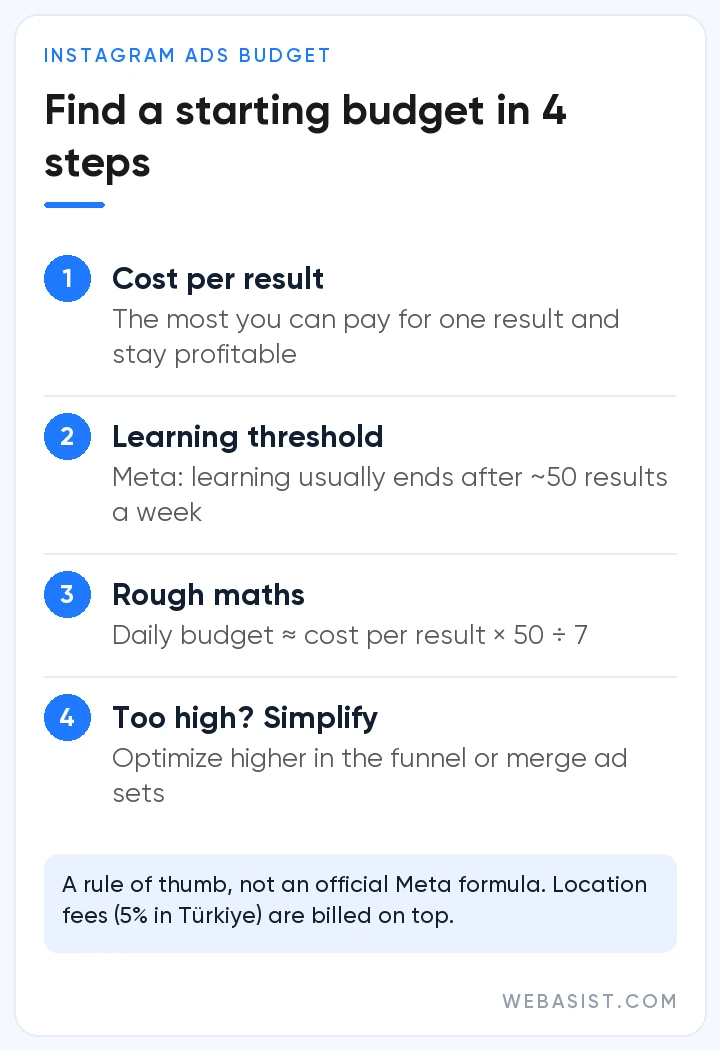
- What is the most I can pay for one result? Product margin, average order value and the total value a customer brings you define an acceptable cost per result.
- Can I generate enough data for the system to learn? According to Meta, an ad set usually exits the learning phase after about 50 results in the week following its last significant edit.
Combining the two gives a rough starting estimate: daily budget ≈ target cost per result × 50 ÷ 7. This is not an official Meta formula, just a rule of thumb derived from the learning threshold. If the figure is beyond your means, optimize for an event higher up the funnel (for example add to cart instead of purchase) or consolidate spend into fewer ad sets.
Two more details matter when planning spend:
- Daily vs. lifetime budgets: a daily budget behaves like a weekly average; Meta spends more on high-opportunity days and less on quiet ones, but the weekly total never exceeds seven times the daily amount. A lifetime budget spreads spend across set dates and suits launches or campaigns with a fixed schedule.
- Location fees: according to Meta's Help Center, ads delivered to people in Türkiye carry a 5% location fee. It is not taken out of your budget; it is added to your invoice as a separate line after delivery, so your total charge can exceed the budget you set.
When results are strong, raise budgets in steps rather than doubling them overnight; Meta itself warns that frequent budget changes can send an ad set back into the learning phase.
Creative tips for Instagram
As targeting becomes more automated, the creative itself has become the strongest signal for who sees your ad. Creative that works on Instagram tends to share these traits:
- Think vertical: Reels and Stories are full-screen vertical experiences. Plan shoots in 9:16 from the start instead of cropping landscape footage later.
- Win the first second: show the product, the problem or the result right away; do not save the logo and main message for the end.
- Work with and without sound: captions and short on-screen text make the video clear whether the sound is on or off.
- Speak the platform's language: creator-style videos showing real use and real faces fit the feed more naturally than glossy commercials. Partnership ads also let you run ads through creators' accounts.
- Know the Reels rules: Reels ads cannot use licensed music, so choose original audio or royalty-free tracks from the Meta Sound Collection, and keep text and logos away from the interface areas at the top and bottom of the screen.
- Build variety: several versions of the same message, with different hooks, people and formats, help the system match the right ad to different audience segments.
- Study competitors: the Meta Ad Library shows the live ads of brands in your sector, so you can compare messaging, tone and offers.
Producing fresh creative consistently is the most labor-intensive part of running ads, so build video production into your campaign planning rather than treating it as an afterthought.
Measurement: how do you know it is working?
Measurement starts with choosing metrics that match the objective. Likes do not prove that a sales campaign is working, and purchases are the wrong yardstick for an awareness campaign.
| Objective | Key metrics to track |
|---|---|
| Awareness | Reach, frequency, cost per 1,000 impressions, video view rates |
| Traffic | Link clicks, link click-through rate, cost per landing page view |
| Engagement and messages | Conversations started, cost per conversation, profile visits |
| Leads | Cost per lead, lead-to-sale conversion rate |
| Sales | Purchases, cost per purchase, return on ad spend (ROAS) |
- Allow for the attribution change: since March 2026, click-through attribution counts link clicks only, and conversions that follow saves, likes or comments appear under engage-through instead. When you compare periods before and after that change, remember the classification moved.
- Look beyond Ads Manager: add UTM parameters to your links and compare results with Google Analytics 4 and your CRM. Real sales and customer acquisition are the final measure.
- Test one variable at a time: use the A/B test feature in Ads Manager to compare a single variable such as creative, audience or placement. Changing everything at once hides what actually worked.
- Watch frequency: with small audiences, the same ad is shown repeatedly within days. If frequency climbs while click-through rate falls, it is time for new creative.
Common mistakes
- Choosing the Engagement objective when you want sales, then treating likes as success
- Splitting the budget across so many small ad sets that none completes the learning phase
- Running a single creative for weeks without refreshing it
- Installing the pixel but skipping the Conversions API and event deduplication
- Editing campaigns constantly in reaction to volatile first-day results
- Topping up funds in the iOS app without accounting for Apple's service fee
Conclusion
Successful Instagram advertising is a process: start with the right tool, feed the system good signals, size the budget around how the algorithm learns and judge results against real business data. Boosting offers a quick start; sustainable growth comes from a planned campaign structure in Ads Manager.
As a Meta Business Partner, WebAsist manages Instagram advertising end to end, from campaign structure and creative production to measurement and reporting. Get in touch and we will review your current account with you.
Frequently Asked Questions
Do I need a business account to advertise on Instagram?
To boost from the app, Instagram's Help Center asks you to switch to a business account; it is free and takes a few steps in your profile settings. Linking a Facebook Page is optional for boosting. To use Ads Manager, you also need to connect your Instagram account to your Meta business portfolio and ad account.
How long does it take for an Instagram ad to go live?
Boosted posts and Ads Manager campaigns both pass Meta's largely automated review before they run, which usually wraps up within a day. We explain which edits restart review and what to do about a rejected ad in our Facebook (Meta) ads guide.
What is the difference between boosting a post and running an ad?
Boosting turns an existing post into an ad in a few taps and offers a limited set of goals: profile visits, website visits or messages. Ads Manager gives you six campaign objectives, advanced audiences, placement control, A/B testing and pixel-based conversion tracking. If you are after sales or leads, Ads Manager is the better fit.
How do I set a budget for Instagram ads?
Start with the cost per result you can accept, then account for the data the system needs to learn. Meta's learning-phase guidance of about 50 results a week is a useful reference for estimating a starting budget. If you advertise to people in Türkiye, add the 5% location fee that appears separately on your invoice.
Can I run ads only on Instagram?
Yes. In Ads Manager you can choose manual placements and select only Instagram surfaces. Meta does recommend Advantage+ placements, and the scope of placement controls can vary by campaign type, so check the options on the setup screen each time.
Why are my Instagram ads not getting results?
First check that the campaign objective actually matches the result you want. Then see whether the ad set is still in the learning phase, whether frequency is climbing and how well your landing page converts the clicks you get. The problem usually sits in the weakest link of the chain between objective, creative and landing page.














