


Instagram Advertising in 2026: Costs, Boost vs Ads Manager, Ad Sizes
Advertising on Instagram has no fixed price; you set a daily budget and the ad is sold in an auction. A boutique that enters 200 TL a day spends at most 6,080 TL a month, and ads shown in Turkey get a 5% location fee added to the invoice. If the question is "boost or Ads Manager", our answer is clear: Ads Manager when you want sales or customer enquiries, boosting when you want to push a Reel that is already doing well.
This article collects the decisions that are specific to Instagram: how much you need to start, when boosting is enough, where the ad appears on screen, which image sizes you need and which of Meta's recommendations we ignore. Ad account, pixel and campaign setup are shared with Facebook; we covered those steps in our Facebook advertising guide and do not repeat them here.
Instagram advertising costs in 2026: how much do you need to start?
There is no answer to "how much is one Instagram ad", because you do not pay per ad; you pay per impression, click or result. The price is set by the other advertisers who want the same people, the size of your audience, the season and how much your creative gets watched. The same audience costs more at New Year and during sale periods, and gets cheaper in January.
Example scenario, a boutique in Nişantaşı: it starts with 200 TL a day on the Sales objective and spends 6,080 TL a month. A link click comes in at 15 TL on average (an example figure), so 400 people reach the site. Two in every 100 visitors buy; 8 sales. Cost per sale: 760 TL. If one order leaves the boutique less than 760 TL in profit, this campaign makes revenue, not profit. Put your own three numbers in (click cost, conversion rate, profit per order) and the answer comes out by itself.
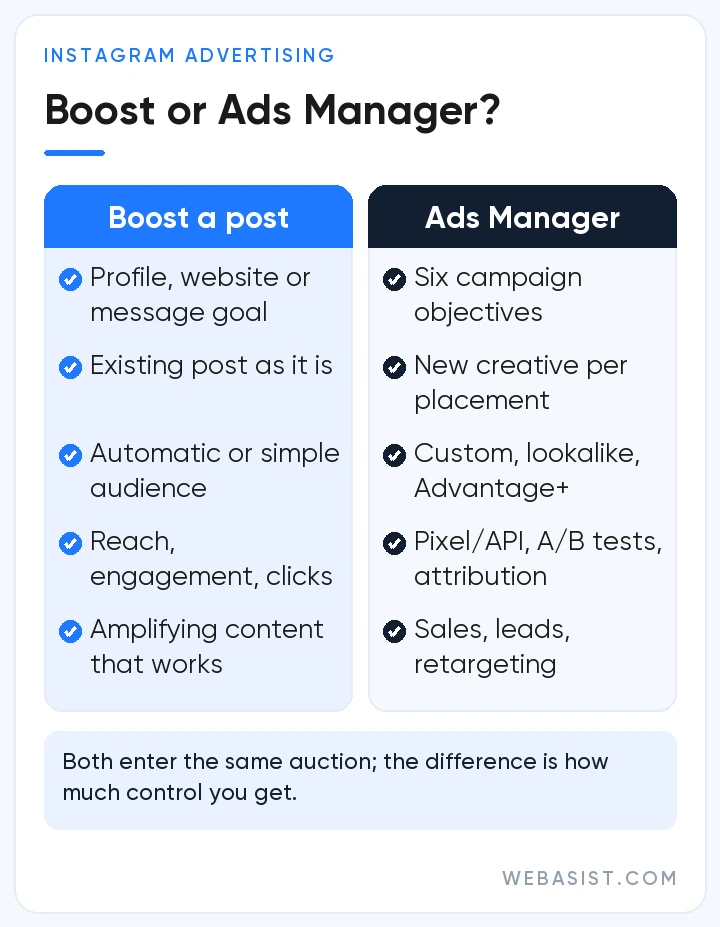
When setting the budget, account for Meta's learning threshold: an ad set that does not see about 50 results in a week never finishes learning and costs stay volatile. Our rough rule is daily budget = what you can pay per result × 50 ÷ 7. If you can pay 40 TL per message, 290 TL a day is enough; for 500 TL per purchase you need 3,570 TL a day. That is why we do not build purchase optimisation on budgets under 10,000 TL a month; we start with a message or add-to-cart event.
Two more things land on the invoice. Ads shown to users in Turkey carry a 5% location fee; it is not taken from the budget, it is billed as a separate line after the ads run, 304 TL on 6,080 TL of spend. The second is the iOS trap: if you add funds for a boost from the Instagram iPhone app, Apple charges a 30% service fee in most regions. Boost from instagram.com or from Ads Manager instead; that 30% is commission, not advertising.
Boost or Ads Manager?
Both enter the same auction; the difference is how much control you keep. A boost takes a few steps in the app: open ad tools from the professional dashboard, pick the post or Reel, choose a goal (profile visits, website visits, messages), set the audience and daily budget. Linking a Facebook Page is optional. The ad goes live once it passes review.
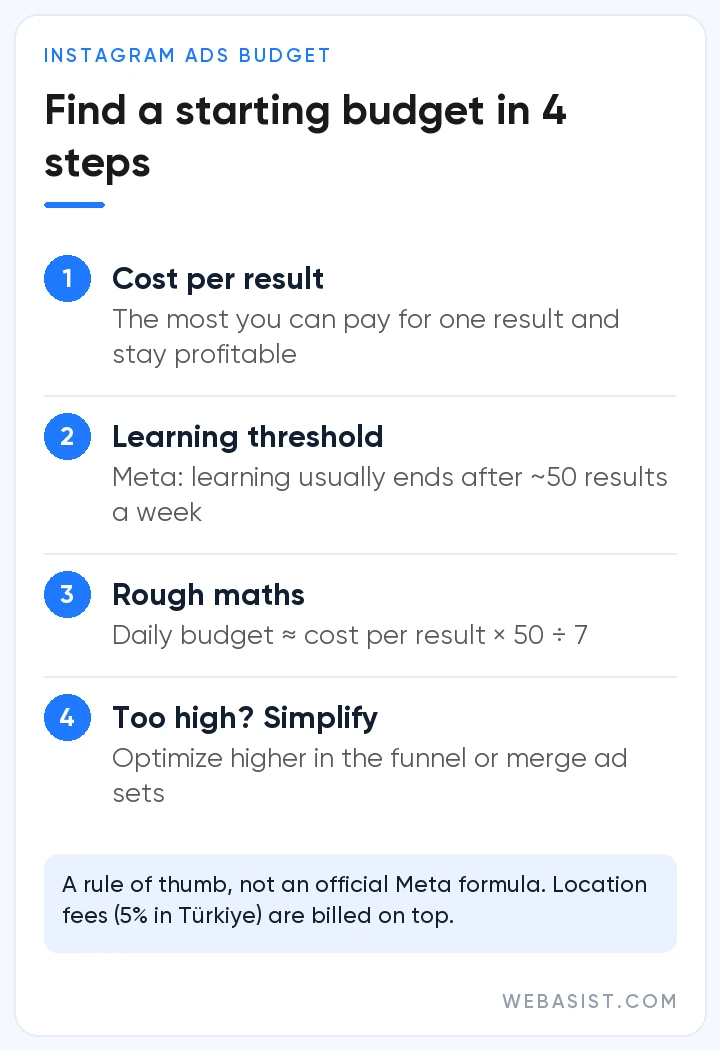
What a boost cannot do: optimise for an on-site result such as a purchase, use different creative per placement, compare two versions, retarget site visitors, measure the result with a pixel. Those five things are the whole of a sales campaign.
Our rule: boost to put 500 to 1,000 TL behind a Reel that already performed organically. Use Ads Manager for sales on the site, forms or WhatsApp enquiries. We say no to clients who want to "boost first and move to ads if it works"; without a pixel you cannot measure whether the boost worked, so you will never know what worked.
How to advertise on Instagram: four Instagram-specific settings
Campaign, objective, budget and audience are set on the same screens as Facebook. Four settings are specific to Instagram:
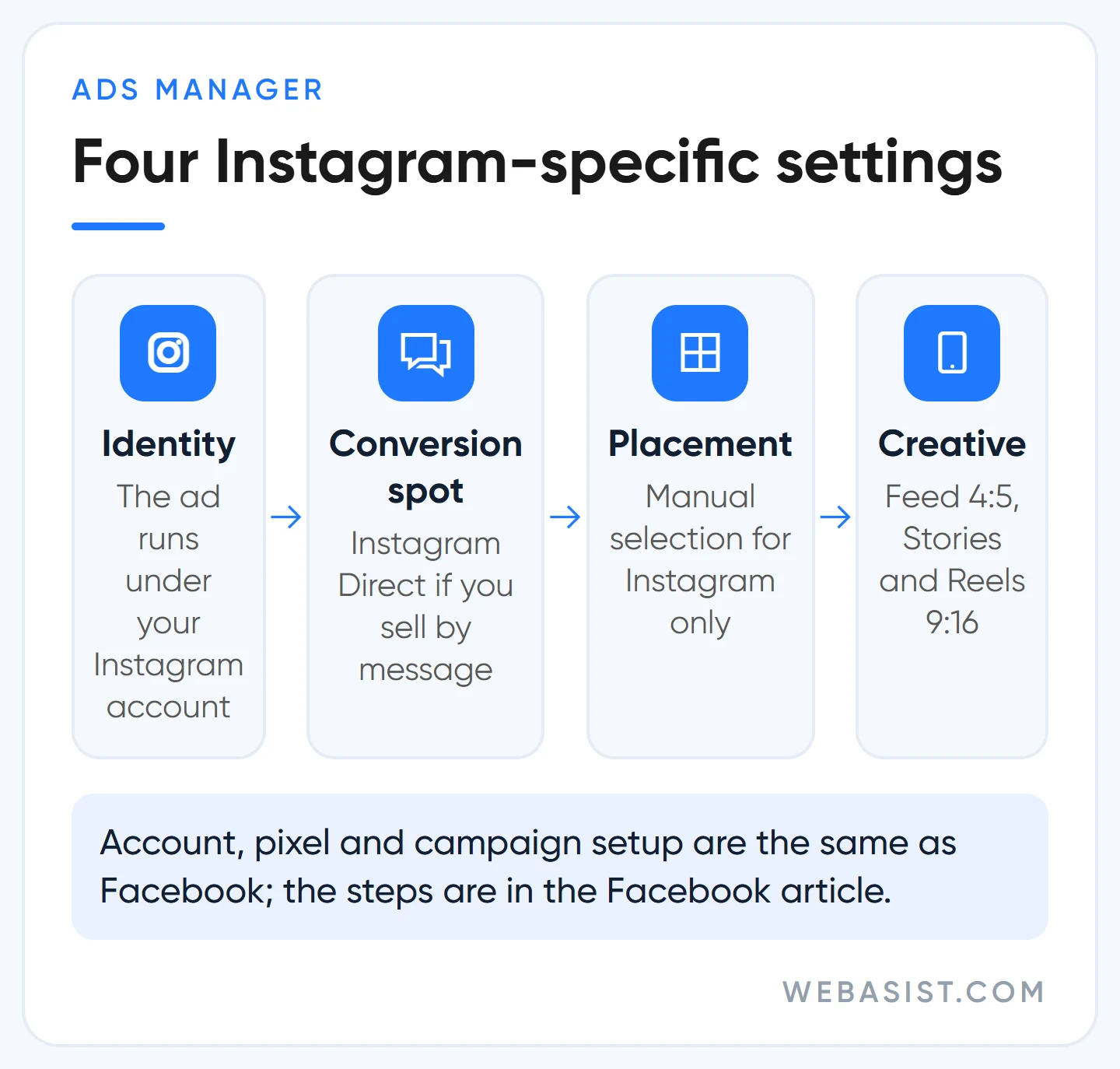
- Identity: at the ad level, select your Instagram account. The ad runs under that account's name; comments and messages land in your profile. If the account is not linked, the ad shows under the Facebook Page name and you gain no followers.
- Conversion location: for a business that sells through messages, choose Instagram Direct. Do not add Messenger and WhatsApp to the same ad set; the team answering cannot watch three inboxes at once.
- Placements: if you want Instagram only, remove Facebook and Audience Network under manual placements. The audience shrinks and cost per result may rise a little; for message quality we accept that.
- Creative: upload a 4:5 version for feed and a 9:16 version for Stories and Reels. Give one version and Meta crops it; your product ends up in the cropped part.
Before publishing, check the preview for each placement separately; in Reels the caption and button cover the bottom and the interface covers the top. Pixel, Conversions API and event deduplication work as in the Facebook article; there is no separate pixel for Instagram.
Instagram ad types: where does the ad appear on screen?
Meta's current placement list has six Instagram surfaces: feed, profile feed, Stories, Reels, Explore home and search results. The old "Instagram Explore" placement, the feed that opened after tapping a post in Explore, was removed in 2026; that traffic now comes through Reels and Explore home.
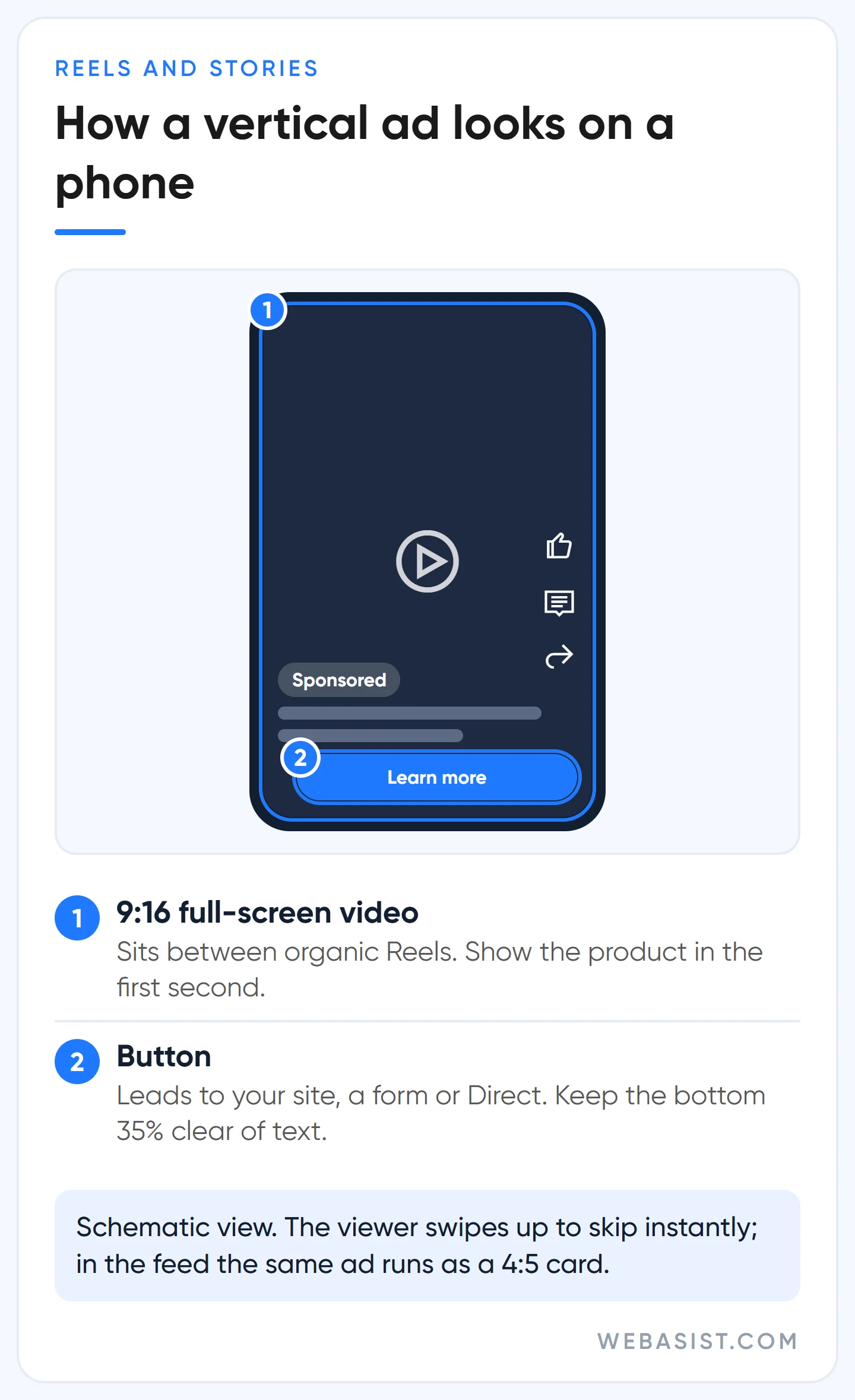
- Feed: between the accounts people follow, with the "Sponsored" label. The best surface for product detail and social proof through comments; a 4:5 image fills the screen.
- Stories: full screen, vertical, skipped with one tap. Videos under 16 seconds play through; an image stays for 5 to 16 seconds. We use it for sale announcements and retargeting.
- Reels: full screen between short videos. The viewer is there to be entertained; an ad that looks like an ad gets swiped. Licensed music is not allowed; use original audio or the Meta Sound Collection.
- Explore home and search: for reaching new audiences. An ad in search results appears to someone looking for something; it is the surface with the highest intent.
In the accounts we manage, most of the budget is spent in Reels and feed; Stories for retargeting, search and Explore as small test slices. The vertical video you shot for TikTok can be used in Reels as it is; we compared the two platforms in our TikTok advertising article.
Choosing a format: image, video, carousel, collection
Placement decides where the ad appears; format decides what it is made of. There are four formats; here is what we use each one for:
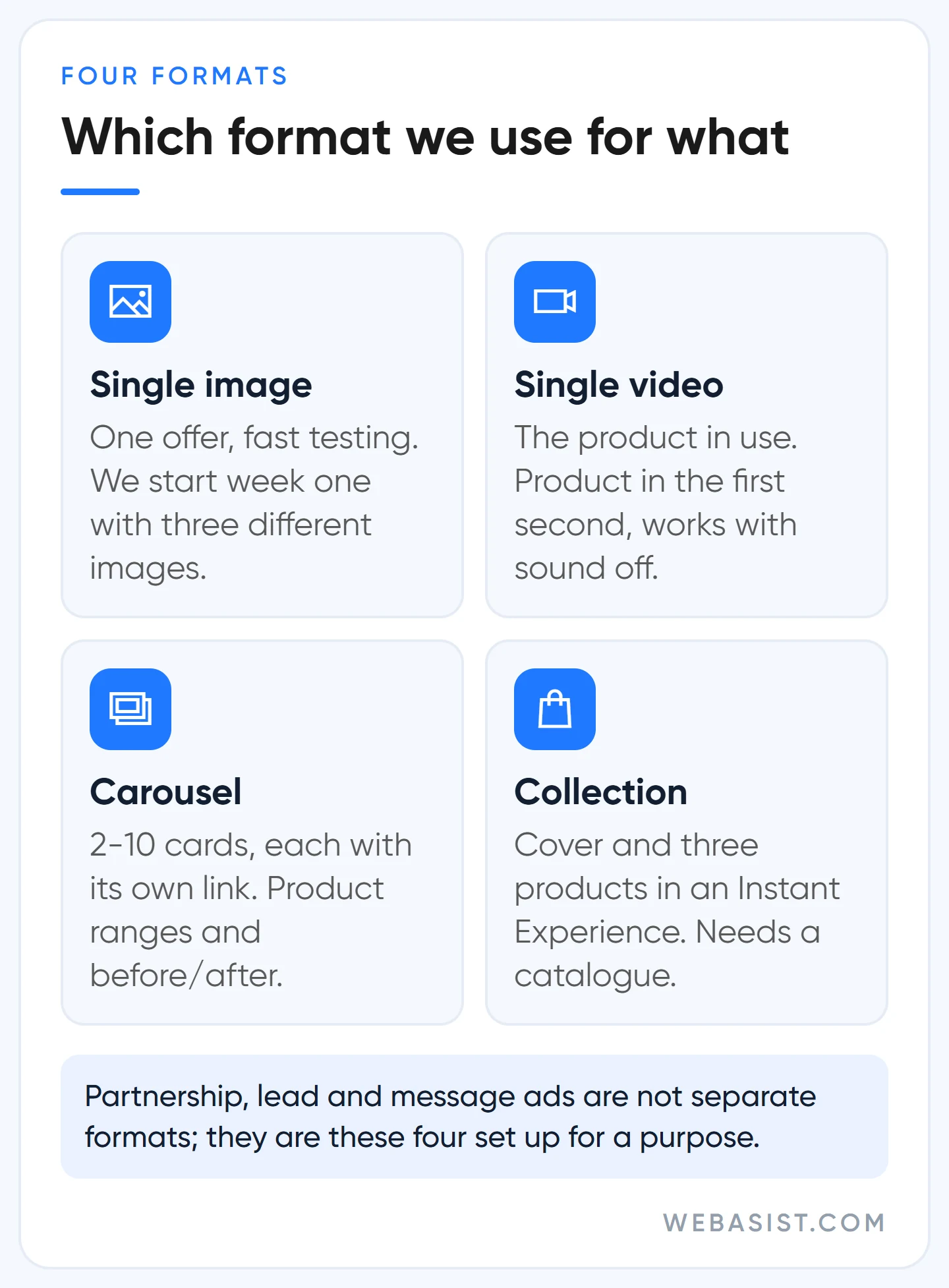
- Single image: one message, one offer. The cheapest to produce and the fastest to test; we start the first week with three different images.
- Single video: the product in use, the result of the service. Show the product in the first second, do not save the logo for the end; it should work with the sound off.
- Carousel: 2 to 10 cards, each with its own link. For product ranges and before/after. Meta may put the card most relevant to the person first while keeping the order; every card should stand on its own.
- Collection: a cover on top and three products underneath; a tap opens a full-screen Instant Experience. For online shops with a catalogue. No catalogue, forget this format.
Partnership ads (run from a creator's account with the "Paid partnership" label), lead ads with Instant Forms and message ads are not separate formats; they are these four formats set up for a specific purpose.
Instagram ad sizes for 2026
We took the sizes from Meta's ads guide; check the guide once more before a big production, the values change from time to time.
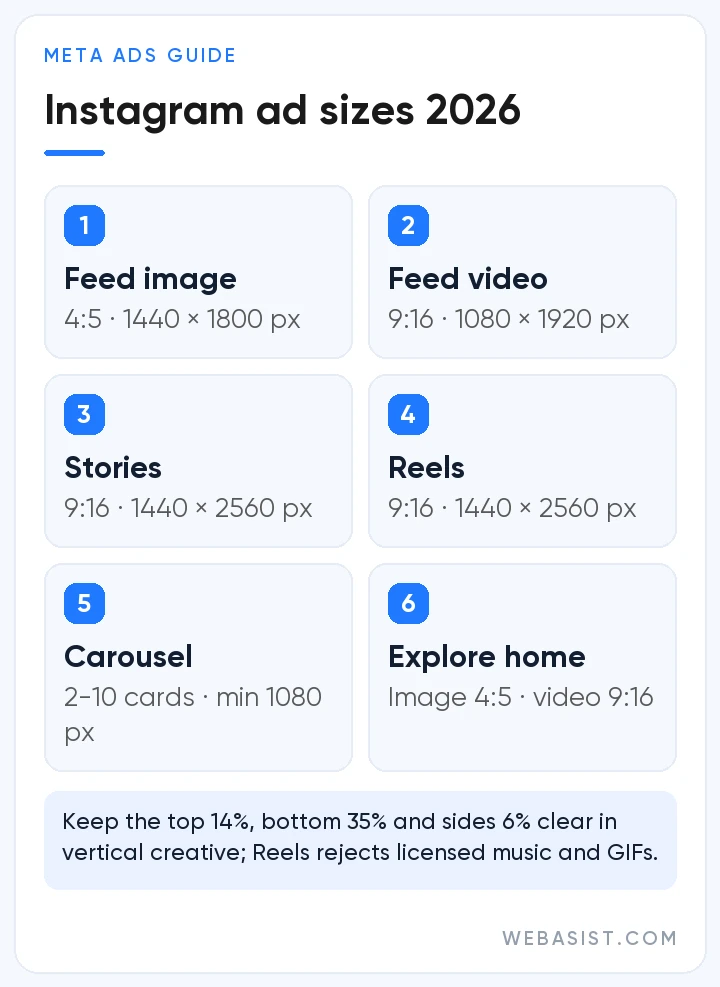
| Placement / format | Ratio | Recommended resolution | Note |
|---|---|---|---|
| Feed, single image | 4:5 | 1440 × 1800 | JPG/PNG, up to 30 MB |
| Feed, video | 9:16 | 1080 × 1920 | MP4/MOV, up to 4 GB |
| Stories and Reels | 9:16 | 1440 × 2560 | Keep top 14%, bottom 35%, sides 6% clear |
| Carousel | 4:5 images, 1:1 with video | At least 1080 × 1080 | 2 to 10 cards; video cards up to 2 minutes |
| Collection cover | 1.91:1 to 1:1 | At least 1080 × 1080 | Instant Experience required |
| Explore home | 4:5 image, 9:16 video | 1440 × 1800 / 1080 × 1920 | Feed creative is reused |
The practical rule: a 4:5 and a 9:16 version of every creative. In the vertical version keep text and logo inside the safe zone; in Reels only a short part of the primary text shows, Meta suggests 44 characters. GIFs, face effects and media with product tags are not accepted in Reels. If you need vertical video regularly, plan the shoot at 9:16 from the start; our video production team builds the shoot around the ad calendar.
What Meta recommends, and what we do instead
The five places where we clash most with Meta's recommendations on Instagram:
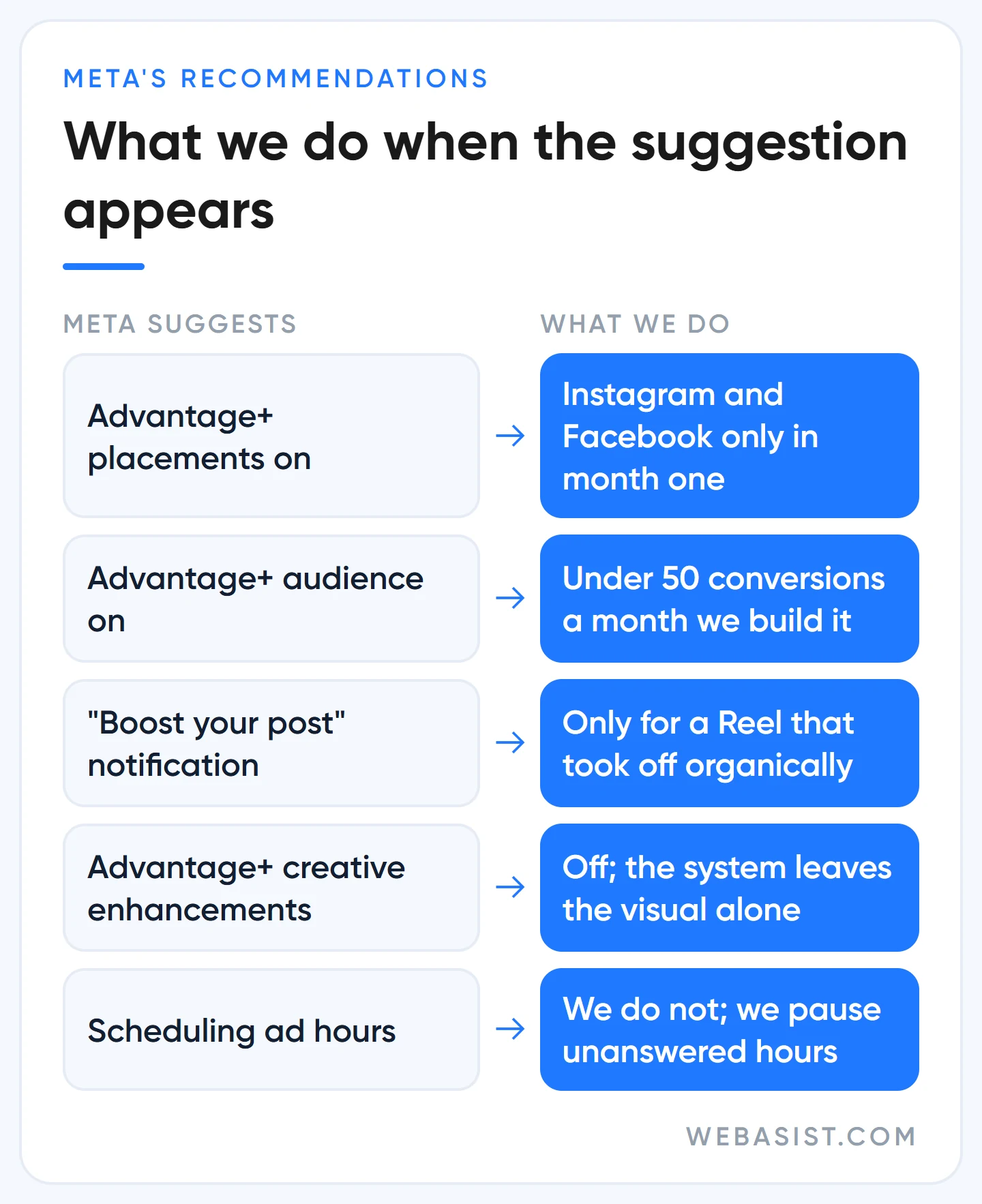
- Advantage+ placements: this is the default, and Meta says adding placements does not raise cost. Cheap impressions come from Audience Network; in a message campaign a conversation from there is often a "pressed it by accident" conversation. Instagram and Facebook only in month one.
- Advantage+ audience: your age and interest inputs become suggestions; the system goes to anyone above the minimum age limit. We leave it on in accounts whose pixel sees more than 50 conversions a month; in a new account, especially a business serving one district, we build the audience ourselves.
- Advantage+ creative enhancements: they add music, brightness and text variations to your visual; we turn them off so the system leaves the brand visual alone.
- "Boost your post" notifications: the app asks on every post. Boost because the post took off organically, not because the app asked.
- Ad hours: many people search for the best hours to advertise on Instagram. There is no hour scheduling on a daily budget at all; it is only available with a lifetime budget. We do not schedule hours either; apart from switching a message campaign off at hours when nobody can answer, playing with hours does not pay. If you want to see what competitors are running, the Meta Ad Library is open.
Who should not put money into Instagram?
- A business that cannot produce visuals. Instagram sells with images. If all you have is two product photos taken on a phone, content first, ads later.
- Emergency services. Someone looking for a plumber, a locksmith or a tow truck does not browse the feed, they search on Google; whether that budget should go to Google or Meta is covered there.
- Anyone who cannot answer messages the same day. On Instagram the enquiry comes through chat; if a morning message gets a reply in the evening, the customer has gone.
- Anyone advertising for followers. Followers are not sales; we do not set aside budget for follower campaigns.
Frequently Asked Questions
My Instagram advertising is restricted. What should I do?
The restriction may sit on your ad account or on your Instagram account; the reason is shown on the Account Quality page and the appeal is made from there. Do not open a new account and carry on; linked accounts can be restricted together. We explained the details in the restriction section of the Facebook article.
How much does a sponsored Instagram ad cost?
There is no fixed rate; the "Sponsored" label appears on every ad that comes from Ads Manager or from a boost. Your budget decides what you pay. You can start with 100 TL a day, but an ad set that does not see 50 results a week cannot learn; the maths is in the cost section above.
What do I need to advertise on Instagram?
For a boost, an Instagram profile switched to a business account and a payment method are enough. For Ads Manager you need a Meta business portfolio that your Instagram account is linked to, an ad account, a payment method and, if you send people to a website, a pixel.
What are the Instagram ad types?
By placement: feed, profile feed, Stories, Reels, Explore home and search results. By format: single image, video, carousel and collection. Partnership, lead and message ads are these formats set up for a purpose.
Conclusion
On Instagram your budget sets the cost of advertising; your creative and how fast you answer messages set the profit. If you want sales, do not waste time on boosts; build a pixel-tracked campaign in Ads Manager and prepare every creative in two sizes.
Send us the link to your best Reel and your monthly budget; we will tell you whether that video is fit for an ad and which objective to build it on. If you want to hand over management, our Instagram ad management service and social media ad packages are ready.