

What Are Google Search Ads? How Sponsored Results Work
Google search ads are the text ads you see above and below the results when you search on Google, marked "Sponsored". The advertiser tells Google which searches to show up for by choosing keywords, a short auction runs on every search, and money only leaves the account when someone clicks. This is what people mean by a "sponsored result" or a "paid listing" on Google.
For local service businesses and B2B companies, the first campaign we open is almost always a Search campaign, because on the other side is someone who has just typed their need into Google. But a search campaign does not become profitable on its own. A few settings that come switched on in a new campaign move your money to searches and sites you never picked. Below we explain the mechanics first, then those settings, and then who should not run search ads at all.
What does a sponsored result mean? Where search ads appear
Search "kadıköy boiler repair" on Google and the first few results sit under a single "Sponsored results" label. Those are search ads. Since October 2025, text ads are grouped under this one label, the label stays visible as you scroll, and a group never holds more than four text ads. Users can collapse the whole group with one click and look only at the organic results.
The same page has other paid spots. Product cards with prices and images are Shopping ads; the business list under the map is mostly free Business Profile listings. Organic results cannot be bought: advertising neither lifts nor lowers your organic ranking. We cover when we run both together in our Google Ads vs SEO article.
There is ad space at the bottom of the page too. The top group takes most of the clicks, and fewer people see the bottom ads. In a new account we do not join a bidding war just to sit at the very top. We first look at which position actually brings customers, and put the money there.
What is a search ad made of?
A search ad is a small box, but it holds five parts that each do a different job. Every search ad created today is a responsive search ad: you write between 3 and 15 headlines (up to 30 characters each) and between 2 and 4 descriptions (up to 90 characters each). On each search Google picks and shows up to three headlines and two descriptions.
- Business name and logo: Tells people who the ad is from. For new or unknown brands we always fill this in; "who is this?" kills clicks.
- Display URL: Your domain plus two optional short paths (up to 15 characters each). A path like "example.com/boiler/kadikoy" shows the searcher where they will land.
- Headlines: The part people actually read. One headline that repeats the search, one concrete offer and one reason to trust you is our minimum. We would rather write ten genuinely different headlines than fill all fifteen slots with variations.
- Description: What sets you apart: price range, response time, warranty, opening hours.
- Assets (formerly ad extensions): Sitelinks, call, location and callout text. They make the ad bigger and count toward Ad Rank. For local businesses the call asset is often the part that works hardest.
We give headline formulas and pinning decisions with examples in our ad copy guide. One warning here: the "Ad strength" meter in the account is a writing score, not a sales score. Do not add irrelevant headlines just to see "Excellent".
How does the auction work? Does the highest bidder win?
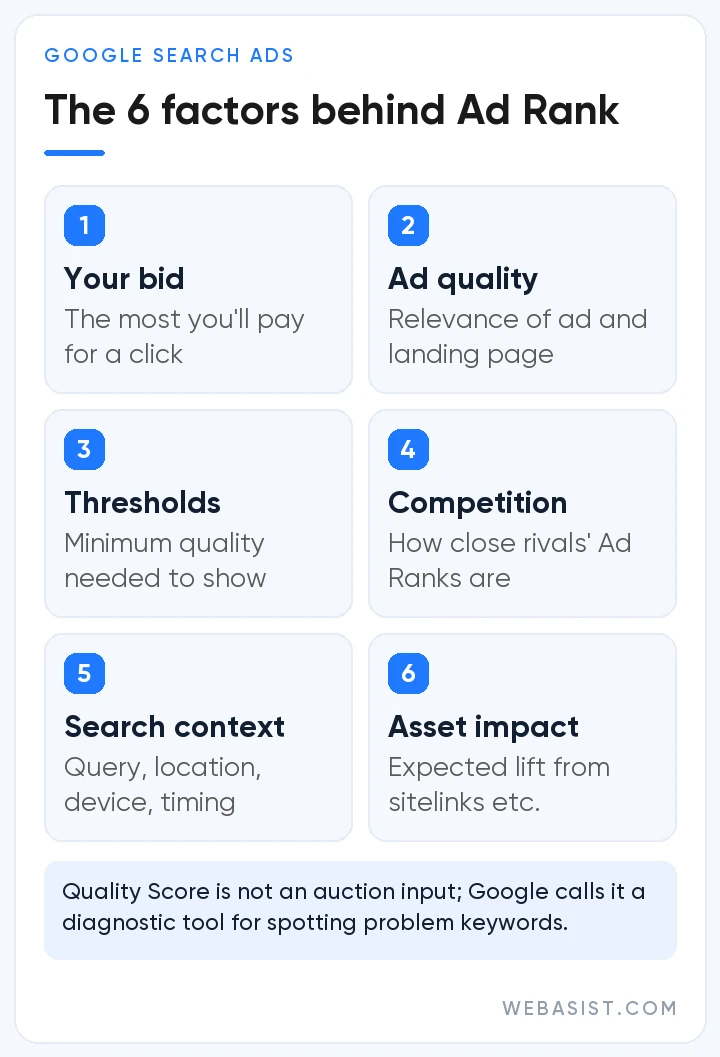
No, the bid alone does not decide the order. On each search Google first picks the ads that can enter the auction, then calculates an Ad Rank for each one. That value combines your bid, how well your ad and landing page fit that search, the context of the search (location, device, time) and the expected impact of your assets. There is also a quality threshold: an ad that misses it will not show, even with no competitor at all.
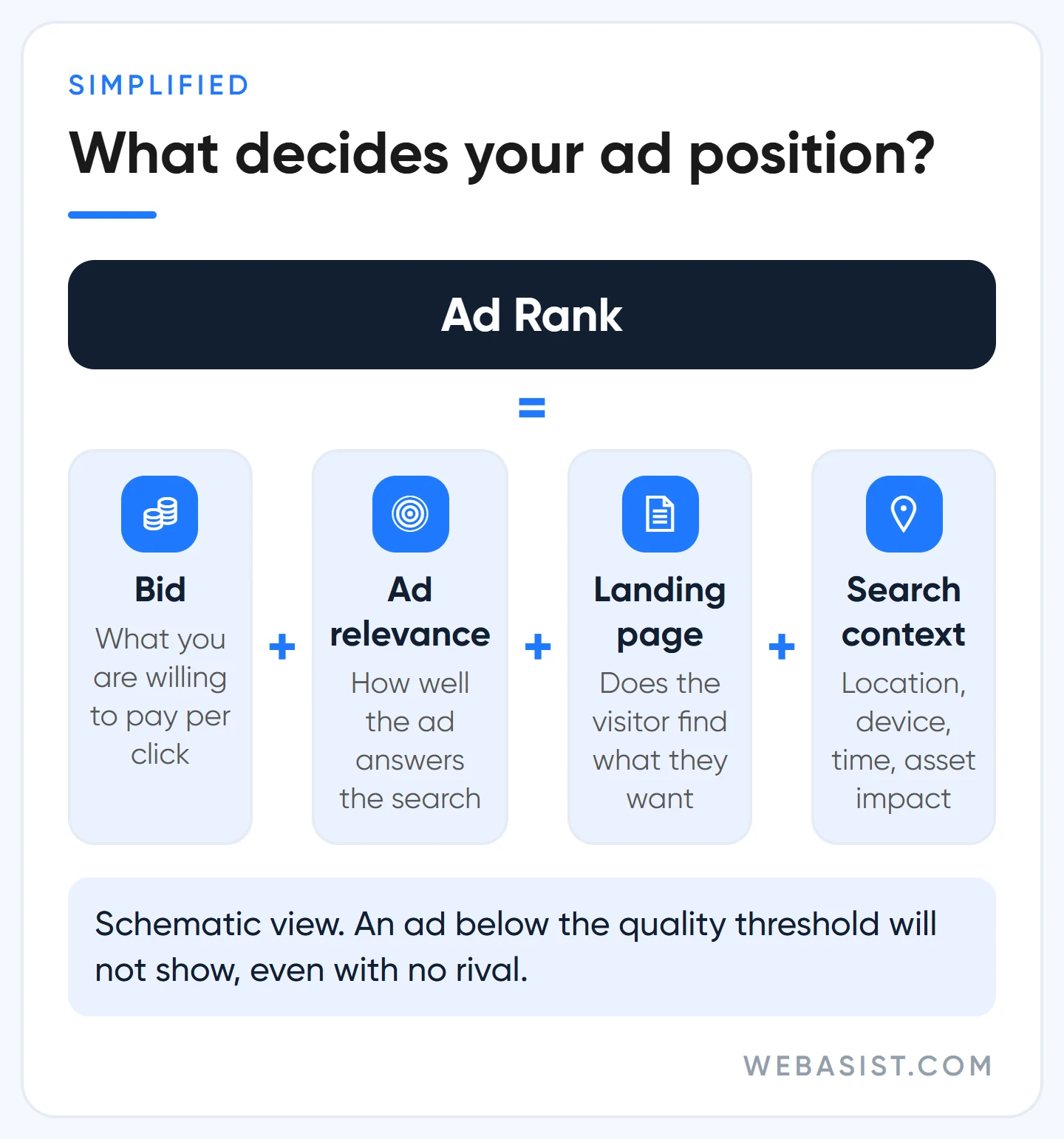
What you pay is not your bid either. You pay just enough to beat the ad directly below you and clear the threshold.
Example scenario: two boiler repair firms bid 40 TL on the same keyword. One ad says "Same-day service in Kadıköy" and lands on a Kadıköy page; the other runs a generic "Technical service" ad that goes to the home page. The first one shows higher and usually pays less per click.
That is why, when a business comes to us saying "our clicks are too expensive", our first move is not to raise bids but to tighten ad groups and send each topic to its own page. We explain how Google scores quality in our Quality Score article, and how much a click costs in lira and how to work out your own maximum in our Google Ads pricing article.
Our rule on bids is simple: we do not touch them in the first two weeks of a new campaign. First we see which searches the ad shows for, which page it sends people to and whether the phone rings. Raising bids before that just makes something you have not measured more expensive.
Which searches trigger your ad? Your keyword is not the search
Your ad is triggered by the search term the user types, not by the keyword you entered. A keyword is a set of directions you give Google, and Google matches by meaning, not word for word. "boiler repair" in broad match can show for "how to reset a boiler". Phrase match ("boiler repair") keeps the meaning, and exact match [boiler repair] limits the ad to searches with the same intent.
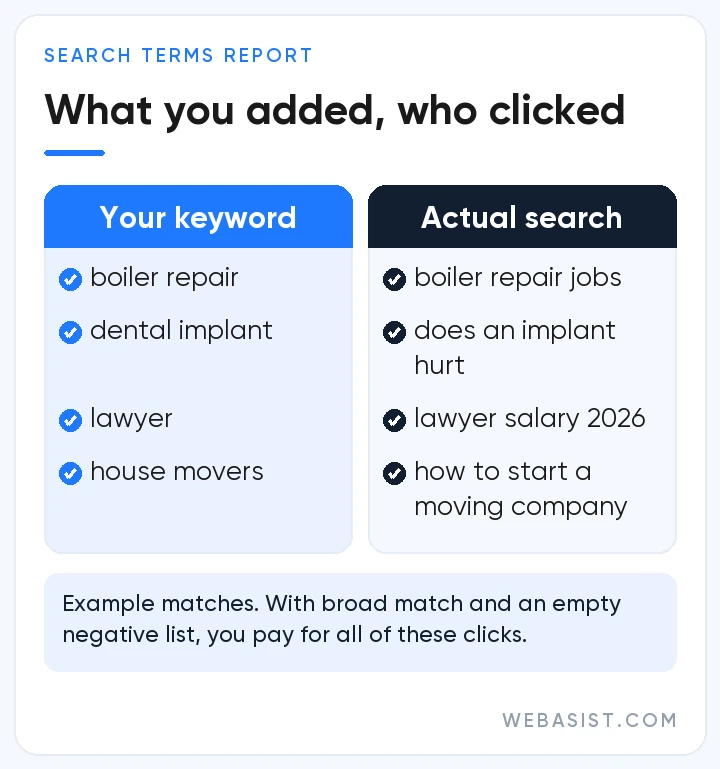
This is where we see the most money lost in the accounts we take over: the campaign is live, keywords are on broad match, and nobody has opened the search terms report in months. When we open it, we find job ads, spare parts, user manuals, even searches for a competitor's name. Those clicks are not fake; real people are behind them. They are just not your customers.
Turkish adds one more trap. Negative keywords do not expand to close variants, so blocking "ilan" (listing) may not block searches containing "ilanı" or "ilanları". Suffixed forms need to be added separately, and in a language built on suffixes that list gets long.
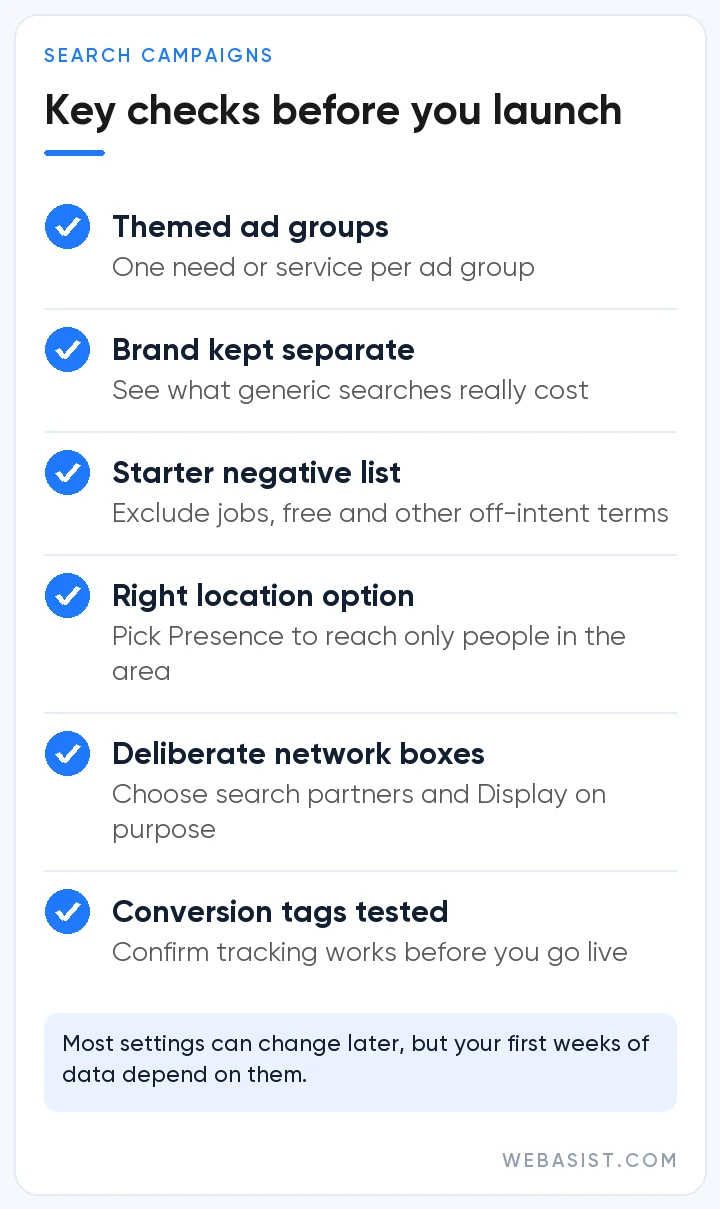
Our routine: in the first two weeks of a new campaign we open the search terms report every day and add irrelevant terms as negatives the day we see them. After that we check it weekly. It is dull work that cannot be handed to automation, and it is where most of the money in a search account is protected. We show how we build it step by step in our negative keywords guide.
Google recommends it, but: where a search budget leaks
When you open a new Search campaign, some doors come open. Each one is presented as "more reach", and reach does go up. But every bit of extra reach costs money, and you should see who benefits before you pay for it.
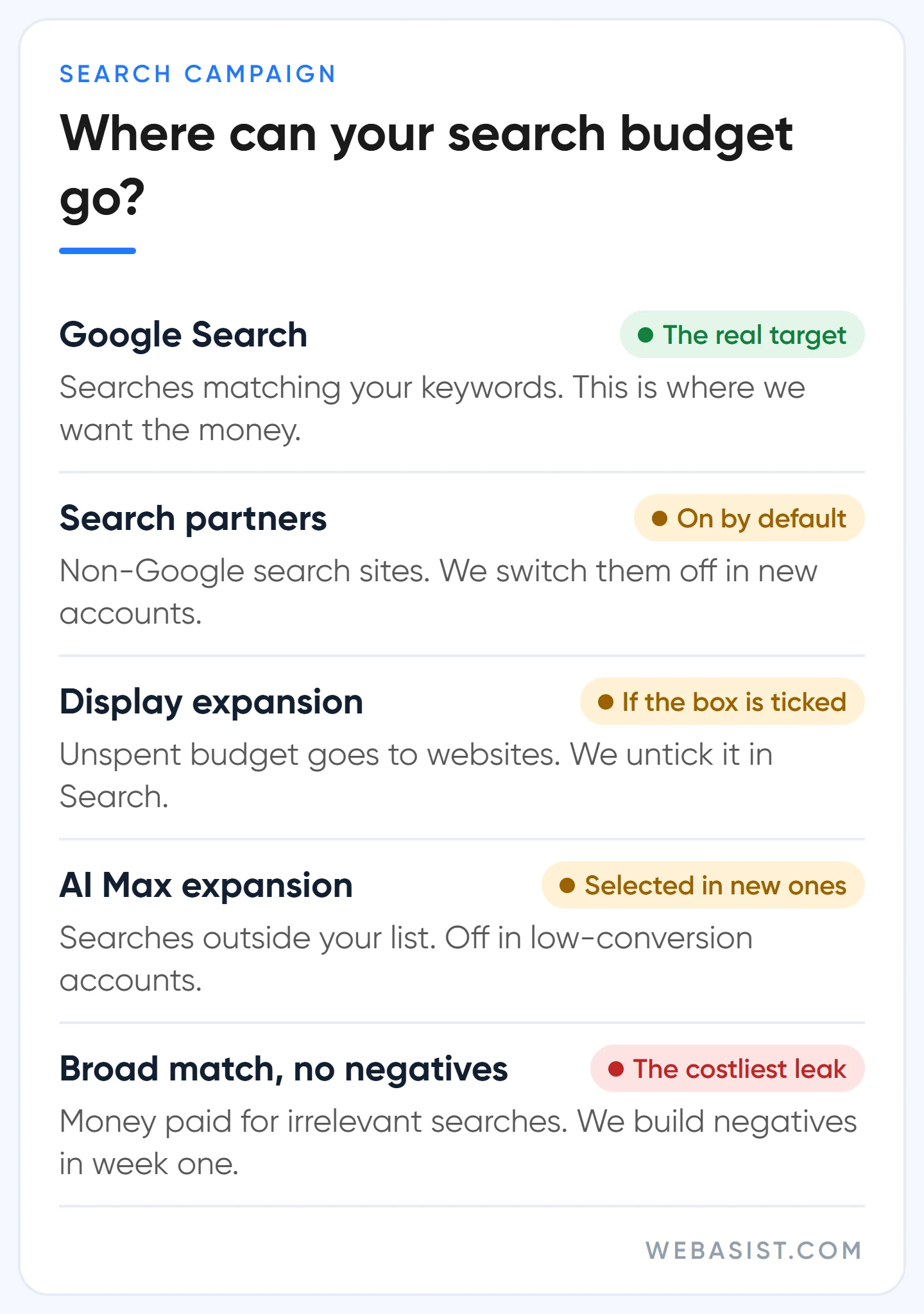
- Search partners: Your ad also shows on non-Google search sites and in YouTube search results. This option is included by default when you create the campaign, and Google's own help page says clicks from these sites may not always be highly targeted. We switch it off in a new account; once data builds up we measure it separately by network and turn it back on only if it works.
- Display Network expansion: If this box is ticked, unspent search budget can go to image ads on websites. We untick it in Search campaigns; if we want display ads, we open a separate campaign so the reports do not mix.
- AI Max: Selected by default in new Search campaigns. It reaches searches outside your keyword list, rewrites your headlines with text generated from your site, and can send users to a different page. We test it in accounts with solid conversion tracking and an unconstrained budget; in a small account with a handful of conversions a month, we switch it off.
- The broad match recommendation: The Recommendations tab asks you to switch keywords to broad match. Smart Bidding can only steer that expansion with steady conversion data; without it, broad match is money paid for irrelevant searches.
None of this is bad faith. Google sells ad space and sets its defaults to grow reach. But you pay the bill. We show where each of these boxes sits on the setup screen, in order, in our guide to creating a Google Ads search campaign; AI Max is covered in detail in our AI ad optimization article.
Who should use search ads, and who should not?
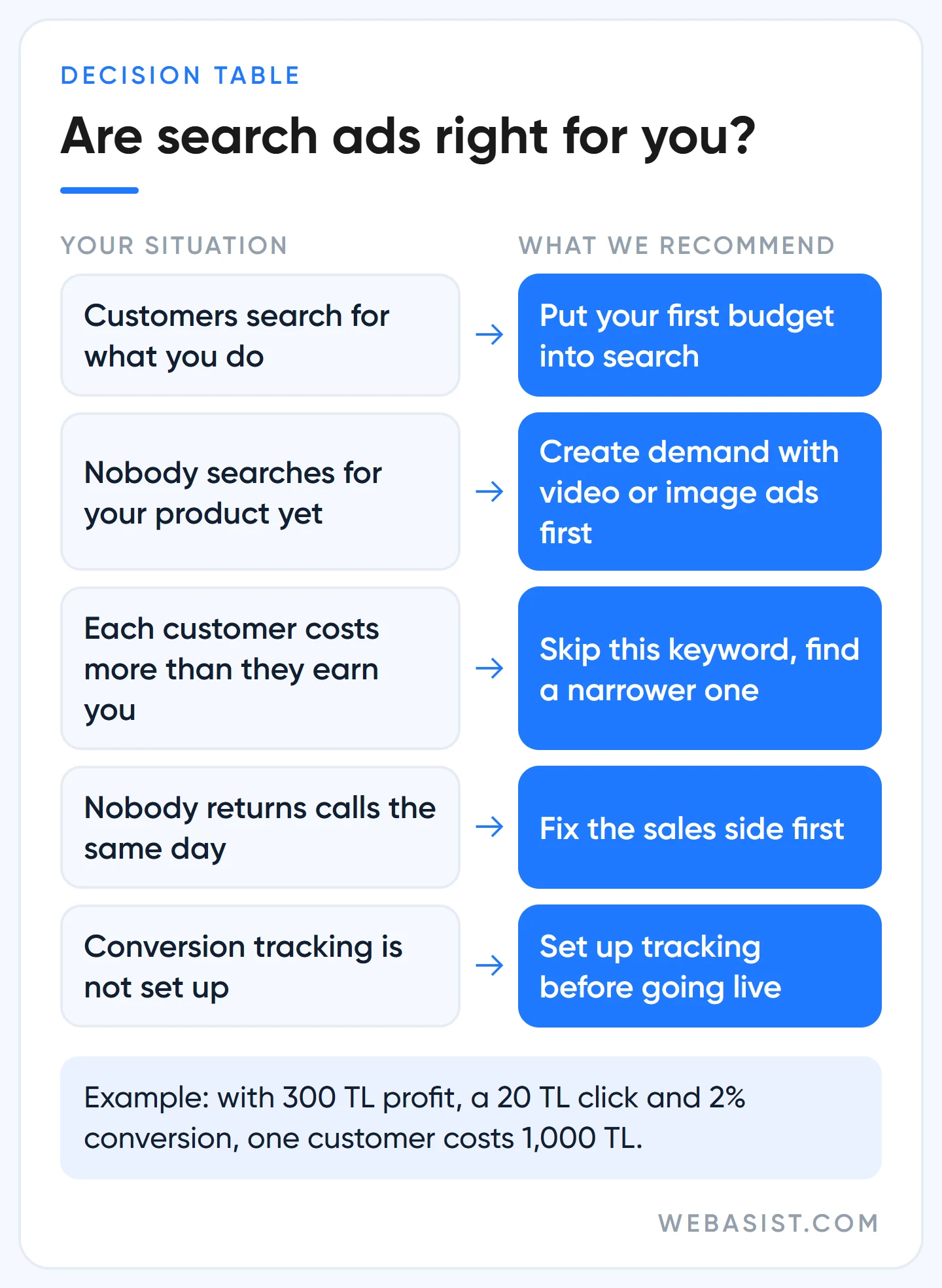
Short answer: search ads work if your customers type their need into Google. Boiler repair, locksmiths, lawyers, dental clinics, movers, spare parts sellers, a B2B machinery maker; in each case someone searches for exactly what you do every day. For these businesses we put the first budget into search.
B2B is a little different. For a firm making machinery, packaging or industrial parts, search volume is low, but a single enquiry can turn into an order that runs for months. There we look at the quality of incoming quote requests, not the click count; a few right enquiries a month pay for the whole budget.
The cases where it does not work are just as clear:
- Nobody searches for your product. Search ads catch existing demand; they do not create it. For a new category or an unknown brand, the video and image campaigns in our campaign types article are a better start.
- Your margin cannot carry the click. Worked example: a product leaves you 300 TL profit, a click costs 20 TL and 2 in 100 visitors buy. One customer costs 50 clicks, or 1,000 TL, so you lose 700 TL on every sale.
- Nobody answers the phone. Search customers are often in a hurry; the person you call back tomorrow has already called your competitor.
- Tracking is not set up. Every lira spent without knowing which search brought a customer is a guess. Set up conversion tracking first, then go live.
If you are just starting to advertise on Google, we cover whether it works for you, where to start and how monthly budgets work in our guide to advertising on Google.
Frequently Asked Questions
How do I turn off sponsored results on Google?
As a searcher you can collapse the sponsored group with one click; there is no setting that removes ads entirely. As an advertiser you pause your campaign and spending stops right away. Closing the account and getting a remaining prepaid balance back is a separate process, covered in our cancellation and refund article.
What are Dynamic Search Ads, and are they still used?
Dynamic Search Ads match on your website content instead of keywords, and Google writes the headline. Google is moving them into AI Max, and automatic upgrades of campaigns using dynamic ads begin in February 2027. We do not start new accounts with dynamic ads.
How do I get to the top of Google?
In ads, bid and quality together decide the top position; a low-quality ad may not reach the top even with a high bid. In organic results the first spot cannot be bought, it is earned through SEO. Be wary of anyone selling a "guaranteed first position".
How much do search ads cost?
There is no fixed price. Each click is priced by the competition on that keyword, and the daily budget you set caps your monthly spend. We show how to find the click price for a keyword and give sample budgets in lira in the pricing article linked above.
Conclusion
Search ads are the most direct way to reach a customer who has typed their need into Google. But a campaign left on default settings pays for that customer on the same invoice as irrelevant traffic. Look at the search terms before you touch the bids.
If your account is already running, give us read-only access and we will open your last 30 days of search terms together and show how much of the spend actually reached customers. That review is free; if you want us to build the campaign, see how our search ads service works.