


Facebook Advertising in 2026: How It Works and What It Costs in Turkey
Advertising on Facebook runs through Meta Ads Manager and has no fixed price. You set a daily budget; a business that enters 300 TL a day spends at most 2,100 TL a week and roughly 9,100 TL a month. Ads shown to people in Turkey carry a 5% location fee on top of the budget.
In our view the real question is not "how much" but "with which objective and which measurement". What burns money on Facebook is not the click price; it is running an engagement campaign when you want sales, and advertising without a pixel. Below we walk through the six decisions of a setup, a budget calculation in lira, and the Meta defaults we switch off on day one. Instagram-specific decisions are in a separate piece: our Instagram advertising guide.
How much does Facebook advertising cost? Where to start in lira
You pay Meta no flat fee and no subscription. Ads are sold in an auction; you compete with other advertisers who want the same people and you pay per impression, click or result. The technical minimum is tiny. What limits you is not Meta's floor but whether the campaign collects enough data to learn.
What leaves your card at month end has three parts: the ad budget, a 5% location fee on ads shown in Turkey, and a management fee if you use an agency. The location fee is not deducted from your budget; it is added as a separate line on the invoice and does not appear in Ads Manager reports. A business that sees 9,120 TL in the panel sees 9,576 TL on the statement. Ask your accountant once about the tax side.
| Item | How much? (example) |
|---|---|
| Ad budget | 300 TL a day means at most 9,120 TL a month |
| Location fee (5%) | 456 TL on 9,120 TL; a separate invoice line, not taken from the budget |
| Management fee | Added separately if you work with an agency; not part of the ad budget |
A daily budget is an average. On a day Meta sees opportunity it can spend up to 75% more; with a 300 TL budget you may see 525 TL on one day. But the weekly total from Sunday to Saturday never exceeds 7 times the daily amount, 2,100 TL here. Owners who do not know this call us in week one saying "it went over my budget". It did not; it spread it.
Meta's learning threshold decides how much you need to start with: an ad set that does not see about 50 results in the week after its last significant edit stays "Learning limited". Our rough rule: daily budget equals the amount you can pay for one result × 50 ÷ 7. If you can pay 100 TL per lead, you need about 715 TL a day, roughly 21,700 TL a month. For an online shop that can pay 400 TL per purchase the figure climbs to 2,860 TL a day.
Our verdict: if your monthly budget is under 10,000 TL, do not start with purchase optimisation; the system cannot learn and you will conclude that "Facebook does not work". At that budget either optimise for a cheaper result such as messages or leads, or concentrate everything in one ad set and one district. If you are torn between Google and Meta, we gave a verdict in Google Ads vs Meta ads.
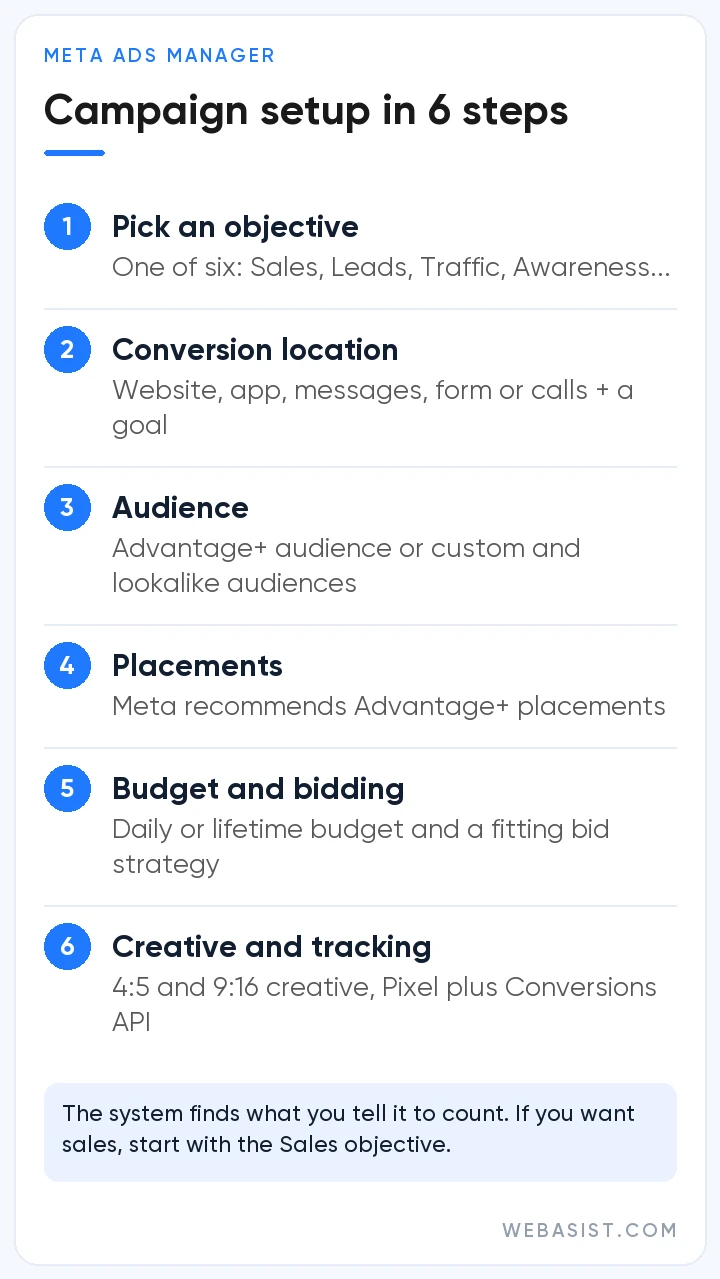
How to advertise on Facebook: six decisions
Ads Manager has many screens and few decisions. Make six of them in the right order; the rest is buttons.
- Infrastructure: a Facebook Page, a Meta business portfolio (formerly Business Manager) and an ad account created inside that portfolio. Choose the currency and time zone carefully when you open the ad account; neither can be changed later, you would need a new account. Keep the account in your own portfolio; an agency is added as a person with access, not as the owner.
- Objective: one of six. Which one we pick for which business is below.
- Conversion location and performance goal: in the ad set you tell Meta where the result happens (website, Instant Form, messages, calls) and what to count. The system finds whatever it counts; if purchases are not counted, it will not find purchases.
- Audience: location, age and, if you have them, custom audiences: site visitors, customer lists, people who engaged with your Page. Do not pile up interests in a new account; two or three clear signals are enough.
- Placements: where the ad appears across Facebook, Instagram, Messenger, WhatsApp, Threads and Audience Network.
- Budget and creative: a daily budget; a 4:5 image or video for feed and 9:16 for Stories and Reels; a clear offer and a button.
After you submit, review usually finishes within a day. Changing the audience, the creative or the optimisation event restarts review; changing budget, bid or schedule does not. That is why, in the first week, adjusting budget without touching the creative causes fewer interruptions.
Which of the six campaign objectives should you choose?
Ads Manager groups objectives under six headings: Awareness, Traffic, Engagement, Leads, App promotion and Sales. No setting rescues a campaign built on the wrong objective. The mistake we see most in accounts we take over is choosing Engagement while wanting sales, and collecting likes. Likes are cheap because the person who likes is not the person who buys.
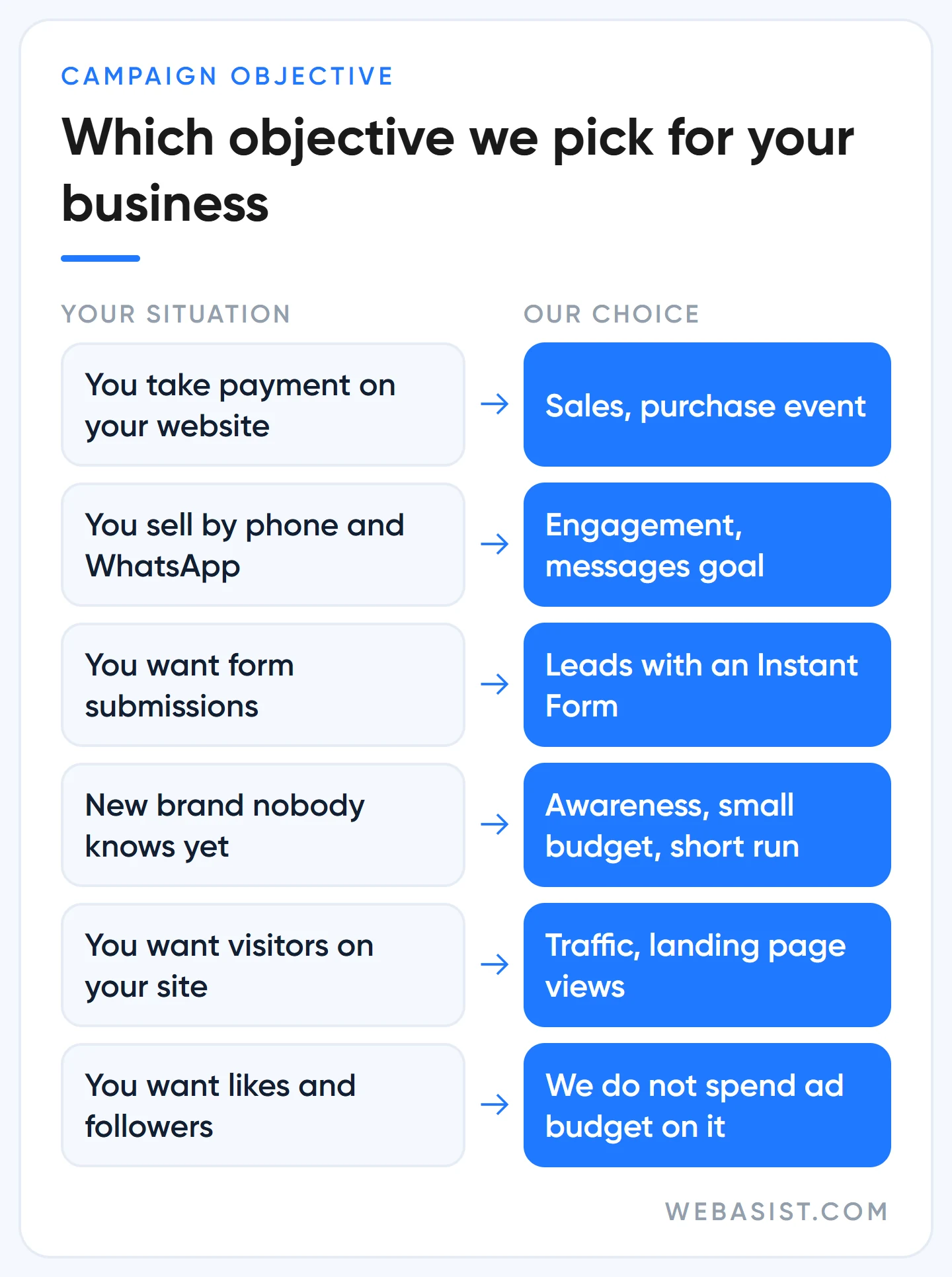
- You take payment on your website: Sales, conversion location website, event purchase. If the pixel does not see 50 purchases a month, move the event up to add-to-cart or initiate checkout.
- You sell over the phone and WhatsApp: Engagement with a messages goal, or Leads through messaging apps. For boiler repair, dental clinics and removals this is where we start.
- You want form submissions: Leads with an Instant Form. Keep the form short; a lead that is not called the same day goes to waste.
- New brand, new product: Awareness with reach and video views. Do not expect sales here; a small slice of the budget, for a short period.
- Visitors to your site: Traffic, but with the landing page views goal, not link clicks. Do not pay for people who click and leave before the page loads.
We do not set aside ad budget for followers and likes. When a client asks for followers we first ask "what do followers sell you"; if there is no answer we do not open the campaign.
Where the ad appears: feed, Stories and Reels
On Facebook, ads run in the feed, in Stories, in Reels, on Marketplace, in search results and in the right column on desktop. The same campaign can also extend to the Instagram feed, Stories and Reels, Messenger, WhatsApp Status, Threads and third-party apps in Audience Network. For small and mid-sized businesses most of the money is spent in two places: feed and Reels.
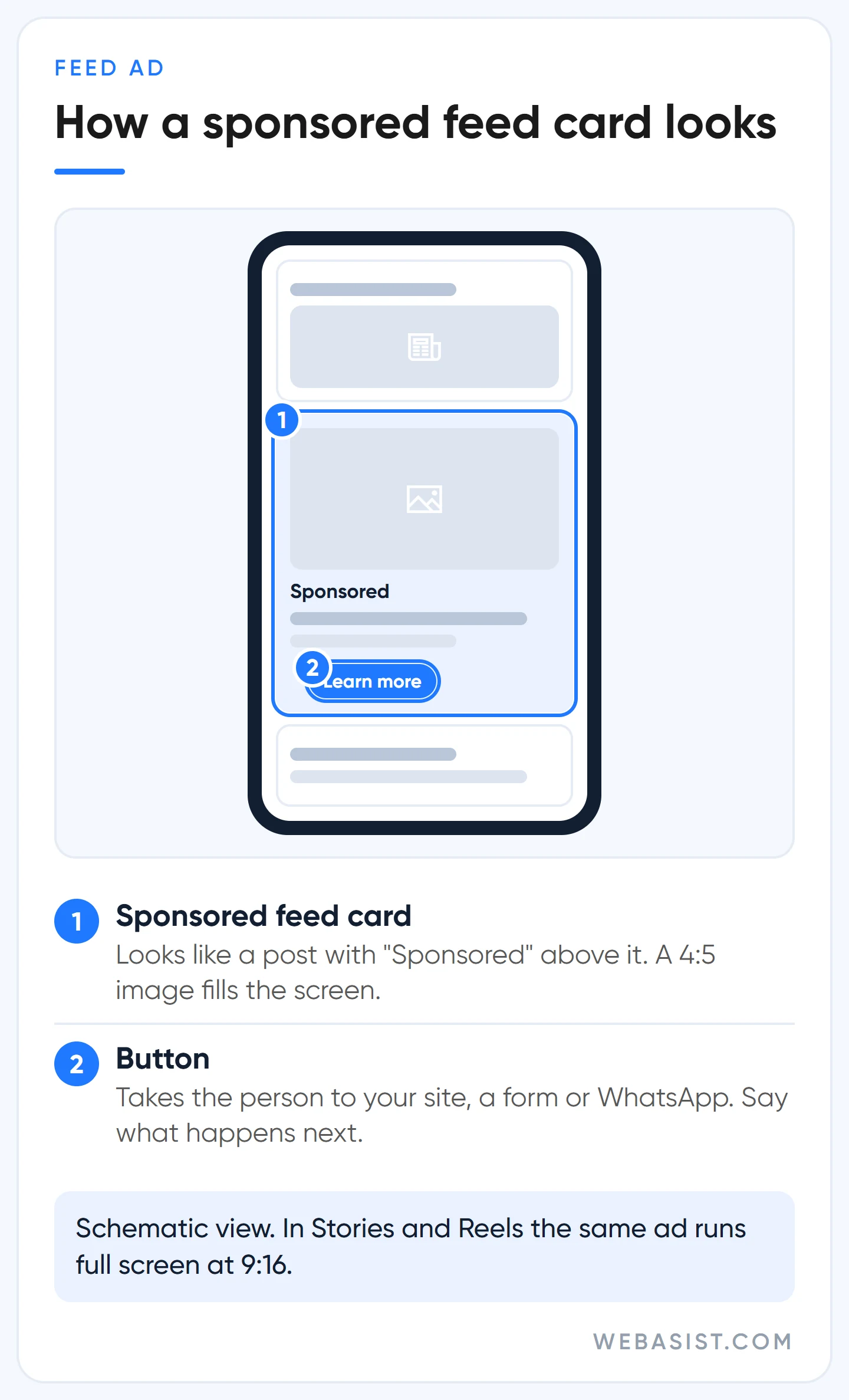
A feed card looks like an ordinary post with "Sponsored" above it; a 4:5 vertical image fills the phone screen, a landscape image stays small. Reels and Stories are full-screen 9:16 and the viewer leaves with one swipe; a video that does not show the product or the problem in the first second dies here. So we prepare every creative in two ratios, 4:5 and 9:16. A client who arrives with a single landscape image gets design work first and the ad later. We gathered the sizes and safe zones in the size table in our Instagram article.
What Meta recommends, and what we do instead
Meta sells ad space; the panel's defaults and its "recommendations" card are built for more impressions and more spend. In accounts we take over, these are the five places we check on day one:
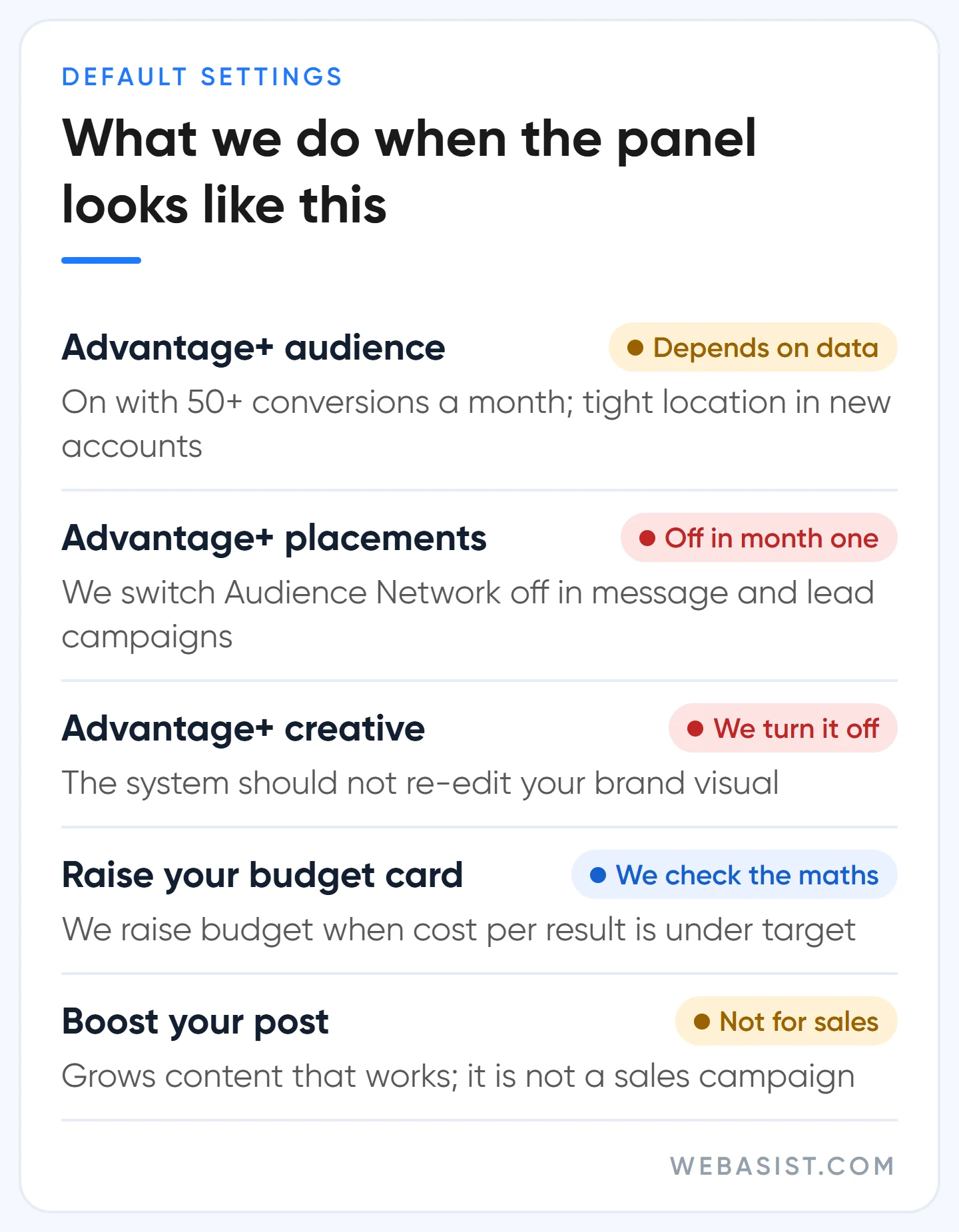
- Advantage+ audience: on by default in a new ad set. The age and interests you enter are suggestions, not limits; if the system expects better results it goes outside them. Location, minimum age, language and excluded custom audiences remain hard limits. In an account with more than 50 conversions a month we allow it; in a new account or a narrow service area we start with interests and custom audiences and keep location tight.
- Advantage+ placements: Meta recommends them and says adding placements does not raise your cost. True, impressions get cheaper. But a click from a game app in Audience Network and a click from the Instagram feed are not the same customer. In message and lead campaigns we switch Audience Network off for the first month, check lead quality, then decide.
- Advantage+ creative enhancements: they add music, brightness and text variations to your visual. If you do not want the system re-editing your brand visual, turn them off; we do.
- "Recommended budget" and "raise your budget" cards: the card measures your spend, not your profit. We raise budget when cost per result is under target, not because the card says so.
- The "boost your post" notification: it arrives for every post on your Page. Boosting is for growing content that already works, not for sales; we explained the difference in the boost or ad section.
We discussed the limits of AI tools more broadly in AI in ad optimisation. The short version: automation feeds on data; in an account without data, automation is guesswork and you pay for the guess.
Do not advertise without the Pixel and the Conversions API
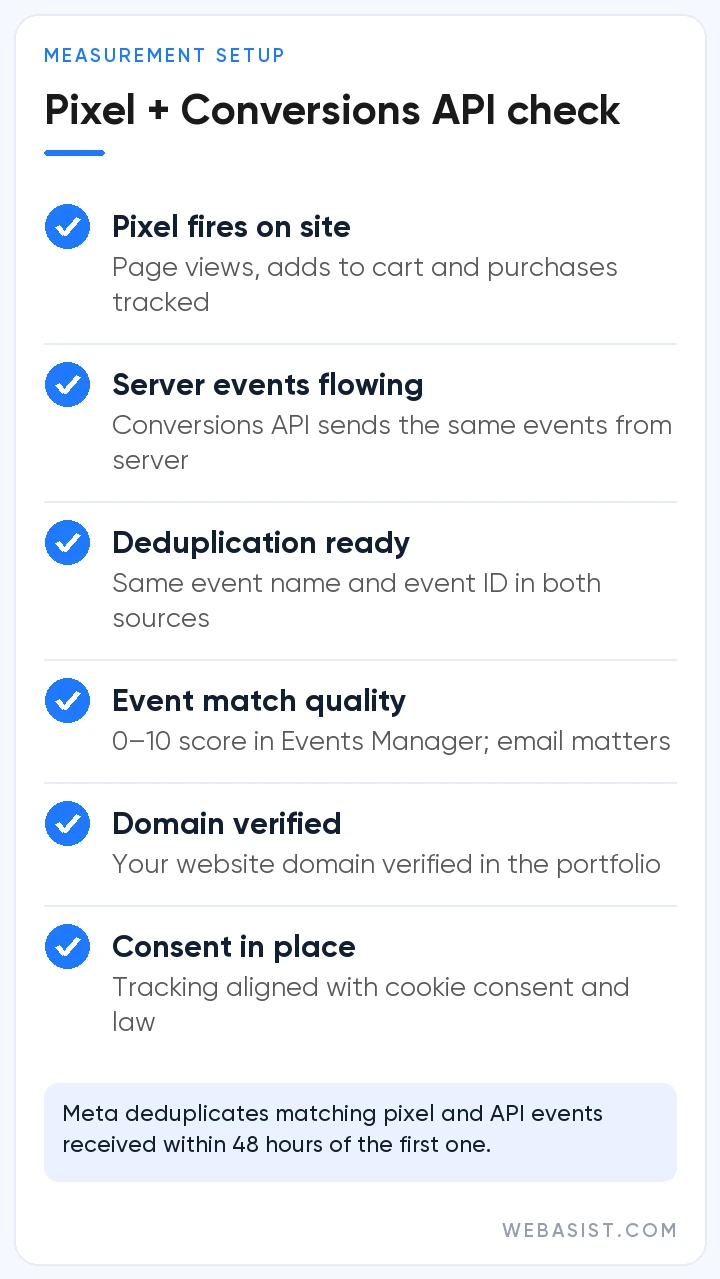
If you want sales or leads on your website, Meta has to see the result. The Meta Pixel sends events from the browser, the Conversions API from your server; ad blockers and browser restrictions mean the pixel alone misses some events. The two work together. So the same purchase is not counted twice, both sides send the same event name and event ID; Meta deduplicates matching events within 48 hours.
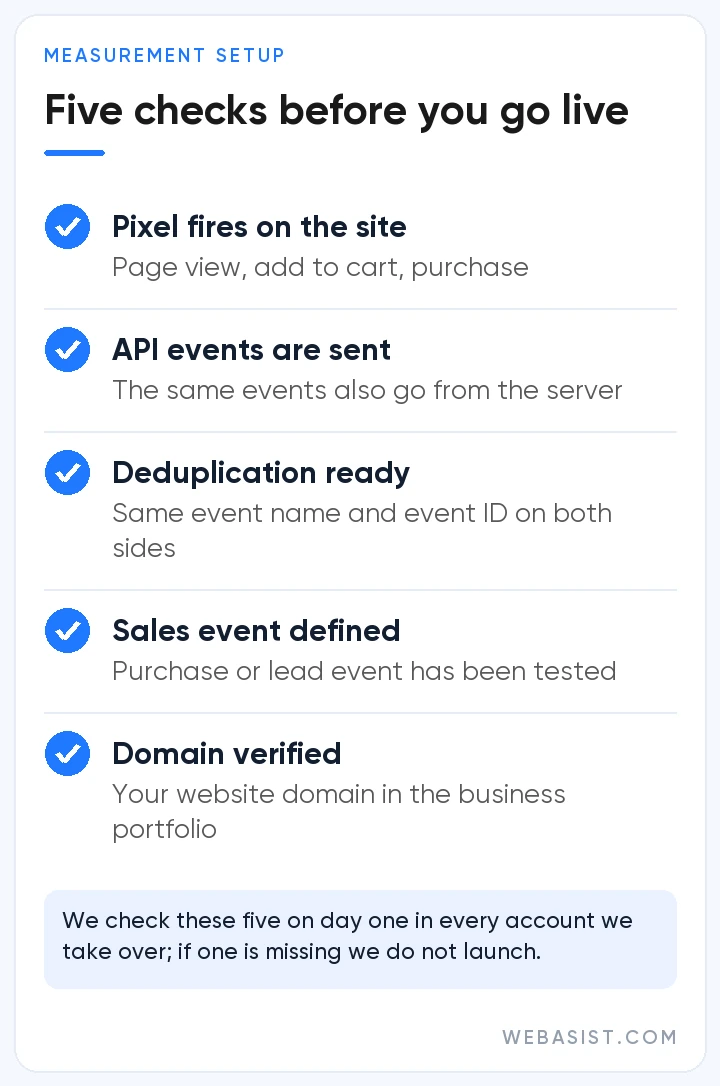
A business advertising without a pixel loses twice: the system cannot learn whom to show the ad to, and you cannot tell which ad brought a sale. In accounts we take over, "Facebook brings no sales" usually hides a pixel with no purchase event defined at all. Shopify and WooCommerce have ready integrations; on a custom site have the event setup planned at the website design stage, adding it later takes twice the effort. Every one of our packages includes pixel setup.
One more measurement detail: attribution. Since March 2026, click-through attribution counts only link clicks (1 or 7 days); view-through counts 1 day; conversions that follow likes, comments and other engagement are reported on a separate "engage-through" line. Use the same setting when comparing periods, and take the real measure from your till and CRM, not the ad panel.
Advertising restricted: what to do if your account is limited
The "advertising restricted" warning appears on new accounts, after payment problems and on suspected policy violations. There is one thing to do: read the reason on the Account Quality page and request a review from there. Do not carry on with a second ad account or a relative's account; Meta can restrict linked accounts together and you lose your main account for good. If a single ad was rejected, fix the stated reason and resubmit. The most common causes are exaggerated claims, references to personal attributes ("struggling with your weight?") and a mismatch between the ad and the landing page.
Who should not put money into Facebook?
- If you need customers today. Facebook creates demand; it does not catch demand that is already waiting. Someone looking for a locksmith, a broken boiler or an urgent removal searches on Google; start with Google Ads.
- If the product cannot be shown visually. B2B software, consulting and industrial machinery do not sell in the Facebook feed; Google for existing demand, LinkedIn for decision makers.
- If you cannot produce creative. An account running one image for three months sees frequency rise, clicks fall and cost climb. If you cannot produce two or three new creatives a month, hold the budget.
- If nobody will answer messages. In a messaging campaign the most expensive conversation is the one answered the next day.
Frequently Asked Questions
Is advertising on Facebook free?
No. Opening a Page and posting are free; showing ads costs money. What gets suggested as "free advertising" is organic posting, and organic posts reach only a fraction of your followers.
How do I run a sponsored ad on Facebook?
The "Sponsored" label sits above every ad that comes from Ads Manager or from boosting; there is no separate sponsored ad type. Make the six decisions above and submit, and your ad runs as sponsored.
Are Facebook and Instagram ads run from the same place?
Yes. Both are managed in Meta Ads Manager and the same campaign can run on both platforms. You can pick only one in the placement settings and see results broken down by platform.
How long until a Facebook ad goes live?
Review mostly finishes within 24 hours; some ads take longer and live ads can be reviewed again. Do not prepare a launch-day ad on launch day; submit it at least a day earlier.
Conclusion
On Facebook the price of advertising is set not by Meta but by the objective you choose and the result you measure. If you want sales, count sales; if you want leads, call them the same day; if your budget cannot feed learning, step down to a cheaper result.
Add us to your ad account as a partner and we will look at the objective, the pixel events and the placement settings together. If one of the three is wrong we tell you how to fix it; if all three are in place we talk packages for Facebook ad management: social media ad packages or the contact page.