


Google Ads Negative Keywords: How to Add Them and a Starter List
Google Ads negative keywords keep your ad out of the searches you do not want it in. Our rule is two sentences long: no campaign goes live without a negative list, and 20 minutes a week go to the search terms report. In most accounts we take over, the list is either empty or five words added three years ago, and part of the budget goes to people searching for "free", "jobs" and "how to" who will never pay you a lira.
Below is the ready list we add on day one, why Turkish suffixes slip past negatives, which term goes to which level and our weekly routine. Figures are example scenarios, in lira.
What is a negative keyword, and how much money does it save?
A keyword says which searches your ad opens to; a negative keyword says which ones it stays closed to. If a search matches a negative, your ad never enters that auction: no click, no money. Google gives you the filter for free, but building it is your job.
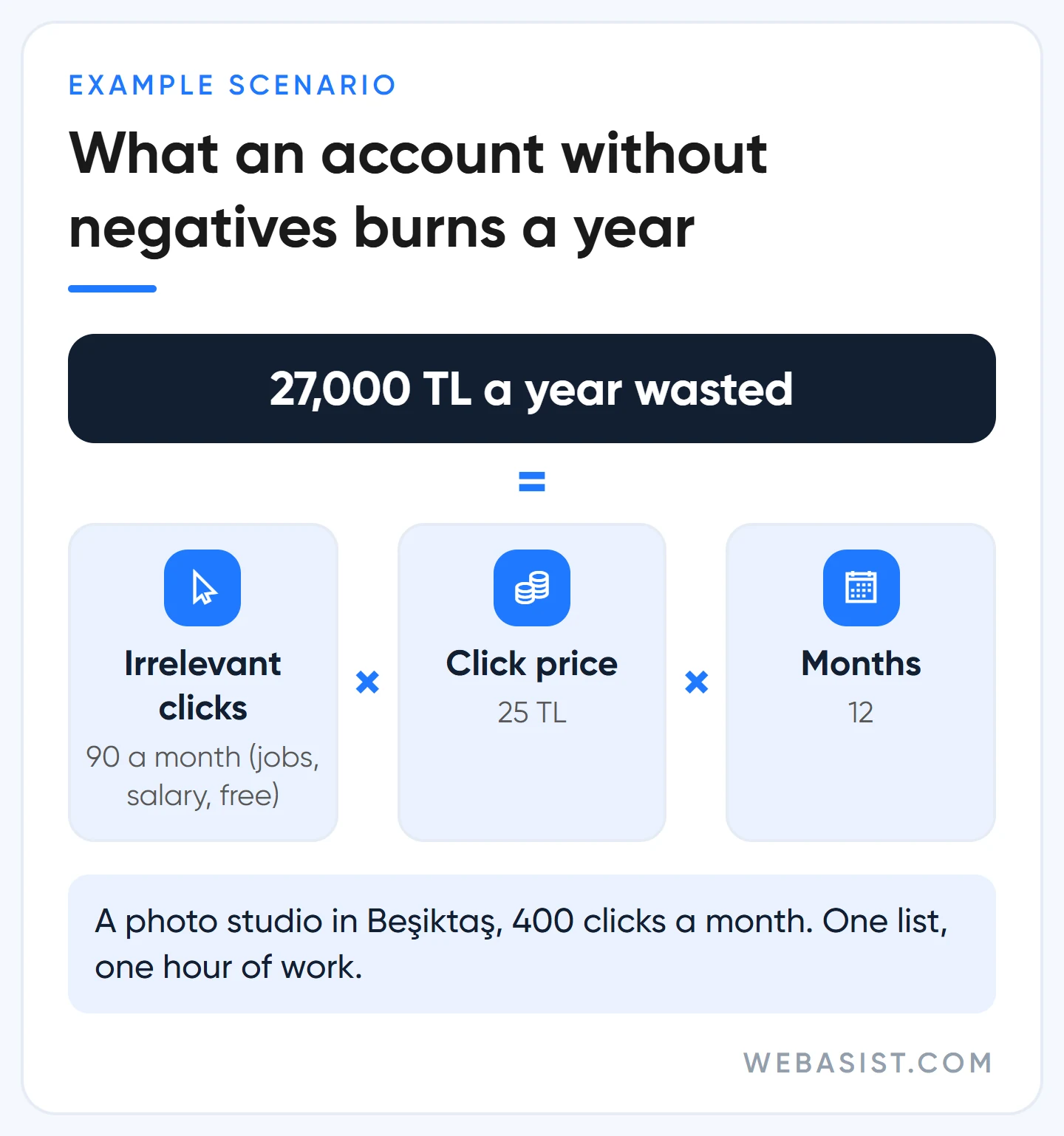
Example scenario: a photography studio in Beşiktaş pays 25 TL per click on "wedding photographer", 400 clicks a month, 10,000 TL. Open the search terms report and 90 of those clicks came from searches like "wedding photographer job vacancies", "wedding photographer salary" and "free wedding photo editing software". That is 2,250 TL a month, 27,000 TL a year; a leak that one list closes in an hour.
Negatives have a cost too: too many of them show the ad to fewer people. We see that in accounts that add buyer words such as "cheap" and "price" as negatives; we never see it with a jobs-and-free list. The goal is not a long list but cutting the searches that burn money, with the right match type at the right level.
The starter negative list: which words we add on day one
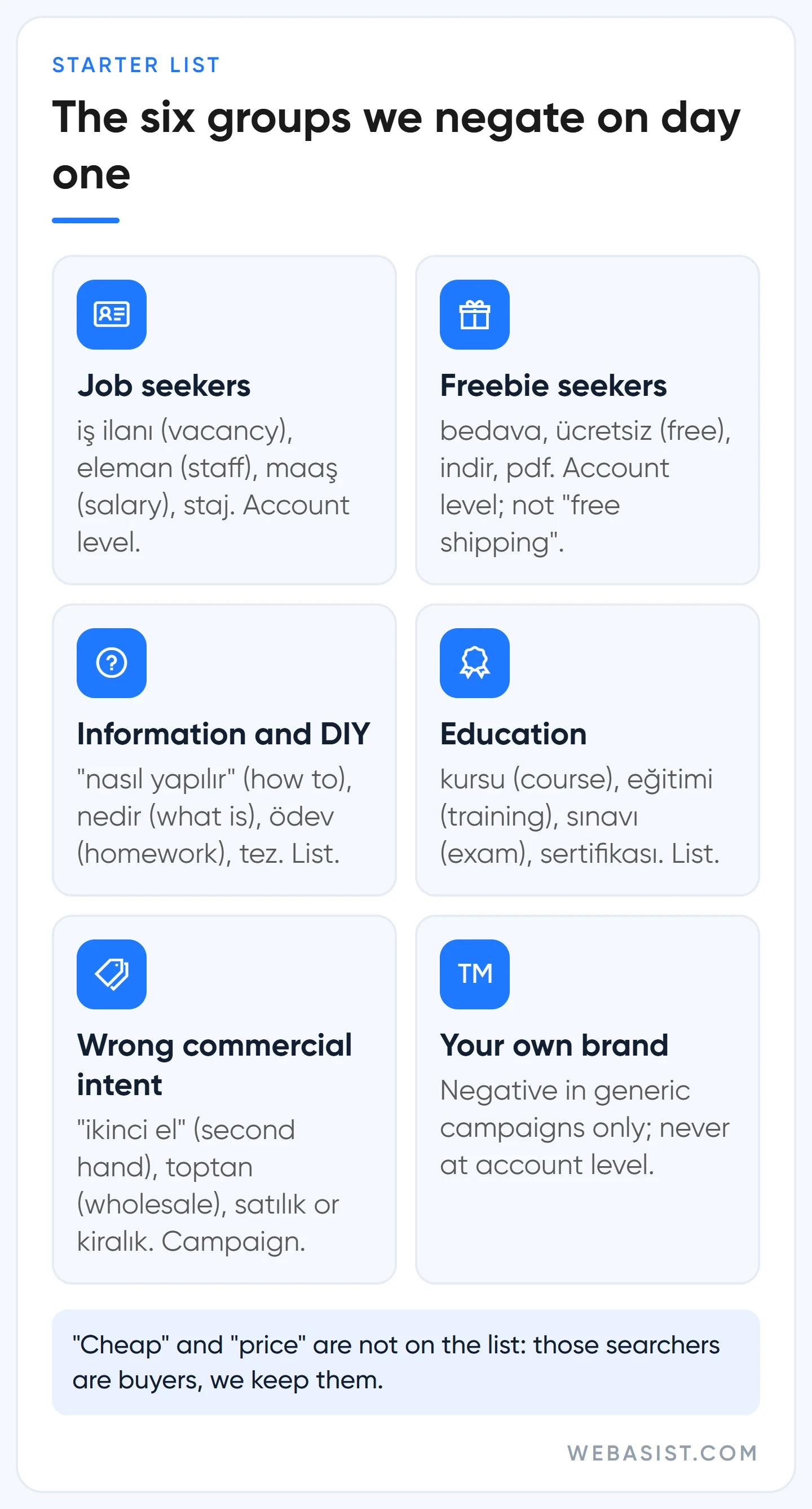
We do not upload the 500-word lists you can download online; in every industry they cut something different. Instead we start with six intent groups and grow the list from the search terms report. Multi-word phrases go in as phrase match (in quotes), single words as broad match.
| Intent group | Example negatives (Turkish, with meaning) | Level |
|---|---|---|
| Job seekers | iş ilanı / iş ilanları (job vacancy, vacancies), eleman, personel (staff), maaş, maaşları (salary), kariyer, staj (internship), "işe alım" (hiring), "eleman aranıyor" (staff wanted) | Account level |
| Freebie seekers | bedava, ücretsiz, free, indir (download), pdf, crack, torrent, "ücretsiz program" (free software) | Account level (in e-commerce "ücretsiz kargo", free shipping, and in services "ücretsiz keşif", free site visit, are buyer searches; read the report first) |
| Information and DIY | "nasıl yapılır" (how to make), "nasıl olur", nedir (what is), "ne demek" (what does it mean), tarifi (recipe), örnekleri (examples), dersleri (lessons), ödev (homework), tez (thesis), yönetmelik (regulation), "evde" (at home) | List |
| Education and certificates | kursu (course), eğitimi (training), sınavı (exam), sertifikası (certificate), bölümü (university department), "taban puanları" (entrance scores), üniversite | List |
| Wrong commercial intent | "ikinci el" (second hand), sahibinden (classifieds site), toptan (wholesale, if you retail), satılık (for sale, if you rent out), kiralık (for rent, if you sell), "iş ortağı" (business partner), bayilik (dealership) | Campaign |
| Your own brand | Your brand name and its spelling variants | Generic campaigns only; never account level |
We left two words out on purpose. People searching "ucuz" (cheap) and "fiyat" (price) are buyers; even if you sell a premium service, check the report for whether they convert before cutting them, and in most accounts we keep them. We do not automatically add competitor brand names either; someone searching a competitor's name is your customer too, which we discuss in our competitor brand bidding article.
Turkish suffixes: a negative for "iş ilanı" does not stop "iş ilanları"
Unlike positive keywords, negatives do not expand to close variants. A negative for "çiçekler" (flowers) blocks "kırmızı çiçekler" (red flowers) but not "kırmızı çiçek" (red flower); synonyms, singulars and plurals all have to be written separately. Capitalisation and misspellings are covered automatically; a form with an accent mark counts as a different word.
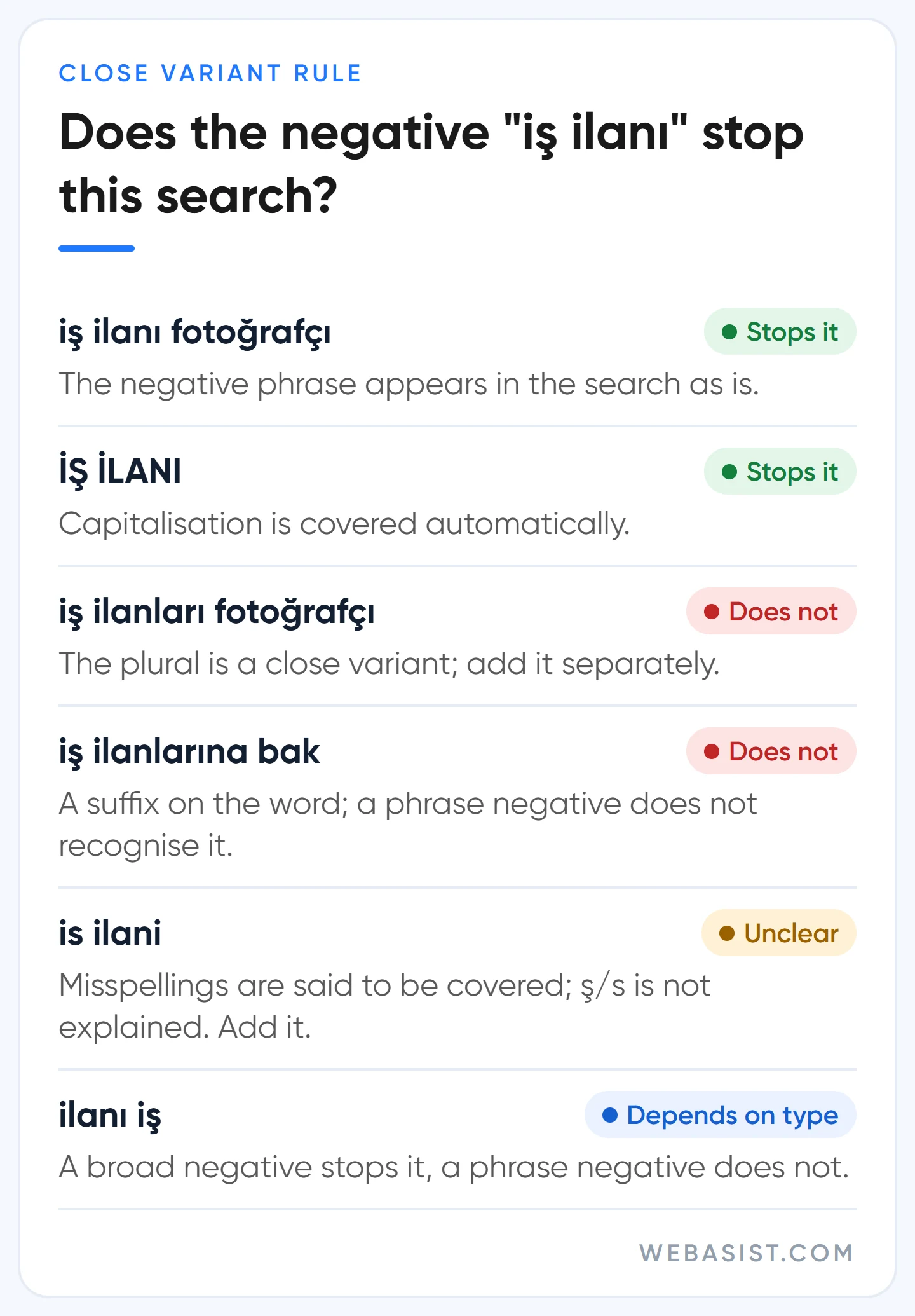
In an agglutinative language this rule doubles or triples the list. With a phrase-match negative, if the word in the search is the negative's word with extra letters added to the end, the block does not fire. The negative "iş ilanı" (job vacancy) does not stop "iş ilanları" (vacancies), "iş ilanlarına bak" (look at the vacancies) or "iş ilanında" (in the vacancy). So for critical negatives we also write the most common suffixed forms: iş ilanı, iş ilanları, iş ilanlarına; maaş, maaşı, maaşları; kurs, kursu, kursları.
Two more practical rules. First, do not cut buyer searches while adding suffixed forms: in a boat rental account, a single-word negative "ehliyeti" (licence) also cuts "ehliyeti olmayan tekne kiralama" (boat rental without a licence), and that person is your customer. Write the pattern instead: "tekne ehliyeti" (boat licence), "ehliyet sınavı" (licence exam).
Second, spellings without Turkish characters such as "is ilani" or "egitimi": misspellings are said to be covered, but Google does not say whether the ş/s difference counts as one. We add the character-free form of our five or ten most expensive negatives too; it costs nothing.
Negative match types: broad, phrase, exact, and when to use each
The notation is the same as for positive keywords: plain text is broad, quotes are phrase, square brackets are exact. With no symbol, a negative is treated as broad match. Here is how the negative "iş ilanı" behaves in the three types:
| Search | Broad: iş ilanı | Phrase: "iş ilanı" | Exact: [iş ilanı] |
|---|---|---|---|
| iş ilanı | Blocked | Blocked | Blocked |
| fotoğrafçı iş ilanı istanbul | Blocked | Blocked | May show |
| ilanı iş fotoğrafçı | Blocked | May show | May show |
| iş ilanları fotoğrafçı | May show | May show | May show |
Our practice: single words (bedava, maaş) as broad; two or more words as phrase; exact almost never. An exact-match negative stops only that one query, and the same query with one extra word is back the following week. In searches longer than 16 words, a negative beyond the 16th word does not work; with long question-style queries this is usually the reason behind "my negative isn't working".
How to add negative keywords in Google Ads: three levels, one rule
The rule: if the term is unwanted in every campaign in the account, account level; if unwanted in several campaigns, a list; if it is only outside the subject of one campaign or ad group, add it there. The wrong level either blocks nothing or silences a campaign you wanted; we have seen plenty of accounts add their brand name at account level and switch off their own brand campaign.
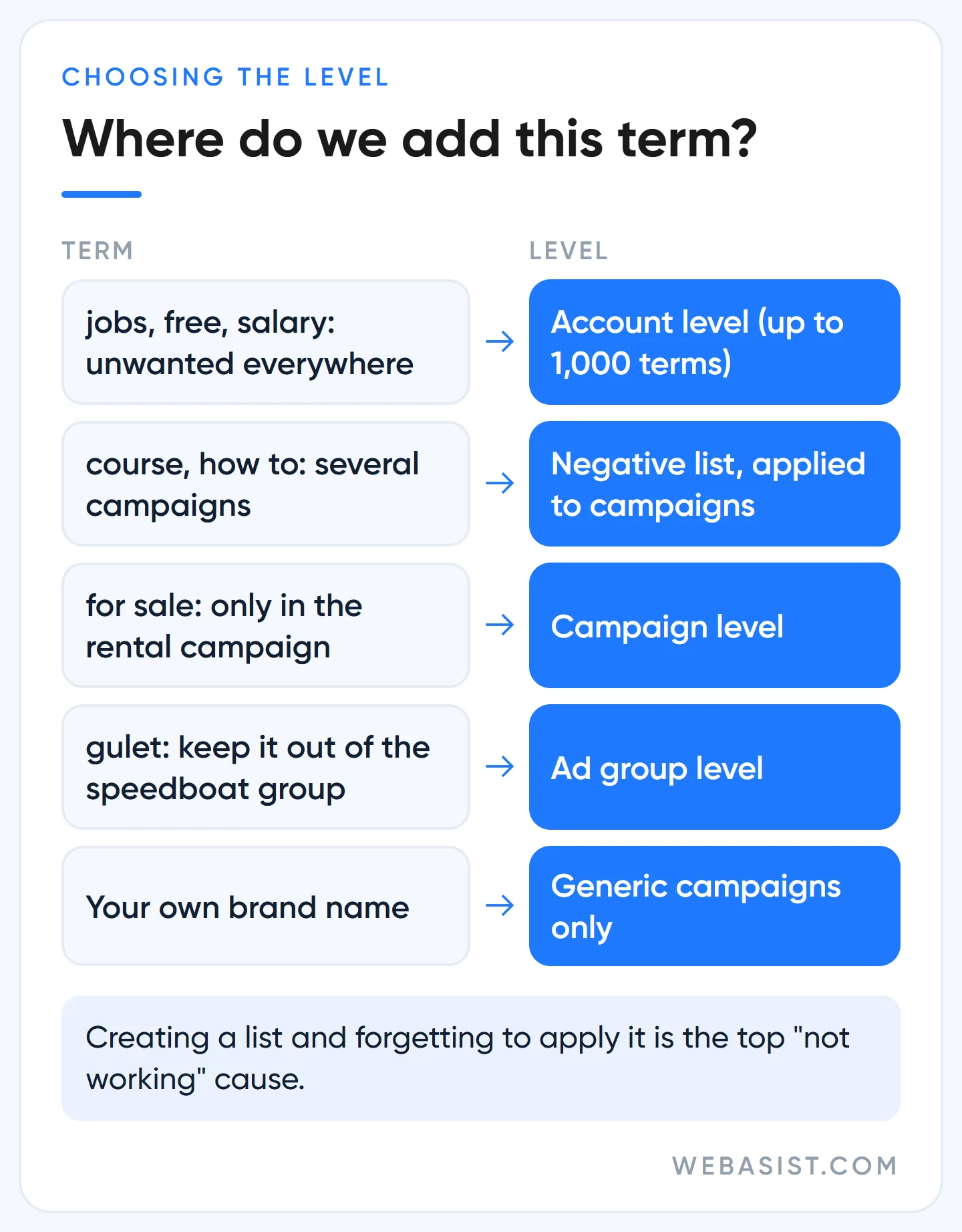
- Campaign or ad group: Campaigns > Audiences, keywords and content > Search keywords > the "Negative search keywords" tab. One term per line, match type by symbol. Limit: 10,000 per campaign.
- Negative keyword list: Tools > Shared library > Exclusion lists. Create the list and apply it to campaigns; updates flow to all of them. 20 lists per account, 5,000 keywords per list. Creating a list and forgetting to apply it is the most common "negative isn't working" cause we see.
- Account level: Admin > Account settings > Negative keywords. Up to 1,000 terms, applied to the search and shopping inventory of every eligible campaign type, including Search, Shopping and Performance Max. The jobs and free groups go here.
If you are an agency or run several accounts, build the list in the manager account; it lands in each sub-account's shared library, and applying it to campaigns in each account is still your job. On the Display Network and in video, negatives behave differently: at most 1,000 are taken into account, all are treated like broad match, and the ad can still appear on a page containing the word; content exclusions work better there.
The weekly routine: finding negatives in the search terms report in 20 minutes
The starter list is a guess; the real list is shaped by the report. It lives at Campaigns > Insights and reports > Search terms. Our 20 minutes go like this:
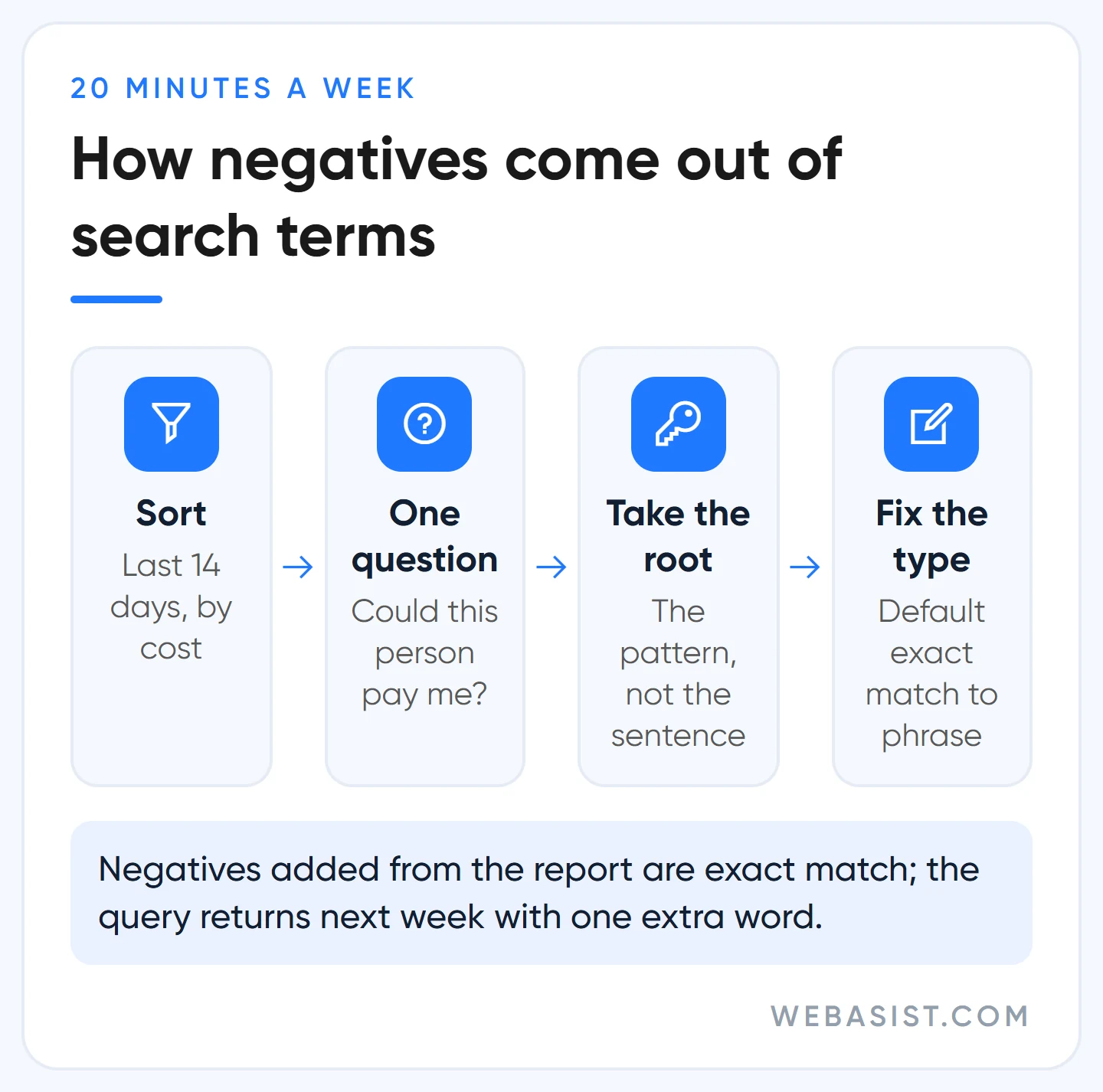
- Select the last 7 or 14 days and sort by cost. Add the "Keyword" column from Attributes so you can see which keyword pulled each search in.
- Ask each term one question: could this person pay me? Mark the "no"s; leave the ones with the right intent that simply have not converted yet, since one expensive click is not a pattern.
- Take the root, not the query. For "beşiktaş wedding photographer job vacancy 2026" the thing to block is not the whole sentence but the pattern "iş ilanı".
- Fix the match type. When you click "Add as negative keyword" in the report, Google adds it as exact match by default, which cuts only that query. Switch it to phrase with the symbol.
- Pick the level and leave a note. Write one line on why you added each negative; two months later, when a keyword's impressions drop, the reason will be there.
There are searches the report does not show: terms without enough volume are hidden by the privacy threshold and only appear as themes in search term insights. You also cannot add negatives from a search terms table opened in Report editor; do the adding on the standard page. Finding new keywords is a separate job, covered in our keyword research guide.
Google recommends it, here is what we do: broad match, AI Max and Performance Max
Google's direction is clear: broad match, AI Max's search term matching and Performance Max reach searches that are not on your list, and Google recommends negatives "only for brand safety and completely irrelevant terms". Every new search is a new click to sell for Google; for you it may not be. What we do in the three cases:
- Broad match: We do not switch on broad match in accounts under 30 conversions a month; where we do, the jobs and free list is applied on day one. A campaign without negatives leaks even without broad match; with broad match it floods.
- AI Max: Google suggests not adding negatives for two weeks after switching on AI Max. We still apply the starter list on day one; paying for job searches for two weeks teaches the system nothing. Industry-specific negatives we hold until we see the report. Queries brought in by AI Max carry their own label in the report, and negative keywords and negative URLs can be added from the "Search terms and ad combinations" view.
- Performance Max: Since 2025, campaign-level negatives and negative lists can be applied; they only affect search and shopping inventory, not YouTube or display. We apply the account-level list to every PMax campaign. For your own brand use brand exclusions rather than negatives; they cover misspellings and variants too. "Preview impact" estimates how much an important negative would lower conversions, for up to 10 words at a time. The rest is in our Performance Max guide.
One place where Google's warning is right: the "remove conflicting negative keywords" card on the Recommendations page. If a negative is blocking an active keyword, that keyword gets no impressions at all; the card is worth a look, but read which negative is cutting which keyword before removing anything.
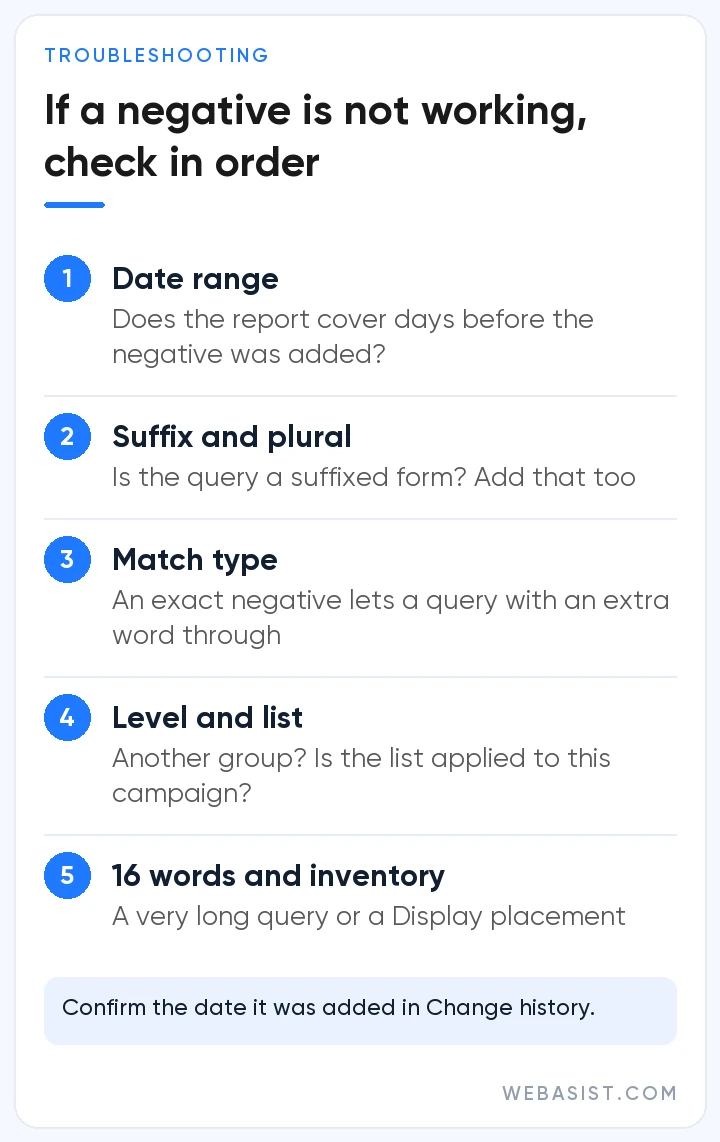
Why isn't my negative keyword working? Check in this order
- Date range: If the report covers days before the negative was added, the blocked query keeps showing. Confirm the date in Change history.
- Suffix or plural: Is the query a suffixed form of the negative? Add that form too.
- Exact match: Negatives added from the report are exact match; a query with one extra word gets through.
- Level and list: Is the negative in another ad group, or is the list not applied to this campaign?
- The 16-word limit and inventory: It may be a very long query or a Display Network placement.
Watch the opposite warning too: the "keyword not showing because of a negative" diagnosis tests the exact-match form of your keyword even if it is phrase or broad; the keyword may still be showing on other searches. The wider diagnosis is in our ads not showing article.
When not to add negatives
- After a single expensive click: It may be chance, not a pattern. Add it once the same intent repeats three or four times.
- To cut buyer words: "ucuz" (cheap), "fiyat" (price), "kampanya" (offer), "indirim" (discount) do not become negatives; if they do not convert, the problem is your page, not the filter.
- To cover up a page problem: If a search with the right intent is not converting, a negative is not the fix; look at the landing page first.
- Your brand name at account level: Your brand campaign goes silent too. Brand negatives belong in generic campaigns only.
- To solve a location problem: Before negating "ankara nakliyat" (Ankara movers), switch the location option to "Presence"; see the settings list in our account audit article.
Frequently Asked Questions
What is a negative keyword?
An exclusion term that stops your ad from showing on certain searches. It can be added to an ad group, a campaign, a shared list or the whole account; on a matching search the ad never enters the auction and no money is spent.
Should I add a negative keyword to the campaign or the ad group?
If the term clashes with the whole subject of the campaign, the campaign; if it only clashes with one group's theme, that group. A term unwanted in several campaigns goes in a list; a term unwanted under any circumstances (jobs, free) goes to account level.
Do negative keywords block plurals and synonyms too?
No. Negatives do not expand to close variants; a negative for "iş ilanı" does not stop "iş ilanları". Add plural, suffixed and synonym forms separately. Capitalisation and misspellings are covered automatically.
How many negative keywords can I add?
10,000 per campaign, 5,000 per list and 20 lists per account, 1,000 at account level. If you are approaching the limits, the problem is method rather than count; you are probably adding queries one by one when you should be adding patterns.
Conclusion
Negative keywords are the one place in Google Ads where you decide where the money will not go, and their power comes not from the length of the list but from three things: the right match type, the right level and a search terms report opened every week. Tomorrow morning's job is clear: add the jobs and free groups at account level, then sort the last 30 days of the report by cost.
If you would like to read the report together, give us read-only access to your account; we will pull the 50 most expensive search terms of the last 30 days, mark which ones went to waste and write your starter list. Search term and negative keyword optimisation is included at every level of our Google Ads advertising packages; reach us through the contact page.














