


Limited Ad Serving Appeals Form: What to Write and When Not to Bother

There is a limited ad serving notice in your account and you are thinking about filling in the limited ad serving appeals form. The short answer: the form takes ten minutes, but one field decides the outcome, "Summary of the issue". It holds at most 1,000 characters, and every sentence you put there needs something in the account, on the site or in the attachment to back it up. In our experience, an appeal sent without changing anything in the account comes back with the same result.
That is why we open the form last in client accounts: verification first, then branded ads and a branded landing page, then the appeal. Why the cap lands on an account and the order we work in to lift it are covered in our limited ad serving guide. This article is only about the form: when to send it, what to prepare, what to write in which field and what happens next.
When does the appeal form work, and when is it a waste of time?
An appeal asks a specialist to look at your account and conclude "this advertiser now clearly says who it is". If you have nothing to show, they will not see anything. Before you open the form, ask yourself one question: since the notice arrived, what has changed in the account and on the site that I can put a date on?
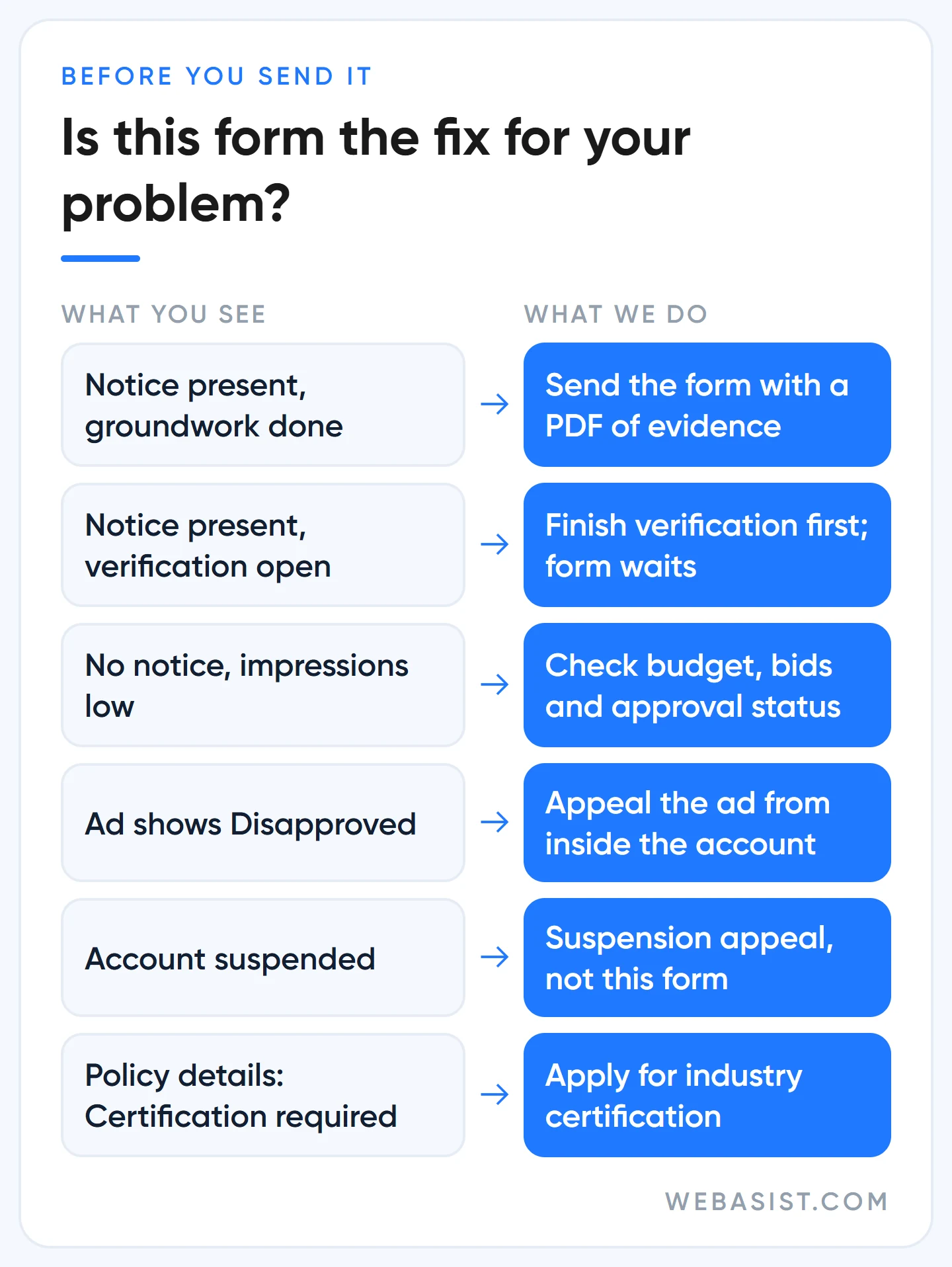
We send the form in two situations:
- The groundwork is done. Advertiser verification is approved, the headlines carry your business name or domain, and the first screen of the landing page says who you are.
- There is a misunderstanding and you can document it. You really are an authorised dealer of the brand named in the ad and you have the dealer letter, or the brand in the ad is your own.
The form is wasted, and this article will not help you, in these cases:
- There is no notice in the account. Something else is behind the drop in impressions; diagnose it with the order in our ads not showing article.
- A verification task is still open. That is the first thing the specialist will see. Finish advertiser verification first.
- Your ads say "Disapproved". That is an ad-level decision, appealed from inside the account; the route is in our ad disapproved guide.
- The account is suspended. This form does not reopen a suspended account; you need a separate suspension appeal, covered in our account suspended article.
- Your industry needs certification. If you are in gambling, finance or healthcare and the policy details say "Certification required", what you are missing is a certification application, not an appeal.
- You get a lot of customer complaints. User reports about you weigh heavily in the qualification decision. A business piling up complaints about delivery, refunds or fake discounts has to fix that before any appeal text can help.
If the account is very new, know this up front: account maturity is also weighed, and an appeal cannot speed it up. We have seen well-prepared appeals bounce on accounts only a few weeks old. In that case we keep running branded ads for two or three weeks and come back with fresh evidence.
The cost of a weak appeal: two weeks
The form itself is free; sending it at the wrong time is what costs money. The written response expectation is 5 business days, so a calendar week. A rejection comes back, you fix the gaps, you write again, and another week is gone.
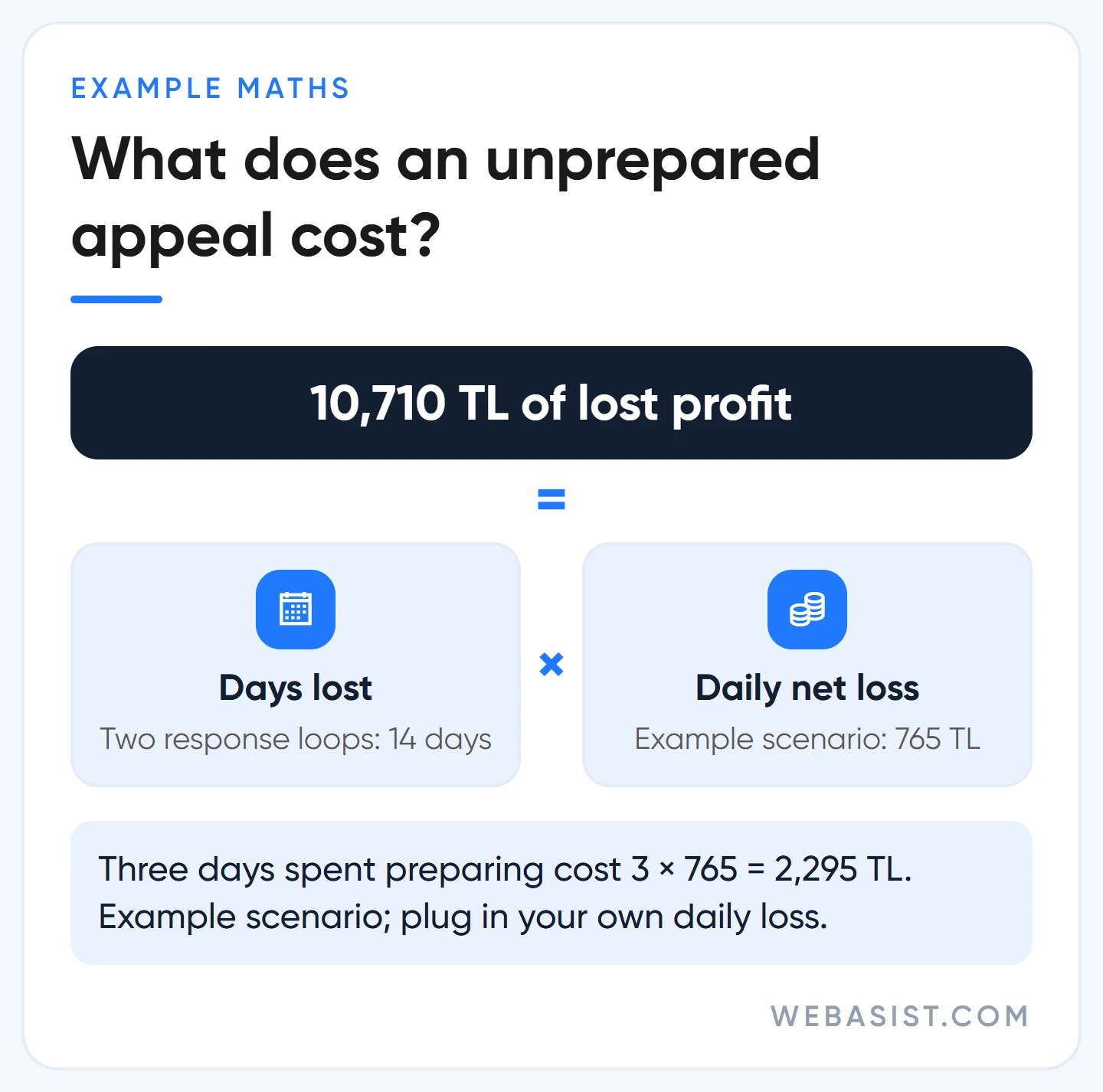
Example scenario: take the Kadıköy boiler repair business from our main guide, which was losing 765 TL of net profit a day to the cap. The two-week loop opened by an unprepared appeal costs 14 × 765 = 10,710 TL. Had the same business held the form for three days and finished the groundwork, the bill would have been 3 × 765 = 2,295 TL. That is why we push back on "let's just send it, it might work".
Five things to prepare before you open the form
We prepare the appeal file in a separate text document, away from the form. We only open the form once the file is complete, so no rushed sentences end up in the fields and you do not hit the character limit mid-sentence inside the form.
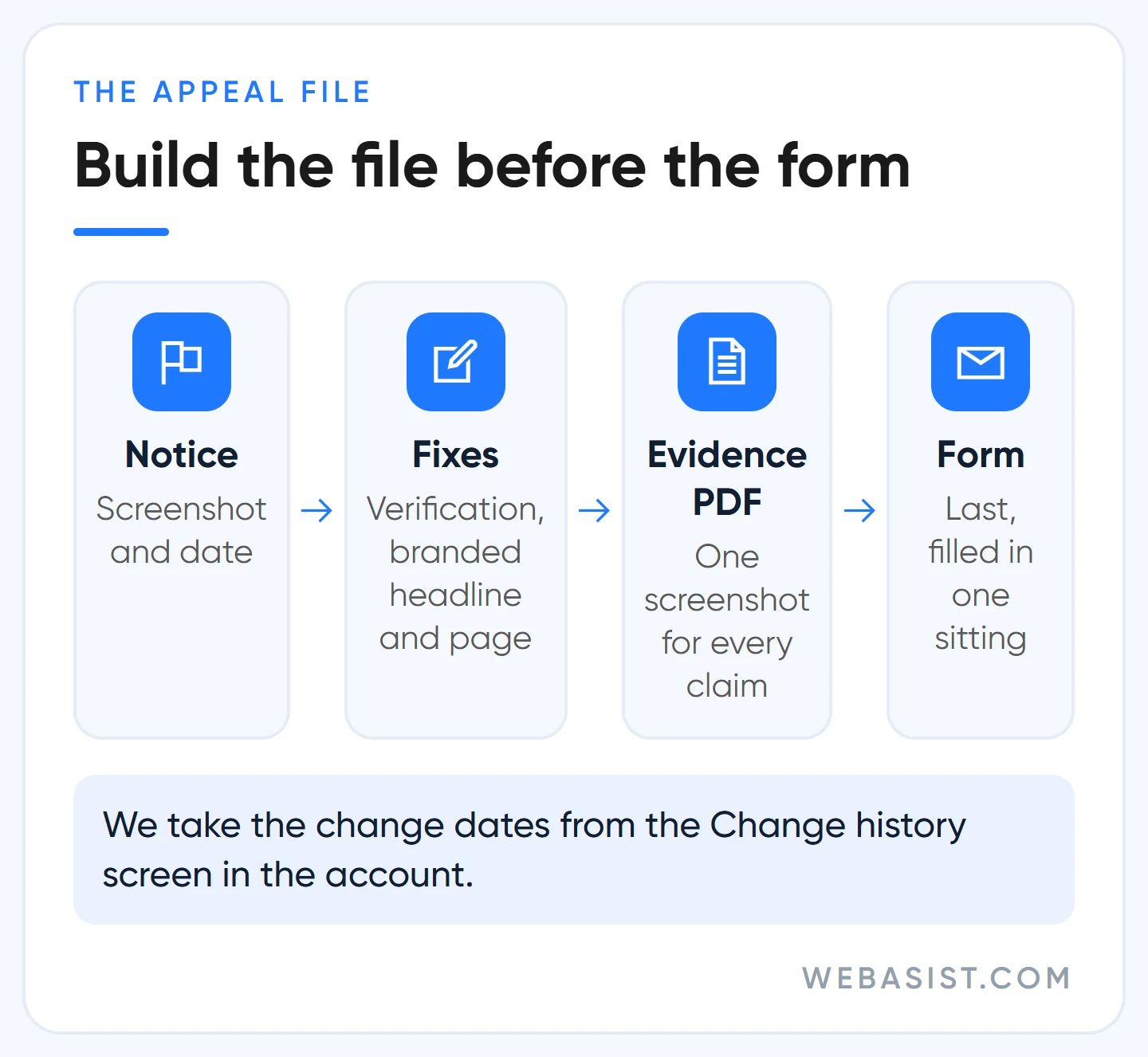
- A screenshot of the notice and its date. The notice sits in the alert bar at the top of the account or in the list under the bell icon. The date answers the "since when" question in your summary.
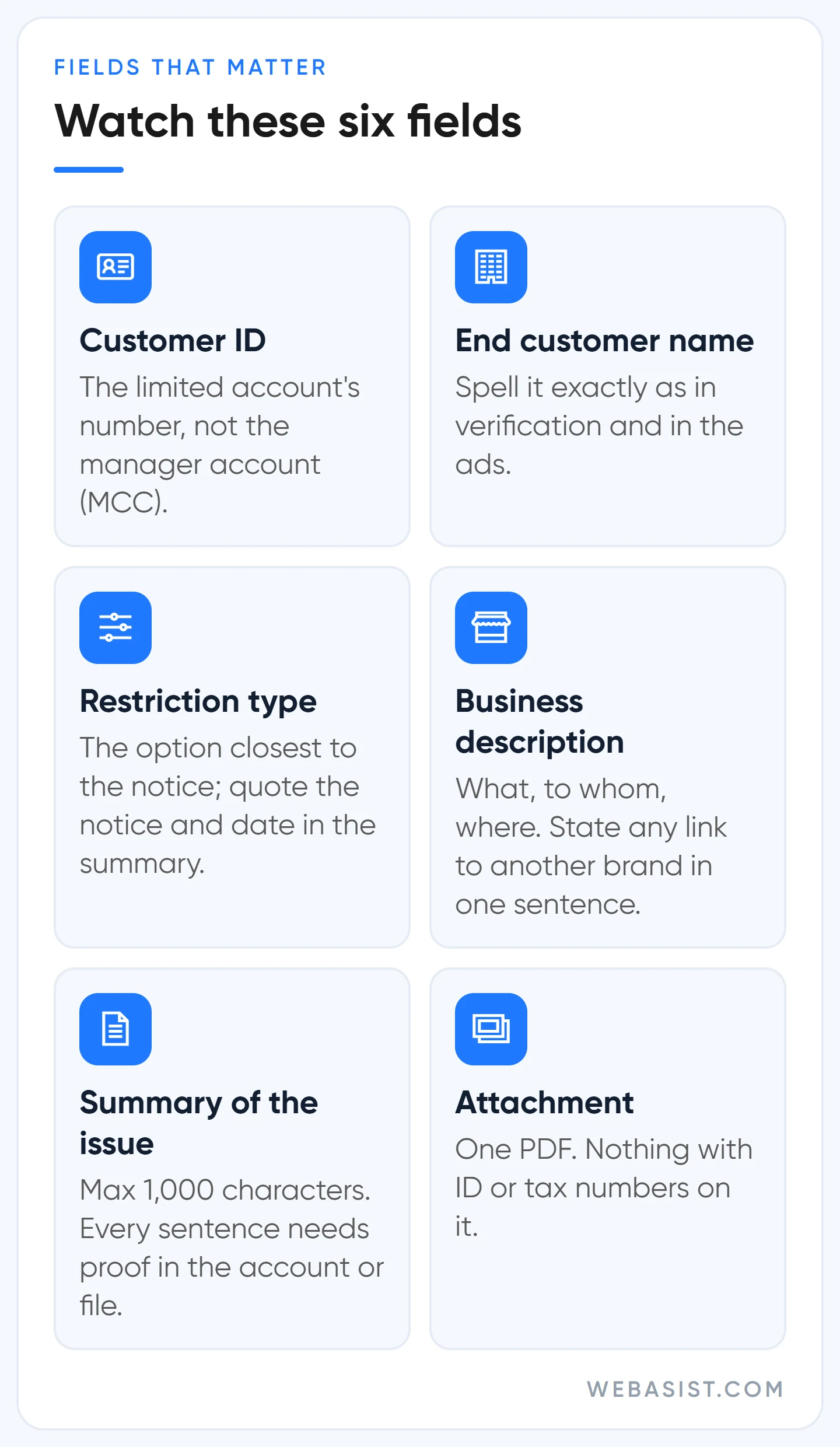
- The right customer ID. The number of the limited account, not the number of the agency or manager account (MCC). The form warns about this in the very first field because it is the most common mistake.
- A dated list of changes. What did you do after the notice, and on which day? The Change history screen in the account keeps two years of records and gives you the dates. Not "we fixed the ads" but "16 September: business-name headline added to four ad groups and pinned to position 1".
- Evidence in a single PDF. The screen showing verification is complete, a preview of the new ad, the first screen of the landing page and, if relevant, the dealer letter. The form asks you not to share ID numbers or tax IDs; if the dealer letter shows a tax number, black it out.
- Who will read the reply. The contact email should be an inbox someone checks daily. If an agency is filing for you, have them CC your own address so the correspondence is in front of you too.
We will not repeat how to write a branded headline or page here; you will find examples in our ad copy article and our landing page guide.
What goes in which field? The fields that change the outcome
Most of the form is contact details, and the only rule there is to be accurate. The fields that change the outcome are below; "Summary of the issue" gets its own section.
"End Customer Company Name"
The name of the company being advertised. When we file as an agency we write the client's name, not ours; the field is used to route the case to the right agent. The name here should match the verified name and the business name in the ads. Three spellings in three places trigger the first question a specialist will ask: who is actually running this ad?
If you are an agency, choose "I manage account(s) for client(s)" in the role question and use the relationship field to say, in one sentence, on whose behalf and with what authority you run the account.
"Which ad serving restriction are you appealing?"
There are two options: "Restrictions on Google Ads" and "Restrictions on Display". The form does not explain when to pick which. We go by the wording of the notice: if the cap is on the Search or YouTube side we pick the first, and we quote the notice with its date in the first sentence of the summary. Even if the choice is off, the specialist will understand what you are appealing.
"Please provide a brief description of your business."
The form's own example is one sentence: what you sell, to whom, where. Do not write a slogan. If you sell other brands' products or service them, say so here; for accounts limited over brand ambiguity, this is the most important sentence in the form.
Weak (example): "We are the market leader with the best prices and quality service."
Strong (example): "Örnek Teknik is an independent boiler maintenance and repair service for households in Kadıköy and Üsküdar; it is not the authorised service of any boiler brand."
"Submit an attachment"
Optional, but we attach something to every appeal. The PDF you prepared goes here, so that every claim in the summary has a screen behind it. Do not attach ID cards, licences or tax certificates; those belong in the verification flow.
The "Summary of the issue" field: a weak and a strong example
The form asks you to explain in as much detail as possible why your ads do not violate the policy. Our experience: saying "we do not violate anything" does not work; saying "here is what we changed, and here is the proof" does. The specialist does not see your intentions, they see your account.
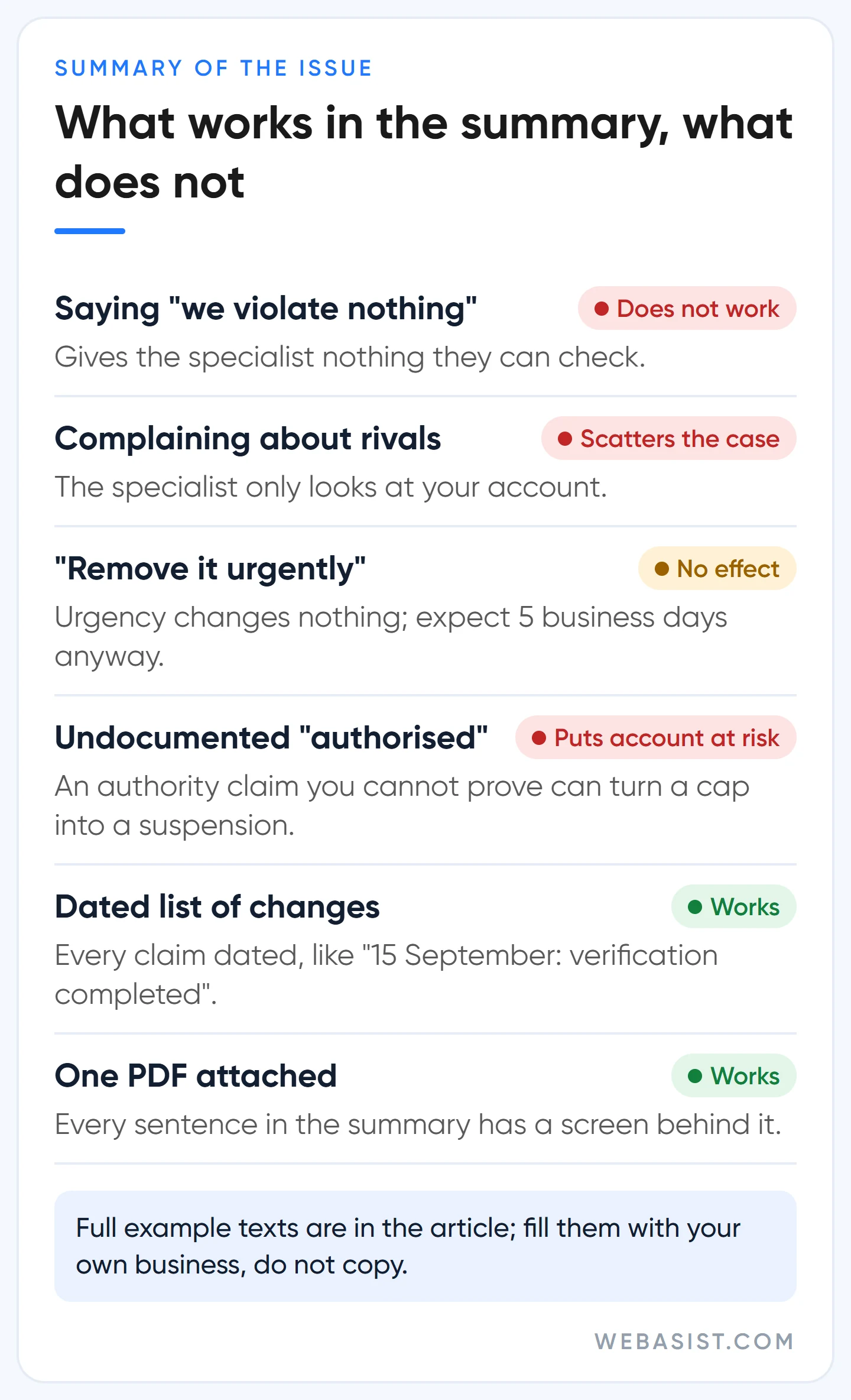
Weak summary (example):
Our ads do not violate any policy. We have been advertising on Google for 6 years and we were limited unfairly. Our competitors run the same ads and nothing happens to them. Our business has stopped, please remove the limit urgently.
There is not a single fact here the specialist can check. The age of the account is already on screen, the complaint about competitors scatters the case, and "urgently" does not speed anything up. If the ads are still generic, this text works against you.
Strong summary (example; "Örnek Teknik" is fictional):
On 12 September 2026 we saw a limited ad serving notice in the account. Örnek Teknik (ornekteknik.example) is an independent boiler maintenance and repair service in Kadıköy and Üsküdar; it is not the authorised service of any boiler brand. What we have done since: on 15 September we completed advertiser verification. On 16 September we added headlines with our business name and domain to every ad group and pinned them to position 1, and added "not an authorised service" to ads that mention a manufacturer. On 17 September we put our logo, legal name, address and phone number on the first screen of the landing page. We deleted two old disapproved ads. The attached PDF contains screenshots of these changes. We kindly ask for the account to be reviewed again.
What makes this text strong is not the style but the skeleton: who you are, what happened and when, what you changed, where the proof is, what you are asking for. Every sentence can be checked in the account, on the site or in the attachment, and the whole thing stays under 1,000 characters. Keep that order in your own text but fill it with your own business; a copied template is exactly the genericness the policy complains about.
What not to write: changes you have not made, "authorised" or "official" claims you cannot document, ID or tax numbers. Giving false information during verification counts as a circumventing systems violation and can end in suspension; we hold appeal text to the same line.
What happens after you submit?
After you press Submit, do two things. Click the link in the confirmation email to verify your address, then use the "Download submission" link on the page to keep a copy. The first avoids delays; the second reminds you what you wrote if a rejection comes back.
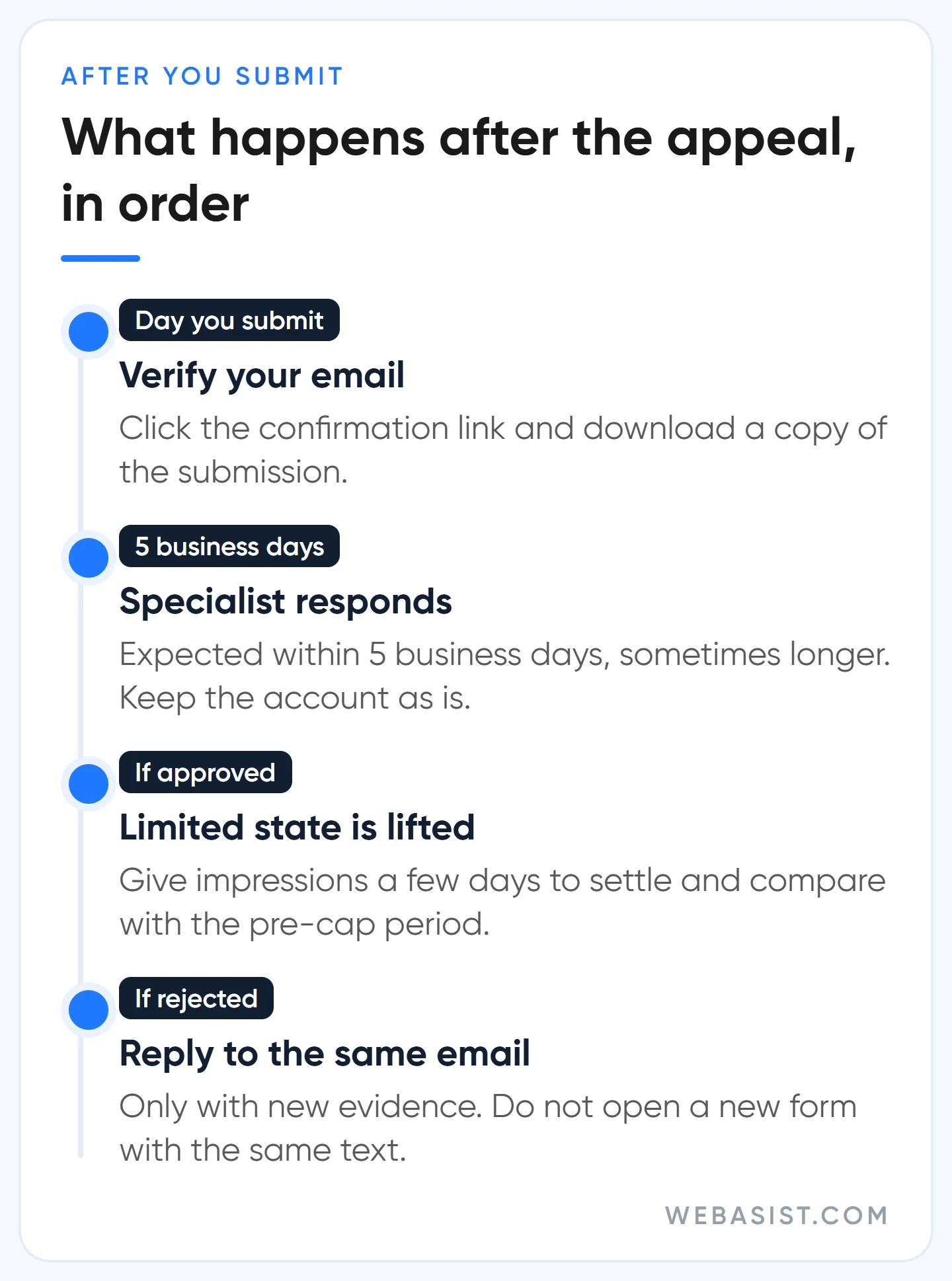
Then you wait. A specialist is assigned to the case; the written expectation is a response within 5 business days, sometimes a bit longer. If the appeal succeeds, the account is released from the limited state. Give impressions a few days to settle after that and compare the first week with the period before the cap.
While you wait, Google recommends that you keep creating campaigns and assets that drive positive user engagement. Do not read that as "open new campaigns and raise the budget"; that reading suits Google, not you. If a capped campaign has a 600 TL daily budget and spends 90 TL a day, raising the budget to 1,000 TL will not buy a single extra impression. During this period we do not open new campaigns, we keep auto-applied recommendations switched off and we keep the money in the brand and remarketing campaigns that are still getting impressions. The account the specialist looks at should match the account you described in the summary.
What if the appeal is rejected or nobody replies?
A rejection does not mean opening a new form. If you believe the response is a mistake, you can reply to that email with additional information; that is the route. But the additional information has to be genuinely new.
- If the rejection gives a reason (brand clarity, verification and so on), close that gap first, then reply to the same email describing what you did, with dates.
- If the rejection gives no reason and your groundwork is complete, keep running branded ads for two or three weeks. Limits are also re-evaluated automatically, and on some accounts the cap lifts in that window regardless of the appeal.
- If 5 business days have passed with no reply, check the spam folder first and whether you verified the confirmation email. Check the contact address against the copy you downloaded. Do not send a second form until these checks are done.
There is no written limit on how many times you can appeal. Our rule is simple: if you have no new evidence, do not write again. Sending the same text a second time does not speed anything up; it only makes the case longer.
However frustrating the rejection, do not open a second Google Ads account to escape the cap. That falls under the circumventing systems policy and can turn one limited account into two suspended ones.
Frequently Asked Questions
Is the Google Ads suspension appeal form the same as this one?
No. Under limited ad serving the account is open and the ads are approved; only impressions on certain searches are capped. Under suspension every ad stops and the appeal goes through a different form. Sending one form for the other only wastes time.
How long does a limited ad serving appeal take?
The written expectation on the form is 5 business days, sometimes a bit longer. That is the time to answer the appeal. No timeline is given for when the cap lifts on its own; we suggest planning cash flow around at least a month of reduced impressions.
Should the agency or the business owner fill in the form?
Either can. If your agency files it, ask them for two things: the text of the summary they sent and the PDF they attached. The appeal is made on behalf of your account; you have every right to know what was written.
Can I fill in the form in Turkish or another language?
Yes. The form is available in Turkish and other languages, and translation services may be used in the email exchange. We write short, plain sentences whatever the language; long, ornate sentences lose meaning in translation.
What to do today
Do not open the form today; build the appeal file first. Take a screenshot of the notice, check your verification status and list every change you made since the notice, with dates, on one page. If that page is empty, your next job is not an appeal, it is fixing things.
Before you submit, send us your summary text and evidence PDF; we will read them and flag any claim that is missing proof. If you would rather hand over the account management too, the scope is laid out in our Google Ads packages.
Sources
- Limited Ad Serving Appeals Form: fields, character limit, sensitive data warning and the 5 business day response expectation.
- Limited ad serving: qualification factors, user reports and automatic re-evaluation.
- Advertiser verification: what happens if you give false information.
- Circumventing systems: why a second account to dodge a restriction is a risk.














