


Google Ads Not Showing? Approved but Not Running: 5 Causes and Fixes

When a business owner writes to us saying Google Ads not showing, our first question is always the same: does the Impressions column in the Campaigns table say zero? For most of them it does not. The ad is live and spending money; the owner just cannot see it when they search from their own phone. That is not a fault, it is how Google works, and we explain why below.
If the column really is zero, or stuck at a handful of impressions a day, the cause in the accounts we take over is almost always one of five: a payment or verification block on the account, a paused link somewhere in the chain, an ad still in review or disapproved, keywords with no search volume or blocked by your own negatives, or a budget that runs out by noon and bids set too low. On brand-new accounts, Google's silent security review joins the list. We go through each one in order, as "what you see on screen, what we do about it".
Approved but not running? Check the Impressions column first, not Google
The first diagnostic step is the account, not Google.com. Set the date range in the Campaigns table to "Today" and look at the Impressions column; preset ranges such as "Last 7 days" do not include today, so a campaign you launched this morning shows zero in that view. If there are impressions, the ad is running, and the problem is not "it isn't showing" but "I can't see it".
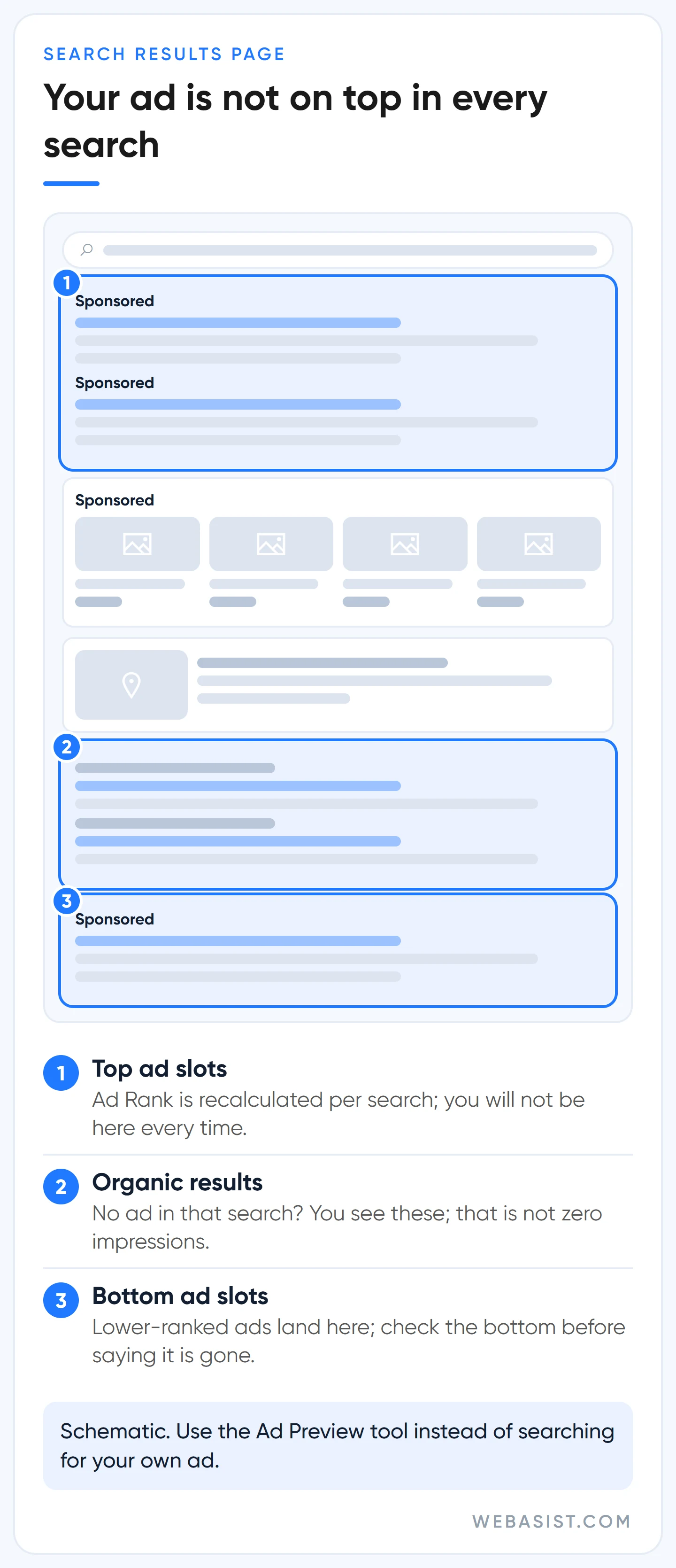
Searching for your own ad costs you twice. Each search gives the ad an impression without a click, your click-through rate drops, and that rate feeds into Quality Score. Worse, when you see the ad repeatedly and never click it, Google's system reads that as "not interested" and stops showing it to you. The more you check, the less you see it; with three people in the office checking all day, the effect triples.
There are other reasons you cannot see an ad that is live. If you target a city your business is not in, it will not appear in your own search. If the daily budget ran out in the afternoon, there is no ad in your evening search; if the ad schedule excludes that hour, same thing. Ad Rank is recalculated for every search, so an ad at the top in one search may sit lower, or not appear at all, in the next.
Our rule is simple: our team does not search for client ads on Google. We use the tool below to see where an ad appears, and the health measure is always the impressions, clicks and conversions in the account.
The Ad Preview and Diagnosis tool: how to see your ad without damaging it
The Ad Preview and Diagnosis tool simulates a search without recording an impression, so it shows whether your ad appears without touching your statistics. You find it under Tools, in the Troubleshooting section. Type a keyword from the campaign, select the same location, language and device the campaign targets, and choose Preview. If the ad is eligible for the first page it is highlighted in green; if not, the tool names a likely reason.
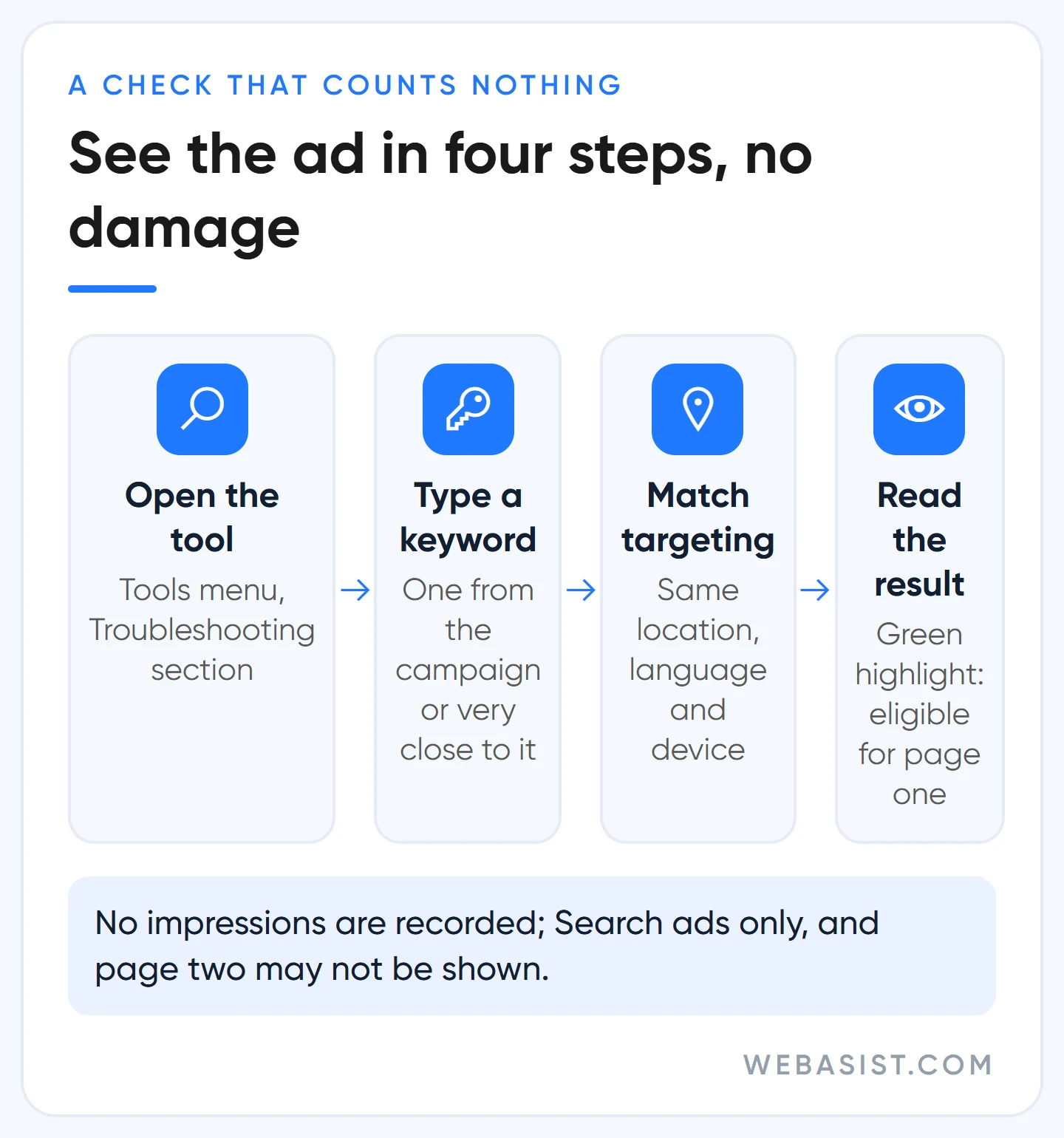
Know the tool's limits before you draw conclusions. It only finds Search Network ads and shows nothing from the Display Network. It may not show ads eligible for the second page, and every result is a snapshot of a single auction. If it says "keyword not in account" while the keyword is active, that can be a temporary glitch in the tool; check real impression data in the account instead.
If the result is "Reason unknown", two possibilities stand out: you recently changed the bid strategy and the campaign is still calibrating, or the keyword has so little search history that the simulation never triggers. If the Quality Score column is empty for that keyword, it is the second. Both are common in new accounts, which is why we never treat the tool's silence as proof on its own.
Diagnosis order: which symptom points to which cause?
If impressions really are zero, do not fiddle with every setting at once. In every account we take over we follow the same order: the causes with the heaviest consequences and the fastest checks first, auction settings last. When the answer at a step is "yes", stop there, fix that cause and wait at least a day. Change five things in one day and you will never learn which one worked.
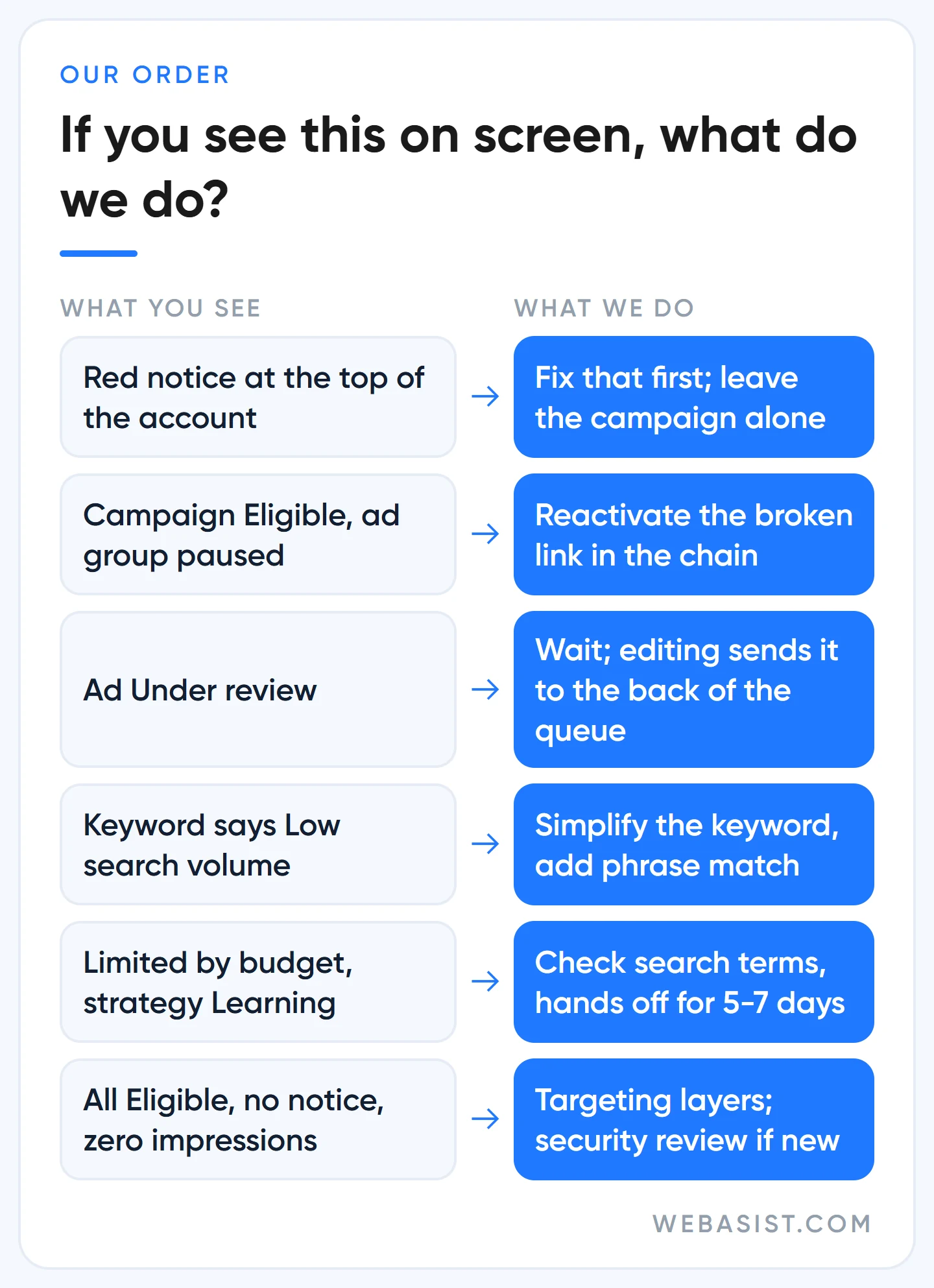
- Is there a red notice at the top of the account? Suspension, pause, a verification task, a declined payment. If so, leave the campaign alone; that is the cause.
- Are campaign, ad group, ad and keyword all "Eligible" at the same time? If one link in the chain is paused, nothing runs even though the campaign looks green.
- Is the ad "Under review" or "Disapproved"? If in review, wait; if disapproved, fix it.
- Do keywords say "Low search volume", or does a negative list block your main keyword?
- Is the campaign "Limited by budget", or the bid strategy "Learning" or "Limited"?
- If all of that is clean, look at the targeting layers: location, ad schedule, device, audience.
The diagnostics panel on a campaign's Overview page and the Recommendations cards such as "Campaign not started", "No ads approved" and "Account budget depleted" do part of this sequence for you. Look at them, then verify each item yourself; the panel does not know your business, you do.
Google Ads approved but no impressions: the four most common causes and fixes
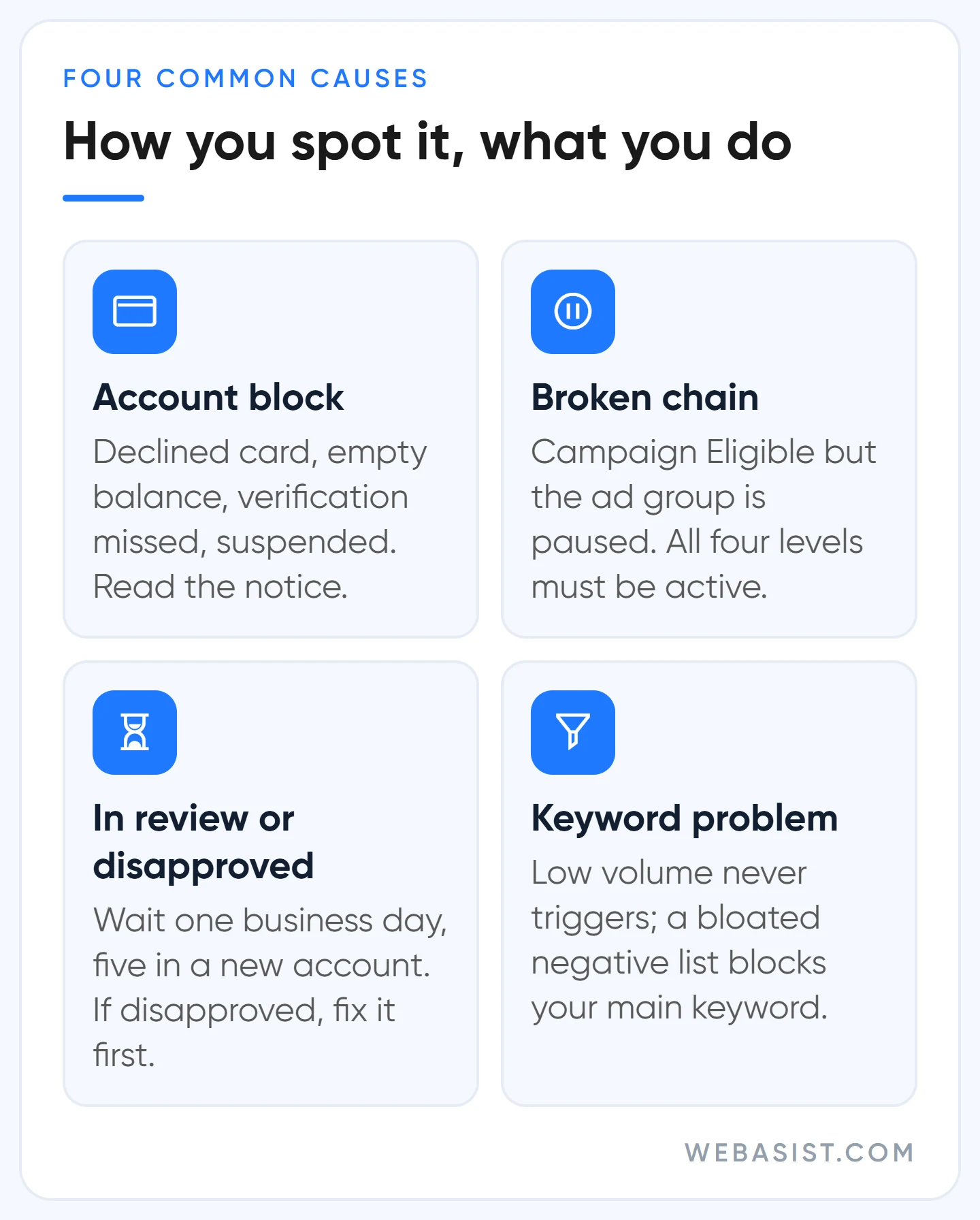
1. A block on the account: payment, verification, suspension
If other campaigns in the account are running, skip this section. If none are, this is the first place to look. An account without billing details serves no ads; a declined card payment or an unpaid balance stops the whole account; when a prepaid balance runs out, ad groups turn "Not eligible".
On monthly invoicing, everything stops once the account budget is used up. The Transactions list on the Billing page shows all of this; the card's limit and expiry date are the details people miss most often. The payment side is covered in our Google Ads billing guide.
If advertiser verification was requested and the 30-day deadline passed, the account is paused; a paused account still shows reports but serves not a single ad. Documents and rejection reasons are in our advertiser verification article. If the account is suspended, there is no point touching budgets or bids; the path is in our account suspended guide.
2. A broken link in the chain
For an ad to run, campaign, ad group, ad and keyword must all be active. A campaign showing "Eligible" while the ad group is paused is the second most common cause we see in accounts we take over. A campaign that says "Pending" has a start date in the future; "Ended" means the end date has passed; an ad group marked "Incomplete" has no ad or keyword in it. Hover over the campaign status and Google shows what percentage of the ads are eligible to serve; if that is low, the problem is at ad or asset level.
There is also a quiet link: keywords with no impressions in the last 13 months are paused by Google automatically and flagged as low activity. When you reopen an old campaign, half the keywords can be inactive for this reason.
3. The ad is in review or disapproved
Every new or edited ad goes into review. Most ads clear it within one business day; for new accounts and for image and video formats the review can take up to 5 business days. Editing an ad in review sends it to the back of the queue, so leave an ad marked "Under review" alone. If you see "Disapproved", hover over the status to read the reason; the five most common disapprovals and the fix-or-appeal decision are in our ad disapproved article.
Behind the "approved but not running" complaint there is usually no policy issue at all, just one of the other causes in this article. The "Eligible (limited)" label means the ad is live but restricted in some places; most of the time there is nothing to do.
4. Keywords: no search volume, or a negative conflict
A keyword marked "Low search volume" does not trigger ads. Google decides this from worldwide searches over the last twelve months and rechecks weekly; raising the bid or improving the ad changes nothing.
If the keyword is too long, simplify it: "emergency locksmith open weekends Kadikoy" becomes "Kadikoy locksmith". A small campaign built only from such keywords never runs. If you are launching a new brand name, waiting is an option; in the meantime we keep the campaign alive on a generic service keyword.
The opposite mistake is sneakier: negative lists that keep growing. A "free" negative added years ago also blocks buyers searching "free shipping"; a "service" negative silences a boiler service campaign. Compare shared lists against your main keywords one by one; how to do it is in our negative keywords article. If the same keyword sits in two campaigns, traffic goes to one and the other looks like it "gets no impressions"; that is not a fault, it is internal competition.
Budget, bids and Ad Rank: does your ad run out by noon?
If the campaign gets impressions but few, the problem is one of three settings: budget, bid strategy, Ad Rank. "Limited by budget" means Google is showing the ad less often so the budget stretches across the day. Next to it comes a "raise your budget" recommendation.
Google recommends it; when we see the suggested figure, we open the search terms report first. If money is going to irrelevant searches, a bigger budget only enlarges the waste; we add negatives first and discuss budget afterwards.
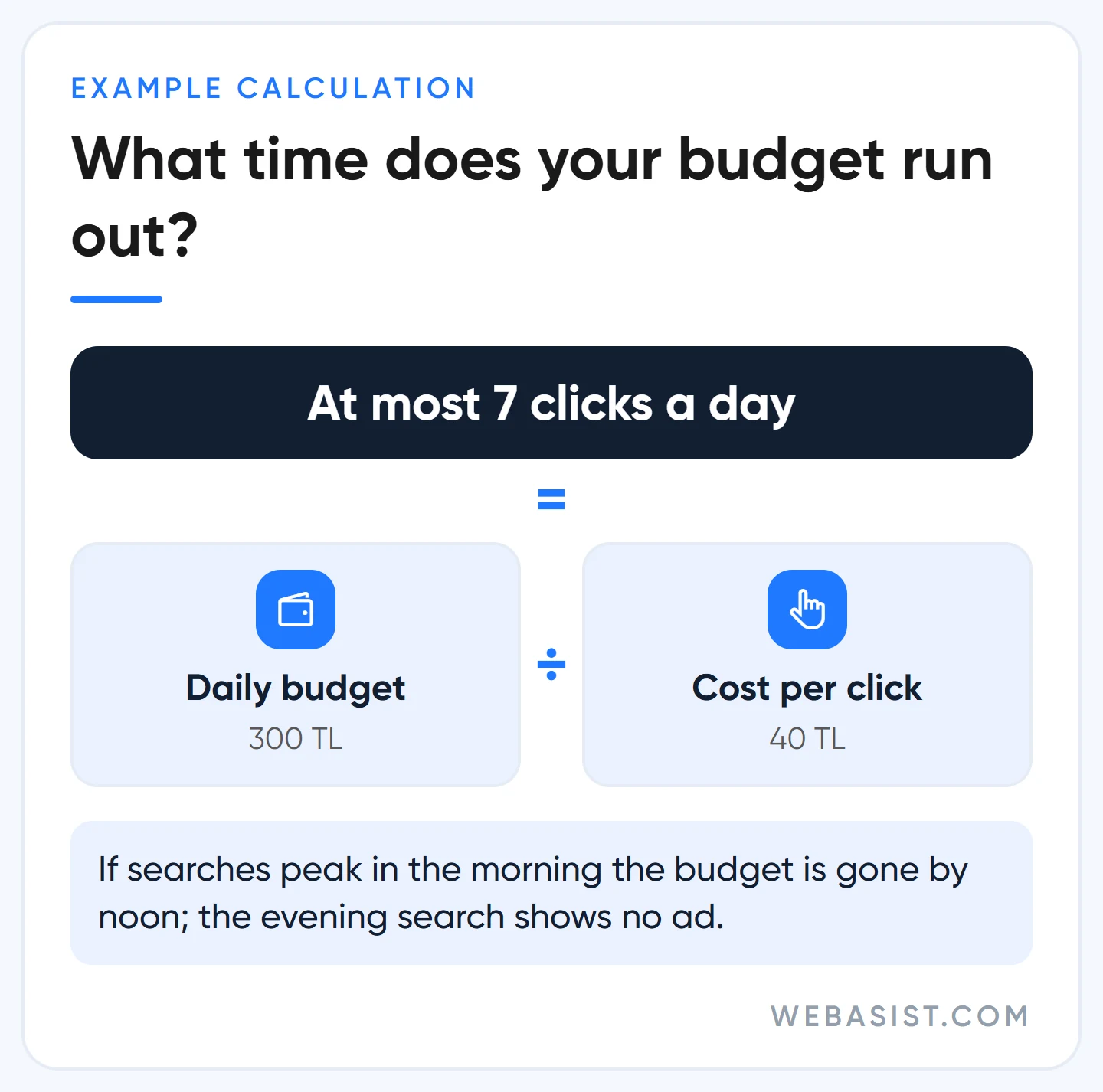
Example calculation: Say the daily budget is 300 TL and the cost per click is 40 TL. That campaign gets at most 7 clicks a day; if searches peak in the morning, the budget is gone by 11:00 and the owner searching in the evening says "my ad isn't showing". Raising the budget to 600 TL means 300 × 30.4 = 9,120 TL of extra spend a month. Before paying that, you need to know how many of those 40 TL clicks turn into customers; we work through it step by step in our budget planning article.
The bid strategy status can be a separate block. "Learning" means the strategy is new or has changed; Google says this usually takes 5 to 7 days and adds that calibration can take about 50 conversions or 3 conversion cycles. Changing budget and target every day during that period resets the learning. "Misconfigured" means a conversion-based strategy cannot find a conversion action; do not pick target CPA before setting up conversion tracking.
Setting target CPA to, say, 150 TL on a new campaign with no conversion history and then waiting for impressions is the most common silent mistake we see. The system simply skips auctions where it does not believe it can deliver a customer at that price, and the campaign goes invisible. We launch new campaigns on Maximize clicks or Maximize conversions and set a target once there is data. On the Ad Rank side, if you see "Rarely shown due to low Quality Score", fix the match between keyword, ad and page instead of chasing the score; we explain why in our Quality Score article.
Targeting too narrow? Google says "expand", we do not always agree
Every targeting layer cuts reach a little more; settings that each make sense on their own can, stacked together, bring the number of auctions a campaign can enter close to zero. Google's troubleshooting page always says the same thing here: widen location to "Presence or interest", add broad match keywords, switch audiences to Observation. All three do increase impressions. But impressions are not your goal; customers are.
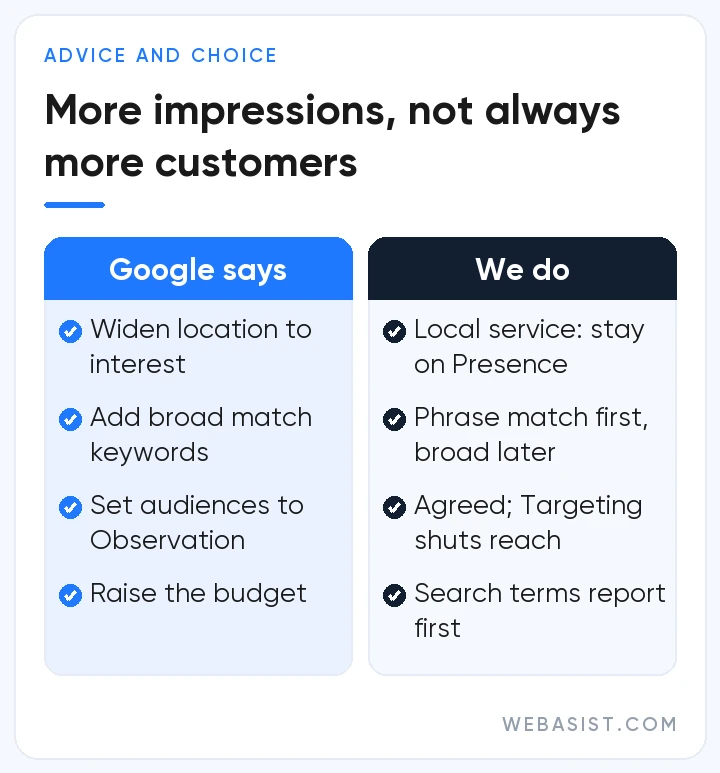
- Location: For a beauty salon that only serves Besiktas, switching on "interest" means paying for someone in Ankara searching "besiktas beauty salon". For local service businesses we stay on "Presence"; for e-commerce and tourism we widen it. A radius must be at least 1 km, and targeting a single neighbourhood or postcode shows the ad only now and then.
- Match type: A campaign using only exact match has limited reach, true. But in an account spending under 10,000 TL a month, switching on broad match sends part of that budget to irrelevant searches. We add phrase match first and move to broad match only once the negative list has settled.
- Schedule and device: Showing the ad only between 09:00 and 18:00 loses the customer searching from their phone in the evening. A device with a 100% bid reduction gets no ads at all; in a mobile-heavy business, forgetting that setting silences the whole campaign.
- Audience: If you add an audience to a Search campaign with "Targeting", only people on that list see the ad; if the list is small, the campaign does not run at all. Add it with "Observation".
- Language: From September 2026 the campaign-level language setting is being removed from Search campaigns; ads match on the language they are written in. Instead of fiddling with the old setting, match the language of your ad and page to the language your customers search in.
How to build the campaign with the right settings from scratch, location setting included, is covered screen by screen in our Search campaign setup guide.
New Google Ads account not getting impressions: what is normal in the first weeks, what is not?
If your new account is not getting impressions, every week spent waiting is a week of lost sales. What we see in practice is this: half the time the cause really is Google being cautious with a new account, the other half it is a mistake made during the initial setup. Do not start waiting until you have separated the two. The diagnosis order above applies to new accounts too; here we add only what is specific to them.
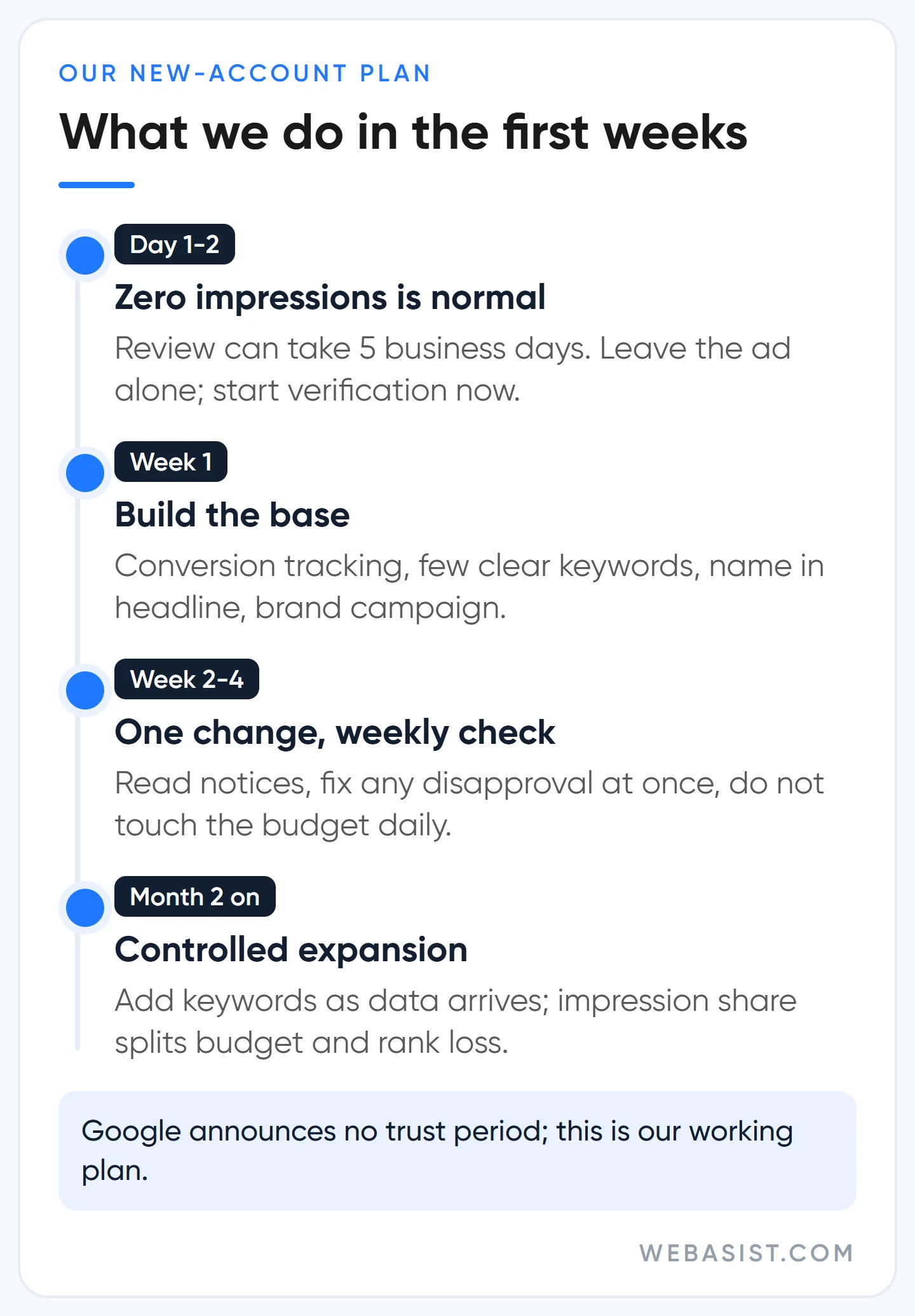
Zero impressions in the first two days is normal: review can take up to 5 business days in a new account, and automated bidding is erratic in the first days. What is not normal is sitting at zero or a few dozen impressions for days after review has finished and ads show "Eligible". In that picture, one of three new-account mechanisms is at work:
- Security review: Google reviews accounts with no policy history without showing any notice; the campaign may not run at all or may run under a temporary daily spend limit. The process cannot be sped up, and the limit lifts on its own once the checks finish. What you can do is keep the signals clean: only real team members as admins in Access and security, your team's email domain added to the allowed domains, any requested verification completed, first payments going through without a hitch.
- Advertiser verification: Do not wait for it, start it yourself. An unverified account can be under ad serving limits, and completing verification can lift them. Review takes up to 5 business days, rarely stretching to 30.
- Limited ad serving: Ads approved, a policy notice at the top of the account, and feeble impressions. This is not an ad problem but an account maturity and brand clarity problem; the way out is in our limited ad serving guide.
Here is what we do in a new account during this period. Week one: start verification, set up conversion tracking, launch with a small number of keywords directly tied to the business and the business name visible in the headline; open a small brand campaign, because that is the ad with the clearest identity. First month: one change at a time, a weekly check of notifications, disapproved ads fixed without delay. From the second month: add keywords and campaigns as data comes in, and use impression share columns to separate budget loss from rank loss.
What you do not do matters more. Opening a second account to get around a limit falls under Google's circumventing systems policy and ends with accounts suspended; a new account starts with the same zero history, so it resets the problem rather than solving it.
Raising the budget blindly changes nothing when budget is not the cause. Pausing the campaign entirely to wait builds no positive history for the account. Do not pay anyone selling "account warming" or "guaranteed activation"; no such method exists.
When is this article not enough?
In four situations, do not waste time here. If there is a suspension notice at the top of the account, every ad has stopped and the issue is the appeal. If the ad row says "Disapproved", the issue is policy and the fix.
If there is a limited ad serving notice at the top of the account, the issue is verification and brand identity. If you use a Smart campaign, you cannot see most of the status columns described here; you first need to switch to Expert Mode and move to a Search campaign.
There is also one area this article does not cover: Performance Max and Display Network campaigns. The preview tool does not work for them and their serving logic is different. If you want to score the overall health of the account, our account audit checklist is the better starting point.
Frequently Asked Questions
Google Ads approved but not running, why?
Approval is only the policy gate, not a promise of impressions. The ad group may be paused, the keywords low volume, the budget gone by noon or the target CPA far too low. Work through the six-step order above; in most accounts the cause turns up at step two or step five.
My Google Ads are not showing but still spending money, is that normal?
Yes, it is the most common situation we see. The ad is live and getting clicks; you cannot see it in your own search because you are outside the target area, the budget ran out at that hour, or you searched repeatedly without clicking and the system stopped showing it to you. Check with the Ad Preview tool and look at the search terms report to see where the money goes.
When do ads start running in a new Google Ads account?
Most ads clear review within one business day; in new accounts it can stretch to 5 business days. If impressions are still zero after that, look at the silent security review, incomplete verification and limited ad serving.
Should I delete keywords marked low search volume?
Not necessarily; leaving them in does no harm, and they reactivate on their own if volume appears at the weekly check. But if the campaign consists only of them, you get no impressions. Simplifying the keyword or moving to phrase match works better than deleting.
Will raising the budget make my ad show?
Only if the campaign is "Limited by budget" and the lost impression share comes from budget. If the ad is disapproved, the keywords have no volume or the bid is below the threshold, a bigger budget just makes the same problem more expensive.
What should you do today?
Set the date range to "Today" and look at the Impressions column, then try your main keyword in the Ad Preview tool with the district and device you target. If the column is zero, go through the six steps in order and stop at the first cause you find. If it is not zero, your ad is working; today's job is not to search for it but to read where the money goes in the search terms report.
If you reach the end of the six steps without a cause, give us read-only access to the account; we will find the setting that is cutting impressions and send you our first three findings in writing. If you hand the account over to us through our Google Ads packages, this diagnosis routine runs through our hands every week. Write to us with the campaign name and a screenshot.














