


Google Ads Ad Disapproved? What Eligible (Limited) Means and What to Do

When Google Ads says your ad is disapproved, it is not running anywhere, and the reason is in the Status column, on the card that opens when you hover over "Disapproved". The good news: most disapprovals we see in client accounts lift with a ten-minute fix. An exclamation mark or capitals in a headline, a phone number typed into the ad text, a page that does not load, a phone number Google cannot verify. Fix it, save it and the ad goes back into review on its own; an appeal is only needed when the decision is wrong.
"Eligible (limited)" is something else: the ad is running but not shown in some countries, on some devices or to some age groups, and usually there is nothing for you to do. If the campaign row says "Limited by budget", the issue is money, not policy. Below we separate all three by what they mean for your ad and what you should do.
What does the account say? Read the right row first
Misdiagnosis wastes more time than anything else with approval issues. The same word "limited" means a policy restriction on an ad row, budget on a campaign row and low volume on a keyword row. So the first job is to check which level the label sits on.
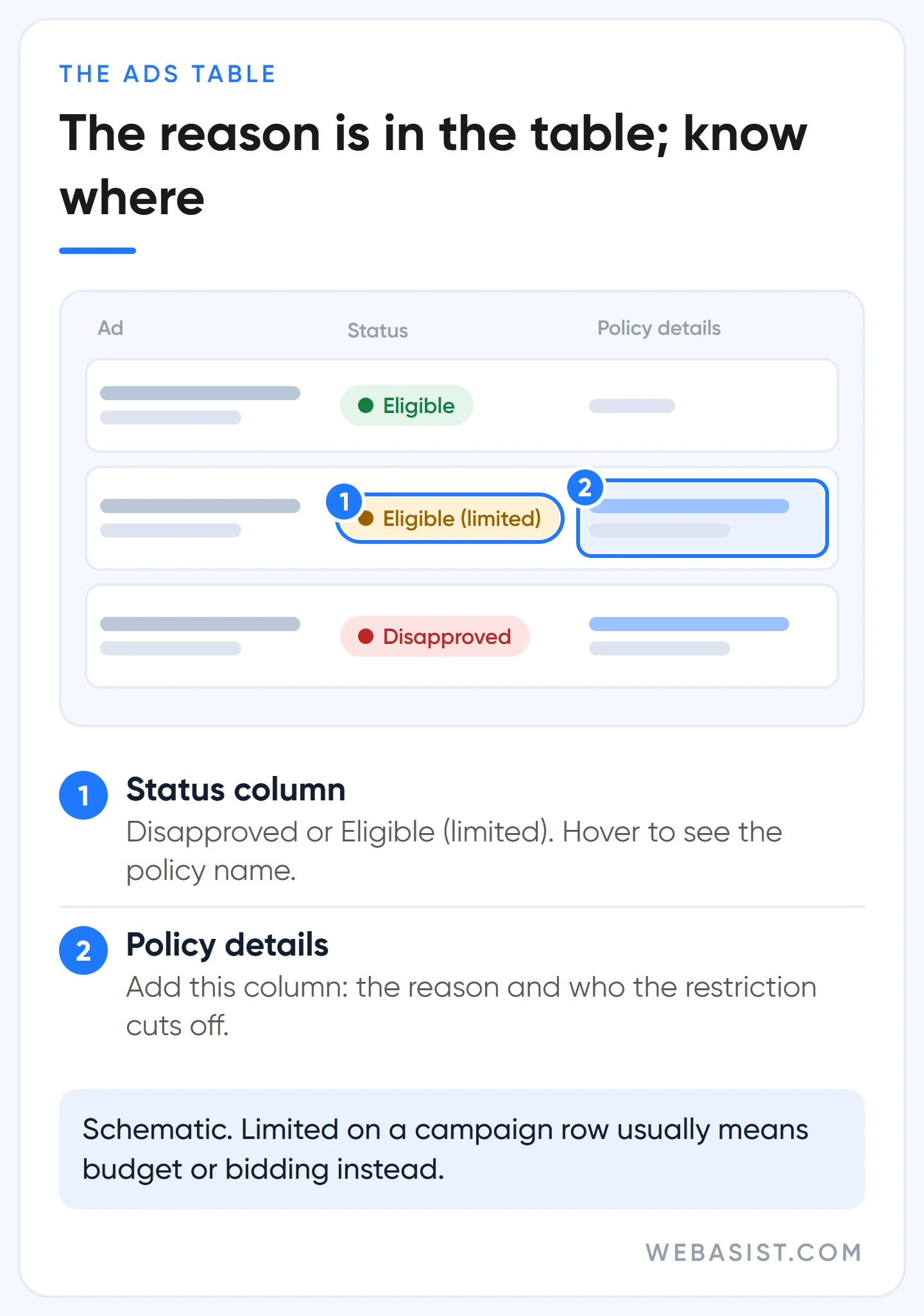
To read the ad-level reason in full, add the "Policy details" column to the Ads table; it sits under Attributes in the Columns menu. That column tells you in one line which policy a disapproved ad hit and which audience a limited ad is restricted from. If you use Smart Mode, you need to switch to Expert Mode to see all the details. We switch this column on in every account we take over on day one; half the answer is usually sitting there.
If your ads say "Eligible" but get no impressions, this is not the right article. If there is a limited ad serving notice at the top of the account, go to our limited ad serving guide; if there is no notice either, follow the diagnosis order in our ads not showing article.
Why was my ad disapproved? The five most common reasons and their fixes
Google Ads has hundreds of policies, but in small business accounts most disapprovals cluster in five places. When we see a disapproval, we check in this order:
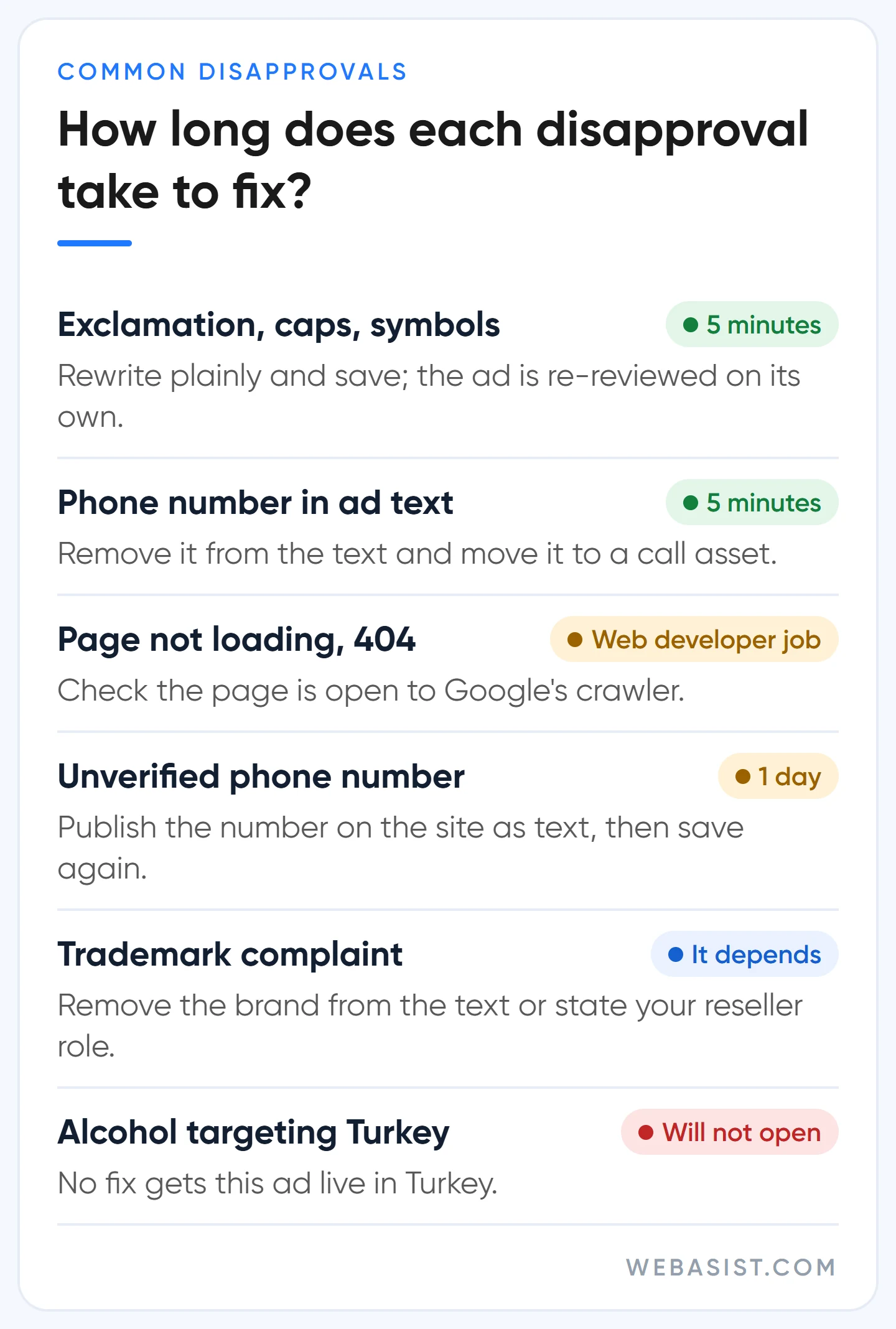
- Text style (Editorial policy). "Deal!!!", "HUGE SALE", dots between letters, numbers or symbols in place of letters. A phone number written into the ad text also lands here; the number belongs in a call asset. The fix takes five minutes: write the text plainly and save.
- The landing page. The page does not load or returns an error such as 404, 403 or 500 to Google's crawler; the display URL and final URL are on different domains; a tracking template sends people somewhere else. The sneakiest one is a security plugin or country block that shuts Google out: the page opens fine on your phone, but the crawler cannot reach it. Check server responses with your web developer; for the page itself, see our landing page guide.
- Unverified phone number. If the number in a call asset cannot be found on the site as text, the asset is disapproved. A number inside an image does not count. Details are in the FAQ below.
- Trademarks. If a brand owner complained, that brand is restricted in your ad text; this policy does not stop you using it as a keyword. If you are a reseller or parts supplier, state your role clearly in the ad and on the page. The full rules are in our competitor brand bidding article.
- Restricted industry. Healthcare and medicines, alcohol, gambling, financial services, crypto. Here the disapproval usually comes from missing certification or verification, not the text.
For Turkey, three rules are worth knowing before you spend time on fixes. Alcohol ads cannot target Turkey; no rewording will get them approved. For online gambling in Turkey, only lotteries and sports betting by a licensed operator are allowed, with a Google certification. Ads for financial services such as loans or investments need a separate financial services verification in Turkey; we cover that process briefly in our advertiser verification article.
For copy that complies and still gets clicks, see our ad copy article. Our own rule is simple: no exclamation marks in headlines and capitals only at the start of words; one exclamation mark is not worth a whole ad group dropping out for a day.
Fix it or appeal it?
If the decision is right, fix the ad; if it is wrong, appeal. It sounds obvious, but the mistake we see most in accounts is appealing without fixing anything. Each ad is limited to 3 appeals; if all three fail, you cannot appeal that ad again until you contact customer support. Every wasted appeal is one you will not have on the day you are actually right.
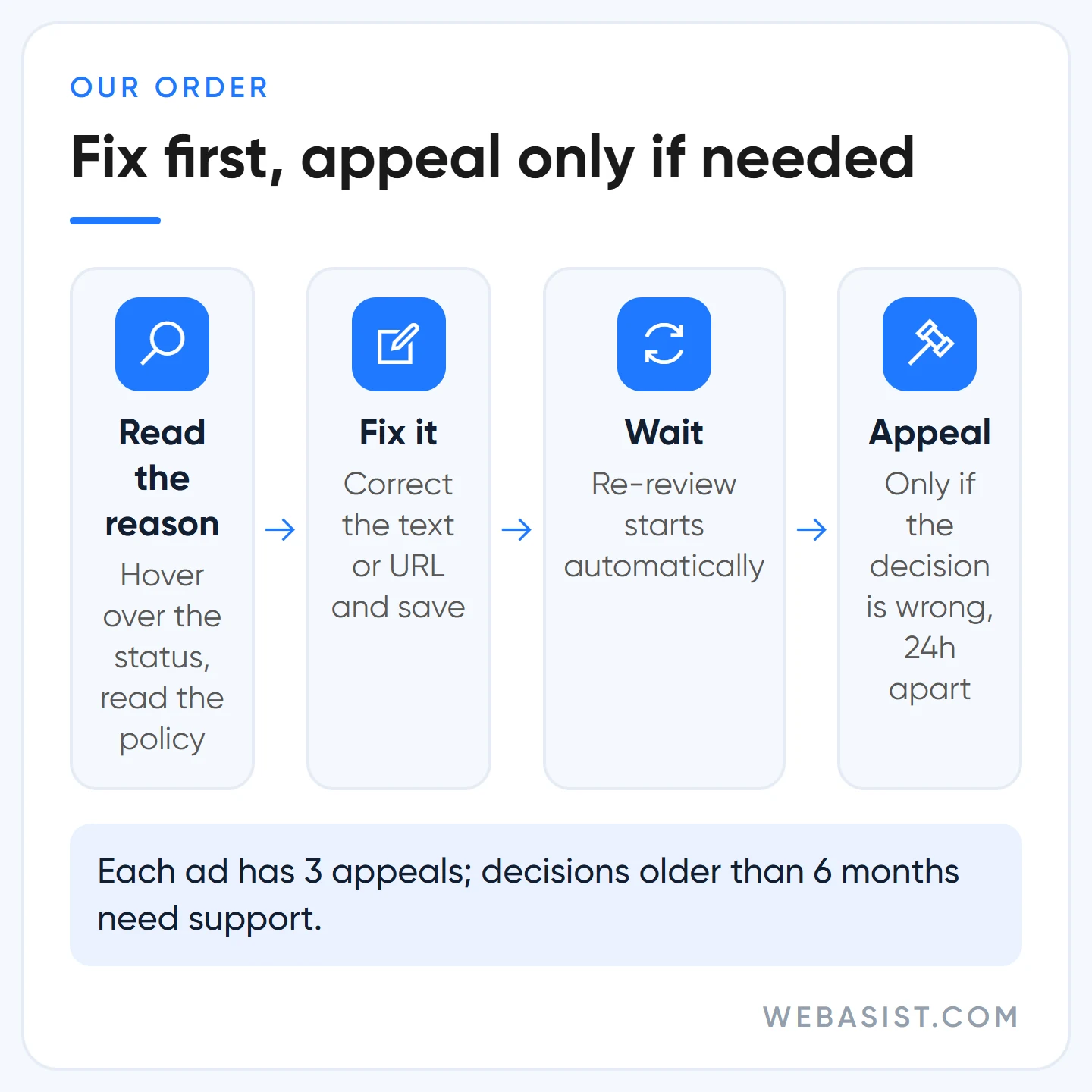
- Fixing: hover over the ad, choose Edit, correct the text or final URL and save. The ad is reviewed again automatically; you do not need to submit anything else.
- Appealing: open Tools > Troubleshooting > Policy manager and choose Appeal next to the ad. There are two reasons: "Dispute decision" if you think the decision is wrong, "Made changes to comply with policy" if you fixed it.
Wait at least 24 hours between two appeals for the same ad or campaign, or the second one is marked as a duplicate. Since 21 July 2026, decisions older than 6 months cannot be appealed from inside the account; for those, contact Google Ads support. If you fixed the ad and the appeal still fails or comes back as a duplicate, do not repeat it: make a small edit to the text or final URL and save, and the system recrawls the page.
One thing not to do: delete the disapproved ad and upload the same thing as a new ad. If the content has not changed, the new ad is rejected for the same reason. Doing it repeatedly to dodge enforcement can count as circumventing systems through ad content changes; it is the fastest way to turn an approval issue into an account issue.
When will my ad go live? Review times
Most ads clear review within one business day. Standard review for Demand Gen campaigns can take 3 to 5 business days, and some complex formats up to 7 business days. If an ad has said "Under review" for more than 2 full business days, check its status; if it is past a week, contact support.
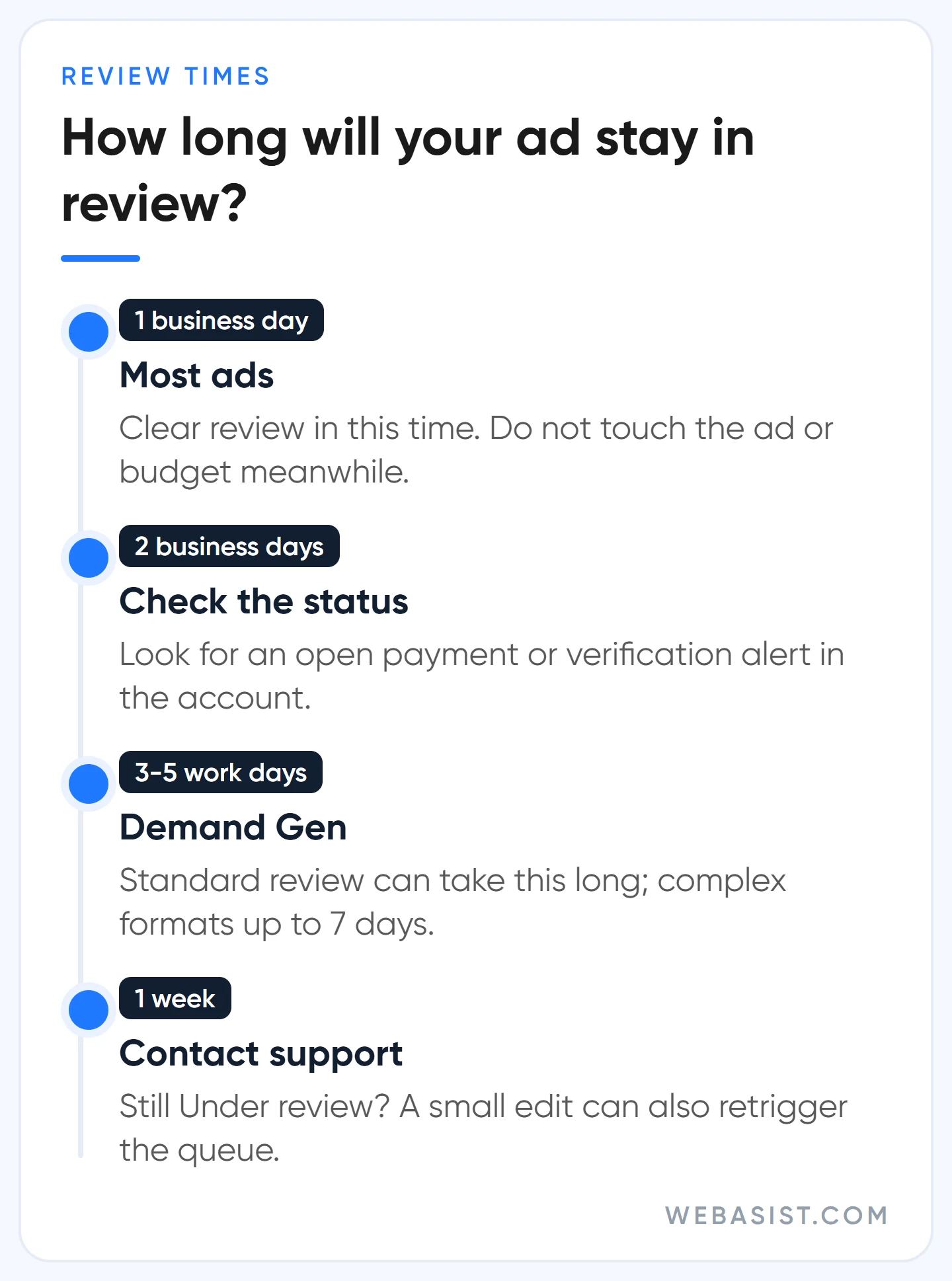
While review is running, do not touch the ad, the budget or the bid strategy; every change sends it back to the start of the queue. In a new account, an ad stuck in review is often not a policy problem but an open payment or verification step; check the alerts at the top of the account. If 7 full business days pass with no change, a small edit can retrigger the queue.
If a campaign has to go live on a set date (a holiday sale, an opening, a trade fair), upload the ads a few days earlier and leave them paused; paused ads are reviewed too. On launch day you only switch the campaign on. A new landing page also has to be ready at the time of review. We upload launch ads at least three business days early, so a disapproval still leaves time to fix it.
What does Eligible (limited) mean in Google Ads? What it means for your ad
"Eligible (limited)" says the ad complies with policy but where and to whom it can be shown is restricted. The restriction comes from four directions: the user's location, device, age and your eligibility to advertise that restricted product (certification). The ad was not rejected and it is live; it just does not show everywhere.
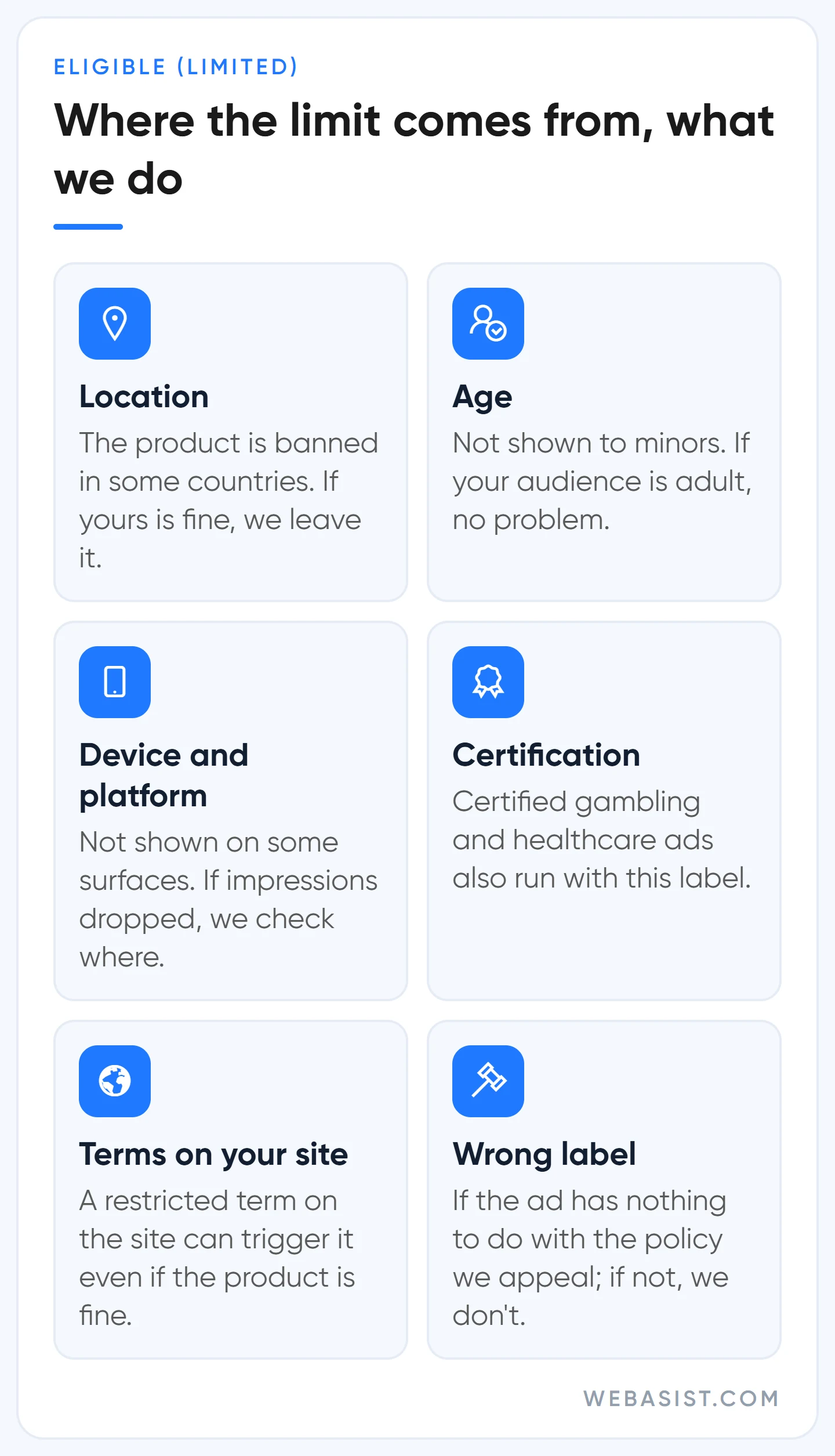
The detail people miss: even if your product complies, the label can appear because your site mentions terms linked to a regulated industry. Example scenario: a boutique hotel in Bodrum only sells rooms in its ads, but the restaurant menu on its site lists rakı and wine; the ad may show as "Eligible (limited)". If impressions to the adult tourists it targets are unaffected, there is nothing to do. If impressions dropped clearly, pointing the ad at the room page, which has no menu, is worth trying.
When we see this label we ask one question: does the restriction cut off the audience we are targeting? If not, we leave it; a certified gambling or healthcare advertiser's ads run with this label even when everything is right. If it does, and the label was applied wrongly, for example a non-medical ad tagged with the healthcare policy, we appeal. If the label is correct, an appeal changes nothing; the restriction comes from the policy itself.
"Eligible (limited all locations)" is a step heavier: the restriction and your location settings overlap and there is no serving in any of the places you target. An alcohol ad targeting Turkey is the textbook case. You have two options: make the ad meet that location's rules or change the location targeting. For assets, the same thing appears as "Approved (limited)"; the logic is identical.
What do Limited by budget and a limited bid strategy mean?
"Eligible (limited)" on a campaign row usually has nothing to do with policy: the campaign is active but only shows ads now and then because of budget or the bid strategy. Hover over the status and it tells you which.
Limited by budget
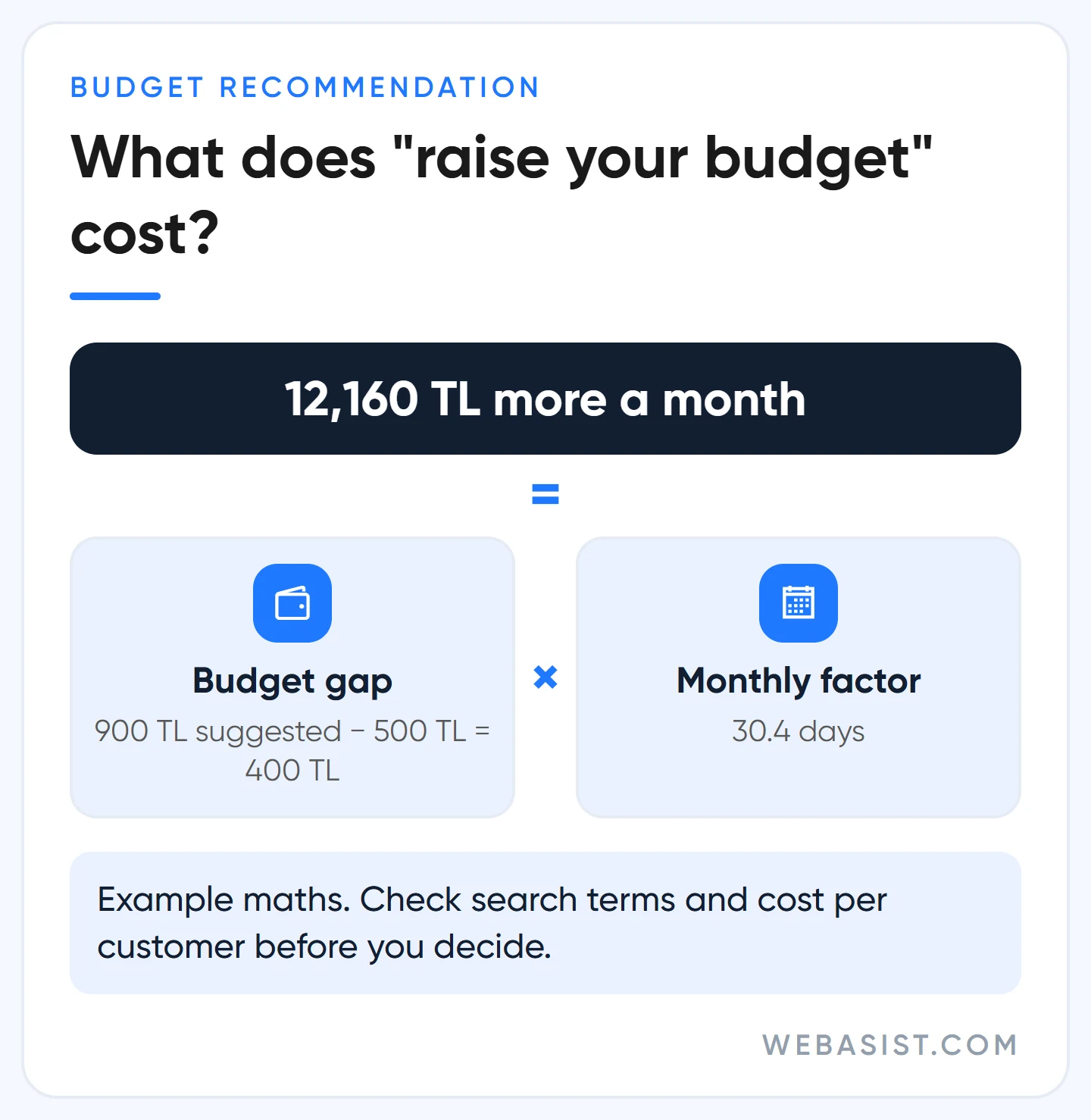
Your daily budget is not enough to cover all the impressions and clicks available with your current settings, so Google shows the ad less often to keep the budget from running out early. A recommended budget appears next to it. Google recommends it; raising the budget does not always suit you.
Example: say your daily budget is 500 TL and the recommendation is 900 TL. Today you can spend at most 500 × 30.4 = 15,200 TL a month; accept the recommendation and the ceiling becomes 900 × 30.4 = 27,360 TL, 12,160 TL more a month. Before approving that difference we check two things: is money going to irrelevant searches in the search terms report, and is today's cost per customer below target? If both answers are healthy, we raise it. If not, we clean up negative keywords and targeting first; adding budget to a broken campaign only makes the loss bigger. We do the maths step by step in our Google Ads budget planning article.
Another cause is bid adjustments: if you raised bids for a district, device or audience, the ad enters more auctions and the budget cannot keep up. Either raise the budget or pull the adjustment back.
Bid strategy status: Limited
If your automated bid strategy says "Limited", one of four reasons applies; hover to see which:
- Inventory: there is not enough search volume. Here Google suggests adding broad match and dynamic ads. In a small account with a handful of conversions a month we do not do that; broad match moves money to irrelevant searches. We add close phrase and exact match keywords first.
- Bid limits: a maximum or minimum bid limit you set is holding the strategy back. Remember why you set it; if it was deliberate, keep it.
- Budget constrained: most keywords using the strategy are limited by budget. The budget maths above applies here too.
- Limited by bid strategy: Google thinks a fully automated strategy would get you more conversions. This is a recommendation, not an error; it usually appears when target CPA is set very low or target ROAS very high.
Which strategy makes sense in which account is compared in our bidding strategies guide.
When not to bother: cases where fixes do not help
In some cases neither a fix nor an appeal changes the outcome; separate these out early so your effort goes where it counts.
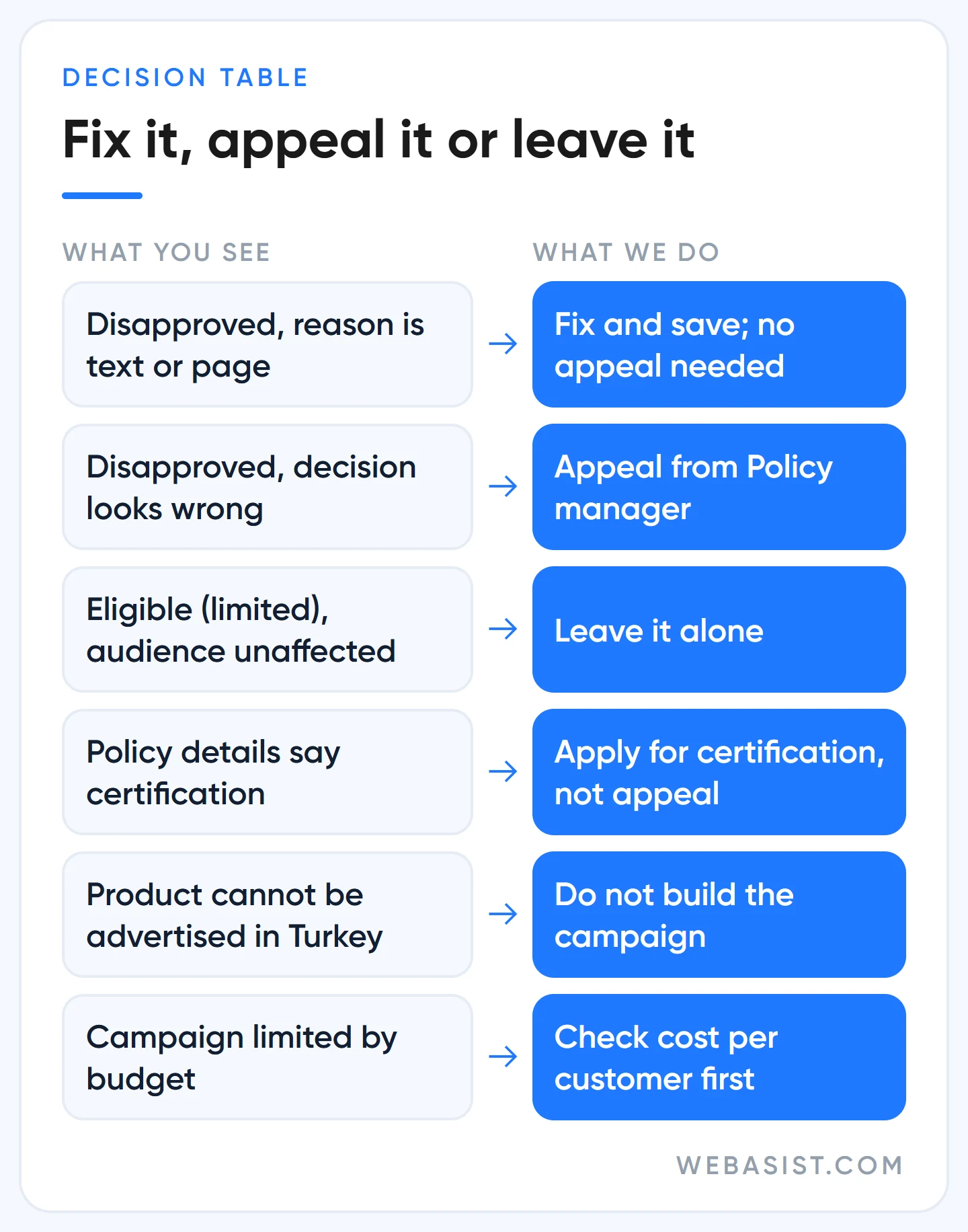
- The product cannot be advertised in Turkey. Alcohol or casino games, for example. Do not build the campaign at all; it wastes money and time.
- Certification is required. If the policy details say certification is needed, the answer is a certification application, not an appeal.
- The account is suspended. All ads stop and individual ad appeals become pointless; the route is in our account suspended guide.
- The label is correct and does not cut off your audience. "Eligible (limited)" is not an error; leave it.
Do not leave ads you cannot fix in the account; remove them. A disapproval on its own does not close an account, but repeatedly violating the same policy can lead to a warning and then a suspension. For egregious violations there is no warning.
Frequently Asked Questions
If my ad is Eligible (limited), is it running?
Yes. The ad is approved and live; it just does not show in some locations, on some devices or to some age groups. The Policy details column tells you which restriction applies.
Google Ads says Limited by budget. Do I have to raise the budget?
No. A campaign limited by budget can still hit your goals. If your cost per customer is below target, raising it makes sense; if not, cut irrelevant searches first and narrow targeting if needed.
What does a limited bid strategy mean?
It is usually the "Limited" label in the bid strategy status: inventory, bid limits, budget or the choice of strategy. If the campaign became limited by budget after you raised a bid adjustment, pulling the adjustment back is also a fix.
My Google Ads call asset was disapproved. What should I do?
Most of the time the reason is "Unverified phone number". Show the number on your site, on the same domain as the ad, as text; a number inside an image does not count. Using the international format starting with +90 in the source code makes it easier for the crawler to find. If you use a system that swaps numbers per visitor, you can prove domain ownership by linking Search Console or adding the Google Ads tag to your site.
Will disapproved ads get my account closed?
Individual disapprovals do not close an account. The risk grows when the same policy is violated again and again: most policies give at least 7 days' warning before a suspension; egregious violations do not.
What to do today
Add the Policy details column to the Ads table and split every disapproved row into two groups: fix and appeal. Fix the first group today and save; use appeals only for rows where the decision is genuinely wrong, after the fixes are done.
If you are not sure how to split them, send us a screenshot of Policy manager; we will mark which rows need a fix and which need an appeal. If you want ongoing management, our Google Ads packages include ad copy written by us.
Sources
- Fix a disapproved ad or appeal a policy decision: fixes, appeal limits and the 6-month rule.
- Check the review status of an ad or asset: what each status means and review times.
- Eligible (limited): Definition: what the label means and how site terms affect it.
- Troubleshoot "Limited by budget": why the budget status appears.
- About bid strategy statuses: the four reasons behind "Limited".














