


Google Ads Account Suspended: First 24 Hours, Causes and How to Appeal
If you have just seen the Google Ads account suspended notice, every ad has stopped, nothing is being charged to your card and the account is mostly read-only. Two panic moves are what really drag the process out: opening a new account straight away, and calling the bank to pull back the last payment. Do neither.
There is one way out: read the reason in the notice, genuinely fix the account and the website, then send a single, complete appeal from inside the account. Google gives no timeline; in the client accounts we have handled, a well-prepared appeal has come back in anything from a few days to a few weeks. Nobody can guarantee the outcome, and we do not either; but we have seen many times that an appeal sent without fixing anything and an appeal sent with fixes and documents do not get the same treatment. Below: the first 24 hours, the four most common causes, why a second account makes things worse, and what goes into the appeal.
The first 24 hours: what to do, what not to do
Mistakes made in the first hours after the notice are the hardest to undo later. Our day-one order:
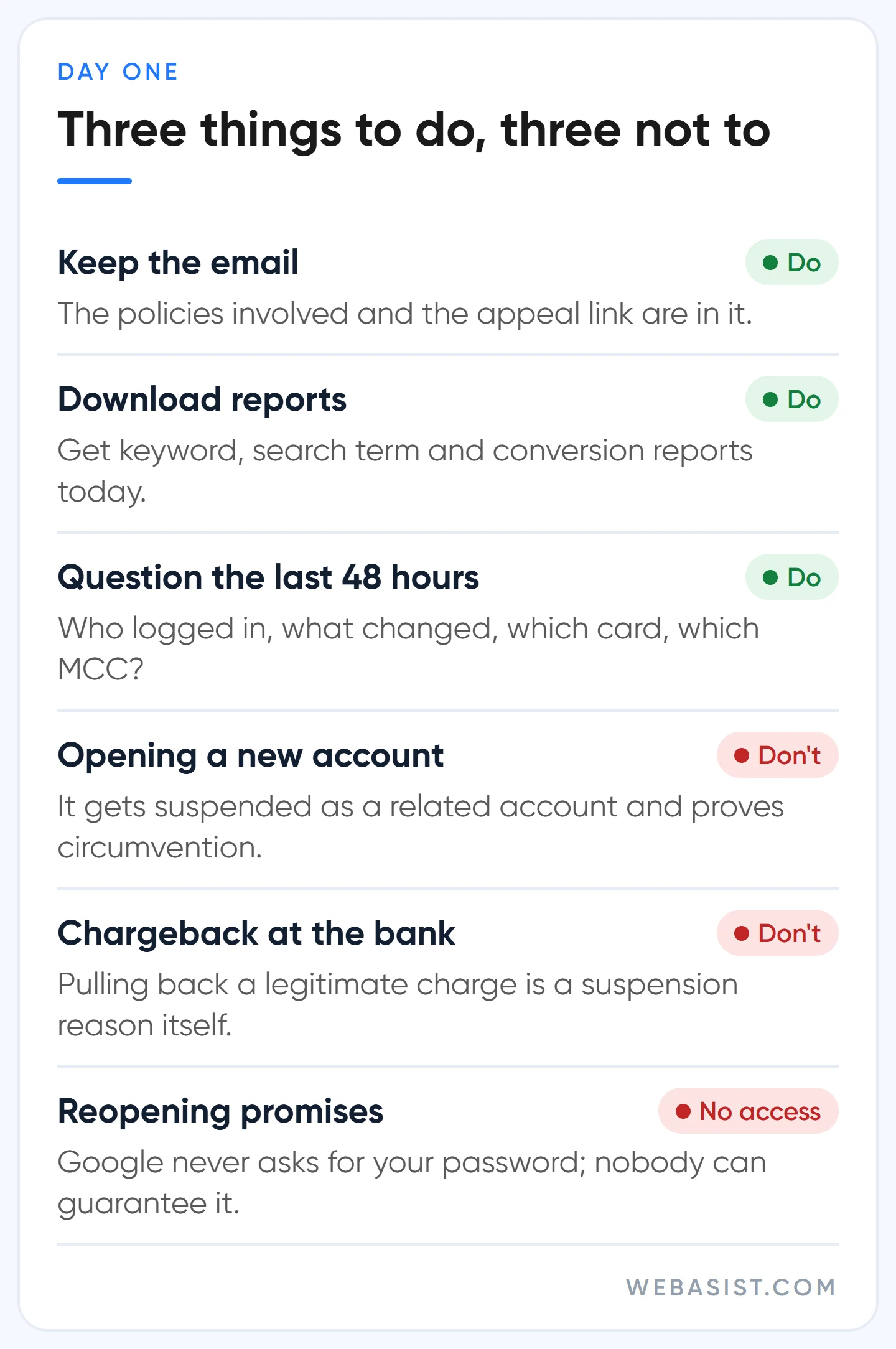
- Keep the email and the notice. The suspension email lists every policy involved and the appeal link; the appeal is built on that text.
- Download your reports. A suspended account can still be viewed and its reports downloaded, but access may close after a long time. Get keyword, search term and conversion reports today.
- Question the last 48 hours. Who logged in, which ad or page changed, which card was added, which manager account are you linked to? Half the appeal comes from these answers.
- Do not open a new account. We explain why below; in short, Google lists coming back with a new account after a suspension as an example of circumventing systems.
- Do not request a chargeback. Pulling back a legitimate Google Ads charge through the bank is a suspension reason on its own. If you dispute an invoice, the route is Google Ads billing support.
- Give no access to anyone promising "we'll get it reopened". Google only writes to you from google.com addresses and never asks for your password. People who promise a guaranteed reopening, ask for login details or sell "clean accounts" add a hijacking problem on top of the suspension.
Some actions stay open in a suspended account: submitting an appeal, completing advertiser verification, making a payment and adding a payment method, updating security settings, and cancelling the account to request a refund where eligible. Your hands are not tied; the order matters.
Suspended, paused or disapproved? What the screen says
Among the businesses that tell us "my ads stopped", a fair share are not actually suspended. What the screen says decides the route. If an ad row says "Disapproved", the issue is a single ad and the fix is in our ad disapproved article.
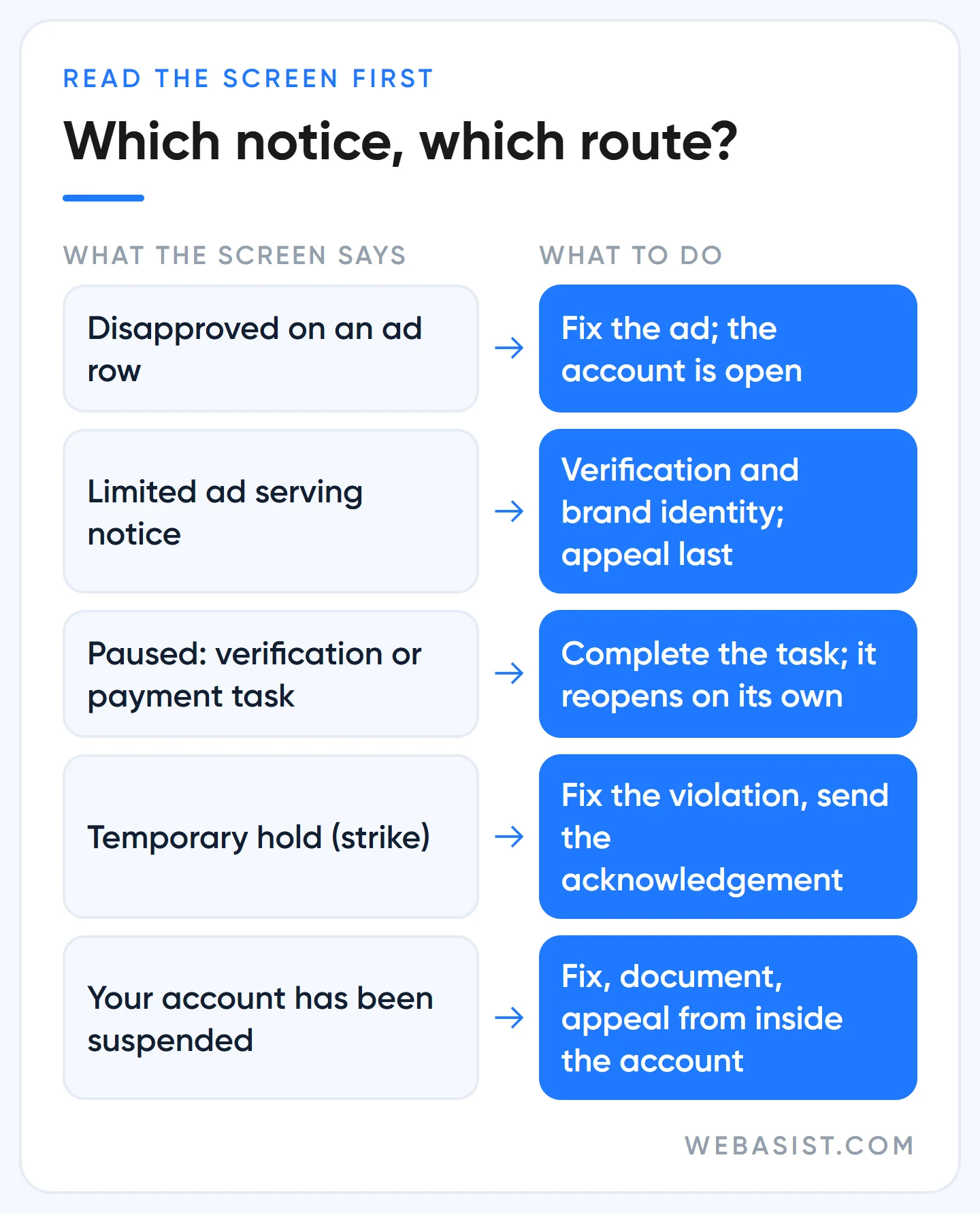
If there is a limited ad serving notice at the top of the account, the ads are approved but throttled; that is covered in our limited ad serving guide. If there is no notice at all and simply no impressions, go to the diagnosis order in our ads not showing article.
"Paused" is not a suspension but an unfinished task: advertiser verification past its 30 days, unanswered questions about payment history, or a link to a manager account that breaks the rules. Complete the task and the account reopens; the verification side is in our advertiser verification article. A "temporary hold" is the 3-day or 7-day penalty of the strike system, with its own section below.
"Suspended" is what this article is about: all ads stop, related accounts can be affected, and the account stays closed until you appeal and win.
Why does Google suspend an account? The four most common causes in SMB accounts
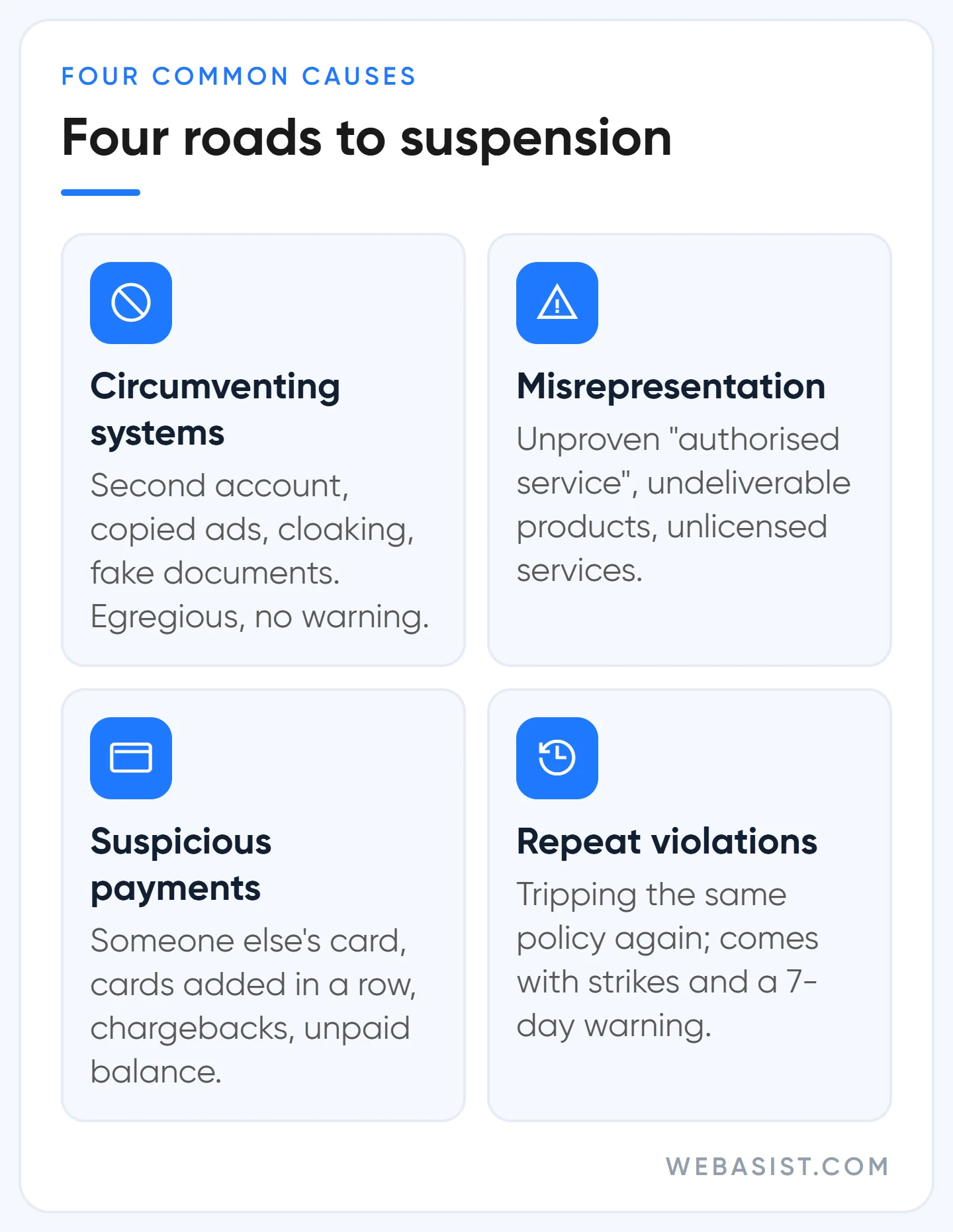
Google's suspension list is long, but the cases we see in small and mid-sized business accounts in Turkey fall under four headings. Each has a different mechanism and a different price.
1. Circumventing systems
Any move aimed at getting around Google's review process falls under this policy and counts as an egregious violation: opening a new account after a suspension, re-uploading a disapproved ad with small changes again and again, showing Google one page and visitors another (cloaking), submitting fake documents for verification. An ad disapproved for a typo or an exclamation mark does not fall under it. The sneakiest case is a hacked website: when a site is compromised and a redirect is injected, you appear to be cloaking without knowing it. If this policy is named in the notice, our first job is to check the site's source code and redirects.
2. Misrepresentation and unacceptable business practices
Appearing affiliated with a brand you have no relationship with, selling a product you cannot deliver, offering a licensed service without the licence, impersonating another business to take money or data.
The version we see most often, as an example scenario: an independent appliance repair shop in Umraniye. The ad headline says "Authorised Service", the site shows the manufacturer's logo, but there is no signed agreement with the brand. That listing leads to a suspension, either through the brand's complaint or Google's own scan.
The fix: remove "authorised" from the headline, add a notice on the site saying "we are an independent service, not affiliated with the brand", and remove the brand's logo. The limits of brand use in ads are in our competitor brand ads article; for the trademark law side ask your lawyer, we only talk about the advertising side.
3. Suspicious payments, chargebacks, unpaid balance
Someone else's card, several new cards added in quick succession, declined payments, a charge pulled back through the bank, and an unpaid balance. In this group Google may just cap spending instead of suspending. This is the group whose cost is easiest to calculate: as an example, a campaign spending 1,500 TL a day and bringing in 6,000 TL of revenue, stopped for ten days over a 2,000 TL unpaid balance, loses 60,000 TL of revenue. The cost of delaying a payment is always bigger than the payment itself.
4. Repeated violations
For some policies that are not egregious (clickbait, misleading ad design, unapproved substances, credit repair, personal loans and the like) Google does not suspend outright; it issues strikes. Accounts that leave disapproved ads sitting and violate the same policy again travel this road to suspension. In other non-egregious cases, a warning email arrives at least 7 days before the suspension; we have seen many clients find that email in their spam folder. Make sure someone on the team reads the policy email address every day.
The strike system: three steps before suspension
The strike system is the only mechanism that gives the account owner a chance to correct course, so it is worth knowing well.
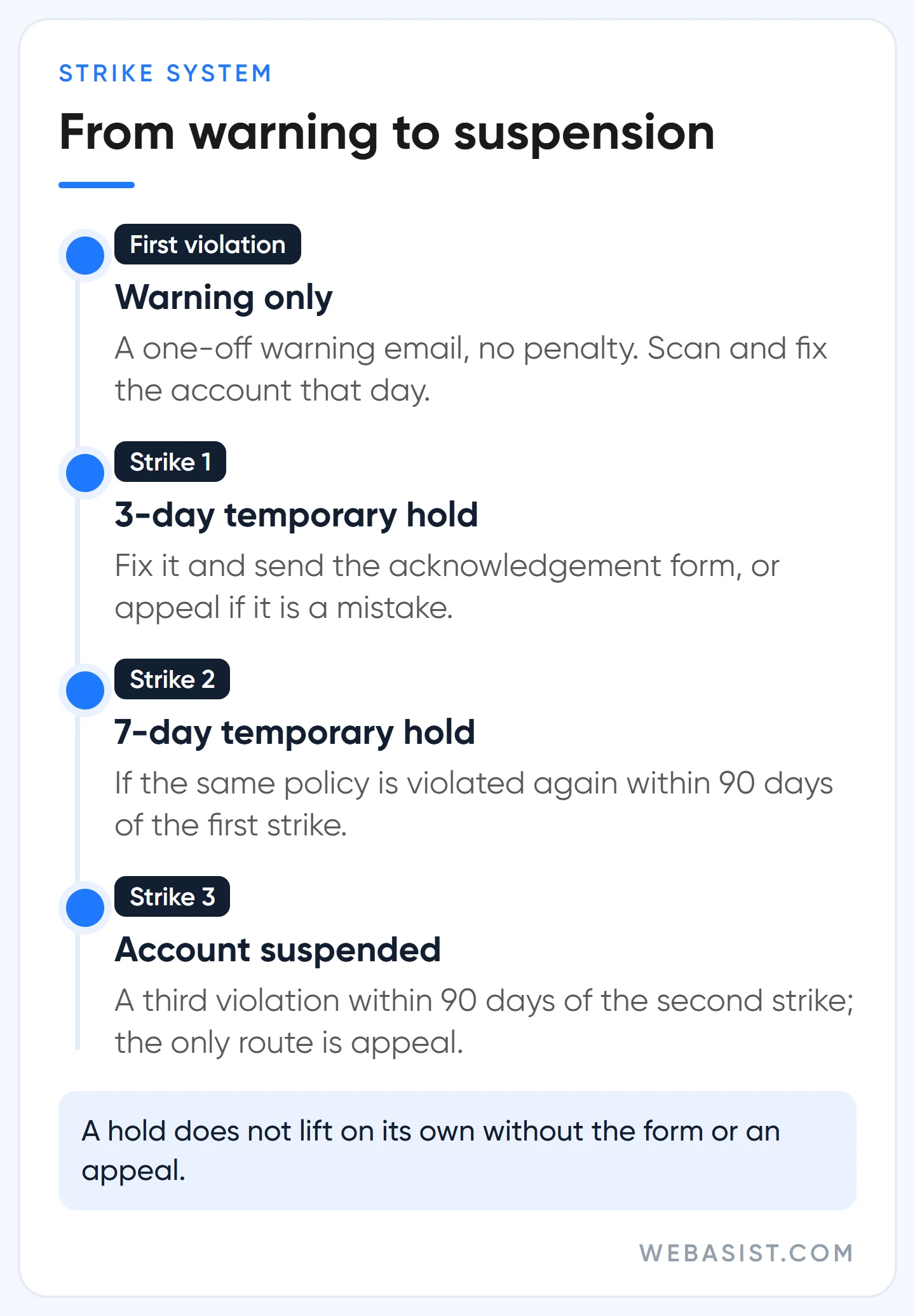
The first violation brings a single warning email, no penalty. If the same policy is violated again, the first strike: a 3-day temporary hold. Another violation within 90 days of the first strike brings the second strike: a 7-day hold. A third violation within 90 days of the second strike suspends the account.
On a temporary hold you have two options: fix the violation and submit the acknowledgement form, or appeal the strike if you believe it is a mistake. If you do neither, the hold does not lift on its own after 3 or 7 days; it continues. Uploading new policy-violating ads during a hold brings another strike.
Our rule: the day a warning email arrives, we scan and fix every ad in the account that could trip the same policy; never reaching the first strike is cheaper than dealing with a 3-day hold. For an account spending 1,500 TL a day, a 3-day hold means 4,500 TL of serving and those days' customers gone.
Why does opening a second account make things worse?
The first thing a suspended business owner thinks of is a new Gmail and a new account. Do not; here is the mechanism.
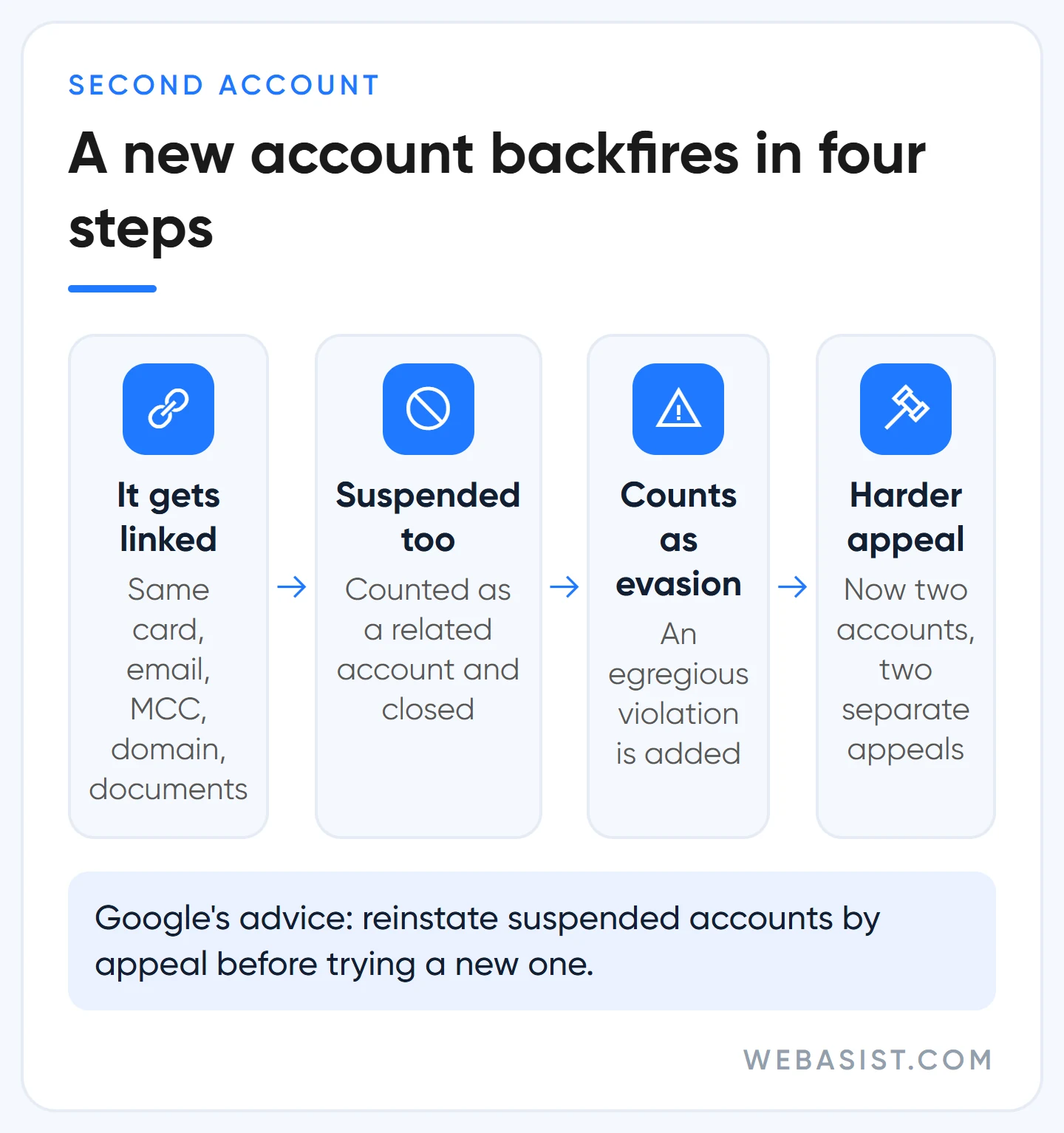
Google links accounts to each other through the same payment method, the same email and phone, the same manager account (MCC), the same domain and the same verification documents. The new account gets knotted to the old one through one of these links and is suspended too as a "related account". On top of that, whatever the reason for the first suspension, this move is added to your file as evidence of circumventing systems; now you have two accounts to appeal and an egregious violation.
Google's explicit advice is to get all suspended accounts reinstated through appeals before trying a new one; if more than one account is suspended, each needs its own appeal. An account suspended because another account verified with the same identity documents was suspended reopens automatically when that account's appeal succeeds. If you work with an agency, ask about the manager account too: accounts linked to an MCC that violates Google's third-party policy can be paused, and sometimes the fix is leaving that MCC. This is exactly where it matters whose name the account was opened in; our agency selection article explains why we ask this before signing a contract.
As for sellers of "clean" or "aged" accounts: what you buy is an account opened with someone else's history and someone else's identity. It closes the moment verification is requested, and it makes the appeal for your real account harder.
How to appeal a Google Ads suspension and what to write
You have at least 6 months from the suspension to appeal, so there is time to finish the fixes and send once, completely, instead of firing off a hasty incomplete appeal. Google may not process repeated appeals for the same suspension and holds certain appeals for 7 days when it suspects misuse of the appeal function. Our order:
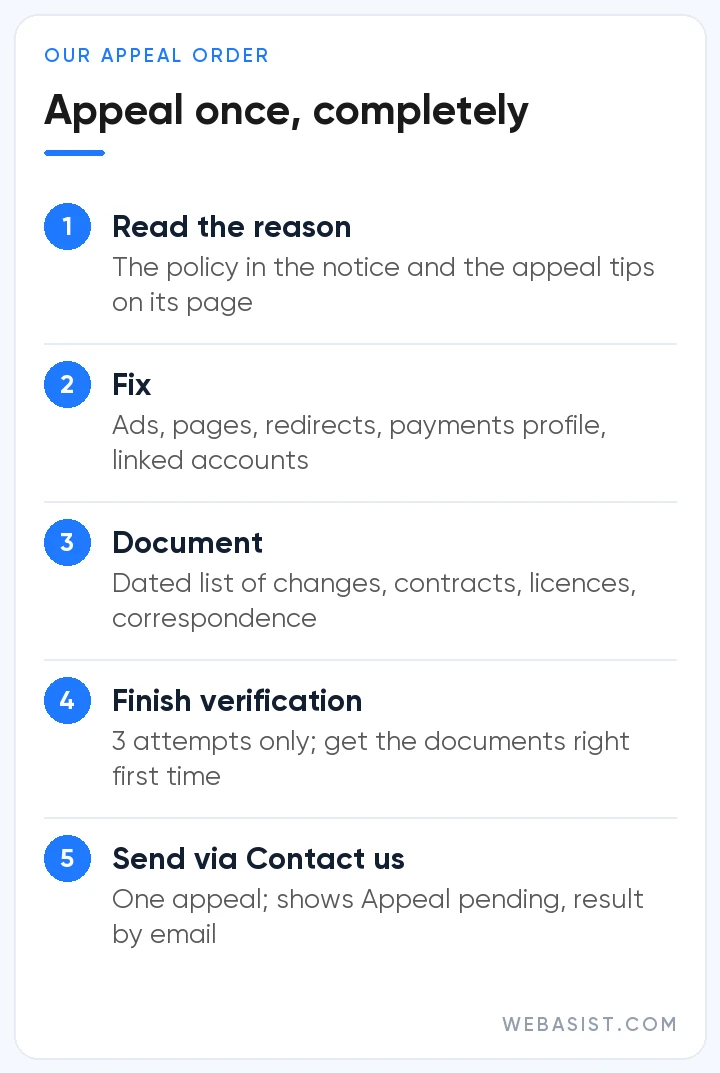
- Read the reason. Note the policy names in the notice; if there are several, each is handled separately. The "tips for submitting an appeal" section at the end of the relevant policy page tells you what the appeal is expected to contain.
- Fix the account, the site and linked accounts. Ads, assets, landing pages, redirects, tracking templates, payments profile, user list. Google expects linked and related accounts to be clean before the appeal.
- Document it. Which ad was removed when, which page changed when; contracts, licences, correspondence as evidence.
- Finish any requested verification. Some advertisers must pass advertiser verification before they can appeal at all, and if identity cannot be verified in 3 attempts, the right to appeal is gone. Prepare the documents correctly the first time. In payment-related suspensions, payment method verification may be requested within 30 days.
- Send it from inside the account. The "Contact us" link in the notice at the top opens the appeal form on the right, with the relevant policy information shown. After sending, the same link shows "Appeal pending", and the result arrives by email.
In the appeal text we write six things: customer ID, the business's legal name and website; the policy named in the notice; an honest account of what happened (if we believe it is a mistake, why; if it was a violation, how it came about); the fixes made, with dates; evidence; and the control put in place, with a responsible person, so the same problem does not recur. For a cloaking claim Google expects to hear why it was shown different content; for an affiliation claim, the document proving the partnership. A text of no more than three paragraphs, built from sentences you can back up on screen, works better than long defences.
If the appeal is rejected you can appeal again the same way, but only with a new fix or new evidence. We have never seen the same text work the second time. For egregious violations Google's stance is firm: if the violation is real, there is no return to the platform. So do not spend the first appeal as a "trial run".
If you were suspended over payments
Payment-related suspensions and pauses work differently from policy violations; most reopen once a task is completed. If there is an unpaid balance, pay it; a bank transfer posts later than a card payment, and on monthly invoicing, if the account is still closed 48 hours after payment, you write to the collections team with proof of payment. If payment method verification is requested, start the "Confirm your payment method" task on the Policy page under Admin: Google places a temporary charge of at most 1.95 US dollars on the card, refunded within 30 days; its last 6 digits are the verification code, and it can take up to 7 days to appear in your transaction list.
For a suspicious payment pause you answer the questions in the notice, and extra card verification may be requested. Every document you upload should carry the same full name, be current and show all four corners; if the payments profile says a company name and the document a personal name, it drags on. Payment emails come from [email protected]; check your spam folder. All payment settings are in our billing guide.
Who is this route not for?
Let us be honest: an appeal does not reopen every account. If an egregious violation really happened, that is, counterfeit goods were sold, visitors were shown a different page, fake documents were submitted for verification, Google does not reopen the platform to that advertiser, and we do not take on such an account either. We do not prepare appeals for bought or rented accounts. If identity could not be verified in 3 attempts, the appeal door is already closed; the only thing left is to cancel the account and request a refund where eligible.
If you think the account has been hijacked, for example you see campaigns and cards you do not recognise, fill in Google's compromised account form before appealing; Google secures the account and gets in touch. Once the suspension is lifted, do not skip an account audit; our account audit checklist scores policy and security items separately.
Frequently Asked Questions
What does "your Google Ads account has been suspended" mean, does it reopen on its own?
It means all ads have stopped and the state is permanent unless you appeal and win. It does not lift on its own; the only exception is the 3-day and 7-day temporary holds of the strike system, and even those require a fix and the acknowledgement form.
What does "your account violated the circumventing systems policy" mean?
Google is saying it saw a move aimed at getting around the review process: copies of a disapproved ad, a second account, cloaking, fake documents or a redirect on a hacked site. It counts as egregious and is enforced without warning. Before appealing, check the site, its redirects and the last changes line by line.
How long does a suspension appeal take?
Google gives no timeline; the result comes by email. What we see for well-prepared appeals is anything from a few days to a few weeks. Appeals against verification-related pauses mostly come back within 5 to 7 business days.
My account is suspended, can I open a new Google Ads account?
No. The new account is suspended as a related account, and coming back with a new account after a suspension counts as an example of circumventing systems. Finish the appeal for the existing account first.
Can I get the balance in my suspended account back?
Cancelling the account and requesting a refund where eligible stays available in a suspended account. The refund depends on the account's payment status; any unpaid balance is settled first.
What should you do today?
Put the suspension email and a screenshot of the notice in a folder, download the reports, and write down who did what in the account over the last 48 hours. Then open the page of the policy named in the notice, read the "appeal tips" section and draw up your fix list. No new account and no chargeback, today or tomorrow.
If you cannot work out the cause, send us the email and the screenshot; we will tell you in writing whether it is a fix job, a verification job or a payment job, and what has to change before the appeal. Nobody can guarantee the outcome of an appeal; but as a Google Partner agency, preparing the appeal completely and then running the account so it never lands in suspension again is our job. Once the suspension is lifted we can take over the management through our Google Ads management service.














