


Google Ads Landing Page: What It Needs, and Running Ads Without a Website
A Google Ads landing page is the page people reach when they click your ad. The short answer: it usually shouldn't be your homepage. It should be the page for the thing searched for, repeat the promise from the ad on the first screen, ask for one action and load fast on a phone. You can advertise without a website too, but the routes are narrow and most of the control stays with Google.
We also build websites, so we have a stake here; better to say that up front. Still, our rule is clear: if you'll spend more than a few thousand lira a month on ads, fix the page first. The cheapest way to get twice the leads from the same budget is usually the page, not the ads. Below we do the maths in lira.
What is a Google Ads landing page, and why the homepage rarely works
The landing page is the final URL you enter in the ad, and it must be on the same domain as the URL shown in the ad. Most businesses running their first campaign point every ad at the homepage. But a homepage talks to everyone at once: menus, promo banners, five different services.
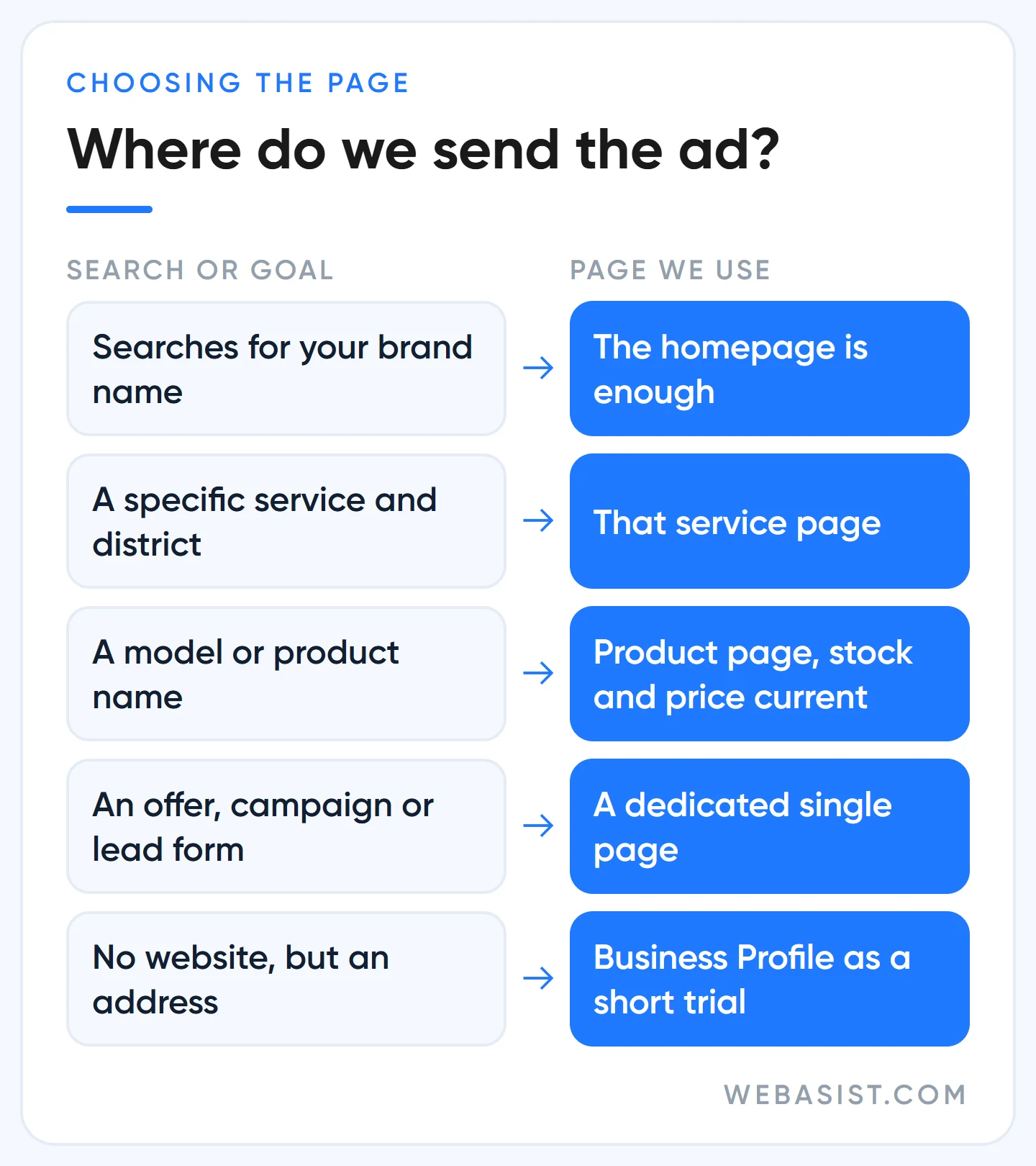
Someone who searched "weekend office move" and clicked your ad has to dig through that crowd on their own. If they can't find it, they hit back, and the click you paid for turns into a visit to a competitor. Our rule: every ad group's theme should match a page on the site. If there's no match, the problem isn't the ad, it's the site structure.
Sometimes the homepage is the right choice. Someone searching your brand name is already looking for you, and a small business with one service effectively has a landing page as its homepage. The decision table in this section shows where we send which traffic.
What belongs on the first screen of a good landing page
Visitors decide within seconds whether they've landed in the right place. So we write the first screen, the part visible without scrolling, together with the ad copy. It needs:
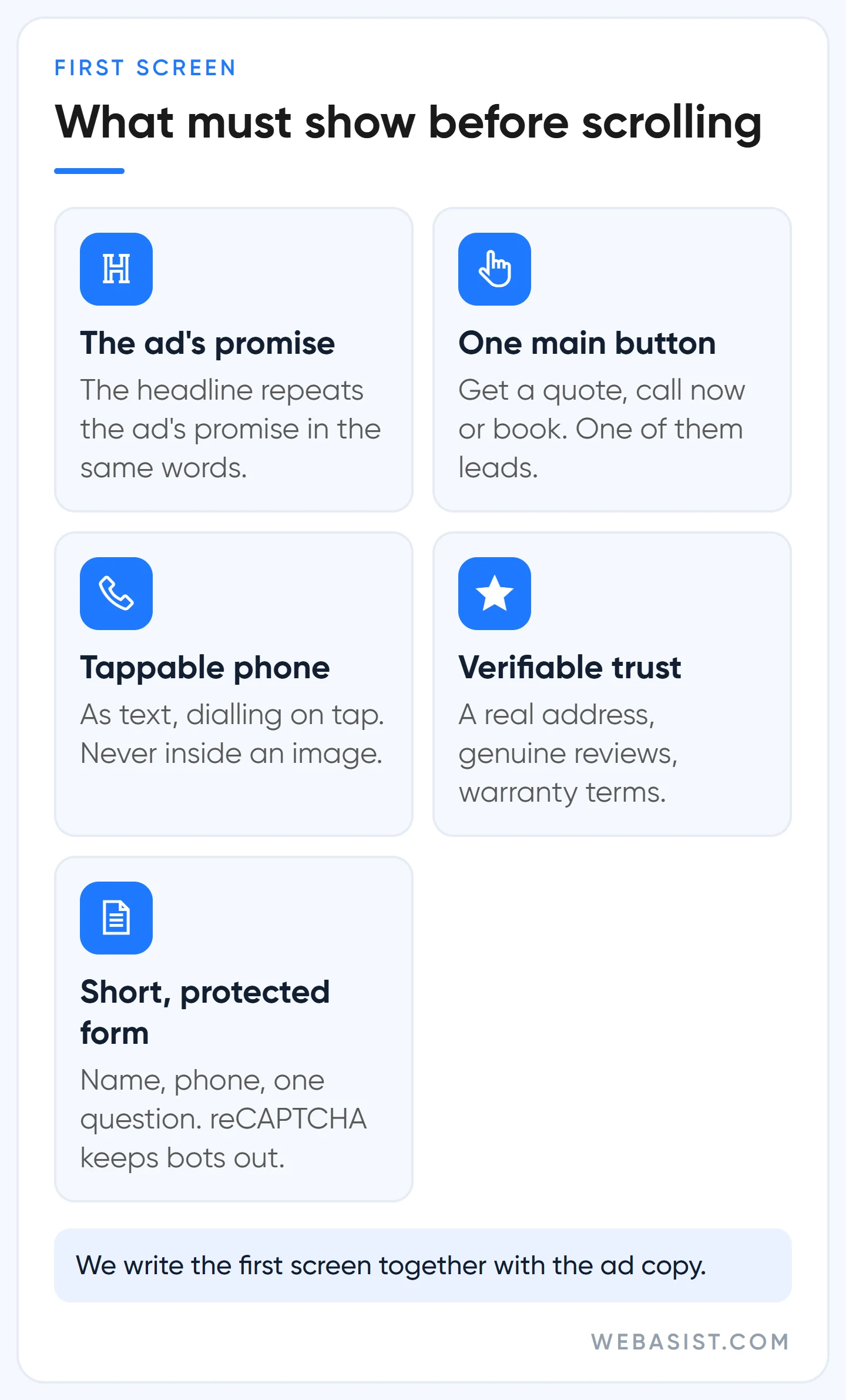
- The same promise as the ad. If the ad says "same-day boiler service in Kadikoy", the page headline should say it too. People who see a discount in the ad and can't find it on the page stop trusting you.
- One main button. "Get a quote", "Call now" or "Book". A form, phone and WhatsApp can share the page, but one must clearly lead.
- A tappable phone number. As text, not inside an image, and dialling on tap. This is also needed for the call asset in your ad to be approved.
- Verifiable trust. A real address, genuine reviews, warranty terms. Lines like "thousands of happy customers" with no source convince nobody.
- A short form. Name, phone and one question are enough for most service businesses. We ask about budget and address details on the first call.
If you add a form, protect it: reCAPTCHA, phone field validation, SMS confirmation where possible. Unprotected forms fill up with bot entries, and automated bidding treats those fake leads as success and sends money to the wrong traffic. We cover fake clicks in our invalid clicks guide. How Google rates the page itself is the subject of our Quality Score guide.
What a landing page is worth in lira: the conversion rate maths
A page's value shows in its conversion rate: how many clicks turn into a call or a form. Example scenario: a business spending 10,000 TL a month at 25 TL a click gets 400 clicks. If its page converts 2% of clicks, it gets 8 leads a month at 1,250 TL each. A page converting the same clicks at 5% brings 20 leads, and the cost per lead drops to 500 TL.
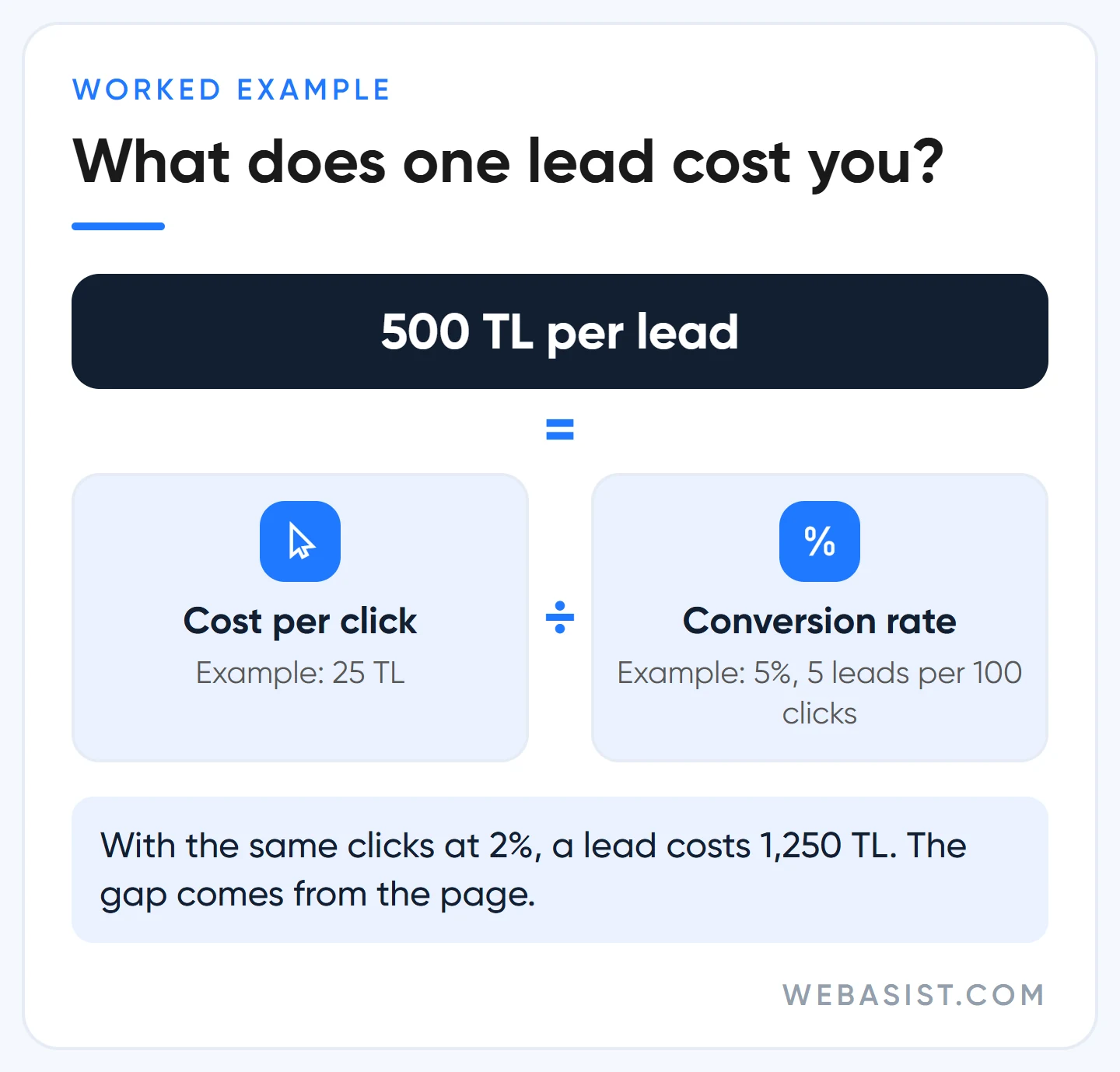
Same budget, same bids, same keywords; only the page changed. There are very few other ways to get two and a half times the leads without two and a half times the budget. That's why, when we take over an account, we look at the page before the bids.
To work out your own number, divide your cost per click by your conversion rate; the result is what one lead costs you. How click prices form is explained in our Google Ads pricing guide.
Open it on a phone: speed and mobile experience
Most ad traffic comes from phones, while most pages get signed off on a desktop. Before a landing page goes live, we open it on a real phone over mobile data and check:
- Are the headline, main button and phone number visible without scrolling?
- Are large images, autoplay video or a pile of plugins slowing it down?
- Is there a pop-up covering the content? Google may treat these as a destination experience problem.
- Does seeing the content require a login or an app download? If so, the ad may not be allowed to run.
- Does the form actually submit on a phone, and does the notification email arrive?
The last point matters more than it looks. We've seen businesses notice weeks later that their form notifications never arrived; that ad money doesn't come back.
Google Ads landing page not loading: the "destination not working" error
It's common for an ad to be disapproved for "Destination not working" while the page opens fine in your browser. The reason is that Google visits the page not the way you do but with crawlers called AdsBot. If that crawler is blocked or gets an error code, the ad stops. Our order of checks:
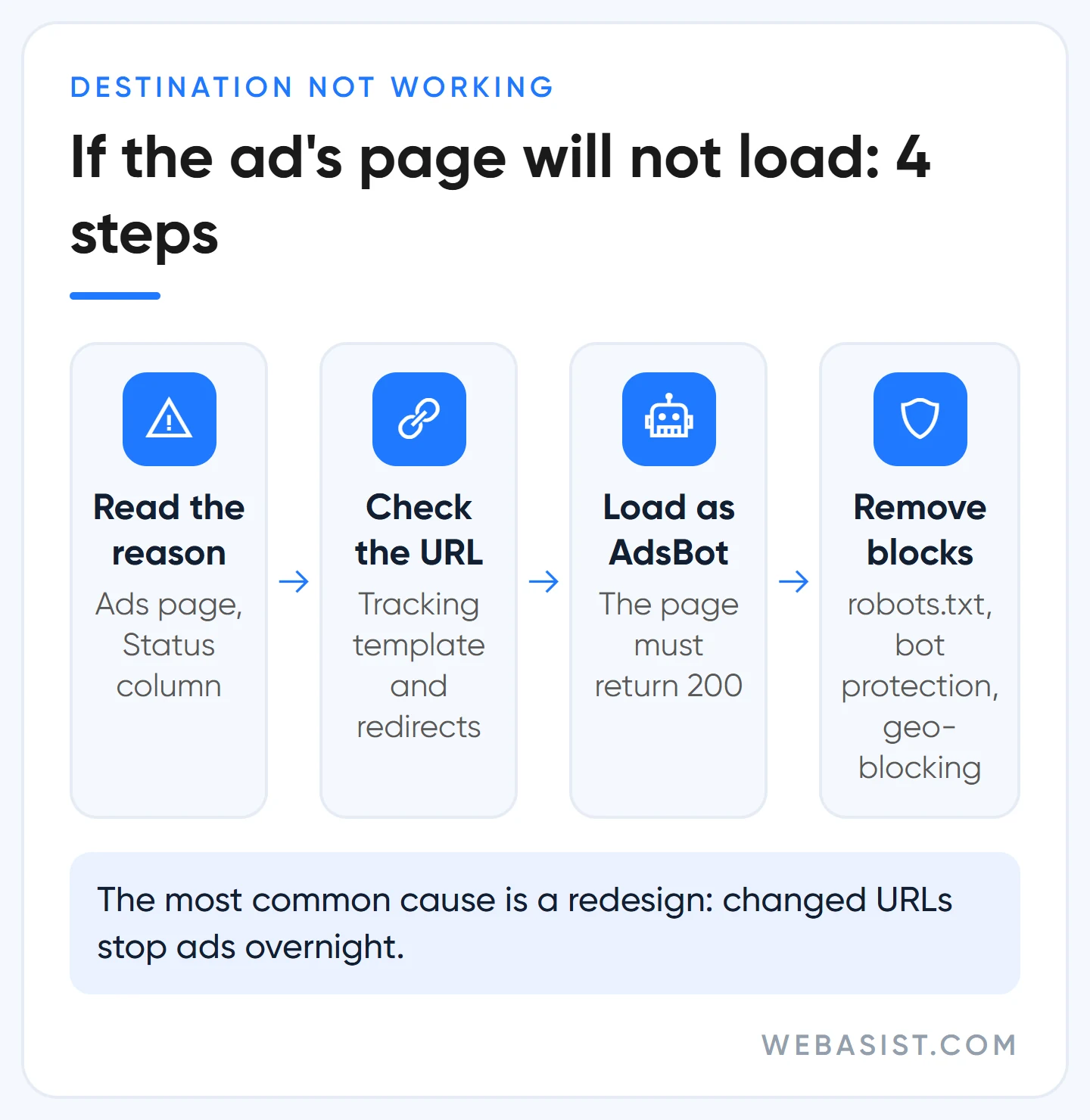
- Read the reason in the Status column on the Ads page.
- Check the final URL and any tracking template for typos; there should be no redirect to another domain.
- In Chrome Developer Tools, set the user agent to AdsBot-Google-Mobile and reload. The page should return a 200 response.
- Confirm with your web admin that robots.txt, security plugins, bot protection and country blocking aren't shutting Google out.
Once fixed, submit the ad for review again. For violations of these rules Google warns you at least 7 days before suspending an account, but don't leave disapproved ads sitting in the account for months. The full rules are on Google's destination requirements page; the appeal process is in our disapproved ads guide.
In accounts we take over, the most common cause of this error is a site redesign. URLs change, old addresses return 404, and ads stop in bulk overnight. If you're redesigning, list every URL your ads point to and test the redirects on launch day.
Google Ads without a website: which route suits whom?
You can run Google Ads without a website, but the two main routes are aimed at local businesses: a Smart campaign that uses your Google Business Profile as the landing page, and a Performance Max campaign linked to your Business Profile. In both, the page is built automatically from your profile's address, phone, hours, photos and reviews. Google itself says this page is not a replacement for a website.
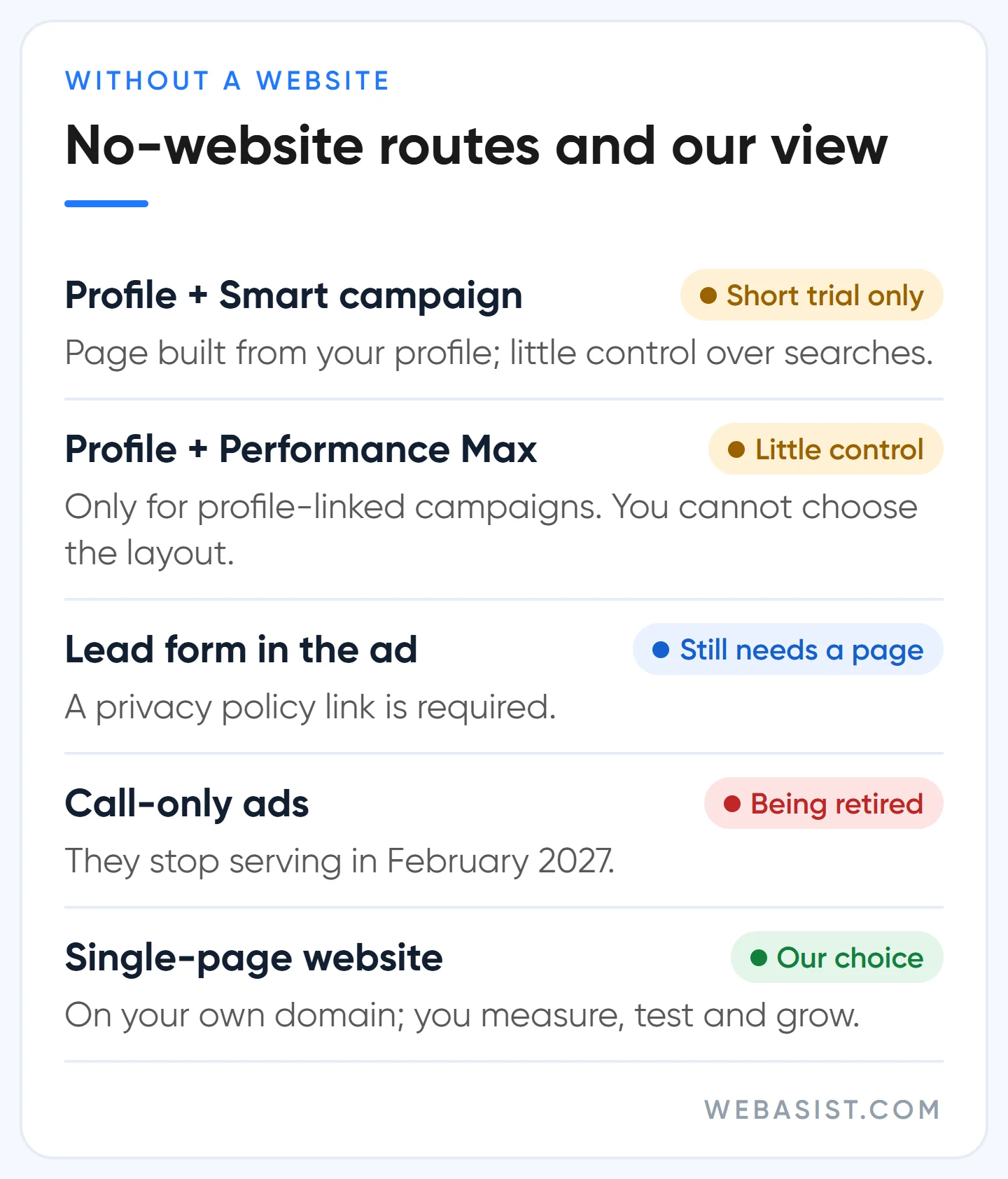
Google offers these routes as an easy start for businesses without a site. We don't recommend them beyond a short trial. The reason is control: in a Smart campaign you can't fine-tune which searches you show for and what you exclude the way you can in a Search campaign, and you can't choose the profile page's layout, message or what to test.
The other "no website" options aren't as site-free as they look. A lead form asset requires a link to your privacy policy, so you still need at least one page. Call-only ads are being retired: creating new ones stopped in February 2026 and existing ones stop serving in February 2027. Their replacement, the call asset, attaches to a search ad that has a final URL and requires the number to appear on your site.
If you're a small business with a physical address that gets its work by phone and directions, starting with a Business Profile is reasonable. If you'll run keyword-based Search campaigns, describe services separately and measure results, you need a page on your own domain. The profile and Maps side is in our Google Maps ads guide.
Forms, calls and WhatsApp: how we measure whether the page works
The only answer to "is the landing page working?" is conversion data. We set a separate conversion for each main action on the page: form submit, phone tap, WhatsApp link click. Page changes made without measurement never show you what worked.
Watch for two traps. A phone tap doesn't mean a call happened, and a WhatsApp click doesn't prove a chat started. We count these clicks and compare them at month-end with the actual call and message logs. How to set this up is covered in our conversion tracking guide.
A landing page or a new website? When it pays off
Most businesses don't need a new website; they need a few good pages that match their ad groups. If your current site has service pages that work properly on a phone, fix those first: match the headline to the ad, bring the button forward, shorten the form. Don't buy a new site for that.
If you have no site, or it's unusable on a phone, the maths changes. In the example above, moving the conversion rate from 2% to 5% meant 12 extra leads a month. If a quarter of them become customers and each customer leaves 5,000 TL of profit, that's 15,000 TL of extra profit a month (example). Set what you would pay for the page against that extra profit; the number of months it takes to pay for itself is your answer.
If the maths doesn't work, don't do it. If your monthly ad budget is a few thousand lira, you offer one service and customers come to your address, a Business Profile and a simple page are enough. The package scope is on our web design packages page, and our approach on the website design page.
Landing page checklist before you go live
Before we connect a new ad to a page, we check these six points. Skipping one means wasting the first week's budget.
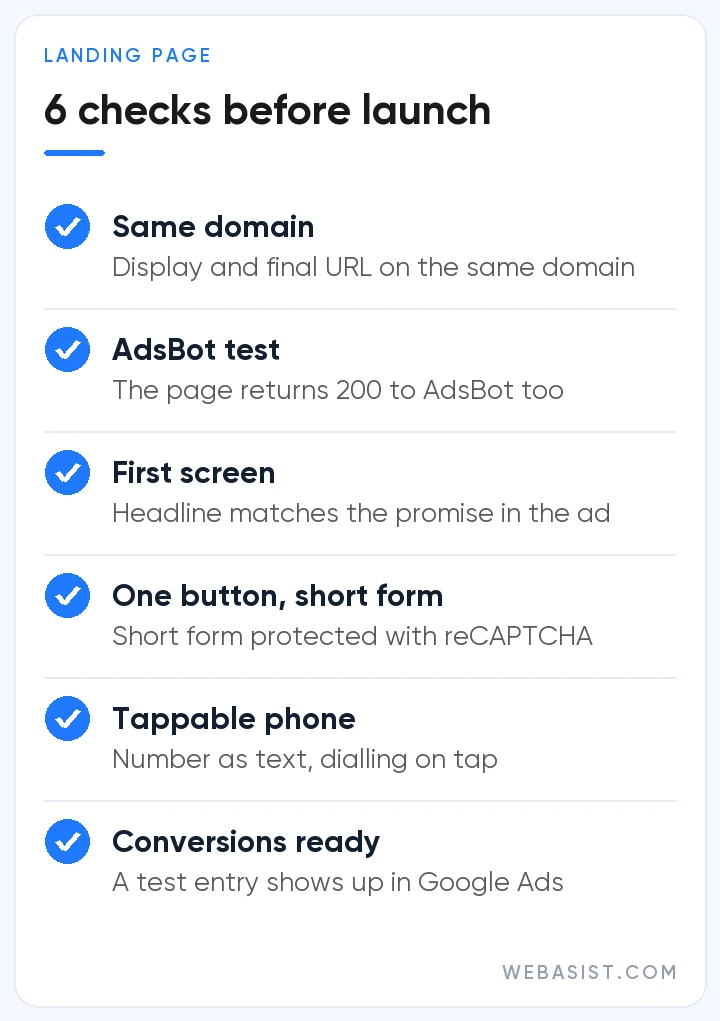
- The display URL and final URL share a domain, and no redirect goes to another domain.
- The page returns a 200 response to the AdsBot user agent too.
- The first-screen headline matches the promise in the ad.
- There's one visible main button, and the form is short and protected.
- The phone number is written as text and dials on tap.
- Conversions are set up and a test entry has been recorded.
Frequently Asked Questions
What is a landing page, and how is it different from the homepage?
A landing page is the page someone reaches after clicking your ad. The homepage can be one; the difference is that a good landing page focuses on one search and one action.
Do I need a separate landing page for every ad group?
No. Closely related themes can share a page. Separate pages for different services or different search intents almost always bring leads in more cheaply.
Can I use a pop-up on my landing page?
Pop-ups that cover content and make navigation harder can break destination experience rules. A small box that stays inside the page and doesn't block leaving is fine. We don't use pop-ups on pages that receive ad traffic.
Does the landing page affect Quality Score?
Yes. Landing page experience is one of Quality Score's three components; a weak page drags it down and makes clicks more expensive.
Conclusion
Before raising the ad budget, look at the page the ad goes to. If the first screen lacks the ad's promise, one button and a tappable phone number, new budget leaks out of the same page at the same rate. Starting without a website is possible but hands control to Google; serious spending needs a page on your own domain.
Send us the address of the page your ads point to. We'll open it on a phone and tell you whether we can find the ad's promise on the first screen, whether the form works and what the AdsBot test returns.














