


Google Ads Limited Ad Serving: Why It Happens and How to Fix It

Your ads say "Eligible", the budget is sitting there, the phone is quiet, and a Google Ads limited ad serving notice has appeared at the top of the account. The short answer: Google does not yet treat you as a "qualified advertiser", so it is capping your impressions on certain searches. Nothing was disapproved and the account is not closed, but the customers are not arriving either.
No setting switches this off. In the client accounts we manage, the order of work is fixed: advertiser verification first, then brand identity in the ads and on the site, then an account clean-up, and the appeal last. Google gives no timeline; our expectation is a few days to a few weeks once that work is done. Below we cover what this costs you, why it happens, what we do and in which order, and which moves are a waste of time.
What is limited ad serving and where does it show up?
Limited ad serving is an impression cap applied to the advertiser, not to an ad. Each ad passes review and the status column still reads "Eligible". The restriction itself appears in the notification bar at the top of the account or in the list under the bell icon. If there is no such notification, the problem in this article is not your problem.
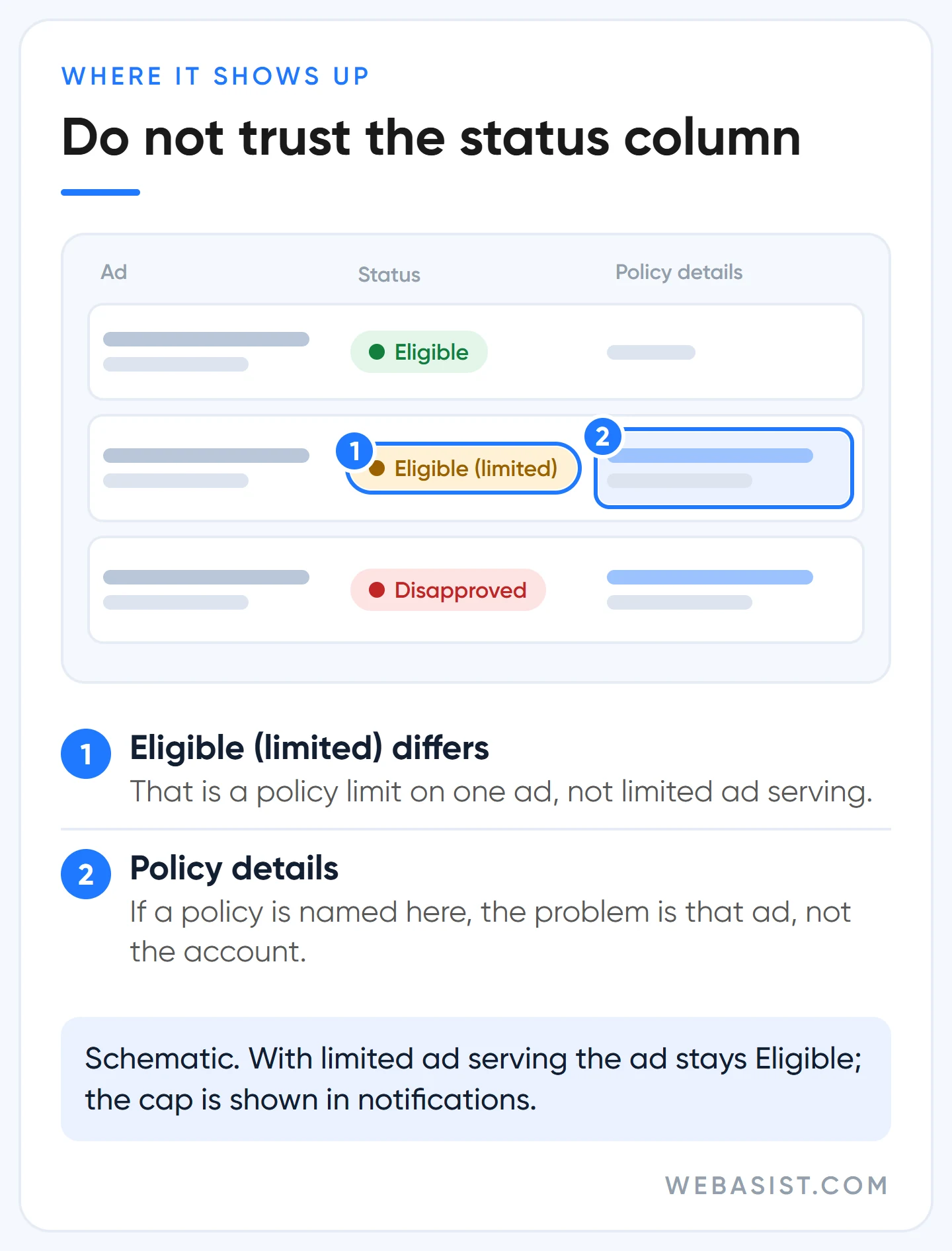
The frustrating part is what you cannot see. No screen tells you which searches are capped, how many impressions you are allowed per day or when it ends. Google does not call it a penalty, but for a business owner the outcome is the same. With no published criteria and no timeline, it is a black box from the advertiser's side.
The most common mix-up is the "Eligible (limited)" label next to an ad. That label means a single ad cannot run everywhere because of a policy such as alcohol, healthcare or trademarks, and the fix is in our ad disapproved guide. With limited ad serving the ad label does not change; the restriction sits on you, not on the ad.
What does it cost you? The maths in TL
Ad money you do not spend stays in your pocket, so the loss never shows on an invoice. The real loss is the customer who never called. Work it out with your own numbers before you decide to "wait and see".
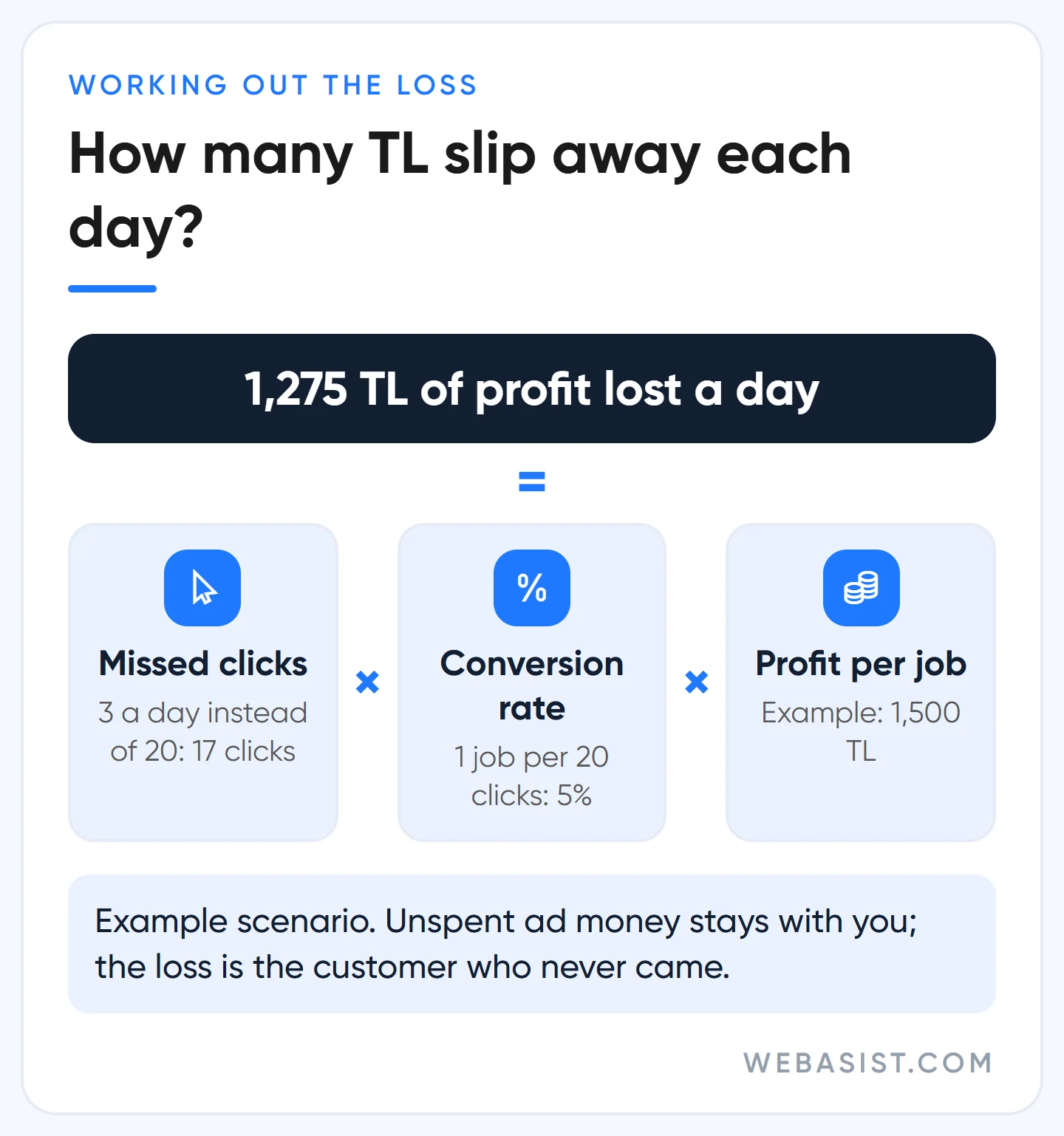
Example scenario: picture a boiler repair business in Kadıköy, Istanbul. The daily budget is 600 TL and the average click costs 30 TL, so a normal day brings 20 clicks. One click in 20 turns into a job, and each job leaves 1,500 TL of profit. On the day the cap arrives, clicks drop to 3.
- Missed clicks: 20 − 3 = 17
- Missed jobs: 17 × 5% = 0.85 jobs a day
- Missed profit: 0.85 × 1,500 TL = 1,275 TL a day
- Unspent ad money: 17 × 30 TL = 510 TL (it stays with you)
- Net loss: 1,275 − 510 = 765 TL a day, or 22,950 TL over 30 days
Add the fixed costs of an idle business: the technician's salary, the van and the rent keep running. If you work with an agency, so does the management fee; we do not want you to burn that fee on a capped account. That is why, in an account with this notice, our first week goes into lifting the restriction rather than tuning performance.
Why does it happen? What Google says and what it leaves out
The official explanation is brief: in scenarios judged more likely to produce a bad ad experience, only "qualified advertisers" serve without limits. Qualification weighs account characteristics, user reports, account maturity, the ad formats you use, your policy history, your industry and your advertiser verification status. Nothing says how much each one counts. Nothing says which keywords count as a "risky scenario" either.
Two items on that list are directly in your hands: verification and how clearly your ads say who you are. You cannot speed up account age and you cannot change your industry. So we put the effort where we have control.
These are the account types where we see the notice most often:
- Brand-new accounts. With no history there is little to judge, so the system plays it safe.
- Unverified accounts. The verification task has been open for weeks and nobody has touched it.
- Advertisers writing anonymous ads. "24/7 Service, Call Now": copy that every business in the same district could run.
- Repair shops and resellers naming another brand. The manufacturer's name is in the ad and the relationship is not stated.
- One-page sites with no company details. A form and a phone number; no logo, no business name, no address.
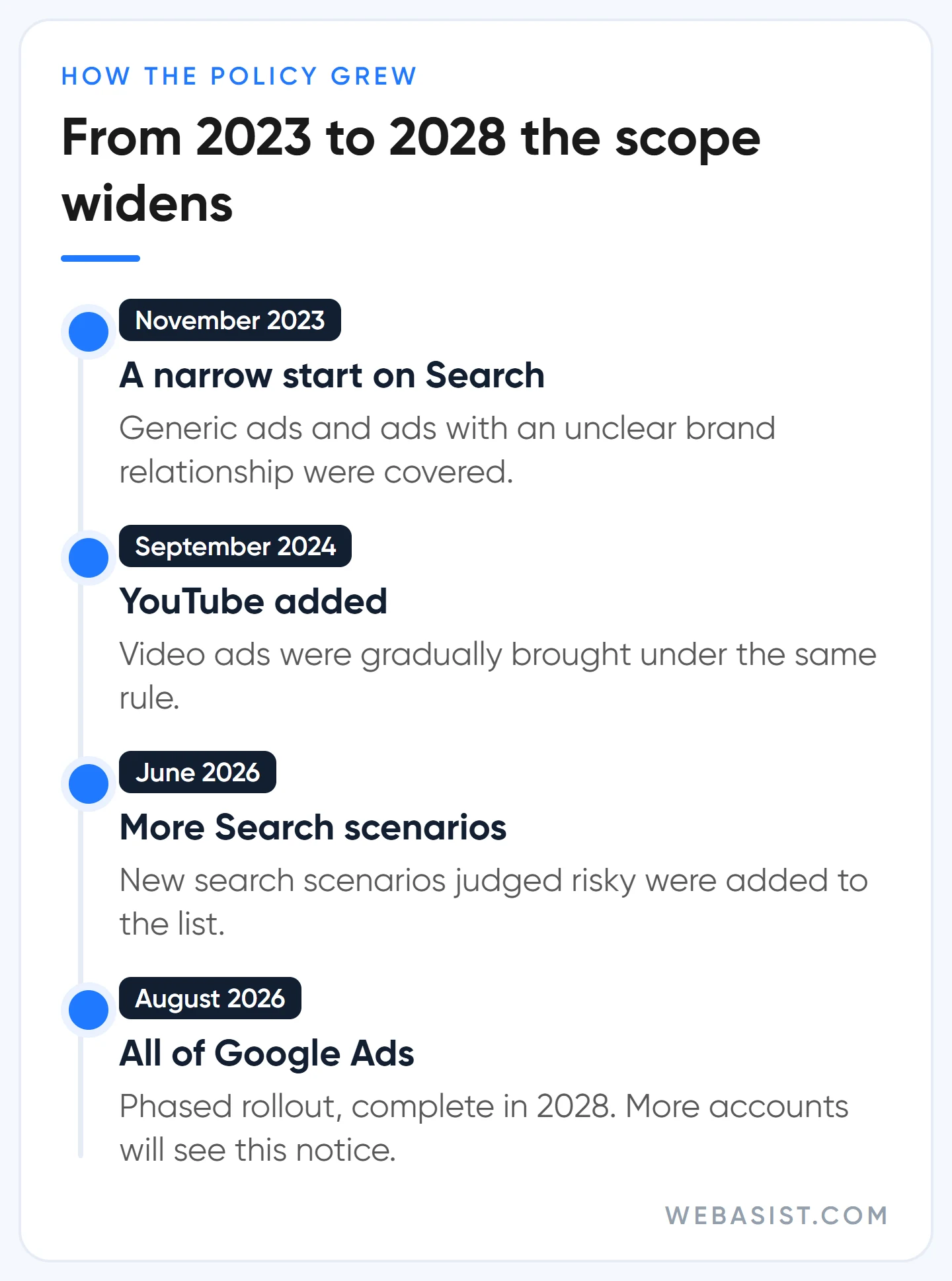
The policy began in 2023 with one narrow Search scenario and has widened every year. With the August 2026 update it was extended to cover all of Google Ads, rolling out gradually and due to complete in 2028. What that means for you: an account that has run without trouble for years may see this notice in the coming months. The phased rollout is also why two businesses in the same sector get hit at different times.
Is it really limited ad serving? Rule out the other causes first
Not every drop in impressions is this policy, and a wrong diagnosis costs weeks. Some of the "we have been limited" complaints we inherit turn out to be budget, bidding or approval problems. We diagnose in this order:
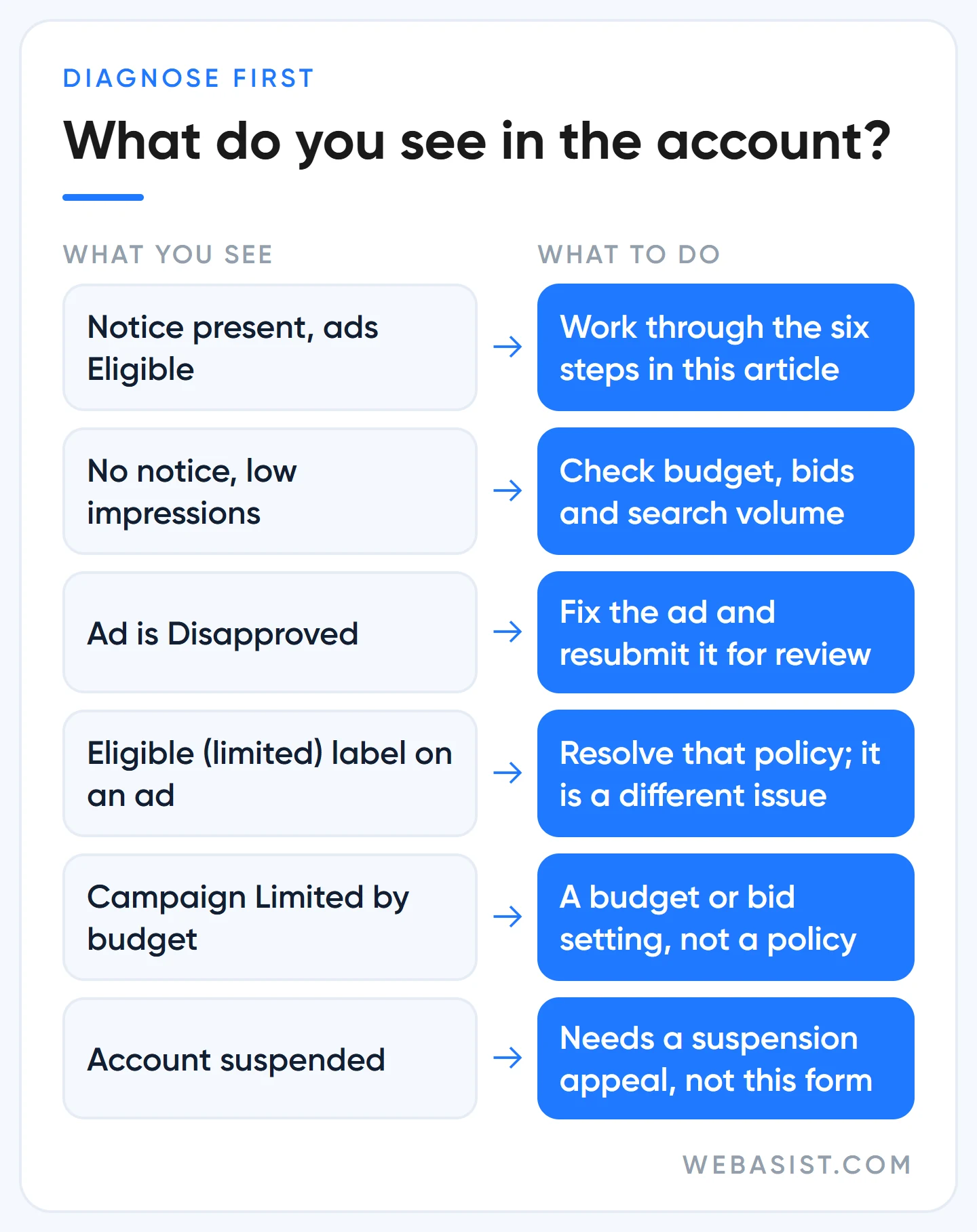
- Does the notification list mention limited ad serving? If not, the question is closed.
- Are the ads "Eligible"? If any are "Disapproved", the problem is the ad itself.
- Does the campaign status show "Limited by budget" or a bidding warning? If so, fix that first.
- Is there an account-level alert about payment, verification or suspension?
- Is the drop concentrated on generic, non-brand searches? If searches for your own name still get impressions, the pattern fits this policy.
If there is no notification, follow the sequence in our Google Ads ads not showing article. If the whole account has shut down, you are dealing with a suspension, and that path is in the account suspended guide.
How to fix limited ad serving: our order of work
Do not change the order. Accounts that start with the appeal form usually come back to the same place with a "nothing has changed" reply. We create something to report first, then we report it.
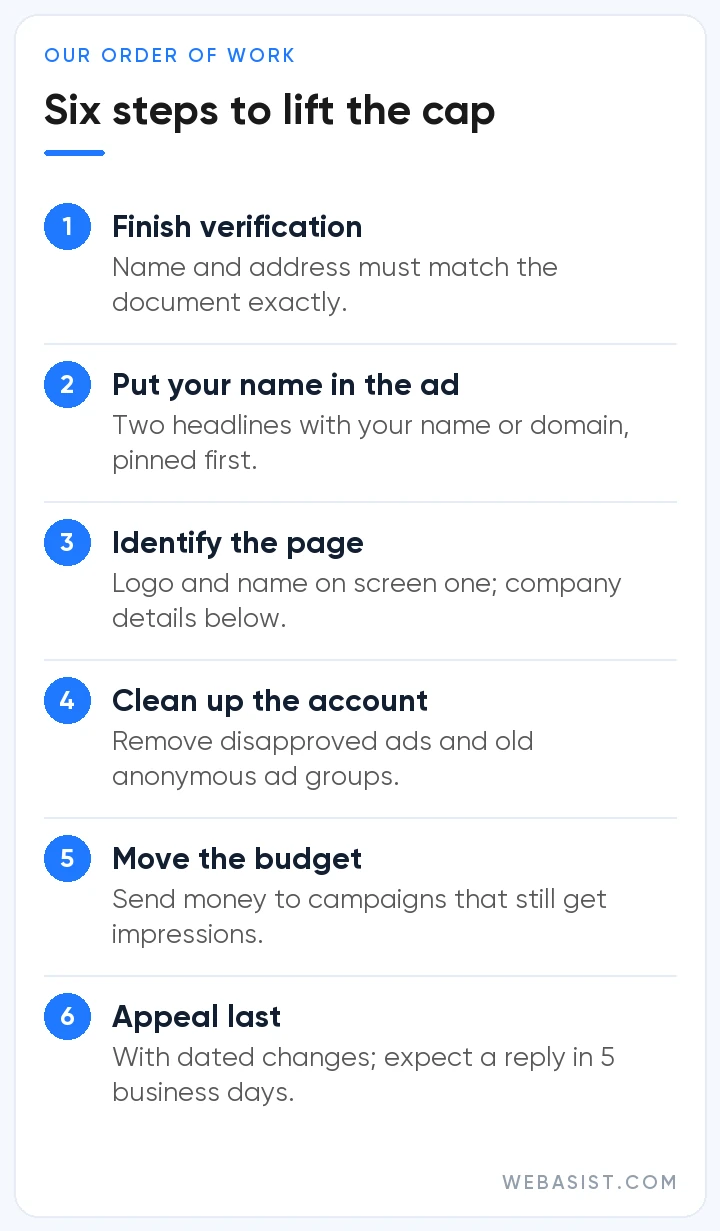
1. Finish advertiser verification
It is the only item on the qualification list that is entirely up to you. If a verification task is open, we close it before touching anything else. Before uploading a document we put the legal name and address in the payments profile side by side with the document; spending an attempt on a name mismatch is the most avoidable loss there is. Which documents are accepted and where people get stuck is covered in our advertiser verification article.
2. Say who you are in the ad
In every ad group we write at least two headlines carrying the business name or the domain and pin them to the first position. Once verification is complete we also add the business name and logo assets; without verification the ad shows a globe icon where the logo would be. Details and sample copy follow in the next section.
3. Give the landing page an identity
If the ad says "Example Technical", the same name and logo must be visible on the first screen of the page. Below that we add the registered company name, an address or service area, a phone number and a link to an "About" page. If you are a reseller or an independent repairer, that relationship belongs next to the service description, not in the footer. For the rest of the page see our landing page guide.
4. Clean up the account
We fix or remove disapproved ads and assets. We also delete old ad groups that were paused years ago with anonymous copy. Policy history is part of the evaluation; appealing with an open violation weakens your own case.
5. Move budget to where impressions still flow
We look at impressions campaign by campaign: which ones are still serving? In most accounts, searches for your own brand name and remarketing lists keep running. We cut the budget of the capped campaigns and move the money there. We do not switch everything off, because the evaluation runs on the signals the account produces.
6. Now appeal
When the first five steps are done you have concrete, dated changes to describe. The route is the Limited Ad Serving Appeals Form, and the stated expectation for a reply is 5 business days. What we write in each field, with a good and a bad sample summary, is in our limited ad serving appeal form article.
Unclear brand and generic ads: a before and after example
On Search the restriction has two named triggers: generic ads with no brand element at all, and ads that mention another brand without explaining the relationship. When that happens it is not only that ad; all of the account's ads can be capped on certain searches. Anonymous copy in one ad group drags down the well-written groups too.
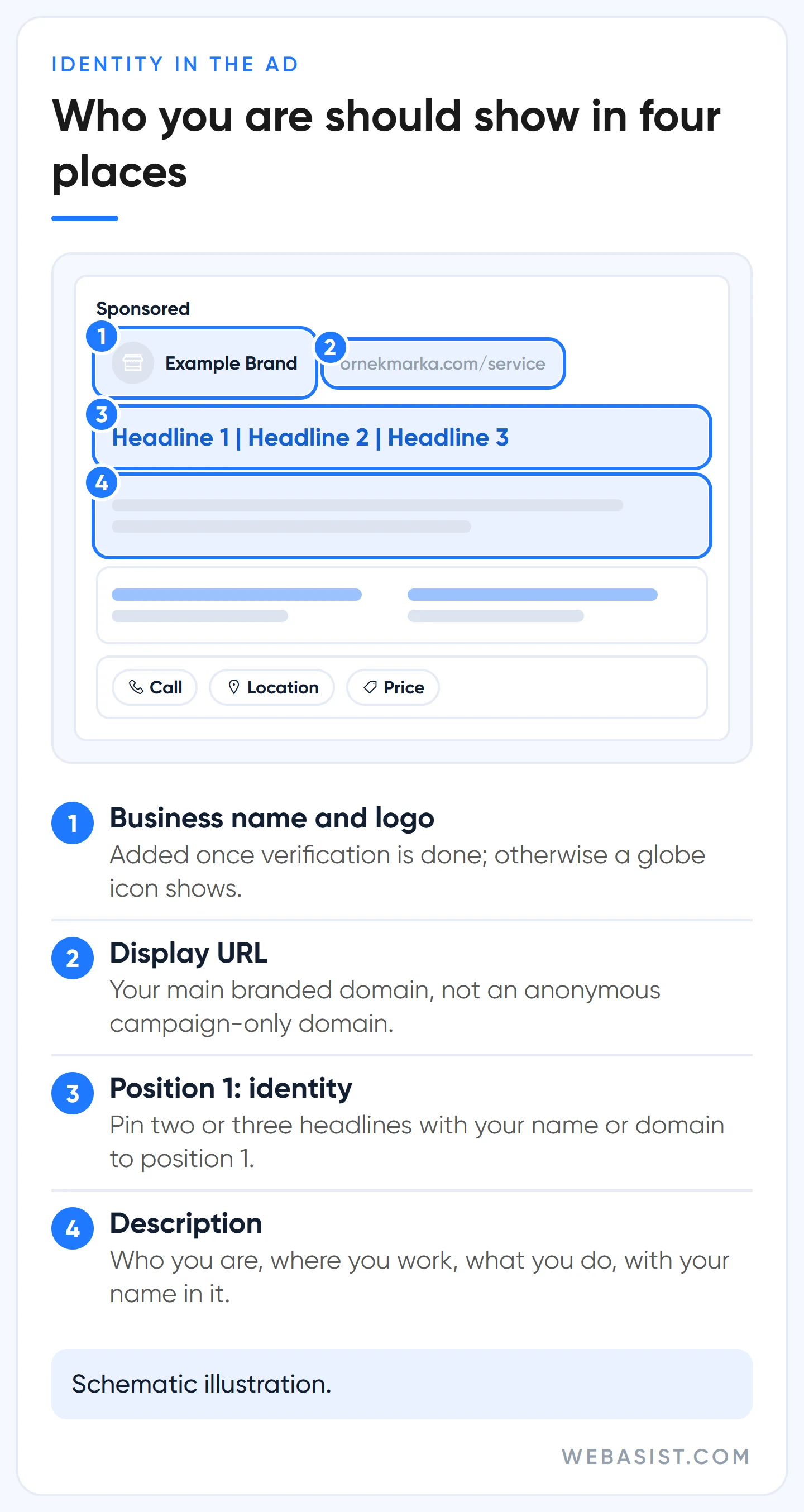
The test we use is simple. Copy your ad text and paste it into the account of your competitor down the road. If it works without changing a word, the ad is generic.
The example below is fictional; "Example Technical" is not a real business.
| Field | Before (generic) | After (identified) |
|---|---|---|
| Headline, position 1 | Boiler Repair 24/7 | Example Technical Boiler Repair (pinned) |
| Position 1, second option | None | exampletechnical.example (pinned) |
| Other headlines | Best Prices, Call Now | Same-Day Service in Kadıköy, Independent Repair Shop |
| Description | Call now for fast, reliable service. We repair all brands. | Example Technical is an independent repair shop servicing boilers in Kadıköy and Üsküdar. |
| Business name asset | None, globe icon | Example Technical (matches the verified name) |
The "after" ad looks less salesy, and some clients push back on that. Our answer is blunt: a shiny headline that gets no impressions is worse than a plain one that does. For the rest of headline writing, see our ad copy article.
If you service or resell another brand
A "[Brand] Service Istanbul" headline and a page topped only by that brand's logo is exactly the picture this policy targets. The right version puts your own name first: "Example Technical | Independent Service", with "not an authorised service centre" in the description. If you really are an authorised dealer, say so and keep the dealership letter ready for the appeal.
We turn down work where the client wants to write "authorised" or "official" without being either. That road leads from an impression cap to a closed account. Using a brand name in ad text has its own rules as well; we collected them in our competitor brand bidding article.
Pinning and AI Max: two Google pages that disagree
On one page Google advises against pinning headlines: a pinned headline stops other headlines from being tested in that position and can lower the ad strength rating. On the limited ad serving page it tells new and lesser-known advertisers in particular to "pin your domain to the first headline position". The two contradict each other, and you have to choose.
Our preference: in an account with the notice, or with a little-known brand, we pin, even if ad strength falls to "Average". Ad strength is a score, not a sale. In an established account that has never been capped, we do not pin.
- Pin not one but two or three headlines to position 1, each stating your identity differently: business name alone, business name plus service, the domain.
- Do not pin the identity headline to position 3; that position does not appear in every impression.
- Leave the remaining headlines free. If you pin every position, the unpinned headlines never show.
The second trap is AI Max. When you turn on AI Max in a Search campaign, final URL expansion is on by default. When the system sends the click to another page it considers more relevant, your pinned headlines are not used. So the identity headline you "pinned" may be missing on exactly the impressions where you need it.
Google recommends AI Max with the promise of more conversions; in a capped account it does not serve you. Until the cap lifts we keep AI Max off, and where it is already on we switch off final URL expansion and URL inclusions.
During the same period the Recommendations tab will keep saying "raise your budget"; with impressions capped, a bigger budget changes nothing. We keep auto-applied recommendations off too. We weighed the broader pros and cons of AI Max in our AI-powered ad optimisation article.
How long does limited ad serving last?
Google does not answer this; it only says limits are re-evaluated automatically. Rather than telling clients an empty "we wait", we talk through the duration of each step separately:
| Step | Who controls it? | Our expectation |
|---|---|---|
| Review of verification documents | Usually within 5 business days; in rare cases up to 30 days | |
| Ad and landing page fixes | You and us | 1 to 3 days |
| Reply to the appeal form | Stated expectation is 5 business days; it can run a little longer | |
| The cap actually lifting | A few days to a few weeks after the work is done; longer for very new accounts |
A practical planning rule: build your cash flow around at least a month of reduced impressions. If it opens earlier, that is a bonus. Anyone who says "I will get it lifted in three days" is selling something; nobody can guarantee this calendar, and neither do we.
The cap can come back after it lifts. If a new issue is detected, the restriction is switched on again. So do not roll back the identity headlines or the company details on the page once things reopen.
What does not work? Six wasted moves
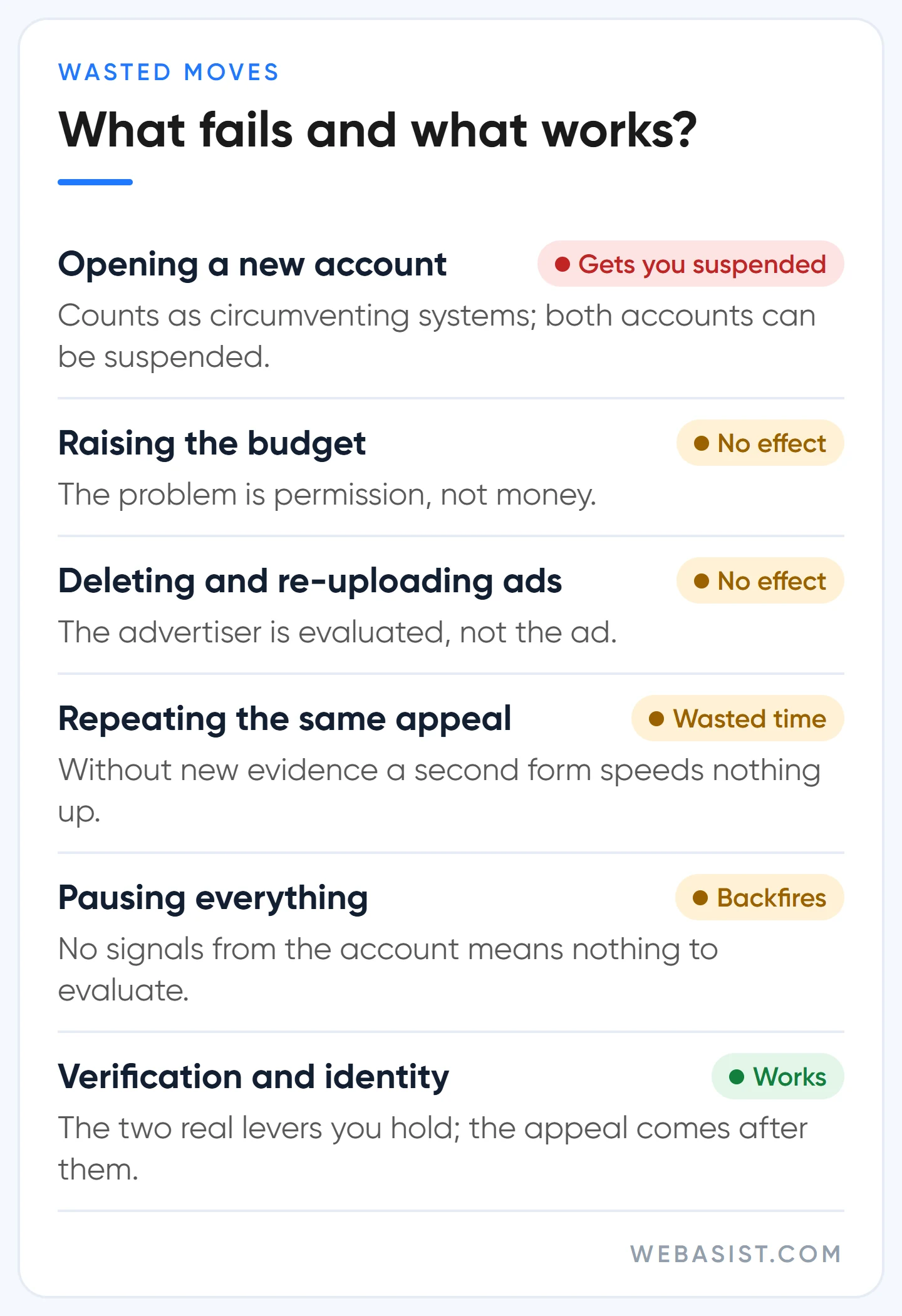
- Opening a new account. The most expensive mistake. Creating a second account to escape a restriction counts as circumventing systems and can end with both accounts suspended. On top of that, the new account starts from zero with the same lack of history that caused the cap.
- Raising the budget. The problem is permission, not money. Budget does not unlock capped impressions.
- Deleting ads and uploading them again. The advertiser is being evaluated, not the ad. Re-uploading the same copy changes nothing.
- Sending the same appeal again and again. Without new evidence, a second form does not speed anything up.
- Pausing everything and waiting. If the account produces no signals, there is nothing left to evaluate.
- Buying a "guaranteed lift". Services for this restriction are sold on forums. Nobody has a button inside Google; what is being sold is either the five steps above done for you or, worse, a rented account.
Who is this approach not for?
In three situations the sequence in this article will not get you there. If you are in a sector that needs certification, such as gambling, finance, healthcare or pharmaceuticals, and the ad says "Not eligible", what is missing is the sector certification, not an appeal. If your account has been suspended, that is a different process altogether. And if there is no notification in your account, you do not need to do any of this.
If your monthly ad budget is a few thousand TL and this cap is your only problem, do the first three steps yourself before hiring an agency: verification, an identified headline, an identified page. In most small accounts that is the whole job. Call us if you get stuck.
Frequently Asked Questions
What do "unclear brand" and "generic ads" mean?
They name two situations in which the user cannot tell who is behind the ad. A generic ad carries no business name or domain and could be run by any business. An unclear brand relationship is when another brand's name appears in the ad and your link to that brand is not stated. Neither is banned, but both are known triggers for an impression cap on Search.
I completed verification. Why is the cap still there?
Verification is only one of the factors considered. If your ads are still anonymous or the account is very new, the restriction can continue. After verification is approved, make the ad and page fixes, then send the appeal form.
Is limited ad serving in AdSense and AdMob the same thing?
No. The AdSense and AdMob limit concerns publishers who show ads on their own site or app, and it is mostly about traffic quality. This article is about the advertiser side. Go to the help pages of whichever product sent the notification.
Where is the limited ad serving appeals form?
It opens from the link inside the account notification and from the Google Ads Help Centre. Complete it with a Google account that has access to the restricted account, not the manager account, and select that account's customer ID.
Will switching agencies lift the cap?
No. The restriction is tied to the advertiser account, not the agency. Moving the account under a different manager account does not reset the evaluation. Switching makes sense if your agency is not doing the five steps; do not move just for the sake of moving.
What should you do today?
If the notice is there, do two things today: open the verification task and run your ads through the "could my competitor copy and use this?" test. Do not send the appeal form before both are finished. While you wait, pull budget into the campaigns that still get impressions, and put the idea of a new account out of your mind.
If you like, we can look at the account together: give us read-only access and we will review the notification, the verification status and your ad copy, then write down which step you are stuck on. Reach us through our contact page, or see our Google Ads packages if you would rather hand over the management entirely.
Sources
- Limited ad serving: the current policy text and qualification factors.
- Limited Ad Serving Appeals Form: the official appeal form and the stated response time.
- Update to Limited Ad Serving Policy (August 2026): expansion to all of Google Ads and the 2028 timeline.
- Advertiser verification: timelines: review times for verification.














