


Google Ads Image Sizes 2026: Which Sizes Do You Really Need?
You do not need long lists of Google Ads image sizes. For responsive display ads and Demand Gen, prepare four files: a 1200×628 horizontal image, a 1200×1200 square image, a 1200×1200 square logo and a 960×1200 vertical image. Images should be JPG or PNG under 5 MB; compress the logo below 150 KB. Google resizes the rest for you, and designing 20 separate banner sizes is a waste of money and time for most businesses.
We give you the compact size table here, but our real concern is elsewhere. We show with mockups how the same image looks on a news site, in Gmail and in the Discover feed, then talk about the money side. On a small budget the Display Network usually burns money, and we explain when it does not.
Short answer: which 4 images does a responsive display ad need?
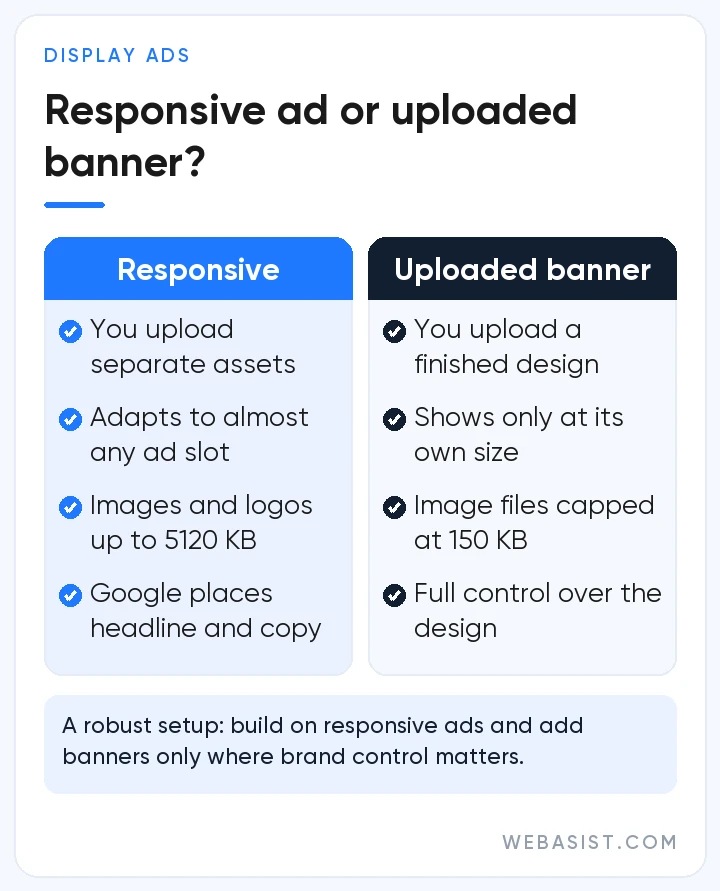
With a responsive display ad you do not hand Google a finished banner. You upload images, a logo and headlines separately, and the system combines them for each ad slot. So ratios matter more than exact sizes: horizontal (1.91:1), square (1:1) and vertical. Get those three ratios and a square logo right and your ad fits almost every slot.
The set we ask for at the first setup: at least two different images in each ratio, one a close-up of the product or service and one of a person using it. A campaign launched with a single image gives the system nothing to test. Google recommends up to five images per ratio; we have not seen sets bigger than four or five make a difference on small budgets.
Google Ads image sizes table (2026)
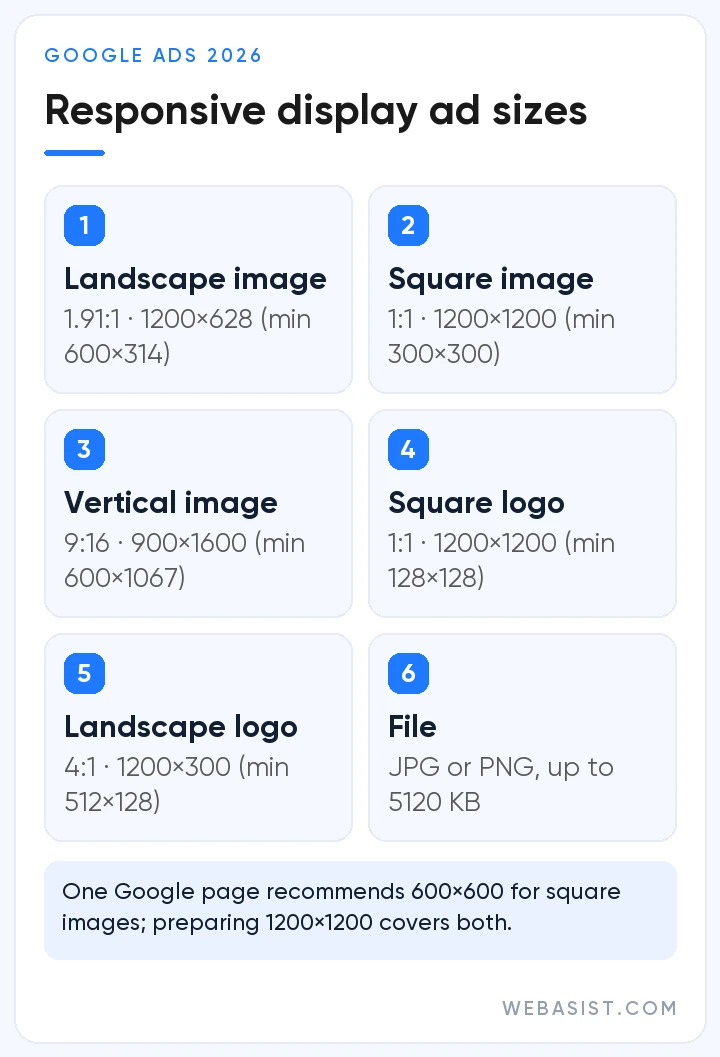
The table below puts the image sizes for responsive display ads and Demand Gen in one place. Vertical 4:5 and 9:16 images are used in Demand Gen, and since display campaigns are moving into Demand Gen, we now prepare a vertical version in every set.
| Asset | Ratio | Recommended | Minimum |
|---|---|---|---|
| Horizontal image | 1.91:1 | 1200×628 | 600×314 |
| Square image | 1:1 | 1200×1200 | 300×300 |
| Vertical image | 4:5 | 960×1200 | 480×600 |
| Full-screen vertical | 9:16 | 1080×1920 | 600×1067 |
| Square logo | 1:1 | 1200×1200 | 128×128 |
| Landscape logo | 4:1 | 1200×300 | 512×128 |
The file limit is 5 MB (5120 KB) for images and 150 KB for the logo in Demand Gen. Text limits: short headlines are 30 characters in responsive display ads and 40 in Demand Gen; long headline and description 90, business name 25. One Google page says 600×600 for the square image while others say 1200×1200; we prepare 1200×1200, which satisfies both and looks sharp. In Demand Gen single image ads the square logo minimum rises to 144×144, and a 1200×1200 logo covers that too.
How we write headlines and descriptions within tight limits is in our ad copy guide.
How your image looks on websites: one image, many boxes
The Display Network is the millions of sites and apps where Google shows ads. Your responsive ad looks different in the leaderboard at the top of a news site, the rectangle in the sidebar and the box in the middle of an article. The same horizontal image is shown in full in one place, cropped in another, and reduced to just a logo and headline in a third.
So we follow two rules. We never put text or a logo on top of the image; it is unreadable in small slots and repeats the headline in large ones. And we keep the important part in the centre of the image, because cropping starts at the edges. Google also checks that blank space does not cover more than 80% of the image and that the product is the focus.
Fake buttons such as "Download" or "Play" that do not work, designs that imitate system warnings and blurry text get ads disapproved. How to fix a disapproved ad is in our ad disapproved guide.
Gmail ads: image and logo in the Promotions tab
Demand Gen campaigns also show in Gmail's Promotions and Social tabs. At first the ad sits like an email row: logo, business name, headline. A click expands it and shows your image large. You pay on that first click; the second click from the expanded ad to your site is not charged again.
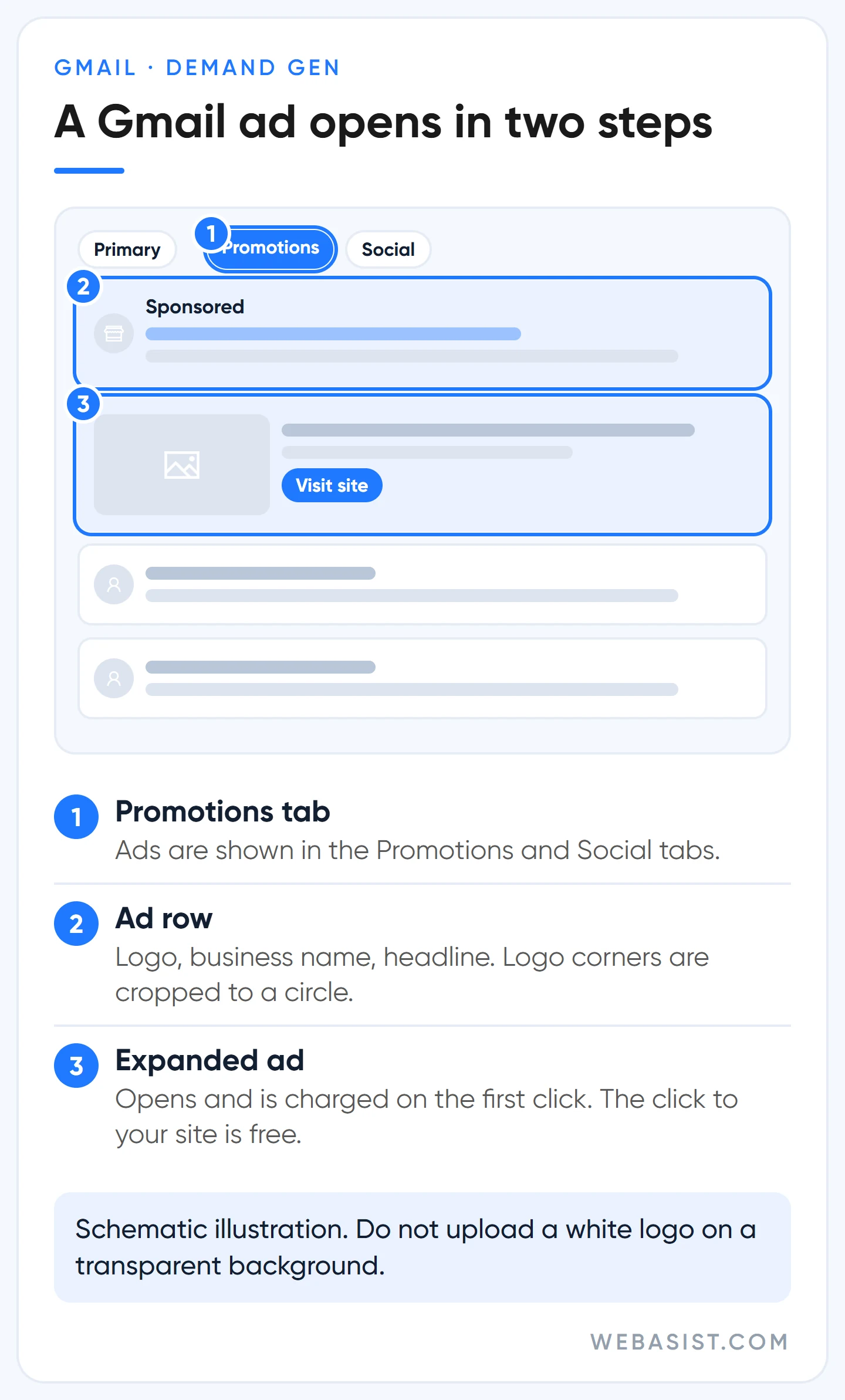
Gmail has two quirks. Your logo may be shown inside a circle with the corners cropped, so text or a symbol placed in a corner disappears. And a mostly white logo uploaded on a transparent background vanishes against a white background. We prepare the logo file with a solid background, centred, at 1200×1200.
Discover and YouTube feeds: why you need a vertical image
Discover is the news and content feed people see in the Google app before they search. Demand Gen ads appear there like a content card: a large image, a headline and a button. The same image set can also be used in YouTube's home feed, in Shorts and on the watch page.
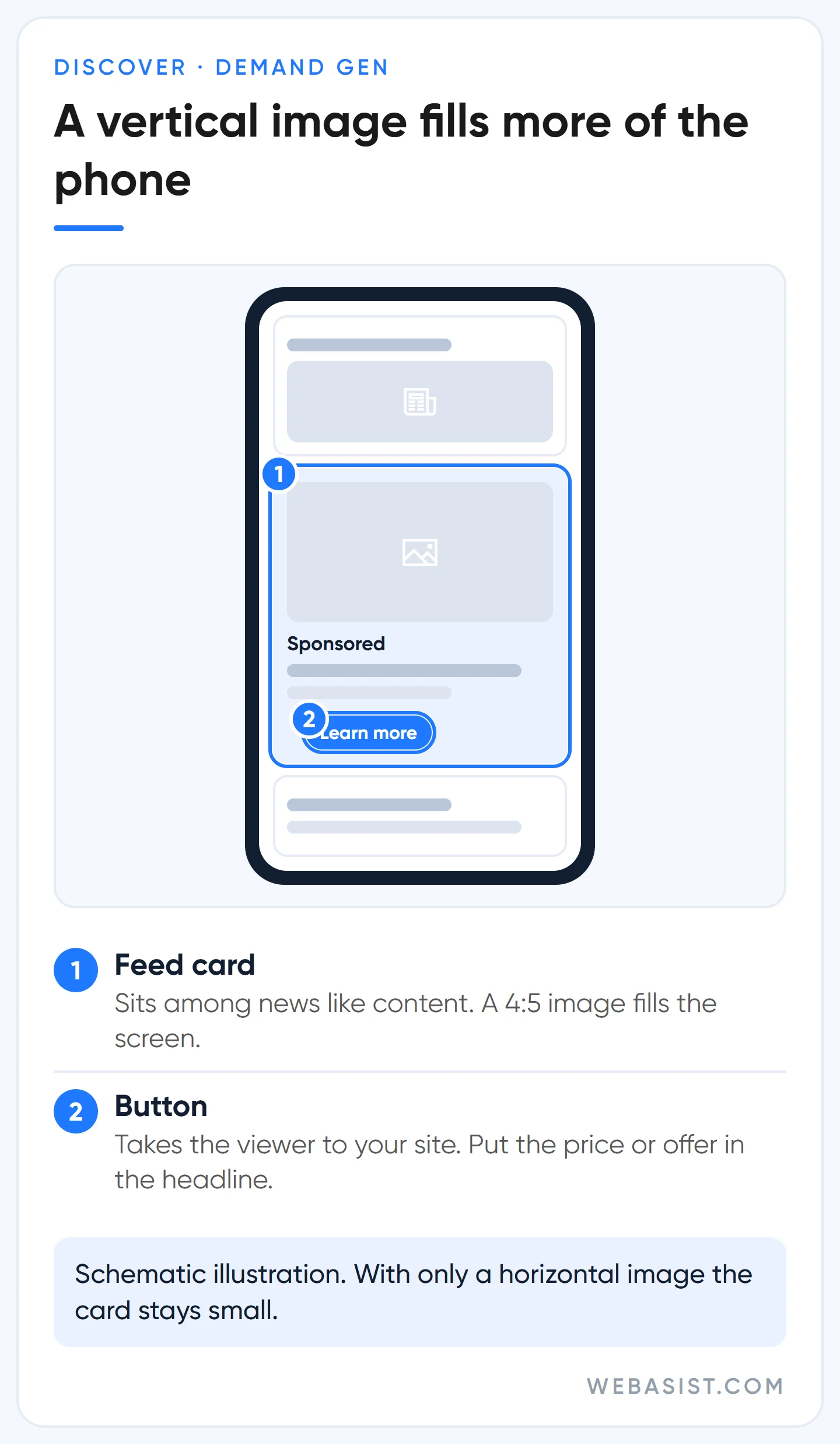
On a phone screen a vertical image takes up far more space than a horizontal one. A 4:5 image stands out in the feed, and 9:16 images are recommended for Shorts. If you only have horizontal photos the system will still show them, but in a small part of the screen.
That is why we never launch a Demand Gen ad without at least one vertical image. Where ads appear on YouTube is shown with mockups in our YouTube ads guide.
Banner sizes: if you design your own, only these five
If you design and upload your own banner, the ad only shows in slots of that exact size. Google lists more than 20 sizes, some used only in certain countries; the full list is on Google's uploaded display ad specs page. When brand control matters we produce only these five, plus a sixth for mobile:
- 300×250 (inline rectangle) and 336×280 (large rectangle)
- 728×90 (leaderboard) and 300×600 (half page)
- 320×100 (large mobile banner), and 320×50 if needed
An uploaded image ad can be at most 150 KB: JPG, PNG or GIF. Animated GIFs must not run longer than 30 seconds, loops must stop within 30 seconds, and the frame rate must be slower than 5 frames per second. HTML5 ads are uploaded as a 600 KB ZIP but are not open to every account; account history and spend are checked. Building on a responsive ad and adding these few banners gets you the best of both.
Does the Display Network burn money on a small budget?
Usually, yes. Clicks on the Display Network are cheaper than on search, but the person clicking is busy with the article they are reading, not with your product. In small accounts we take over, the most common picture is a display campaign that collected cheap clicks, a report listing hundreds of sites and apps, and no leads. Do not confuse a cheap click with a cheap customer; how click prices work is explained in lira in our Google Ads pricing guide.
Example scenario: a dental clinic in Ataşehir puts 3,000 TL a month into display ads for cold audiences and pays 3 TL a click (illustrative figures). That is 1,000 clicks; if 5 in a thousand of those visitors fill in the appointment form, it gets 5 leads at 600 TL each.
The same 3,000 TL on search, at 30 TL a click, buys 100 clicks and, at 5% conversion, can also bring 5 leads. We do not treat those two equal-looking numbers as equal: the search lead is someone looking for treatment today, the display lead is someone who got curious while reading the news and filled in a form. You hear the difference the moment you call them back.
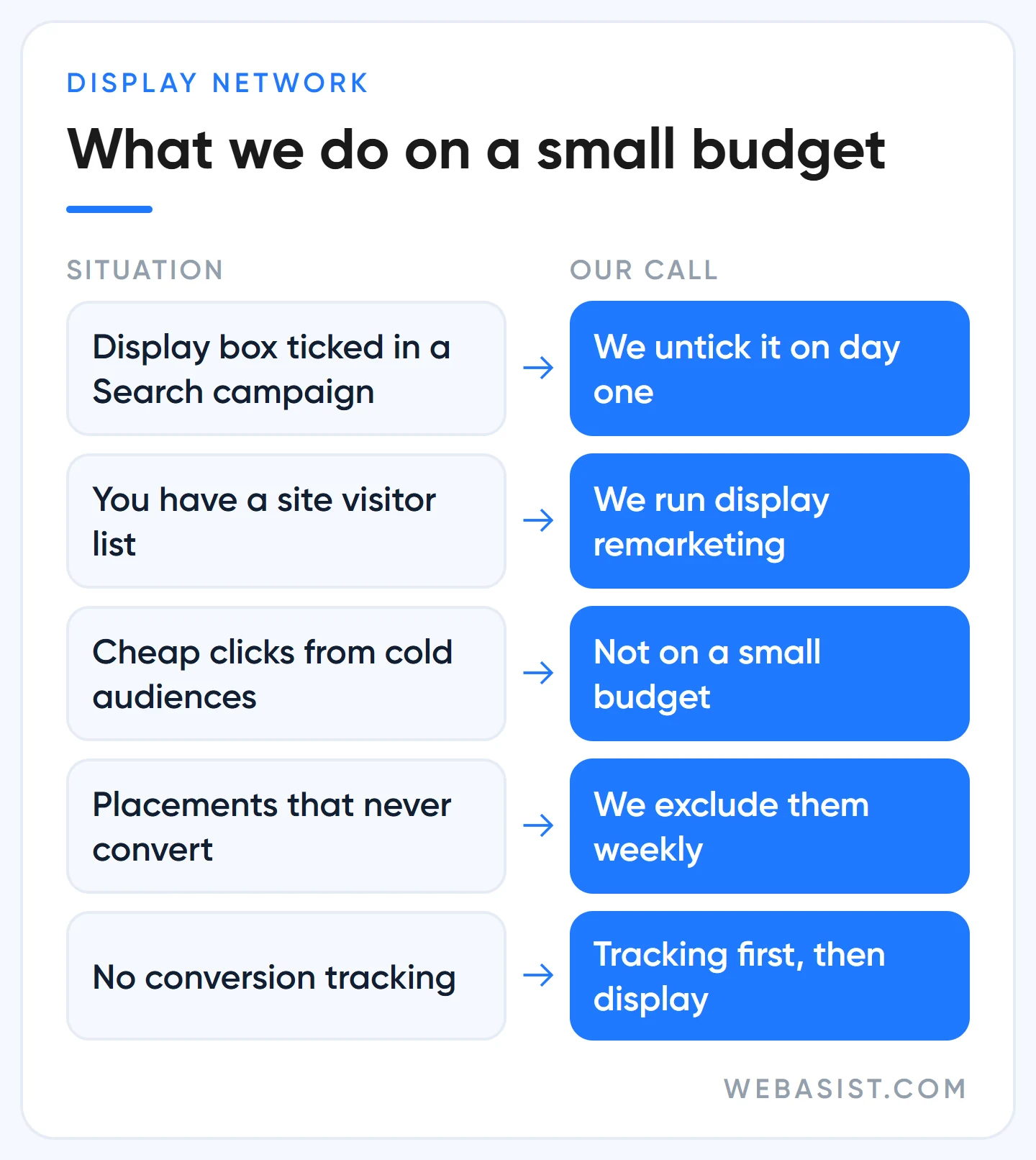
Google also has a quiet recommendation. In a new Search campaign the "Include Google Display Network" box comes ticked; it aims to spend the unused part of your search budget on display at a similar cost per conversion. It sounds sensible on paper, but your search report gets mixed with two different kinds of traffic, and "unused budget" is often money better spent on search. We untick that box on day one and, if we want display, run it as a separate campaign with its own budget and report.
The one case where we recommend display even on a small budget is remarketing: coming back with an image to people who visited your site, added something to the basket or opened the form page. They already know you, and their click actually means something.
Who should not use display ads?
- Businesses with under 10,000 TL a month for ads whose search campaigns are capped by budget. Search comes first.
- Anyone without conversion tracking. Without conversion tracking you cannot see which placement brings sales.
- Anyone with a single stock photo. A display ad built on the image everyone uses is remembered by no one.
If producing images is a burden, ad image design is included in some of our Google Ads packages; the package page shows which. The ad budget is not included in the fee.
The Demand Gen move: how to prepare your images now
Google is moving display campaigns under Demand Gen. From June 2026 a migration tool is rolling out to eligible accounts in phases; later, new display campaigns can only be created inside Demand Gen and the remaining campaigns will be migrated automatically. A migrated campaign cannot be reverted, and it comes with the Display Network switched on; you add YouTube or Gmail afterwards yourself.
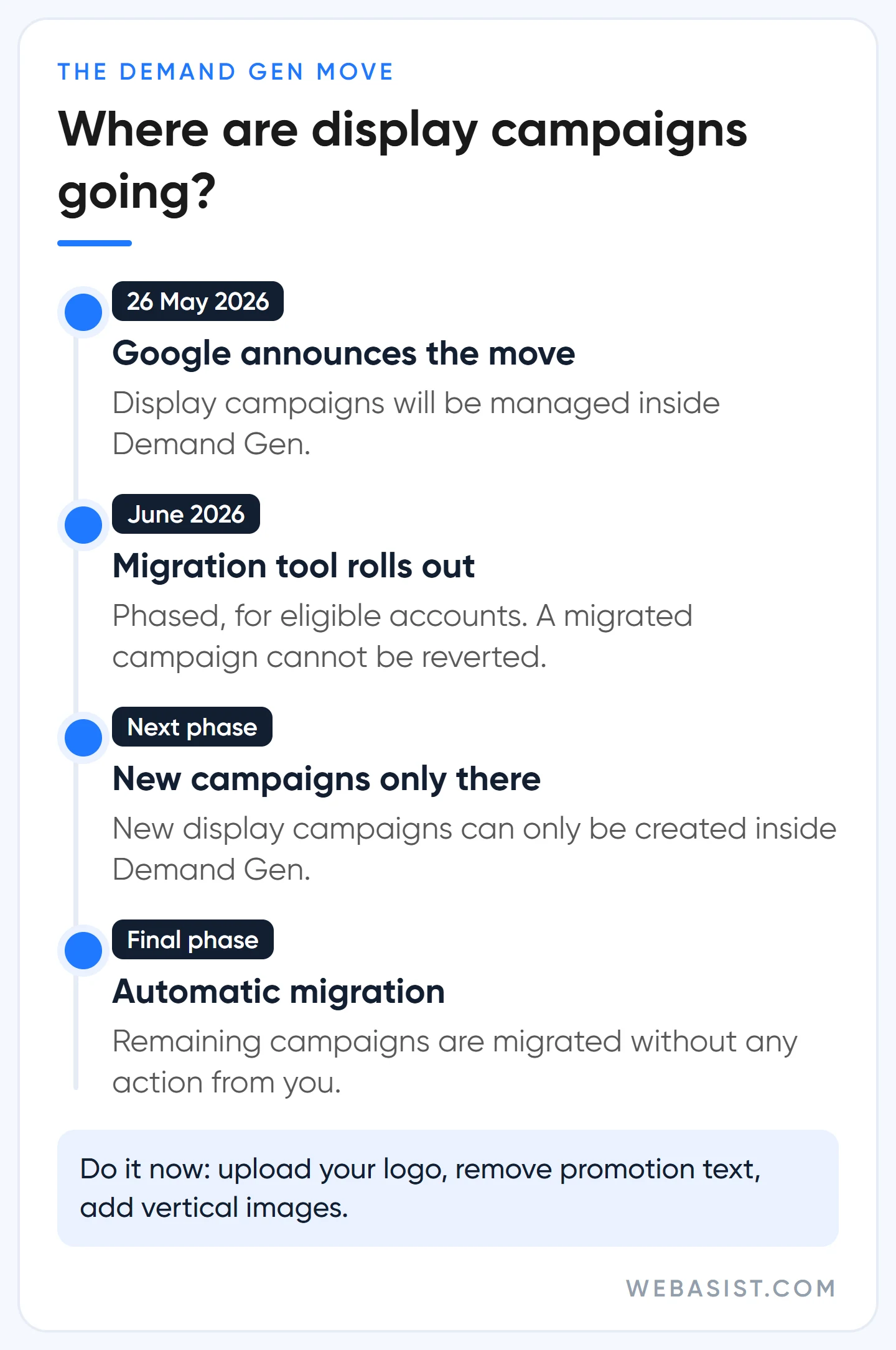
On the image side, here is what you need to know:
- A business logo is required in Demand Gen. For campaigns without one, the migration tool adds a placeholder logo; upload your own now.
- Custom promotion text and price prefixes are not supported in Demand Gen; remove them from your ads before migrating.
- Keep the logo file under 150 KB and add 4:5 and 9:16 vertical images to your set.
The differences between campaign types are in our Google Ads campaign types comparison, and how Performance Max uses images is in our Performance Max guide.
Frequently Asked Questions
What size should a Google Ads logo be?
Prepare the square logo at 1200×1200 pixels; the minimum is 128×128 in responsive display ads and 144×144 in Demand Gen single image ads. The landscape logo is optional, 1200×300 (at least 512×128). In Demand Gen the logo file must not exceed 150 KB.
How do I turn off the Display Network in Google Ads?
Open the Networks section in your Search campaign settings, untick "Include Google Display Network" and save. This only stops the search campaign spilling onto display; it does not affect display or Demand Gen campaigns you set up separately.
Can I put text and prices on the image?
On a banner you design yourself, yes, as long as it is readable. On a responsive ad, do not: headlines and descriptions are added separately, and text on the image is unreadable in small slots and repetitive in large ones. Put the price in the headline so you do not have to redesign the image when it changes.
Can I use AI-generated images?
Yes; Google Ads' own tools generate images too. An image that shows the product differently from reality, though, comes back as returns and complaints. Where AI helps is discussed in our AI ad optimisation guide.
Conclusion
Reduce the sizing job to four files and spend your energy on the image itself: a clear product, no text, a logo on a solid background. On a small budget, use the Display Network for people who already visited your site, not for cold audiences.
Send us links to your images and we will mark which ones will be cropped in a responsive ad and which ratio is missing from your set. What we take on in display campaigns is on our display ads page.