


Performance Max Campaigns: When to Open One, and When Not To
A Performance Max campaign (PMax for short) runs on Google Search, YouTube, the Display Network, Discover, Gmail and Maps at the same time, with one budget and one conversion goal. You do not pick keywords; Google decides who sees which ad, and where. Our verdict up front: if your account does not see around 30 conversions a month, do not open PMax. If it does, open it, but next to your Search campaign rather than instead of it, and with brand exclusions on day one.
This article does not walk through the setup screens step by step. It explains which decisions on those screens affect your money, how PMax eats your brand traffic, and which controls we put in place. The comparison with other campaign types is in our Google Ads campaign types article.
What Performance Max is, and why Google recommends it to everyone
Think of PMax like this: you provide the goal (sales, forms, calls), the budget and a handful of headlines, images and videos; Google combines them across six channels and moves the money to wherever it believes conversions come from. The good part is being in six places without building six campaigns. The bad part is that you only see where the money went afterwards, and only partly.
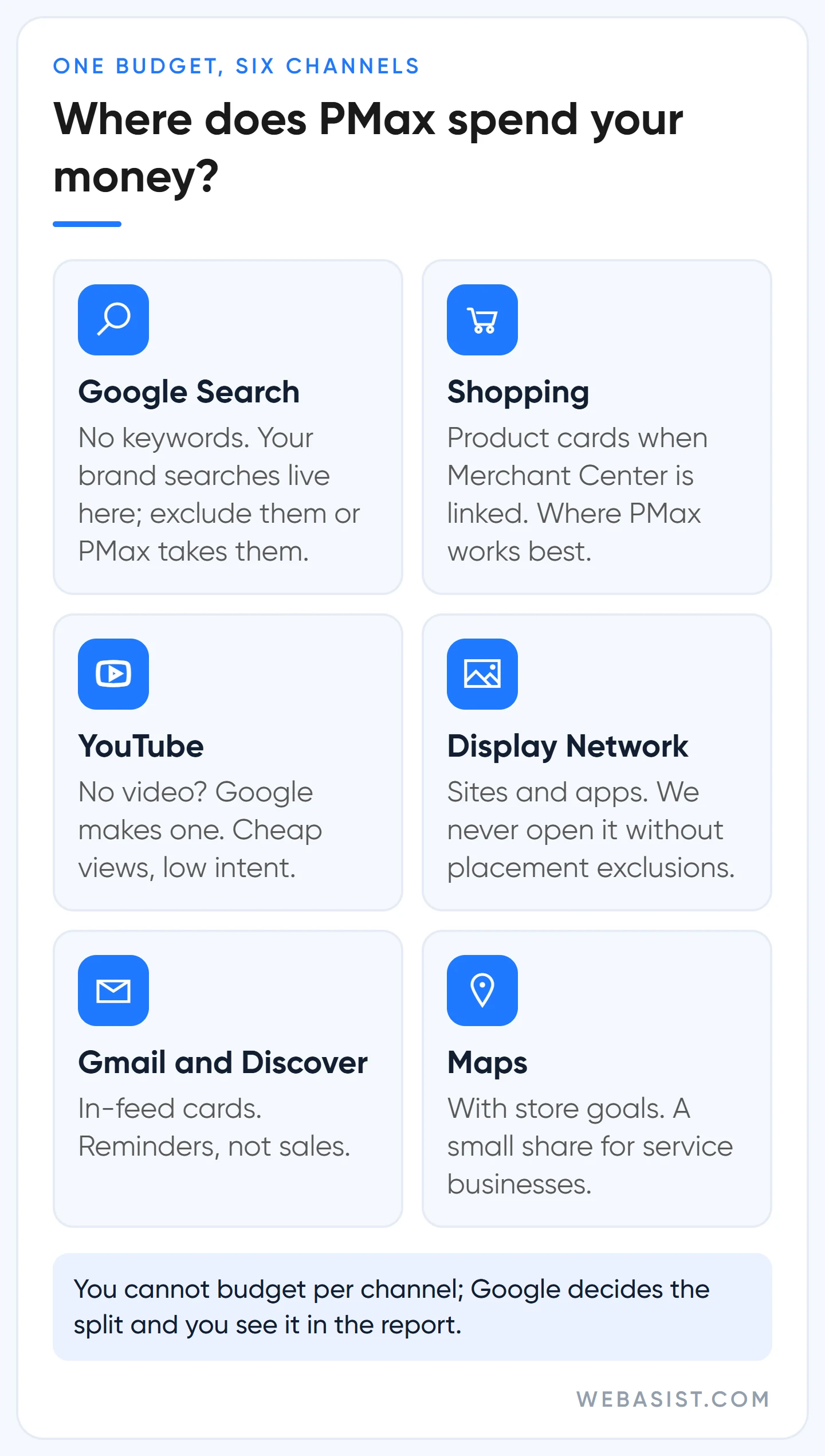
Google pushes this type in the setup flow, in the Recommendations tab and through the optimisation score. The reason is no secret: PMax pours budget into YouTube, Display and Gmail inventory that a Search campaign never touches, and the party selling that inventory is Google. Your question is different: are the clicks from those channels customers, or cheap impressions? Your account's data answers that, not Google's recommendation.
When to open Performance Max, and when not to
PMax learns what to look for from your conversions. With little data it has nothing to learn from and spreads the budget over the cheapest impressions; "conversions" rise in the dashboard, the phone stays silent. Our thresholds:
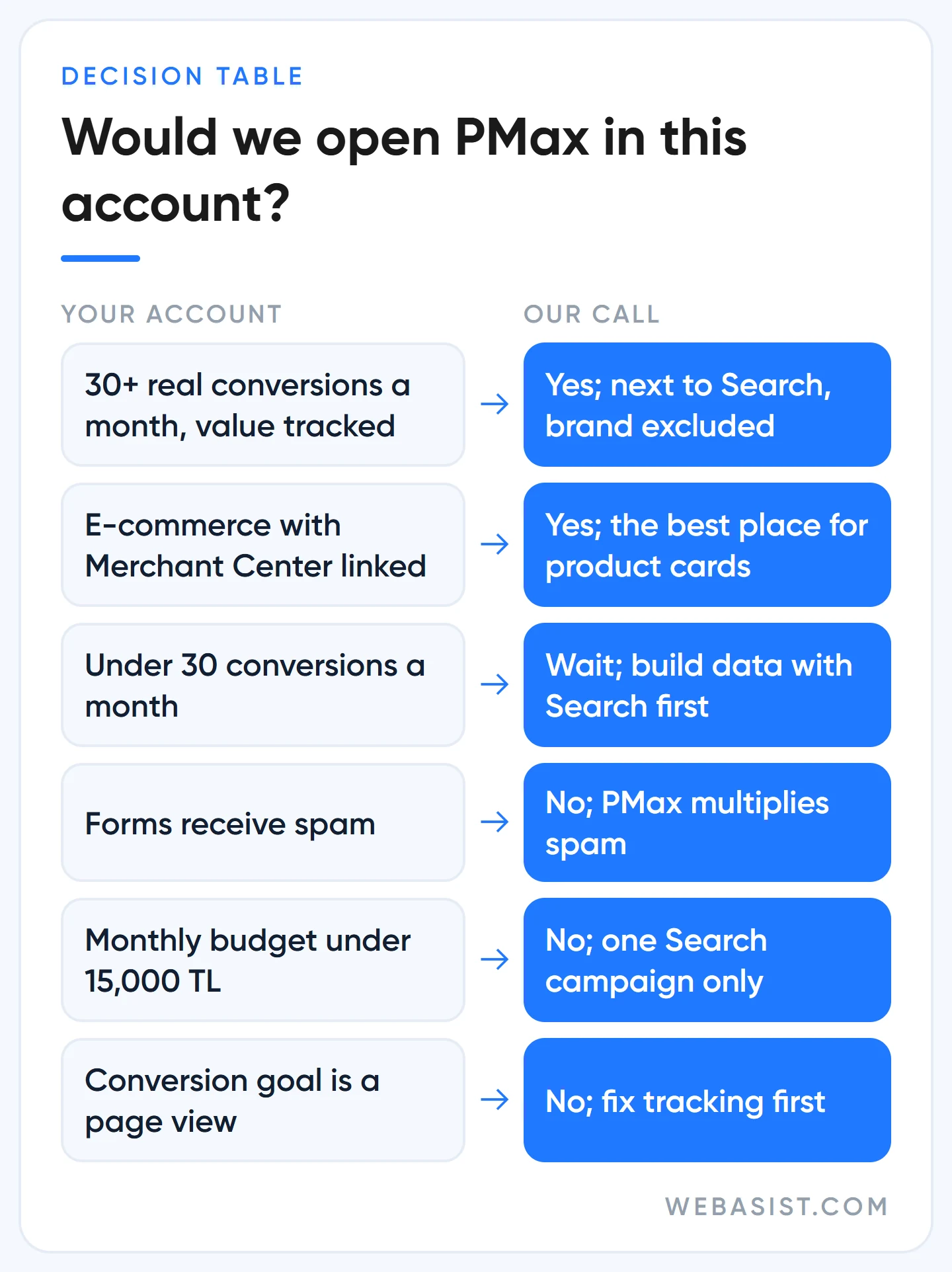
- We open it: when the account sees around 30 real conversions a month (purchases, qualified forms, calls longer than 60 seconds) and conversion tracking sends the purchase value correctly. In e-commerce, with Merchant Center linked, PMax also produces product cards; that is where we see it work best.
- We wait: below 30 conversions we build data with a Search campaign first. Google considers a goal with 15 conversions in the last 30 days enough for lead accounts; we have seen too many PMax campaigns opened on 15 conversions burn their first month.
- We never open it: when forms receive spam (PMax learns to multiply spam), when the monthly budget is under 15,000 TL (Search is barely fed as it is), and when the conversion is a weak action such as a page view.
Example scenario: a dental clinic in Kadıköy spends 20,000 TL a month and gets 25 appointment forms from Search. Google shows the "more conversions with PMax" card. We would not open PMax in this account; we would push Search above 30 first, measure form quality, then add a PMax campaign next to Search starting at 200 TL a day. Moving budget out of Search and into PMax swaps a known source for an unknown one.
How PMax eats your brand traffic, and how to tell
The mechanism is simple. PMax runs without keywords and looks for the cheapest conversion. The cheapest conversion is the person already searching for you by name: a customer typing "x furniture" would have reached your site without an ad. PMax shows up on those searches, takes the click and books the sale as its own. The report shows a ROAS of 12 while total sales stand still. In the accounts we take over, "PMax works great" usually has this behind it.
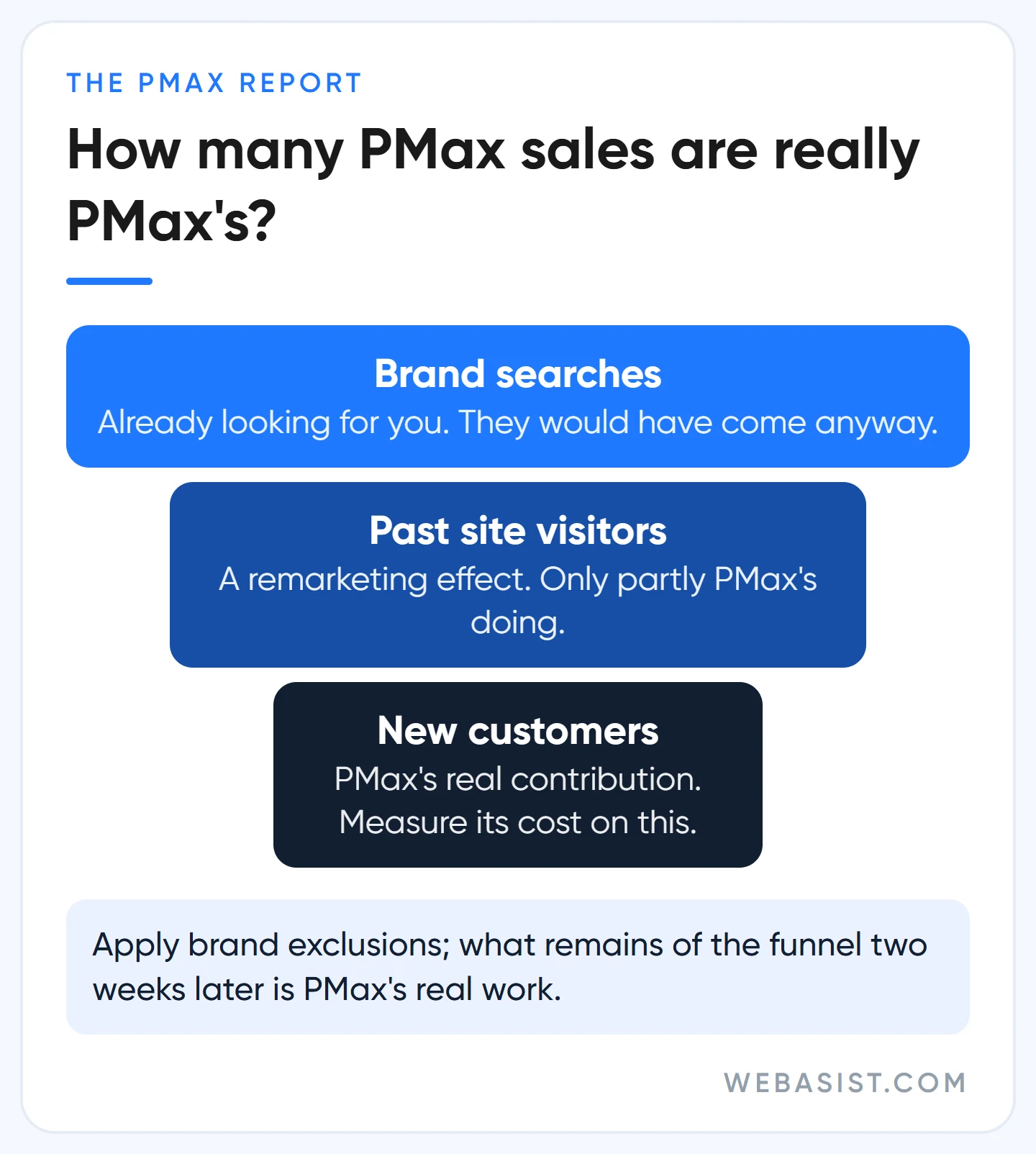
How do you tell? Look in three places. First, the share of queries containing your brand name in the PMax search terms report (the "Search terms and landing pages for Performance Max" view). Second, the impression share of your brand Search campaign, if you have one; if it dropped after PMax went live, PMax is taking that traffic. Third, the simplest test: apply brand exclusions to PMax and look again two weeks later. If PMax's ROAS fell but the account's total sales did not change, PMax was not bringing those sales, it was reporting them.
That is why we enter the brand list on day one in every account where we run PMax, and keep the brand in a separate, small Search campaign; why we keep it separate is in our competitor brand bidding article. In e-commerce we usually leave the "allow Shopping ads on searches mentioning excluded brands" box ticked: let the product card show on brand searches while the text ad comes from the Search campaign.
Setup: only the decision points
The setup wizard takes 20 minutes and on most screens the default works for you. On the following it does not, and this is our choice:
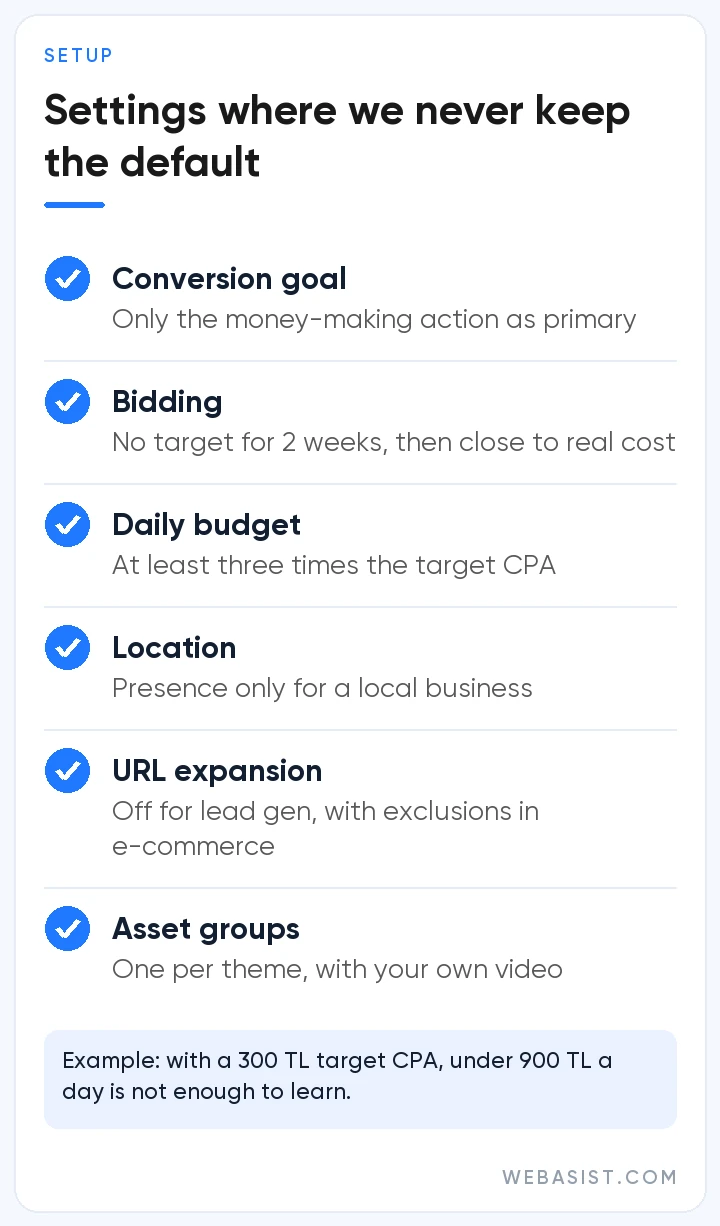
- Conversion goal: only the action that makes money stays on the list. If "page view" or "button click" is a primary goal, PMax learns to collect those. If tracking is not clean, fix conversion tracking first.
- Bidding: we run the first two weeks on "Maximise conversions" without a target, then enter a target CPA or ROAS close to the actual cost. An account that sets an ambitious target on day one cannot enter auctions and comes to us saying "PMax is not getting impressions". Choosing a strategy is covered in bidding strategies.
- Budget: Google's budget panel suggests Low, Medium and High; we keep the daily budget at least three times the target CPA. With a 300 TL target CPA, anything under 900 TL a day is not enough to learn; if that money is not there, there is no PMax either.
- Location option: the default is "presence or interest"; for a local business we pick "Presence". Otherwise you also pay for someone in Ankara searching "Istanbul plumber".
- Final URL expansion: on by default; Google may send the visitor to a different page on your site depending on the search. In a lead account we switch it off so traffic goes to the service page. In e-commerce we leave it on and block blog, careers, login and cart pages with URL exclusions.
- Text customisation: Google generates headlines from your page. Off in healthcare, legal and other fields where every word matters; on elsewhere, watched through the asset report.
- Asset groups: a separate group for every product or service that needs different images and messages; with everything in one group, the kitchen cabinet ad goes out with the bedroom photo. Each group should have at least 15 headlines, 5 descriptions, 7 images and your own video; if you upload no video, Google generates one from your images and you will not like the result.
Which controls we put in place
"PMax gives you no control" was true in 2022, not today. But every control works on a different channel, and a control placed in the wrong spot does nothing. Our opening list:
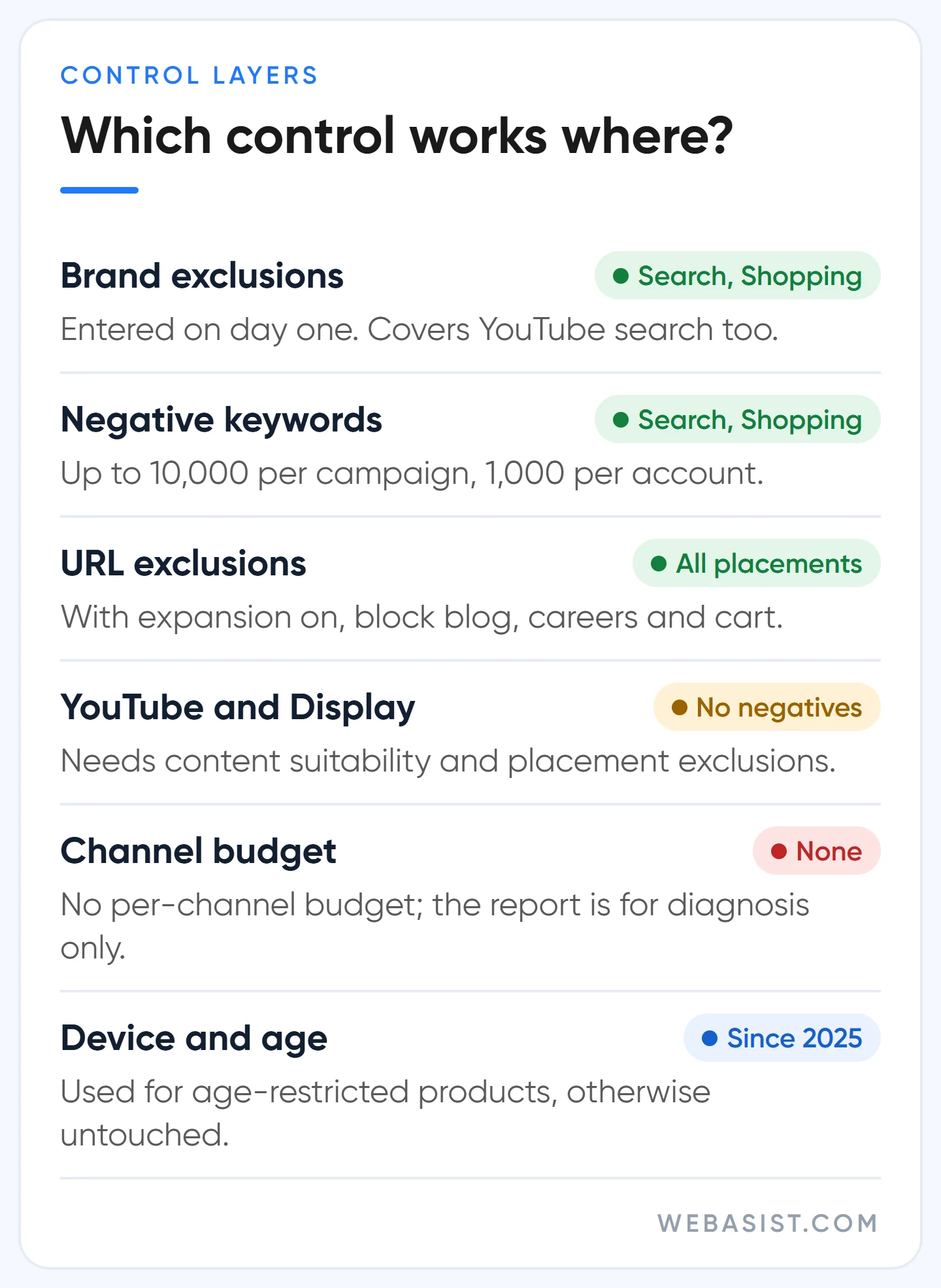
- Brand exclusions: an account-level brand list applied to the campaign. Works only on Search, Shopping and YouTube search. You do not need to enter misspellings and variants separately.
- Negative keywords: up to 10,000 per campaign and 1,000 at account level. They work only on Search and Shopping inventory. Patterns such as "free", "second hand" and "jobs" go at account level; we build the list the way our negative keywords article describes.
- URL exclusions: mandatory when expansion is on. Every page you do not exclude is a candidate landing page.
- Content and placement exclusions: negative keywords do nothing on YouTube and Display; there you use content suitability settings and placement exclusions. Children's channels and mobile game apps are the first we switch off.
- Device and age controls: available in all accounts since August 2025; we use them for age-restricted products and leave them alone otherwise.
Know the control that does not exist too: you cannot give channels separate budgets. There is no "10% of budget to YouTube" setting; the channel performance report is for diagnosis only. If you do not want money spent on YouTube, the answer is not to tune PMax but not to open it.
In the same account as Search: which one serves first?
When both campaigns qualify for the same query, the rule is: if the query is identical to an exact match keyword in your Search campaign, Search wins. Search themes sit on the same step as phrase and broad match. Without an identical match, relevance and Ad Rank decide. The one exception matters: if the Search campaign holding that exact match keyword is limited by budget, PMax can serve on those queries too. That is why we never leave a Search campaign "limited by budget"; if PMax needs money, we find it elsewhere.
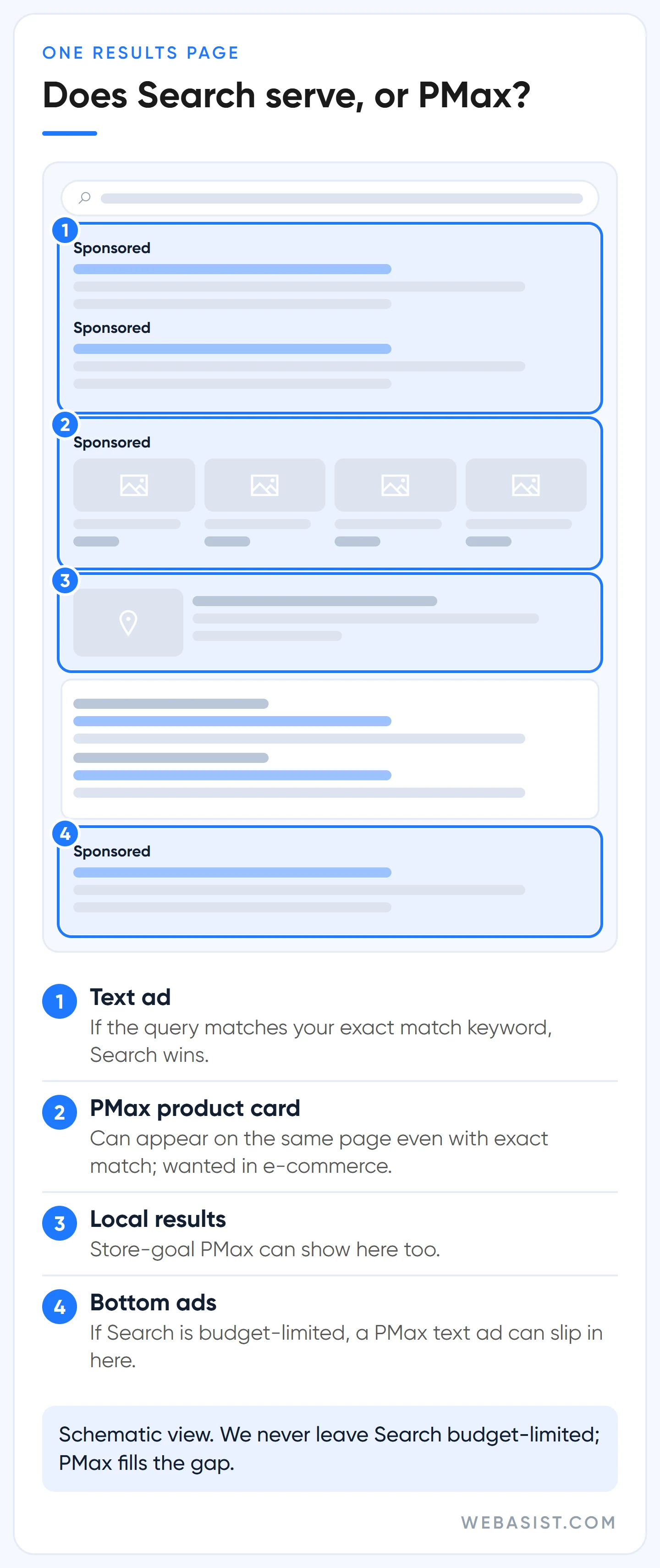
This rule applies to text ads only. Even when the query is identical to your exact match keyword, PMax's product card can appear on the same results page next to your text ad, and in e-commerce that is usually what you want. Every month we read the search terms of both campaigns side by side and move the valuable queries PMax keeps bringing into Search as exact match. Over time the most profitable queries migrate to the campaign we can control.
The first 6 weeks: when we intervene and when we switch it off
The most expensive mistake in PMax is rebuilding the campaign before learning is done. Google says to give a new campaign at least 6 weeks, and 1-2 weeks after every major change; we follow the same calendar, but we do not wait empty-handed:
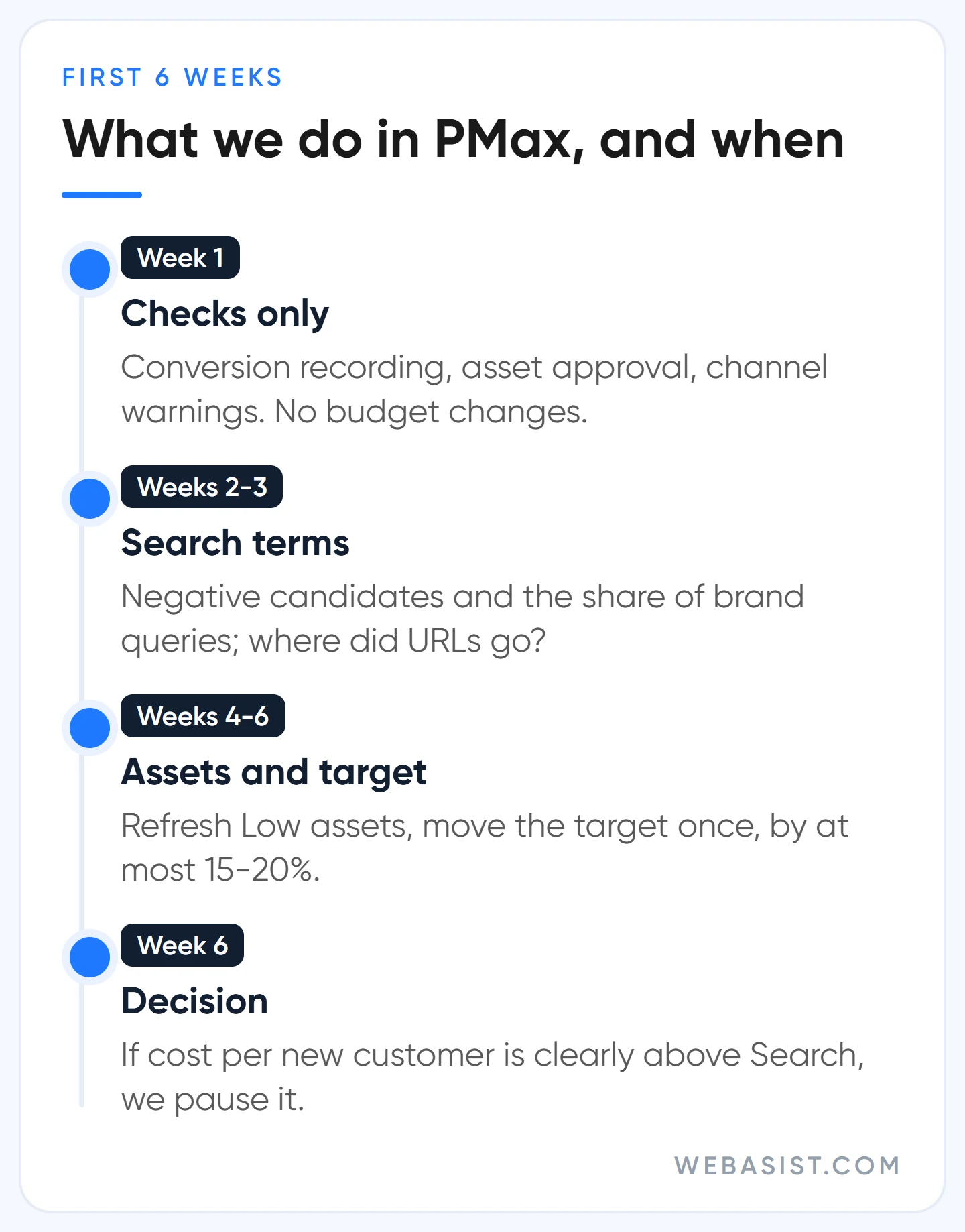
- Week 1: are conversions recording, are assets approved, does the channel performance report show "missing video" or a policy warning? We do not touch budget, target or bid strategy.
- Weeks 2-3: negative candidates and the share of brand queries from the search terms report. In the expanded final URL assets tab, which pages did traffic go to? We do not replace assets in bulk.
- Weeks 4-6: we refresh assets rated "Low" for 2-3 weeks and move the target CPA or ROAS for the first time, by at most 15-20%.
- After week 6: decision week. If PMax's cost per new customer (with brand excluded) is clearly above Search's and the gap did not close in six weeks, we pause the campaign. Based on the six-week total, not one week's swing.
The yardstick: if a PMax campaign with brand traffic excluded brings customers at a higher cost than the Search campaign in the same account, and budget is tight, we put that money back into Search. Google's warning not to pause because learning will be disrupted is correct, but there is no point protecting the learning of a campaign that has lost money for six weeks. How we read the whole account is in our account audit article, and our general stance on AI products in AI-powered ad optimisation.
Frequently Asked Questions
Can you add negative keywords to a Performance Max campaign?
Yes. Up to 10,000 negative keywords and existing negative lists per campaign, plus 1,000 at account level. They only work on Search and Shopping surfaces; YouTube and Display need content and placement exclusions.
How long is the Performance Max learning period?
At least 6 weeks for a new campaign, and 1-2 weeks after a change to budget, target or bid strategy. Every major change during that time restarts learning. If the numbers do not add up after six weeks, we do not extend the campaign with "let's wait a little longer".
What is the minimum budget for Performance Max?
Google does not publish a fixed amount; the budget panel in setup makes a suggestion based on your account. Our rule is a daily budget of at least three times the target CPA. With a 300 TL target CPA that is 900 TL a day, roughly 27,000 TL a month; if that budget is not there, stay in the Search campaign.
Is a Merchant Center feed required for Performance Max?
No. Service businesses use PMax with asset groups only. In e-commerce, linking the feed lets the campaign produce product cards as well; how we prepare the feed is in our Merchant Center article.
Conclusion
Performance Max is a good second campaign in an account that has data, and an expensive experiment in one that does not. Without 30 conversions a month, do not open it. With them, open it with brand exclusions, next to Search, with a daily budget of three times the target CPA, and decide in week six based on cost per new customer.
If PMax is already running in your account, try one thing: open the search terms report and look at the share of queries containing your brand name. If that share is high, send us the number; we will apply brand exclusions together and work out PMax's real contribution two weeks later.
Sources
- About Performance Max campaigns: inventory, exact match priority and the budget-limited Search exception.
- Apply brand exclusions: scope and the Shopping ads allowance.
- Negative keywords in Performance Max campaigns: Search and Shopping scope only.
- Ad group and asset group prioritization: the order between Search and PMax.
- Performance Max optimization tips: the 6-week guidance and asset counts.














