


Google Ads Account Audit: Where Is Your Budget Going? Checklist

When we say Google Ads account audit, we do not mean a 60-item list. We mean the five places we look at in the first 20 minutes of every account we take over: conversion actions, network settings, the location option, search terms and auto-applied recommendations. In most accounts that waste budget, the leak is in one of those five. The numbers on the report screen only mean something once those five are right.
Below is that 20-minute tour first, then the full checklist and the table you can score your account with. The second half of the article is the reporting side: how to pull a Google Ads report, how to read it, which metrics drive decisions and which are decoration. Example figures are in lira and labelled as example scenarios.
The 20-minute quick audit: check these five places first
If you have no time for a full audit, or you are wondering whether to trust your agency's report, these five checks are enough. Read-only access is sufficient; you look without changing anything.
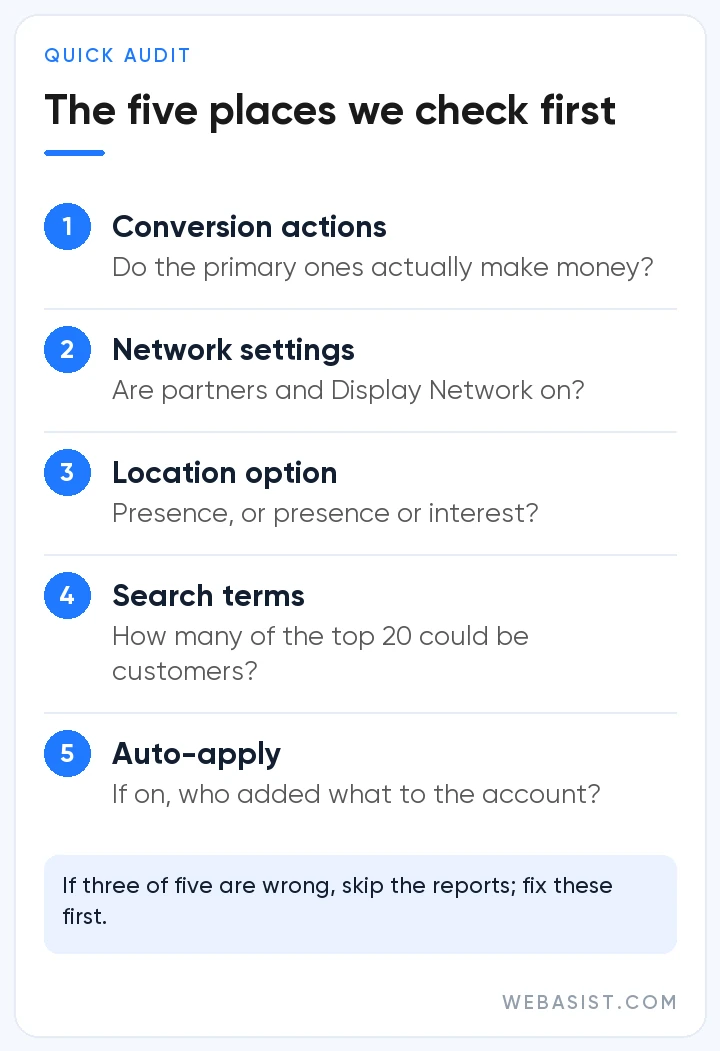
- Goals > Conversions: Read the actions marked primary. If page views, scrolls or button clicks are primary, the bidding system has been chasing the wrong thing for months.
- Campaign settings > Networks: Are Search partners and the Display Network ticked? Both come ticked in a new campaign; if nobody switched them off, they are on.
- Campaign settings > Locations: If "Presence or interest" is selected, a boiler repair business in Kadıköy may be getting clicks from Ankara.
- Search terms report: Sort the last 30 days by cost. Of the top 20 terms, how many could possibly be a customer of yours?
- Recommendations > Auto-apply: If it is on, broad match keywords, target changes and network expansions have entered the account without you knowing.
If three of the five are wrong, there is no point reading the rest of the account; fix these first, talk about reports afterwards. If all five are clean, congratulations, whoever runs the account knows the job; move on to the full list below.
1. Conversion tracking: is the number in the report real?
The first and heaviest item of the audit. Bidding strategies learn only from the primary actions that feed the "Conversions" column; if that column is wrong, money flows to the wrong place even when everything else is right. Four things to look at:
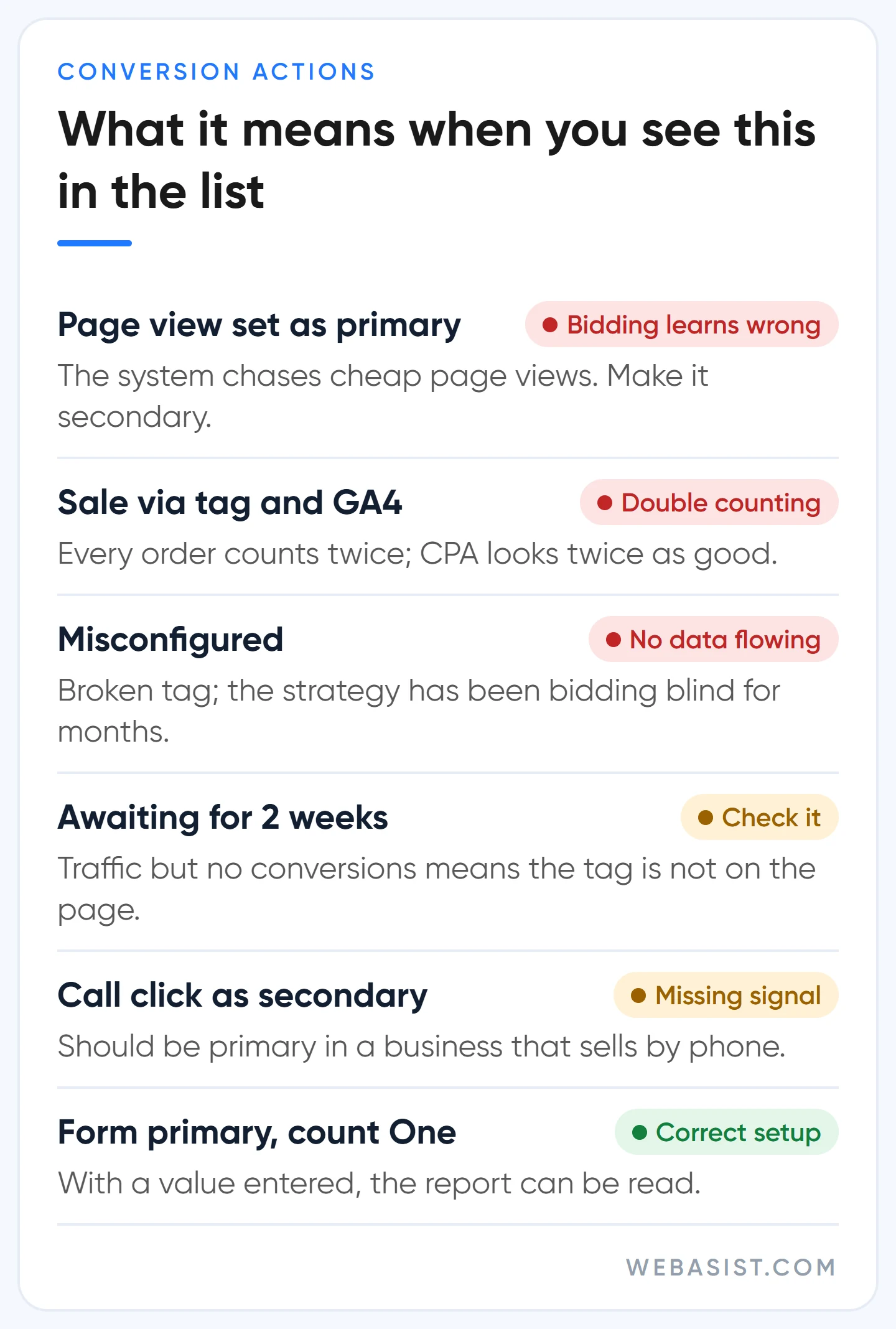
- Primary versus secondary: The action you want bidding to chase (form, call, WhatsApp, sale) is primary; everything else is secondary. Conversions imported from GA4 arrive as secondary by default and can only be made primary on the Google Ads side.
- Double counting: If the same sale is primary both through the Google tag and through the GA4 import, every order is counted twice and the CPA looks twice as good as it is. Pick one source.
- Status: Actions reading "Misconfigured", or "Awaiting conversions" for two weeks, are feeding nothing to the bidding system. "Unverified" clears within hours on a new action; if it does not, the tag is not on the page.
- Counting and value: "One" for forms and calls, "Every" with the basket value for sales. If value is empty, the ROAS column is decoration.
Example scenario: a kitchen cabinet workshop shows 180 "conversions" a month at a CPA of 90 TL. A look at the primary actions shows 150 of them are "price list page viewed". Real demand is 30 forms; the real CPA is 540 TL.
For months the account has been bidding on searches that bring cheap page views. Fixing the setup is the subject of our conversion tracking guide; here we only diagnose.
2. Campaign settings: where does money quietly leak?
Settings mistakes are made at setup and go unnoticed for years, because no report ever says "this setting is wrong". Google's defaults lean towards more impressions and more spend; natural for a seller, expensive for you. What we check, in order, in every account we take over:
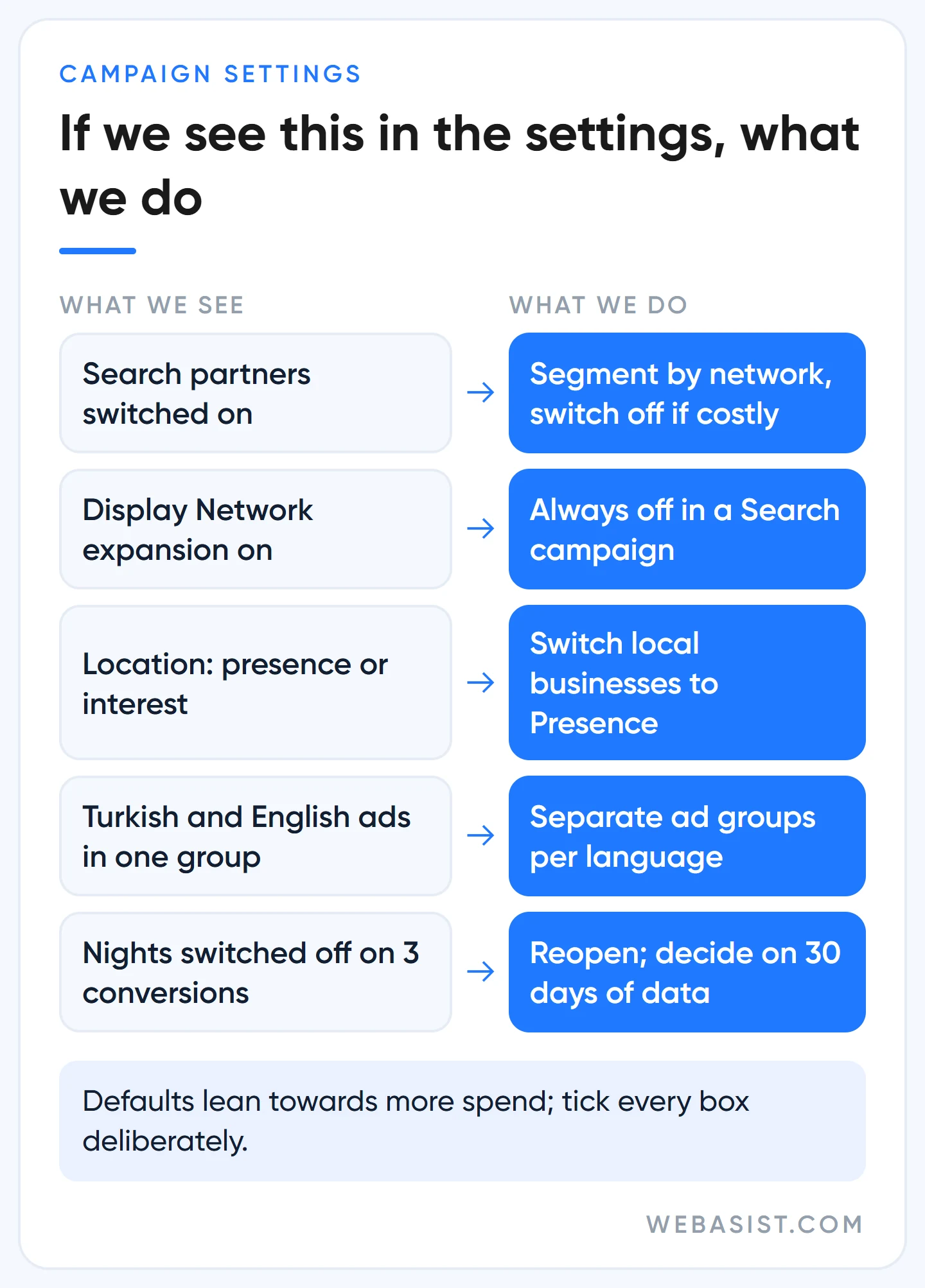
- Search partners: On by default. Segment the table by network; if partner cost per conversion is clearly above Google Search, switch it off. We turn it off in most service accounts and measure before deciding in e-commerce.
- Display Network expansion: If it is on in a Search campaign, unspent search budget goes to banner placements. We always switch it off in Search campaigns; display ads are a separate campaign's job.
- Location option: The default, "Presence or interest", covers everyone showing interest in your area. For a business serving one district we switch to "Presence"; for tourism, real estate and education we keep the default. Decide by looking at matched locations in the "Where and when ads showed" report.
- Language: From September 2026 the campaign-level language setting is being removed from Search campaigns; ads match by the language they are written in. In the audit, check that Turkish and English ads are not mixed in the same ad group.
- Ad schedule: Plenty of accounts switch off night hours on the strength of three conversions. Since 1 June 2026, in schedules that switch off whole days, a campaign live 16 or more days a month can still spend up to 30.4 times the daily budget; cutting days concentrates the budget, it does not lower it.
3. Search terms and negatives: how much of the spend is irrelevant?
A keyword is what you typed, a search term is what the customer typed; the gap between the two is where your budget leaks. Sort the last 30 days of search terms by cost and ask each one a single question: could this person pay me? Example scenario: in a dental clinic spending 20,000 TL a month, 11 of the top 30 terms are searches like "dentistry entrance scores" and "what helps toothache", and they spent 4,800 TL. Recovering that 4,800 TL with one negative list is an hour's work.
Check that an account-level negative list exists, that lists are actually applied to campaigns and that conflicting negatives are not blocking active keywords. Why negatives do not expand to close variants, how Turkish suffixes behave and the weekly cleaning routine are in our negative keywords article. Low-volume terms are hidden by the privacy threshold; a clean visible list does not mean the whole report is clean.
4. Ads and landing pages: does the page keep the promise?
Add the "Policy details" column to the Ads table; you will see disapproved and limited ads with their reasons. Do not put too much weight on the ad strength label: an ad marked "Poor" does not lower Ad Rank, the label measures asset variety. We would take an ad with "Average" strength and a high click-through rate over an "Excellent" one that sends people to the homepage.
The real check is the landing page. Open the final URL of one ad from each ad group on your phone: does the page load in 3 seconds, is the promise from the ad on the first screen, are the phone number and form one tap away? The page criteria are in our landing page article.
Since 26 January 2026 the "add responsive search ads" recommendation is no longer auto-applied, but older accounts may still be running ads created by that recommendation that nobody ever read. Find them and pause them.
5. Bidding strategy and budget: does it match the data?
The question is not the strategy's name but its fit with the account's data. A campaign running Target CPA on 10 conversions a month is an audit finding, and so is a campaign still on Manual CPC with 80 sales a month. Which strategy we pick at which conversion count is a table in our bidding strategies article; in the audit we compare against that table.
On the budget side, two columns decide: "Search lost IS (budget)" and "Search lost IS (rank)". If budget loss is high and CPA is below target, the campaign is losing customers for lack of money; before raising the budget we try moving it from a weaker campaign. If rank loss is high, the problem is not money but ad and page quality; adding budget there means buying expensive clicks. If change history shows a campaign whose target is changed every week, that is the cause of the fluctuation; the strategy restarts before it can learn.
How to pull a Google Ads report, and how to read it
Pulling the report is the easy part. There are three ways: the download icon at the top right of any table for a CSV or PDF; Campaigns > Insights and reports > Report editor, where you drag dimensions and metrics into a custom table; and "Email and schedule" on that report so it lands in your inbox every Monday. Scheduled reports only go to users with access to the account; to send one to the boss you download a PDF. Google deletes saved reports that have not been opened for 18 months.
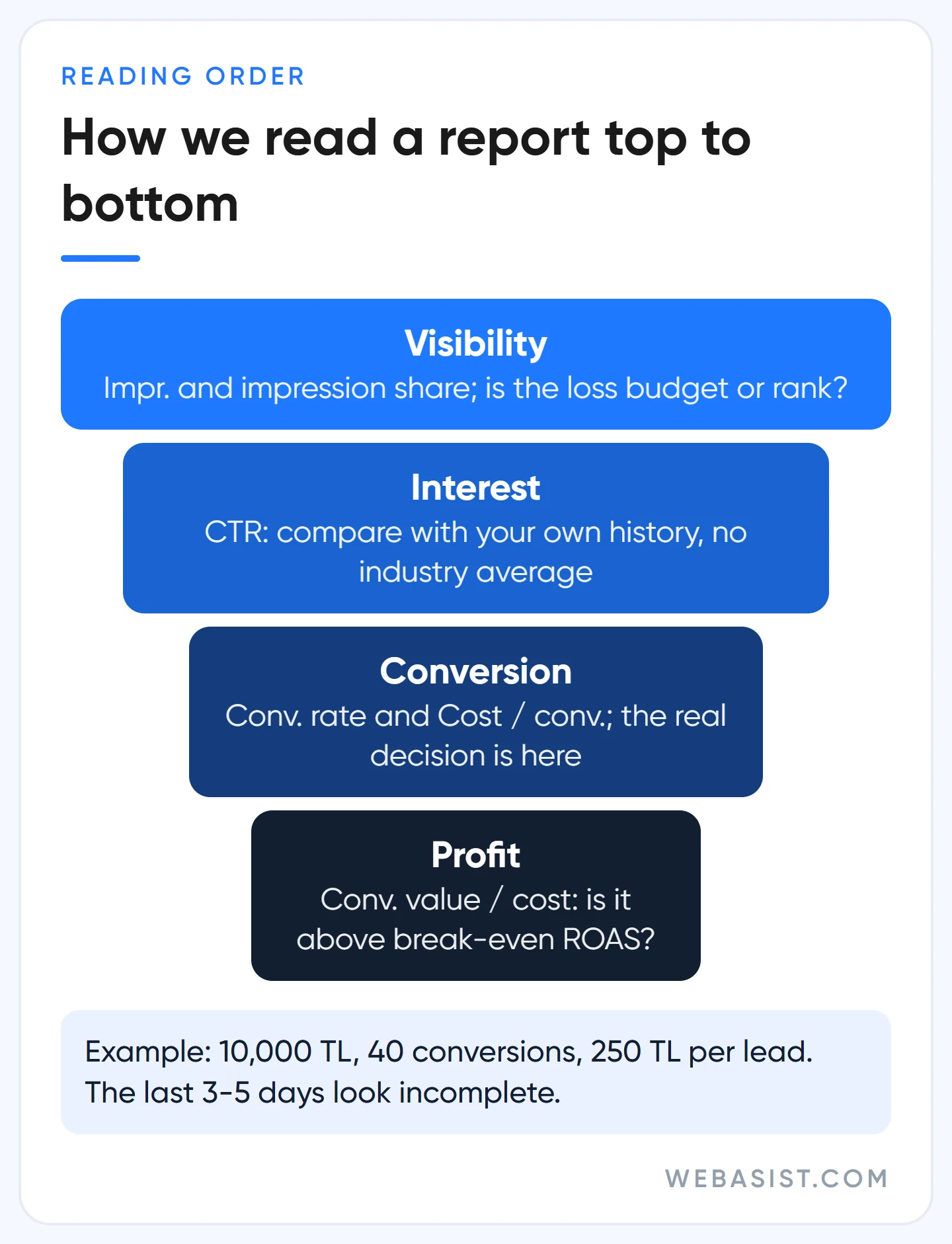
Reading is the hard part. We always read a report in the same order: visibility, interest, conversion, profit. One metric per step, one question per metric:
| Question | Column (interface name) | How we read it |
|---|---|---|
| Am I visible enough? | Impr., Search impr. share | If share is low, we look for the reason in the lost IS columns: budget or rank? |
| Do viewers click? | CTR | Compared with your own history and across ad groups; there is no "industry average" |
| What does a click cost? | Avg. CPC | Never decides on its own; read together with CPA |
| Do clickers become customers? | Conv. rate | If low, the first suspects are search intent and the landing page |
| What does one lead cost? | Cost / conv. | Compared with the profit ceiling; the real decision column |
| What does each 100 TL bring back? | Conv. value / cost | Only meaningful if values are sent correctly |
Memorise two sums. CPA: 10,000 TL spend, 40 conversions, 250 TL per lead. ROAS: 10,000 TL spend, 42,000 TL in sales, the column reads 4.2, which means 420%.
With a 25% gross margin, break-even ROAS is 100 ÷ 25 = 400%; 4.2 keeps you only just above zero. We have seen plenty of e-commerce accounts celebrate a ROAS without knowing their margin.
Three traps. The "Conversions" column counts primary actions, "All conv." counts secondary ones too; use the first in management reports. Google writes a conversion to the day of the click, so the last 3 to 5 days look incomplete; do not decide on those days.
If you are reconciling with accounting, add the "Conversions (by conv. time)" column; the two systems still will not match exactly, what matters is that the gap stays the same every month.
Which metrics drive decisions, and which are decoration?
Most agency reports open with an impressions and clicks chart, because both always go up. The first page of our report is CPA, conversion count and lost impression share; the rest is appendix. We sort metrics into three groups:
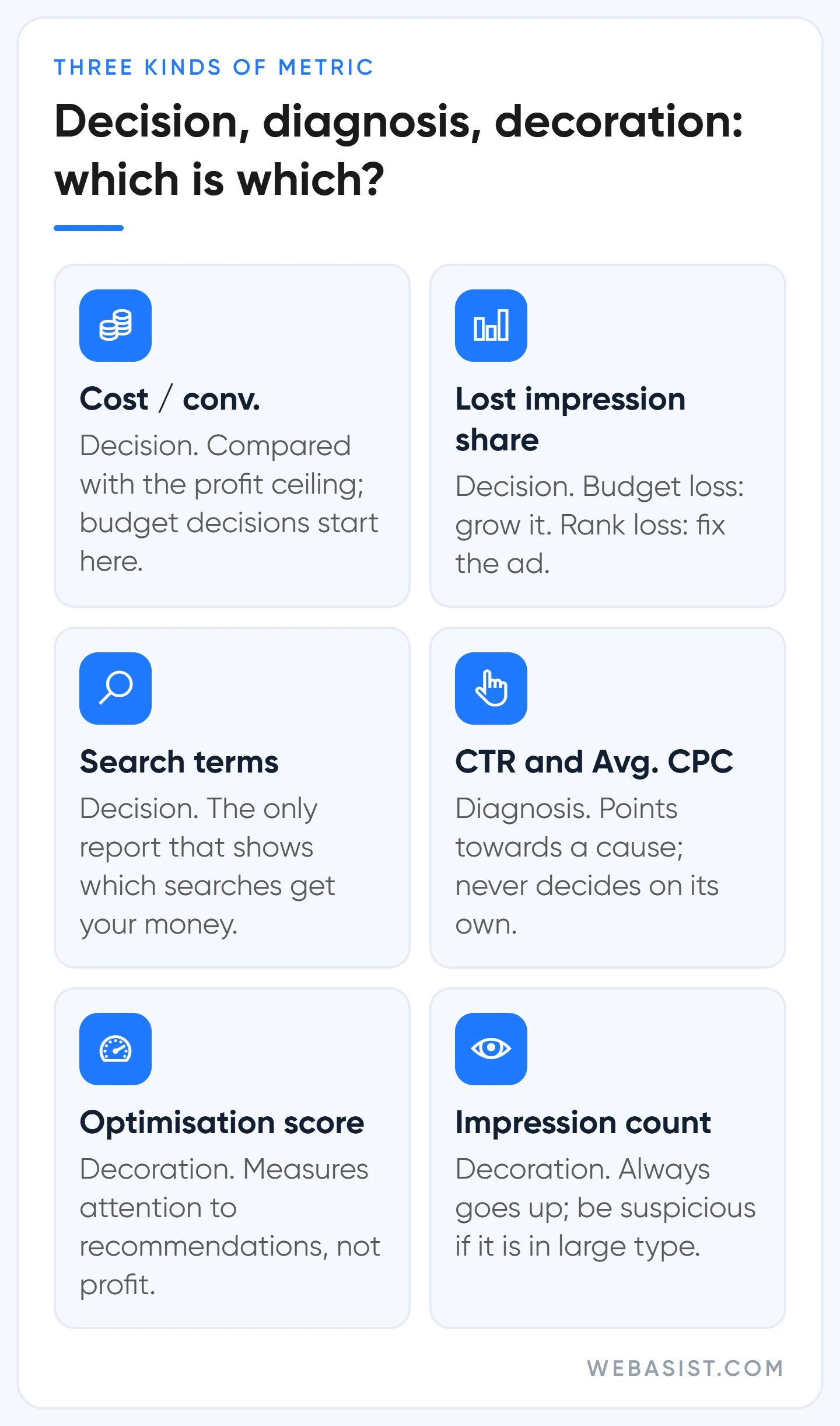
- Decision metrics: Cost / conv., conversion count (primary), Conv. value / cost, lost IS (budget and rank), the search terms report. Decisions to raise, cut or move budget come only from these.
- Diagnostic metrics: CTR, Avg. CPC, Conv. rate, Quality Score components, auction insights. When something breaks they bring you closer to "why", but they do not decide on their own.
- Decoration: Impression count, optimisation score, ad strength, "Impr. (Top) %". None of them measures your profit; if a report prints them in large type, that is a problem.
Impression share is a special case. "Search impr. share" on its own is decoration; together with the two lost IS columns it is a decision metric. Budget loss of 40% with CPA under the ceiling means you are leaving money on the table; rank loss of 40% means you need to write better ads for the same budget.
With little data or a new keyword the column shows a dash, which is not zero. Search partner data is excluded from the calculation, and the metric is reported per campaign type; do not read Search and Performance Max on one average.
The auction insights report is also diagnostic: if your impression share is falling while a competitor's overlap rate rises, the problem is competition, not your settings. Below 10% impression share the report shows nothing at all. To see a competitor's ad copy, the route is in our Ads Transparency Center article.
Optimisation score and recommendations: Google's score is not your profit
The 0 to 100% score on the Recommendations page is Google's estimate of how well the account is "set to perform". The score moves when you apply a recommendation and when you dismiss it; you can reach 100% by dismissing everything. So the score measures how much attention you pay to Google's recommendations, not your profit.
If your agency boasts about the optimisation score in its report, that is a problem: the score is one of the Partner requirements and pushes agencies to accept recommendations. We are a Partner; we reject recommendations that would hurt a client even when it lowers our score.
Google recommends it, and here is when we do not do it:
- "Add broad match keywords": Rejected in accounts under 30 conversions a month; there is no data to pay for searches the system considers "related".
- "Raise your budget": Only when lost impression share due to budget is high and CPA is below the ceiling. The card sees volume, not your profit.
- "Enable Search partners / Display expansion": Never, unless we can measure it separately with the network segment.
- "Raise your target CPA": No, if the suggested figure is above the profit ceiling; it would "successfully" lose you money.
- Auto-apply: Works at account level, does not raise budgets, but includes types that change how the account behaves, such as broad match, network expansion and target adjustments. We switch it off on day one; it is the most common explanation for "nobody touched anything but performance changed".
Change history and access: who did what?
If performance broke on a given day, the reason is in change history, shown on the same timeline as the chart. Records go back 2 years. If you see no email address in the "User" column, the change was made by an automated system or a tool through the API; that too is a finding. Some changes made by a Google representative during a call may not appear in the list, so note important settings yourself.
Look at the access list as well: former employees, old agencies, email addresses you do not recognise. There are five access levels (email only, billing, read only, standard, admin); an agency does not need admin, standard is enough. Two-step verification should be on for everyone. If the account is not in your name, that is the heaviest finding of the audit; we explain why in our agency selection article.
Score your account: the 10-row audit table
Give each row 0 (problem), 1 (partly) or 2 (fine). The first two rows count double, because a mistake there corrupts the reading of the other eight. This is our own working table, not a Google scoring system.
| # | Check | Weight |
|---|---|---|
| 1 | Primary conversions are only actions that make money; no double counting | ×2 |
| 2 | All conversion actions active; none misconfigured or waiting for months | ×2 |
| 3 | Search partners and Display Network deliberate; measured with the segment | ×1 |
| 4 | Location option matches the business geography; matched locations checked | ×1 |
| 5 | Search terms reviewed weekly; negative lists at account and campaign level | ×1 |
| 6 | No disapproved ads; the landing page in every group keeps the ad's promise | ×1 |
| 7 | Bidding strategy fits the conversion count; target below the profit ceiling | ×1 |
| 8 | Lost impression share is read; budget decisions made on CPA | ×1 |
| 9 | Auto-apply off; recommendations accepted or rejected with a reason | ×1 |
| 10 | Change history monitored; access list current; account in your name | ×1 |
The maximum is 24. 20 and above is a healthy account; 14 to 19 calls for a planned round of fixes; below 14, measurement and waste come first, reports later. Use it to set the order, not to chase a number.
Who does not need an audit, and when not to do one
- A two-week-old account: There is no data to audit. Spend the first month on setup checks, following the order in our search campaign setup guide.
- An account spending under 3,000 TL a month: A full audit is heavy for that budget; do the five checks above yourself and leave the rest for later.
- The two weeks after a strategy change: Numbers fluctuate while the system learns; an audit done then misdiagnoses.
- An account that is not in your name: Get the account into your name first; auditing and fixing someone else's account means starting from zero when you part ways.
After the audit: the order of fixes
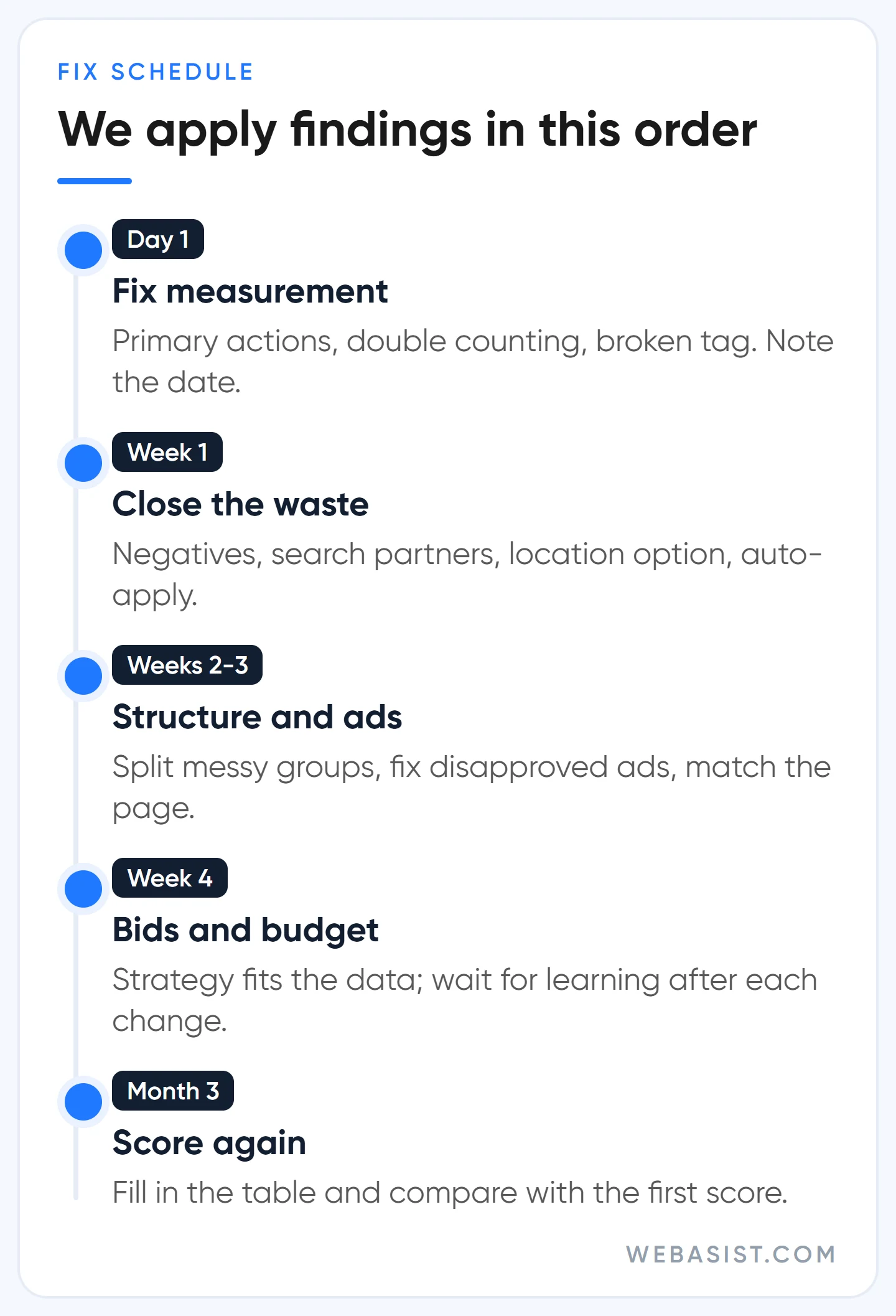
Applying every finding at once makes it impossible to see which change did what. Our order: on day one, fix measurement and note the date; in the first week, close the waste (negatives, networks, location, auto-apply), which is low-risk and fast; in weeks two and three, structure and ads; bids and budget come last, with a learning period after each change. After three months, score the table again and compare with the first score.
As a rhythm: search terms, policy alerts and change history weekly; the full table once a quarter. After a site migration, a tag change or an agency change, do a full audit without waiting.
Frequently Asked Questions
How often should a Google Ads account be audited?
Three fast-moving things weekly: search terms, policy alerts, change history. The full table once a quarter. If the account changed hands or the site moved, do not wait for the quarter.
Should the optimisation score be 100%?
No. The score rises when you dismiss a recommendation too; 100% shows you have dealt with the recommendations, not that you are making a profit. Dismiss recommendations that do not fit your business and note why.
What should Google Ads impression share be?
There is no right figure for everyone. On a brand campaign we want above 90%; on a generic campaign we look less at the share itself than at the reason for the loss: if it is budget and CPA is under the ceiling, we grow it; if it is rank, we fix the ad and the page.
What access level is needed to analyse a Google Ads account?
Read-only access is enough for reading, and that is the access we do a first review with. Give standard access to whoever will apply the fixes; an agency does not need admin.
Conclusion
A good account audit is not rebuilding the account, it is asking the right questions in the right order: measurement first, then waste, then structure and ads, bidding last. Read the report in the same order; a report that opens with impressions reassures whoever wrote it, not you.
The offer on our homepage applies here too: let us review your Google Ads account for free. Give us read-only access; we will run the five checks above and write up the first three sources of waste we find, with their cost in lira, and you decide whether you or we fix them. Send your customer ID through the contact page; if you want to hand over management, scope and prices are on the Google Ads advertising packages page.














