


YouTube Ads: What They Cost, How to Run Them, Do They Work?
YouTube ads are bought through Google Ads and have no fixed price: you pay either when someone watches your ad for a set time or per thousand impressions. Set a daily budget of 300 TL and the most you will spend in a month is 300 × 30.4 = 9,120 TL, plus a 4.5% regulatory operating cost on ads shown in Turkey, plus VAT. As for whether they work, our answer is that YouTube will not make your phone ring today. It introduces you to people who do not know you yet and brings back people who already visited your site, so if your search campaigns are still limited by budget, fill those first and come to YouTube later.
What our clients mix up most is where exactly an ad appears on YouTube. "Skippable", "bumper", "in-feed" and "Shorts" are different places on the screen, and each one is billed differently. So we start by showing them as mockups, then explain how to set a campaign up, who it is right for, and which of Google's default settings we change.
How much do YouTube ads cost? What you actually pay for
There is no rate card on YouTube. The price is set in an auction against other advertisers who want to reach the same audience. You decide two things: the budget and the bidding method. The bidding method decides what you pay for.
- Per view (Target CPV): On a skippable ad you pay when the viewer watches 30 seconds (or the whole ad if it is shorter) or clicks. Someone who skips at second five costs you nothing. On Shorts the threshold is 10 seconds or the end of the video.
- Per thousand impressions (Target CPM): Bumper and non-skippable ads are sold this way. The ad counts as soon as it is on screen, whether or not anyone watches.
- Conversion bidding: In Demand Gen campaigns that aim for sales or leads, the system optimises for conversions while you are billed on impressions or clicks.
Example scenario: a furniture store in Kadıköy puts 6,000 TL a month into a Video views campaign and pays an average of 1.5 TL per view (an illustrative figure; yours depends on targeting). That buys 4,000 people watching 30 seconds of the ad. The invoice adds 6,000 × 4.5% = 270 TL of regulatory operating cost, with VAT on top. The real question is not whether 4,000 views are cheap, but how many of those people come to the store or the website; we get to that in the measurement section.
How a daily budget turns into a monthly figure, and every line added to the invoice, is worked out in lira in our Google Ads pricing guide, so we do not repeat it here.
YouTube ad formats: the six things viewers see
Google Ads offers six ad formats for YouTube. The format is what the viewer sees; the goal you pick when you build the campaign decides which formats are available. The full length and technical rules are on Google's video ad formats page; the cards below show what we use each format for.
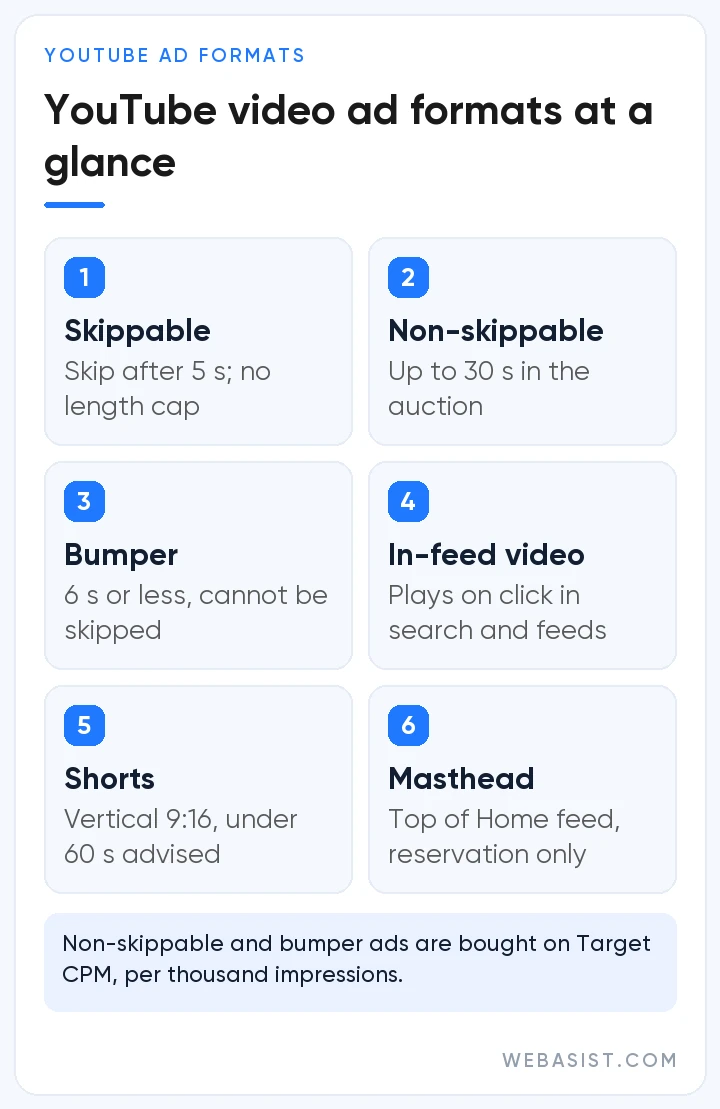
For small and mid-sized businesses the two formats we use most are skippable in-stream ads and Shorts. Both can be bought on a "you don't pay if they don't watch" basis, which matters a lot when the budget is tight. We keep bumpers and non-skippable ads for brands that want to show the same message to many people again and again.
The masthead means renting the top of the home page for a day or a few hours. It is sold only as a reservation, at a fixed price, and cannot be switched on without a Google representative. It is for big brands launching something, not for a local business budget.
Ads on the watch page: skip button, call to action and banner
The watch page is where YouTube ads are seen most. Your video plays before, during or after the video the viewer chose. On a skippable ad a "Skip" button appears after 5 seconds; on a non-skippable ad it does not. A call to action and a short headline sit on the ad, and a click takes the viewer to your site.
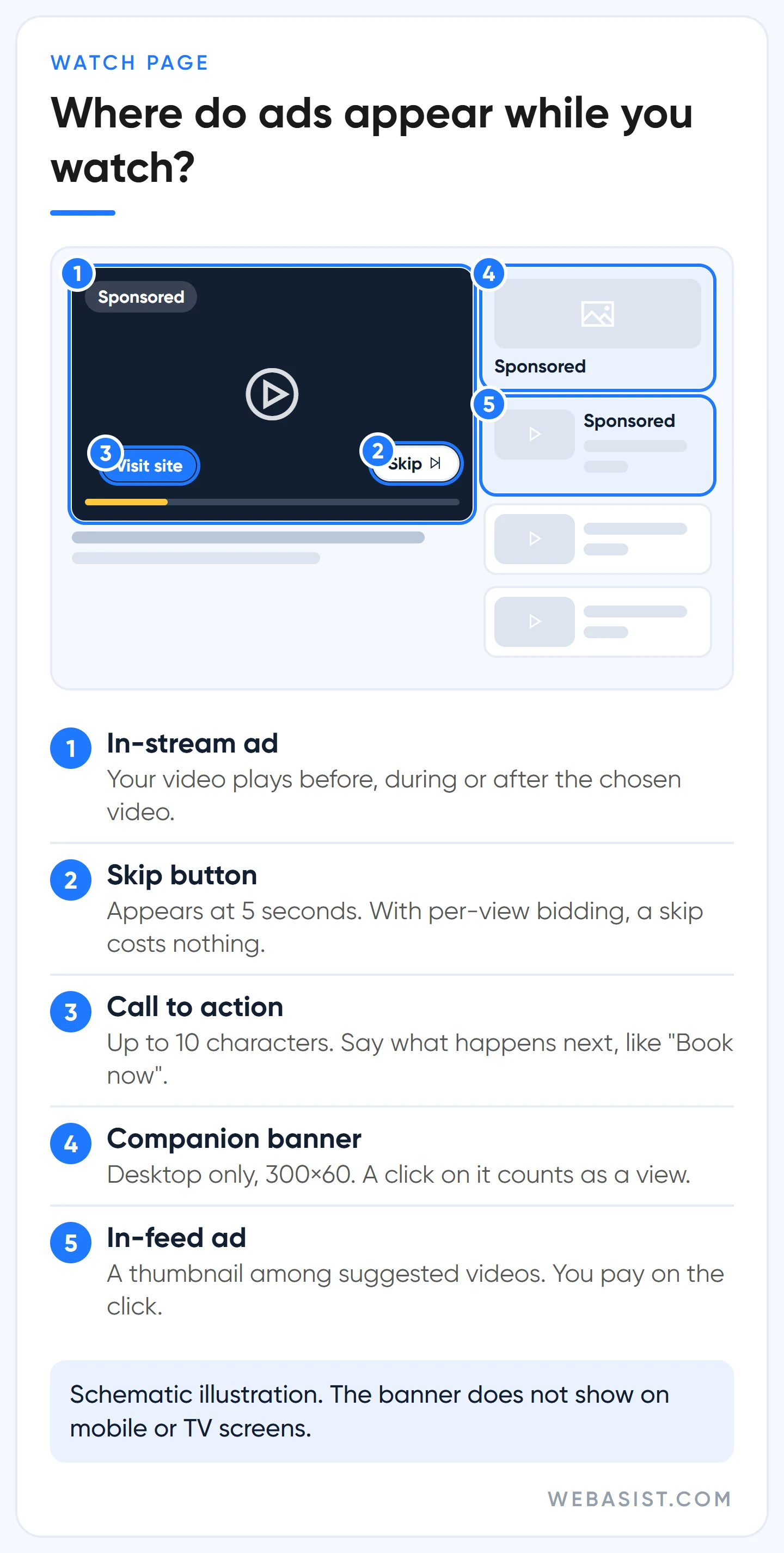
The button text can be at most 10 characters. Instead of a vague "Learn more" we write something that says what happens next, such as "Book now" or "Get quote". On desktop a 300×60 pixel companion banner also appears next to the ad; it does not show on mobile or TV. A click on that banner counts as a view, so you pay even if the viewer never reaches 30 seconds.
Google recommends generating the banner automatically from your channel art. We prefer to upload our own design, because the automatic banner rarely says anything beyond the brand name; if you are paying for clicks there, put an offer in it.
In-feed ads, shown in the suggested videos list on the right and in YouTube search results, do not play on their own. A thumbnail and short text invite the viewer to click, and you pay when they click and start watching. A heating engineer's video appearing for someone who searched "how to service a boiler" is exactly where this format earns its money.
Home page ads: the masthead and in-feed placements
The home feed is the first thing people see when they open YouTube. The wide slot at the very top is the masthead; on desktop the video autoplays muted for up to 30 seconds. Inside the feed, between recommended videos, sit in-feed ads, and on the mobile home page a Shorts shelf breaks in as well.
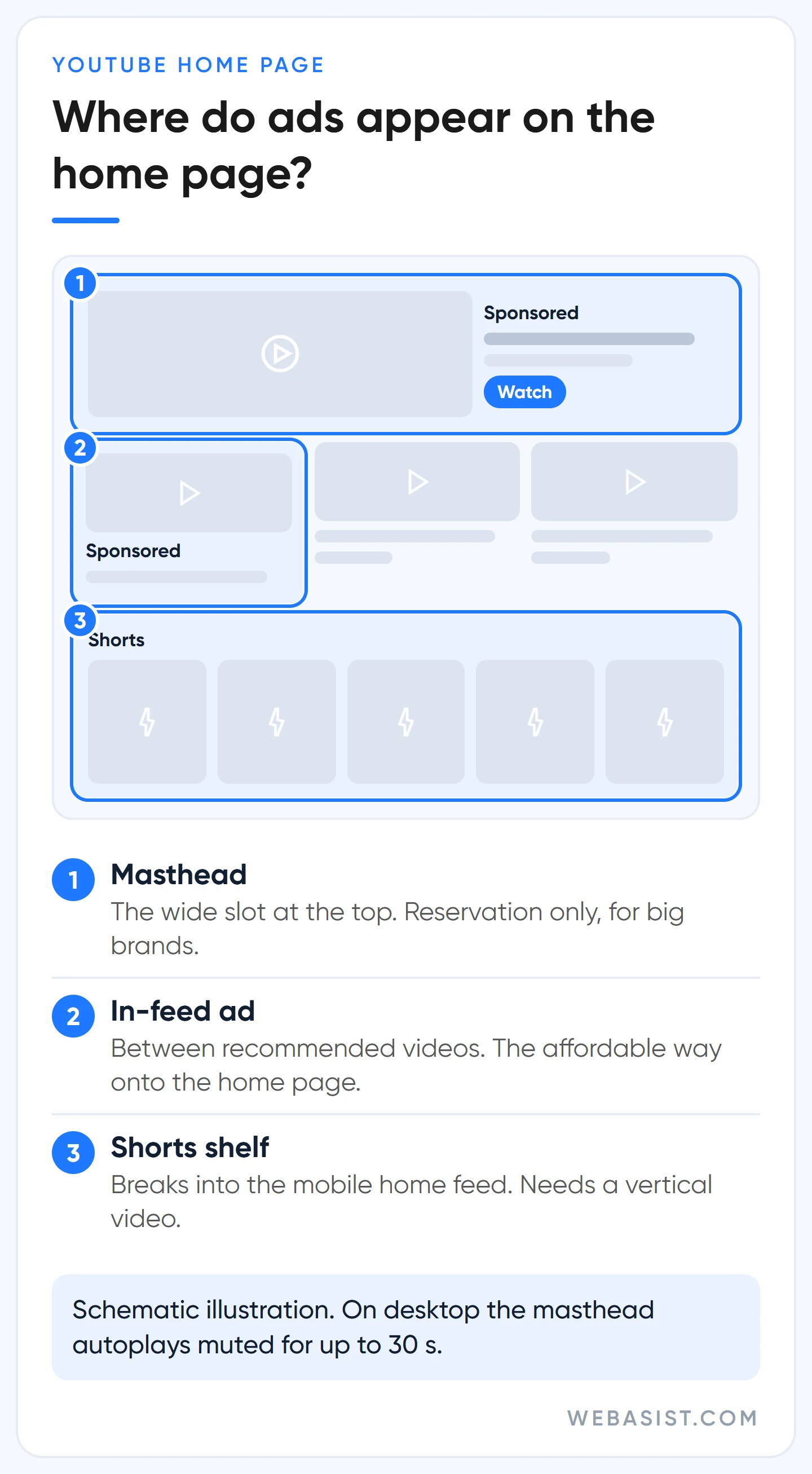
The affordable way to appear on the home page is not the masthead but an in-feed ad. If the in-feed format is selected in a Video views or Efficient reach campaign, your ad can show in this feed too. We think of in-feed as the ad the viewer chooses: the person who clicks is watching out of curiosity, not because they were forced to. That is why one- or two-minute product videos breathe more easily here than as skippable ads.
How to advertise on YouTube Shorts: vertical video or nothing
A Shorts ad sits full screen between short vertical videos and looks like an organic Short. The viewer can swipe it away immediately; scrolling back shows it again. There is a call-to-action button at the bottom. With per-view bidding you pay when someone watches 10 seconds, reaches the end, or taps the button, like, comment or share, and only once per impression even if the video loops.
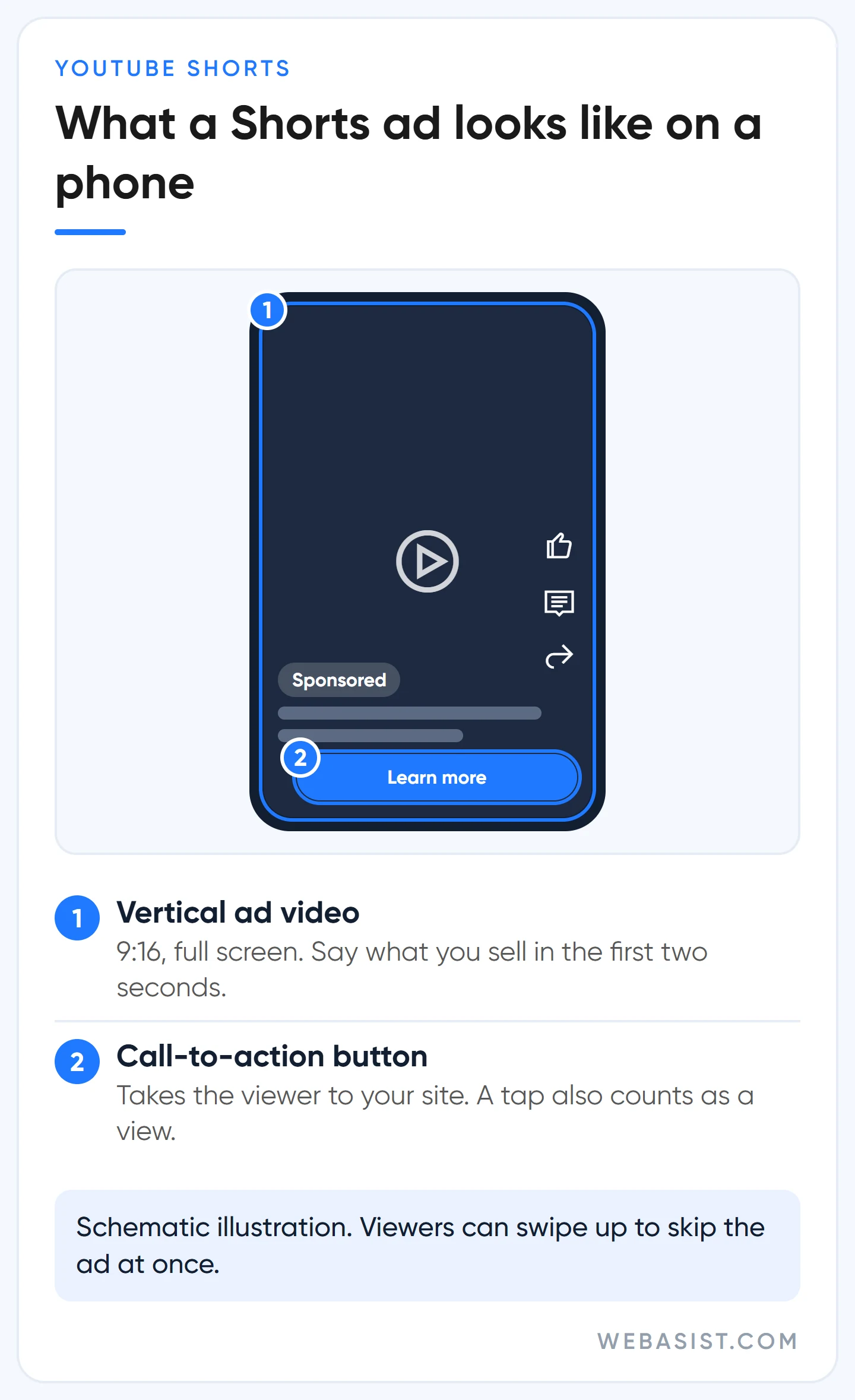
There is no separate campaign type for Shorts. Vertical (9:16) videos added to Video views, Video reach and Demand Gen campaigns can serve in this feed. If you want to appear only on Shorts, Demand Gen channel controls let you switch the other surfaces off.
What we see is that Shorts viewers smell an ad instantly. Videos under 60 seconds that say what they sell in the first two seconds and look as if they were shot on a phone do better here than studio commercials. Cropping your horizontal ad down the middle for Shorts usually cuts off the text and the logo.
How to advertise on YouTube: four decisions in Google Ads
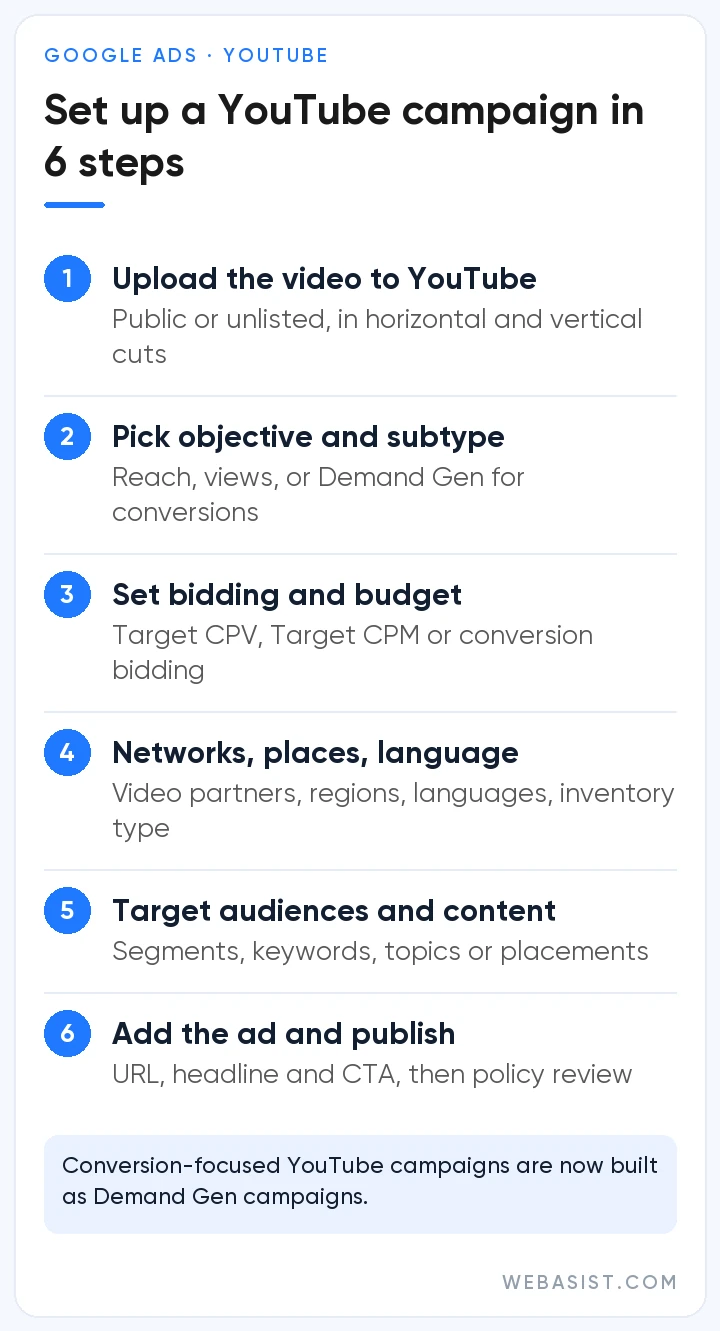
You advertise on YouTube from Google Ads, not from YouTube. The video only needs to be uploaded to YouTube; it does not have to be public, unlisted works too, but private or deleted videos are rejected. If you have no account yet, open a Google Ads account first; linking your channel is optional, but we link it so we can build lists of viewers. Setup comes down to four decisions:
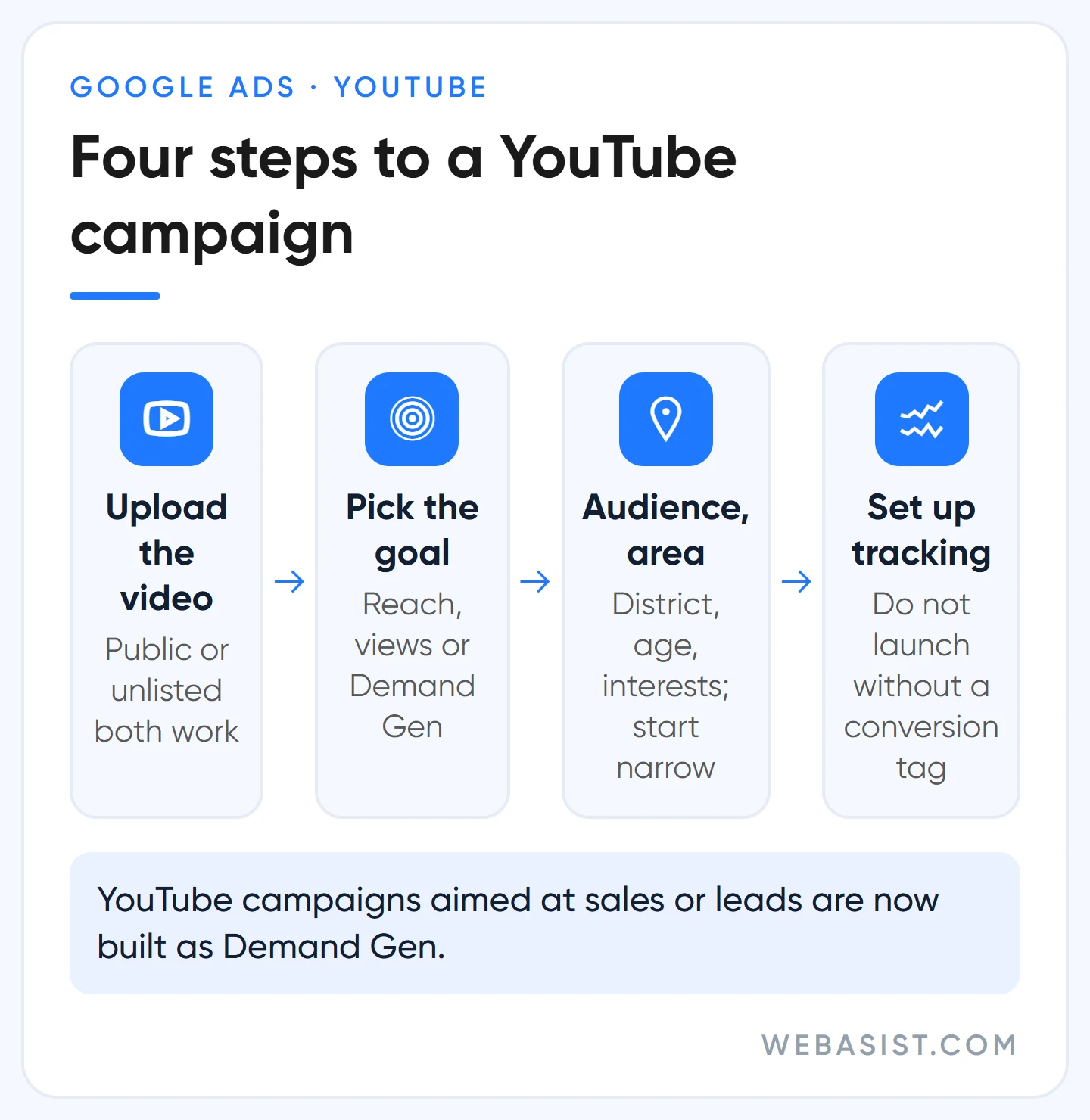
- Goal: For awareness and views you build a Video campaign under the "YouTube reach, views, and engagements" objective. If you want sales or leads you build a Demand Gen campaign; all of the old Video action campaigns were moved to Demand Gen by April 2026.
- Subtype: Video views bills per view; Video reach (Efficient reach, Non-skippable reach, Target frequency) bills per thousand impressions. For local businesses our starting choice is Video views.
- Audience and area: Location, language, age and interest segments, plus keywords, topics or specific channels if you need them. Exclude existing customers from awareness campaigns so the money reaches new people.
- The ad: Video link, landing page, button text and headline. Most ads are reviewed within one business day.
Performance Max can also show your video assets on YouTube, but you cannot choose the format or the placement; we explain the difference in our Performance Max guide. To see every campaign type side by side, read our Google Ads campaign types comparison.
Are YouTube ads worth it? Who they work for and who they don't
They work, but they do not do a search ad's job. A search ad catches the person typing "boiler repair" who needs it right now; YouTube shows you to people who are not searching yet. A business that expects as many forms and calls from YouTube in month one as from search will be disappointed. The problem is not the channel but the expectation.
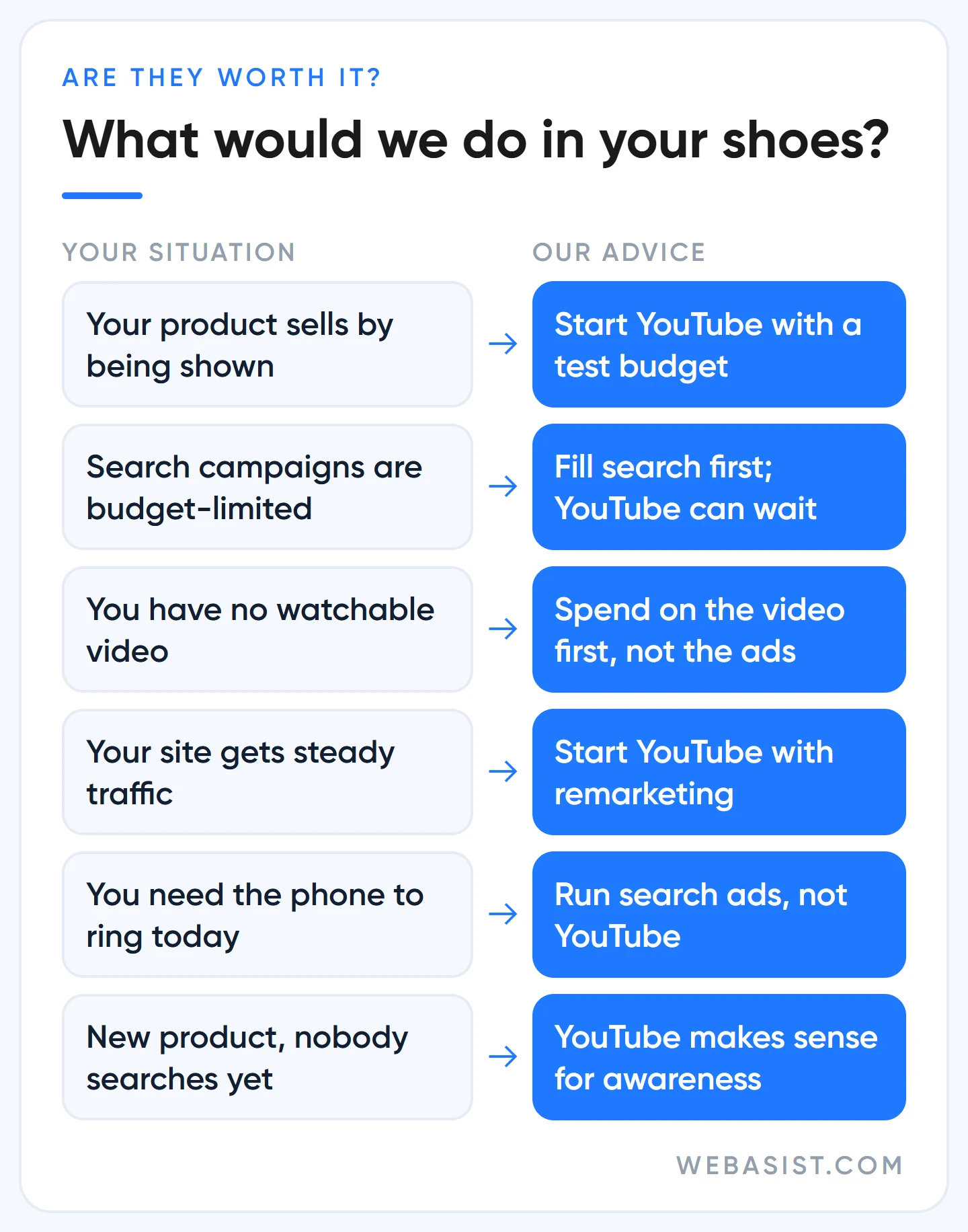
The cases where we recommend YouTube are clear: the product or service sells by being shown (furniture, education, tourism, machinery), you already get site traffic and want to bring those visitors back, or you have a new product nobody is searching for yet. We discuss whether YouTube or Instagram is the better place to create demand in Google Ads vs Meta ads.
Who should not use YouTube ads?
- Businesses with under 10,000 TL a month for ads whose search campaigns are still capped by budget. That money should go to search first.
- Anyone without a watchable video. Going on YouTube with a slideshow of product photos means paying for the skip button.
- Emergency services: locksmiths, tow trucks, drain unblocking. People search for these; they do not choose them by watching videos.
- Anyone who has to show sales from it this month. YouTube's effect arrives late, in brand searches and returning visitors.
Google recommends it, but: settings that quietly eat your YouTube budget
Google sells ad inventory, and YouTube's defaults lean towards more impressions. We are not looking for bad intent there, but it is your money. These are the four settings we check first in any YouTube campaign we take over:
- Google video partners: You are advised to keep video partners on the Display Network switched on in Video campaigns. That means your ad plays on sites and apps outside YouTube, sometimes inside a game as a rewarded or interstitial ad. For local businesses we switch it off in the first month and test it separately once we have seen how YouTube itself performs.
- Automatic vertical versions: In Video reach campaigns, "Get vertical versions of your videos" is on by default for new campaigns, and the system creates a 9:16 cut from your horizontal video. We never leave it unreviewed: if the logo or price text gets cropped, we turn it off and upload our own vertical edit.
- Demand Gen budgets: Google's Demand Gen guidance asks for a daily budget of at least 100 US dollars on Maximize conversions, at least 10 times the target on Target CPA, and no judgement before 50 conversions. Where a business cannot fund that, we do not run Demand Gen as a sales campaign; we use YouTube for views and remarketing instead.
- View counts: The growing "TrueView views" column looks nice but is not sales. A campaign built for "most views" collects cheap views from broad audiences who will never buy from you. We would rather narrow the audience and pay more per view than buy cheap, irrelevant ones.
Where automation helps and where it eats budget more broadly is covered in our AI ad optimisation guide.
The first 5 seconds and measurement: seeing what YouTube really adds
Audience settings put the ad on the right screen; the video does the rest. On a skippable ad the first 5 seconds are everything: the brand and the offer must be on screen and in the audio by then. Most viewers skip an ad that hides its logo in the final frame before they ever see the brand. When we make the video, we cut 6, 15 and 30 second versions of the same message in horizontal and vertical at once; we do not treat video production as separate from the ad.
We have two measurement rules. First, we never launch a YouTube campaign before conversion tracking is set up. YouTube viewers rarely click; they watch, then search for the brand later. Google Ads counts this as an engaged-view conversion: someone who watched at least 10 seconds of a skippable ad, or 5 seconds of an in-feed or Shorts ad, and converted without clicking.
Second, we do not judge YouTube on last-click reports. After launch we watch how your brand searches and direct site traffic change. Brand Lift studies, which measure ad recall with surveys, need a Google account representative and a minimum spend that varies by country, so they are out of reach on small budgets. Building a list of people who watched your video and showing them remarketing ads is the cheapest way to make YouTube's contribution visible.
Frequently Asked Questions
How much does one YouTube ad cost?
There is no per-ad fee. You pay per view (30 seconds or a click on a skippable ad) or per thousand impressions. You find your own unit price by dividing spend by views: if you spent 3,000 TL and got 2,000 views, you paid 1.5 TL per view (example calculation).
I want to promote my own video. Do I need Google Ads?
If you own the channel you can promote a video directly from YouTube Studio under Content > Promotions. The tool runs on Google Ads in the background and asks for a goal, budget and end date; the video must be public or unlisted and at least 10 seconds long. It is enough for subscribers and views; if you want to measure sales or leads, we recommend building the campaign in Google Ads.
How long should a YouTube ad be?
Bumpers are up to 6 seconds; non-skippable ads are 7 to 15 seconds in the auction, and 16 to 30 second versions run only on TV screens. Skippable ads have no limit, with under 3 minutes recommended; for Shorts keep it under 60 seconds. Our practical set: a 15 to 30 second main cut, a 6 second cut-down and a vertical version.
How soon does a YouTube ad go live?
Most ads are reviewed within one business day and start serving once approved. Impressions can be thin in the first days; do not change budget and targeting every day in week one, so the system has data to decide with.
Conclusion
YouTube advertising is not expensive; it becomes expensive when it is launched with the wrong expectation. Use search ads to make the phone ring today, and YouTube to reach people who could become customers but do not know you yet, and to bring back people who already visited. If you have a strong 15 seconds and your search budget is already full, it is worth a test.
Send us your video link and we will look at its first 5 seconds, which format it fits and how many lira a month a meaningful test needs. What we take on in YouTube campaigns is on our YouTube advertising page. The management scope is in our Google Ads management packages; the ad budget is not included in the fee.