


Google Ads Budget Planning: How Much Should You Spend a Day?

Google Ads budget planning comes down to one line of arithmetic: multiply the number of leads you want per month by what you are willing to pay for one lead, then divide by 30.4. If you want 20 leads and accept 500 TL per lead, your monthly budget is 10,000 TL and your daily budget is 329 TL. That is the number you type into the panel.
The hard part is not the arithmetic; it is finding those two numbers honestly. In this article we work a daily budget back from a target in lira, explain why Google can spend up to twice your budget in a day, and tell you when we say no to a "raise your budget" recommendation. If you want to know what a click costs and how agencies set their fees, read our Google Ads pricing article first.
How much should your Google Ads daily budget be? Work back from the target
Start from "how much can I spend a month" and the budget becomes an arbitrary number. We build it the other way round: how many jobs do you need, and what can one job cost? Example scenario, an air-conditioning service in Ümraniye, Istanbul:
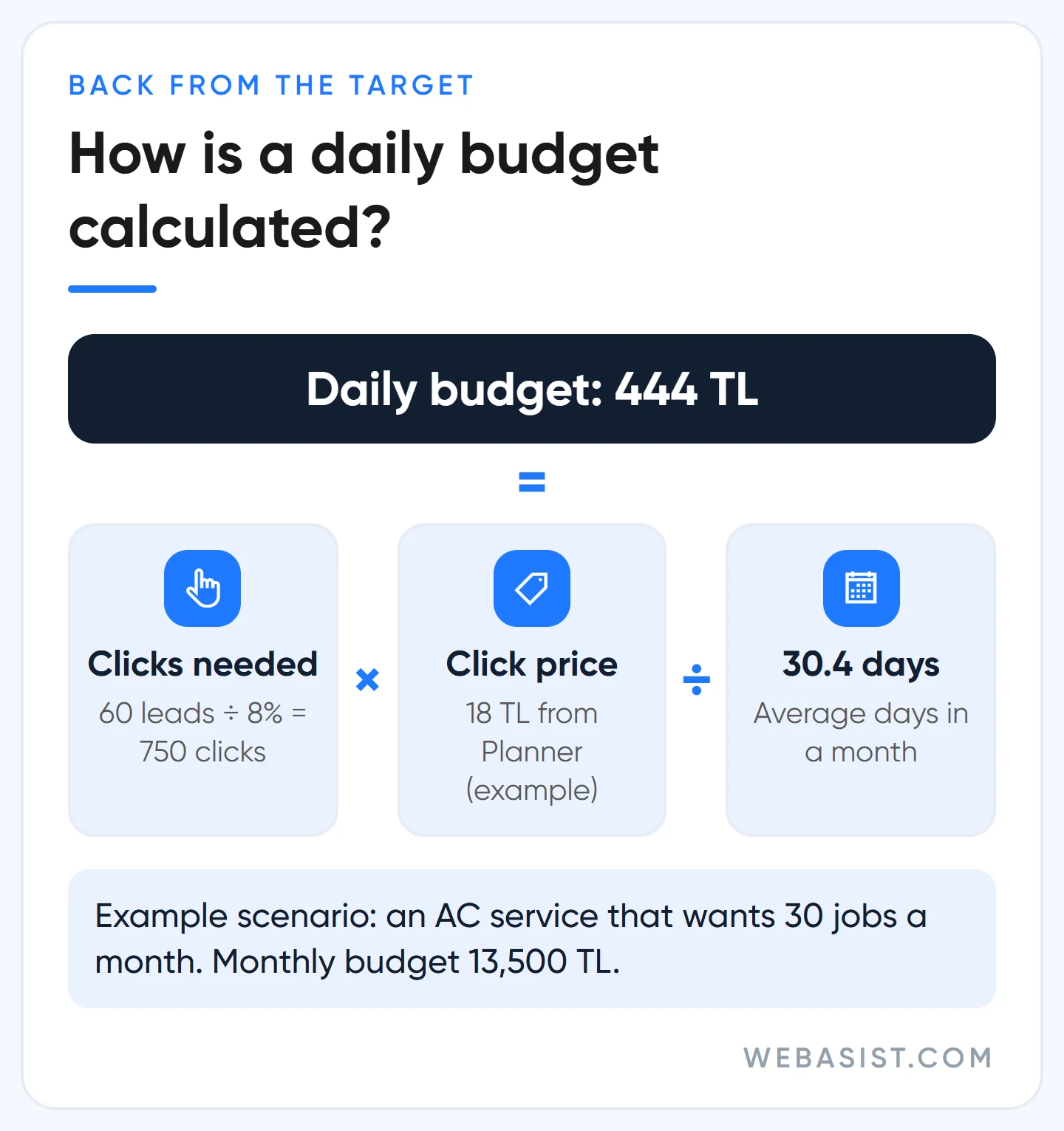
- Target: 30 jobs a month. One in two callers becomes a job, so 60 leads are needed.
- Clicks needed: 8 out of 100 clicks on the site call or fill in the form. For 60 leads that is 60 ÷ 0.08 = 750 clicks.
- Click price: Keyword Planner shows an average of 18 TL for these keywords (an example).
- Monthly budget: 750 × 18 = 13,500 TL.
- Daily budget: 13,500 ÷ 30.4 = 444 TL.
Now the check: you are paying 225 TL per lead and 450 TL per job. If one air-conditioner service leaves you 1,800 TL profit, advertising takes a quarter of it and the sum works. If profit per job were 500 TL, the same budget would lose you money. You can only do this sum if leads are being counted; without measurement, set up conversion tracking first.
While you build the campaign, the panel shows ready-made budget options and marks one as recommended. That figure knows nothing about your profit. Choose the option to set your own budget and enter the result above.
What does the budget you have actually buy? And what to do when the sum fails
Most businesses arrive with the money in their pocket rather than a target: "I can set aside 6,000 TL a month." Then run the same sum forwards. 6,000 TL at 18 TL a click is 333 clicks; at an 8% conversion rate that is about 27 leads, and if half close, 13 jobs.
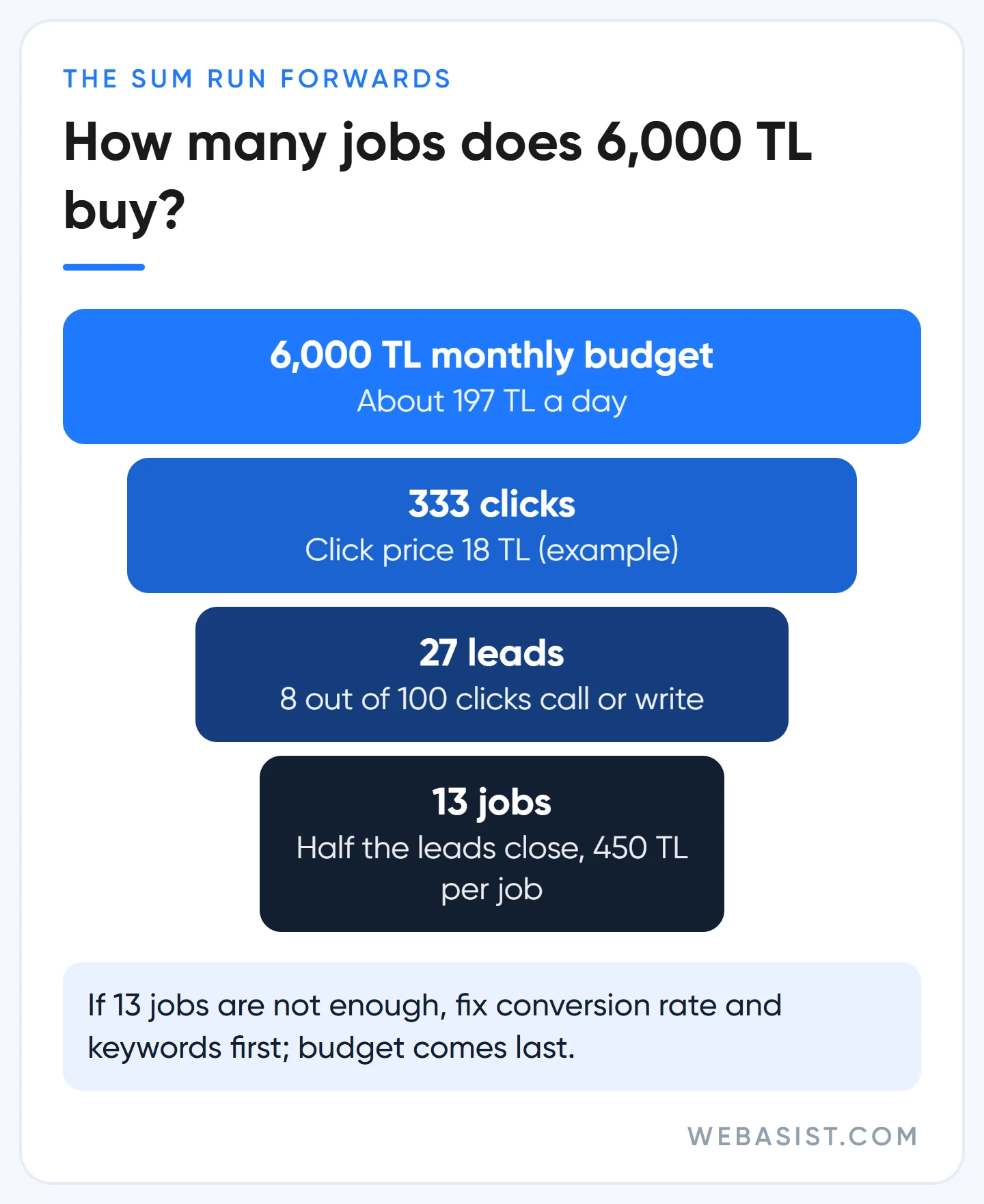
If 13 jobs are enough, start. If not, you have three options, and raising the budget is the last one:
- Raise the conversion rate. Is the phone number on the first screen, and does the page load in three seconds on a phone? Taking 8% to 10% gives you the same result as a 25% bigger budget, for free.
- Narrow the keyword. Instead of "air conditioning service", go for searches with clear intent such as "Ümraniye air conditioning service" and "AC gas refill", and cut wasted clicks with a negative keyword list.
- Shrink the area. Not all of Istanbul; the three districts you can actually reach.
Our verdict: if your cost per lead is more than your profit can carry, a bigger budget makes the loss bigger. Fix the unit cost first, then put the money in.
Google spent twice my daily budget: the 30.4 rule and the 2x rule
The number you type into the panel is not a daily cap; it is a monthly average. Google spends more on days when search is busy and less on quiet days. There are two limits: at most 2 times your budget in one day, and at most 30.4 times your budget in a calendar month. 30.4 is the average number of days in a month (365 ÷ 12).
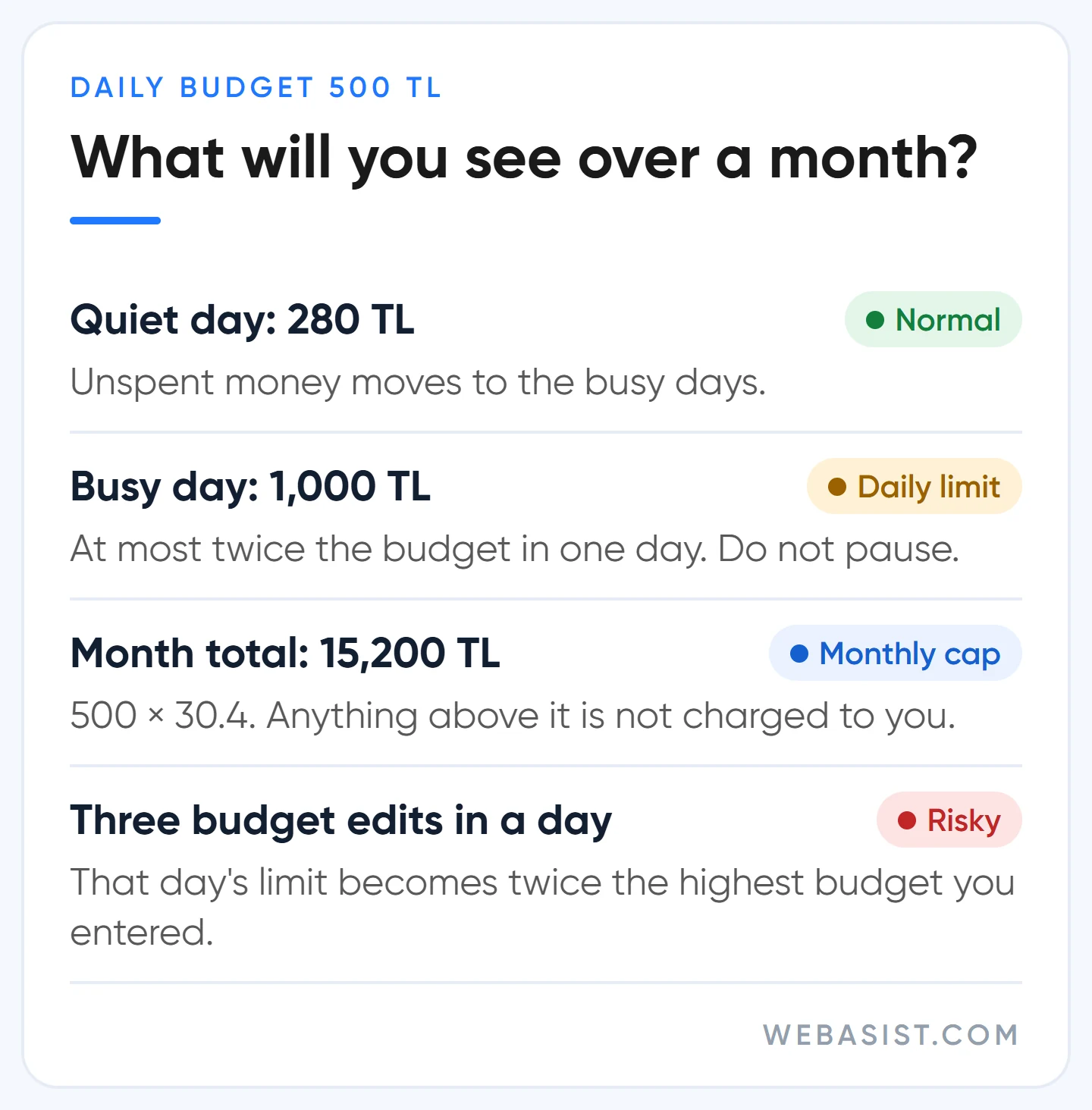
If you entered 500 TL a day, you may see 1,000 TL spent on a Tuesday; at month end the bill will not exceed 500 × 30.4 = 15,200 TL. If the system delivers clicks beyond the limit on a given day, the excess is not charged to you and comes back as a credit. We have seen many owners pause a campaign after a 1,000 TL Monday. Do not pause; look at the month total.
The rule has three side effects worth knowing:
- If you change the budget mid-month, the new cap is what you have spent so far plus the new budget times the days left. You spent 9,000 TL by the 20th and moved the budget to 800 TL; with 10 days left, the cap for the month is 9,000 + 8,000 = 17,000 TL.
- If you change it several times in one day, that day's limit is twice the highest budget you entered. An account set to 500 in the morning, 1,500 at noon and 500 again in the evening can spend up to 3,000 TL that day.
- If you only show ads on weekdays, monthly spend does not fall by itself. Since June 2026, a campaign that runs 16 or more days a month still has a 30.4x cap, and the system spreads the 15,200 TL across the days it runs. For a campaign that runs 15 days or fewer, the cap is twice the daily budget times the number of days it runs.
If you want to switch off weekends and also spend less, change the daily budget, not the schedule. A business that wants to spend 11,000 TL a month on weekdays only should enter 11,000 ÷ 30.4 = 362 TL, not 500.
Test budget: how much should you set aside for the first month?
The first month is not about profit; it is about collecting enough data to decide. Our yardstick: a Search campaign should see around 250 clicks or 20 to 30 leads in its first month. At 18 TL a click that is 4,500 TL; at 60 TL a click it is 15,000 TL. Below that, you will have nothing to interpret a month later.
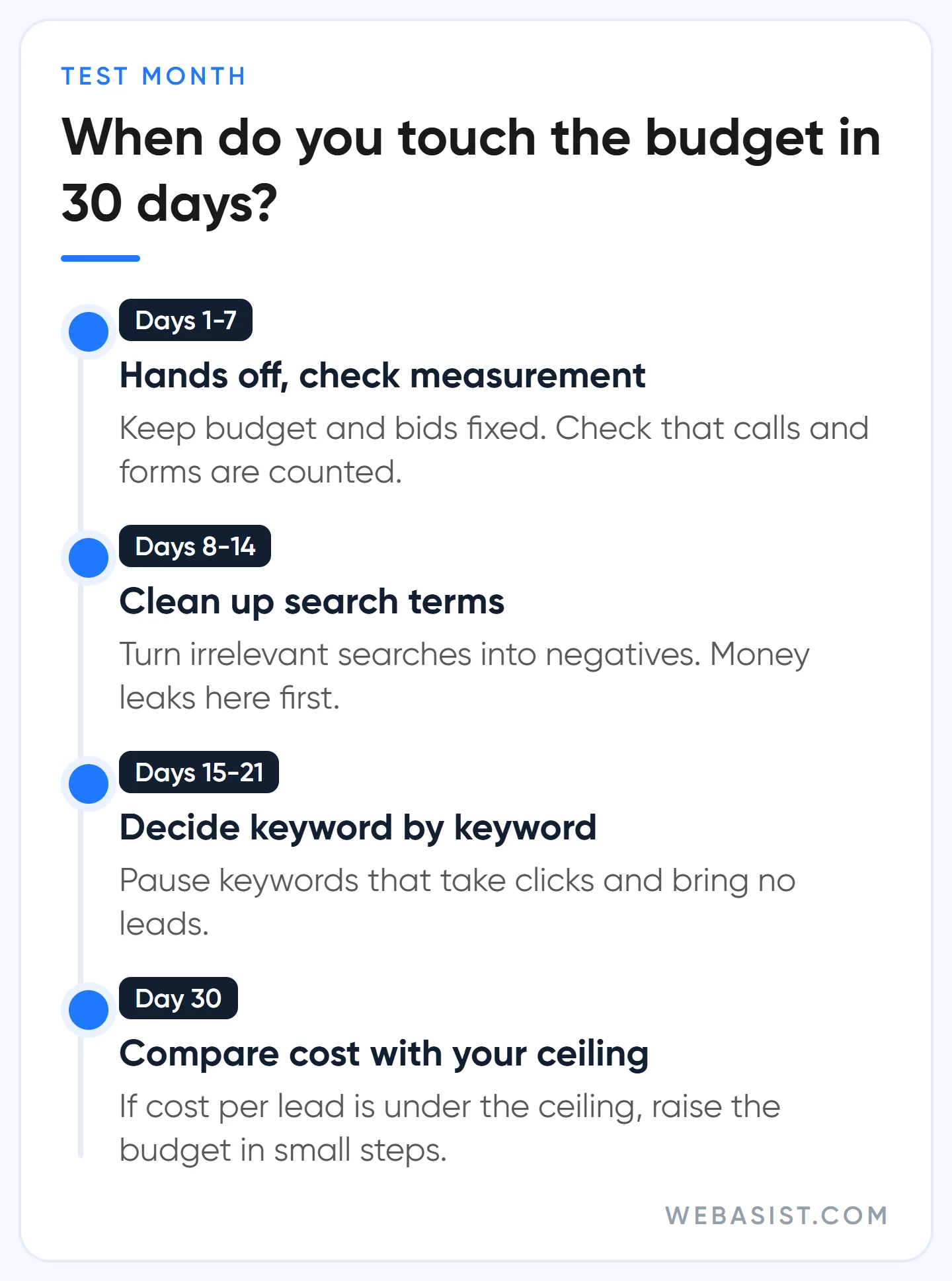
Do not split a small budget. Spread 300 TL a day across four campaigns and each gets 75 TL, and none of them gets past five clicks a day. One campaign, the highest-intent keywords, one area. You open the second campaign when the first one is profitable.
Campaign type sets the budget too. Google recommends a daily budget of at least 3 times your cost per conversion for Performance Max, and at least 10 times your target cost per conversion for Demand Gen. For a business paying 400 TL per lead, that means 1,200 TL a day on Performance Max (36,480 TL a month) and 4,000 TL a day on Demand Gen. The advice makes sense for the system's learning, but what it means for you is this: if your monthly budget is under 15,000 TL, do not open Performance Max; stay on Search.
If you use automated bidding, do not move the budget every day. The system has to resettle after every large change; we wait at least 7 to 10 days after one. Which strategy works with which budget is covered in our bidding strategies guide.
When do we say no to "raise your budget"?
Your account shows "Limited by budget", the Recommendations tab says "raise your budget and get this many more clicks a week", and sometimes a Google representative calls to say the same. They all rest on one fact: your budget does not cover every search on those keywords. That is true. But "you will get more clicks" and "you will make more profit" are not the same sentence.
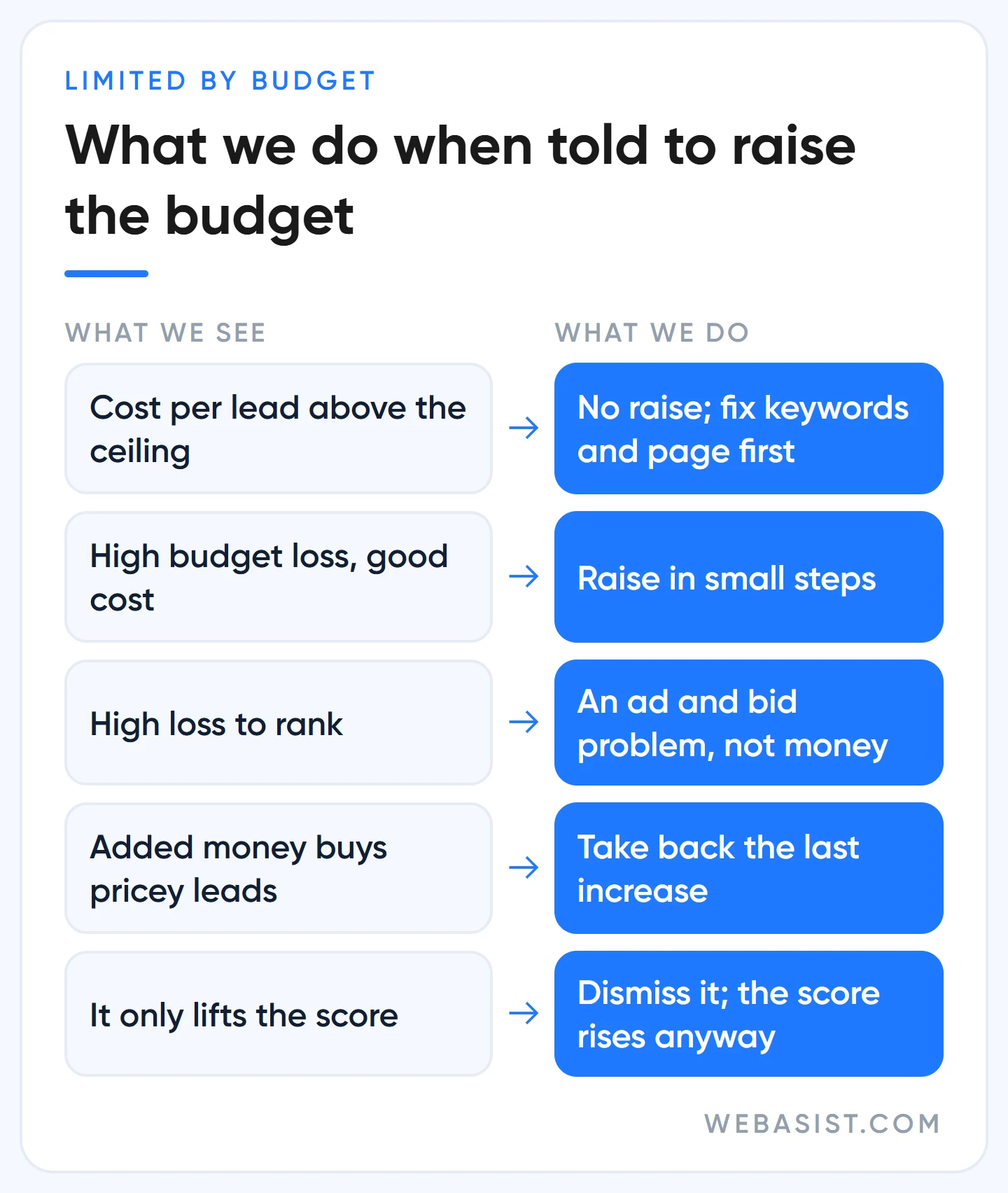
Google sells advertising; your bigger budget is its revenue. Your optimisation score also goes up when you accept the recommendation. It goes up when you dismiss it too, so you never need to spend money for the sake of the score. This is the order in which we decide:
- Is cost per lead under your ceiling? If not, the question is closed. Buying more of an overpriced lead makes the problem bigger.
- Is the loss caused by budget or by rank? Add the "Search lost IS (budget)" and "Search lost IS (rank)" columns to the campaigns table. High budget loss with low rank loss means money really is the limit. The reverse means the problem is the ad and the bid; budget will not fix it.
- What did the last money you added bring in? Look at the added slice, not the average.
The third point is the one most often skipped. Example: with 10,000 TL you were getting 25 leads at 400 TL each. You moved to 15,000 TL and got 32 leads. The average rose to 469 TL, which does not look bad. But the extra 5,000 TL bought only 7 leads, at 714 TL each. If your ceiling is 500 TL, that last 5,000 TL is running at a loss; take it back.
There is also the August 2026 change. Budget-limited campaigns on Target CPA or Target ROAS now track the target you entered more closely. If you left the target loose because "it stays below anyway", your cost will climb towards that loose target when you raise the budget. Before touching the budget, pull the target down to what the last 30 days actually delivered.
There is a case where we say yes: cost per lead is comfortably under the ceiling, impression share lost to budget is high and the business can handle the extra work. Then we raise it, not doubling in one go but in small steps, checking the cost of the added slice after each one.
Budget types: daily, total and shared budgets
There are three budget types, and most businesses only need the first.
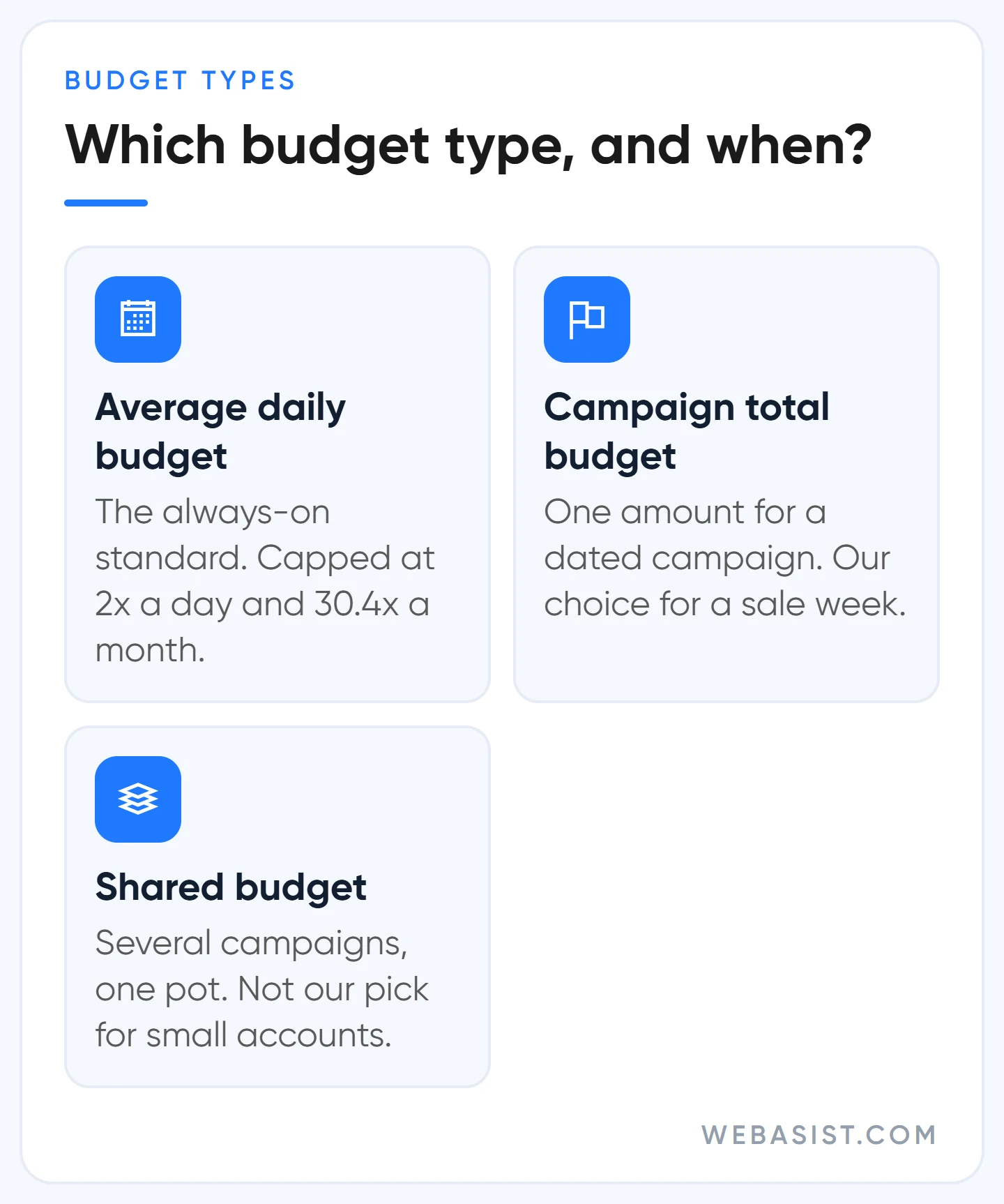
- Average daily budget: The standard for an always-on campaign. The 2x and 30.4x rules above apply to it.
- Campaign total budget: You enter one amount for a period with a start and an end; the system spreads the money across the days and does not exceed the total. On Search, Shopping and Performance Max it runs for 3 to 90 days. It can only be chosen on a new campaign and the type cannot be changed later. For a ten-day November sale this is what we prefer.
- Shared budget: Several campaigns spend from one pot, and what one does not use moves to another. It cannot be used with Performance Max. Because it becomes harder to see which campaign is eating what, we do not recommend it for small accounts.
If you need a short seasonal lift, Search and Shopping campaigns accept a seasonal budget adjustment of 3 to 14 days, and the budget returns to normal when the period ends. That beats raising it by hand and forgetting to bring it back.
Do not set a budget before doing this sum: who should wait
In these three situations, wait instead of entering a daily budget:
- You do not know the profit one customer leaves you. In an account with no ceiling, every figure turns into an "is it expensive or cheap" argument.
- Leads are not being counted. Without call and form conversions, nobody can tell you at month end how many jobs 13,500 TL turned into.
- Your budget cannot carry a one-month test. A campaign that runs out of money in two weeks gives you a feeling that it failed, not information.
One last note: the budget you enter only limits click cost. Ads shown in Turkey carry a 4.5% regulatory operating cost and VAT on top, so a 13,500 TL budget will not appear as 13,500 TL on the invoice. Plan your cash with the sum in our billing guide.
Frequently Asked Questions
Where do I change the daily budget in Google Ads?
In the campaigns table, click the pencil icon in the Budget column and enter the new figure. The budget report in the same window shows the forecast month-end spend and the limits.
Can I advertise on Google with 100 TL a day?
You can, but know what you are buying. 100 TL a day is at most 3,040 TL a month; at 20 TL a click that is 152 clicks, and at 5% conversion 7 or 8 leads. It makes sense in one district, with a handful of keywords, in a business with cheap clicks. In an industry where a click costs 60 TL, you cannot decide anything from 50 clicks a month.
Is there a minimum budget in Google Ads?
There is no official floor for Search campaigns. Some types, such as Demand Gen, enforce a minimum amount at setup. The real floor is set not by the system but by the number of clicks a test needs.
Does changing the budget restart the learning period?
Small changes usually cause no trouble; doubling or halving the budget overnight throws automated bidding off balance and the campaign swings for a few days. That is why we make changes in steps and wait about a week in between.
Conclusion
A daily budget is not a guess; it is one multiplication and one division: number of leads, ceiling per lead, 30.4. Once the number is there, the rest is discipline: leaving the first month alone, not panicking over one day at twice the budget, and answering "raise your budget" with the cost of the added slice.
Send us three numbers: the profit one customer leaves, the number of jobs you want per month and the keyword you are targeting. We will work out your daily budget and the leads to expect from it and write back. If you would rather have us run the account, what we take on is listed on our Google Ads packages page.














