


Google Ads Bidding Strategies: Which One at Which Budget? (2026)

Our short answer on Google Ads bidding strategies: if your account does not see 30 conversions a month, do not rush into Target CPA, and if you have no conversion tracking, stay out of Smart Bidding altogether. In most accounts we take over, the problem is not the wrong strategy but a strategy switched on before the data existed. An account picking "Maximize conversions" on 8 conversions a month gives the system nothing to learn from, so it simply spends the budget.
Below we explain which strategy we pick at which budget and data level, how many lira to put into a target CPA, what the "Learning" label means and which of Google's bidding recommendations we reject. Every figure is an example scenario, written in lira so you can run the same sums on your own account.
Which bidding strategy at which budget and data level? The short answer
A bidding strategy decides who sets the bid in each auction: you or Google. If you hand that decision to Google, you have to give it something to learn from, and that something is conversions. So we choose by monthly conversion count, not by budget.
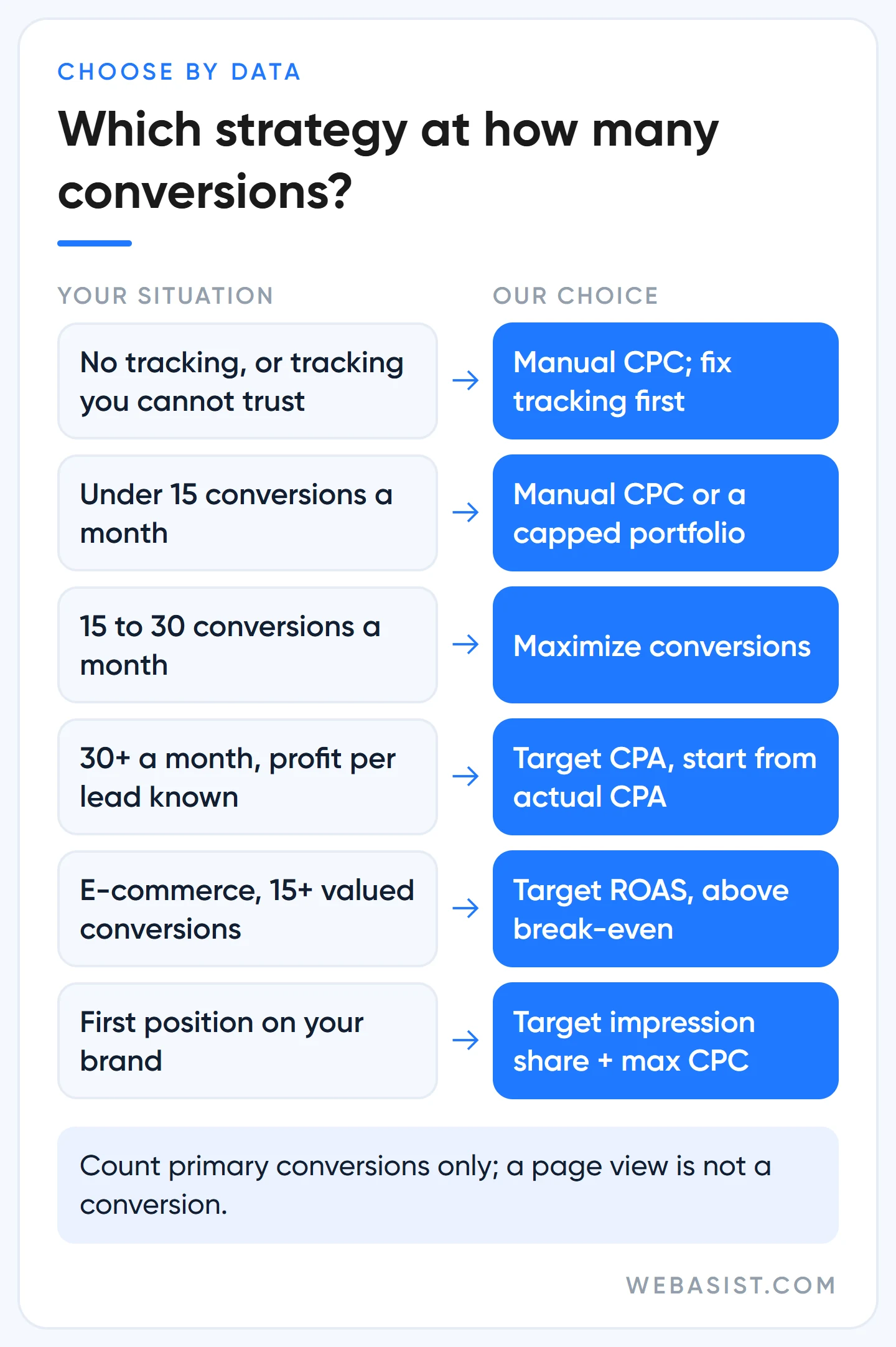
| Your situation | Our choice | Why |
|---|---|---|
| No conversion tracking, or tracking you cannot trust | Manual CPC; or "Maximize clicks" with a maximum CPC bid limit | Nothing for the system to learn from; fix tracking first |
| Under 15 conversions a month | Manual CPC; at most, "Maximize conversions" inside a portfolio with a max CPC limit | With little data, Smart Bidding drifts to expensive clicks |
| 15 to 30 conversions a month | "Maximize conversions" with a budget cap you set deliberately | Let the system learn while you hold it with the budget |
| Over 30 conversions a month and you know the profit per lead | Target CPA, starting from the actual CPA of the last 30 days | Enough data for cost discipline |
| E-commerce with varying basket sizes, 15+ conversions with values in 30 days | Target ROAS, set above break-even | Chase revenue, not counts |
| First position on your own brand name | Target impression share with a max CPC limit | Ignores conversions, buys position |
Count conversions over a 30-day window and only the primary actions that feed the "Conversions" column. An account showing 200 conversions because page views are counted is, for this table, an account with zero conversions. What to count is covered in our conversion tracking setup guide; that article is the foundation for this one.
Seven strategies at a glance: what Google promises, what we see
Search campaigns offer seven options. Since June 2026 the targeted versions are listed under their own names; "Maximize conversions with a target CPA" is now simply "Target CPA".
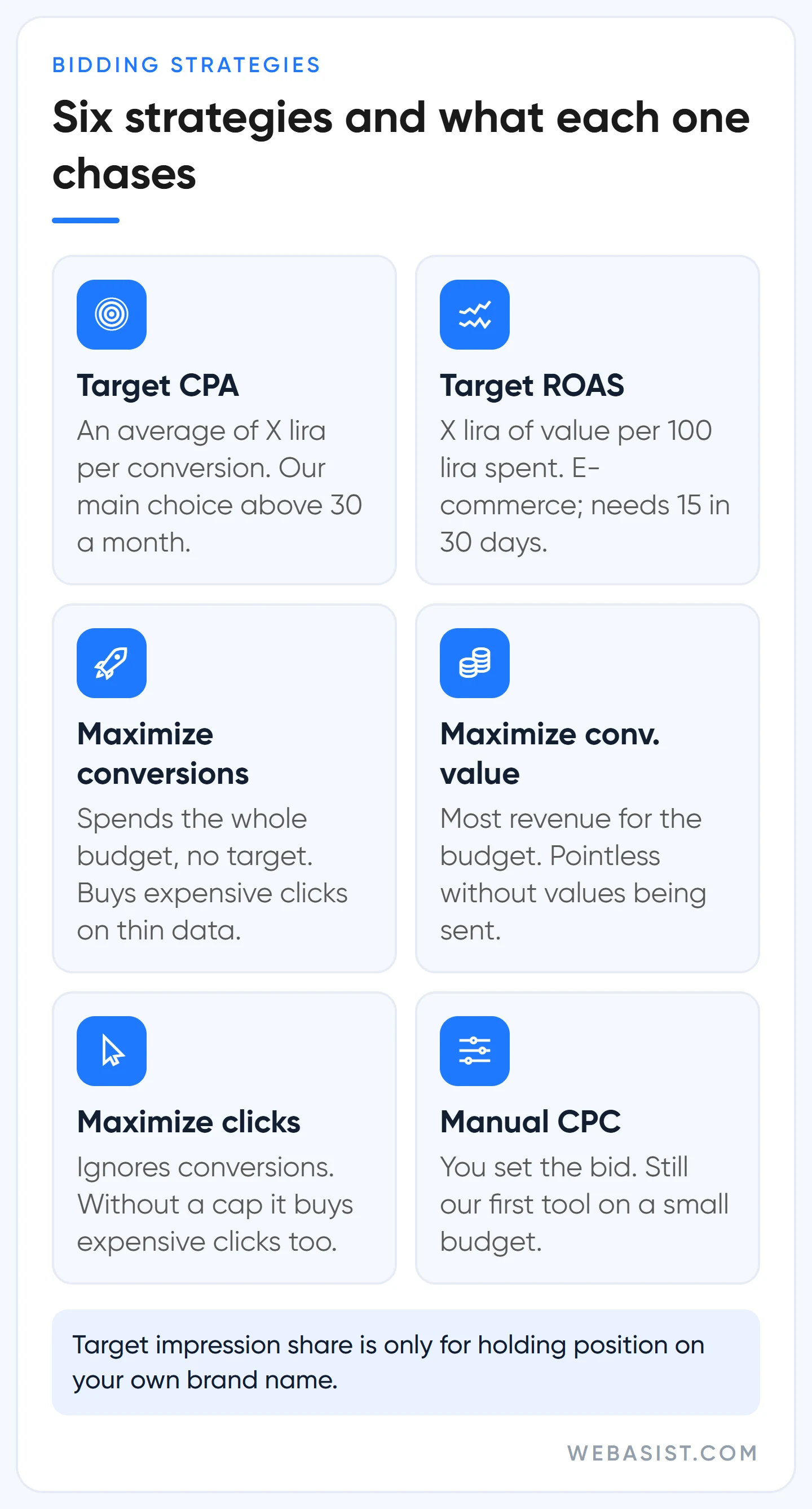
- Maximize conversions: Spends the whole budget chasing the most conversions. No target, so cost per conversion floats freely.
- Target CPA: Chases the most conversions while holding an average of X lira per conversion. Individual conversions can exceed the target; the average holds.
- Maximize conversion value: Spends the budget to grow total value, meaning revenue. Meaningless unless transaction-specific values are sent.
- Target ROAS: Aims for X lira of value for every 100 lira spent. On Search it needs at least 15 conversions in the last 30 days.
- Maximize clicks: Ignores conversions and buys the most clicks the budget allows. Without a max CPC limit it buys expensive clicks too.
- Target impression share: Shows the ad at the top of the page or in first position a set share of the time. Search Network only, no regard for conversion probability.
- Manual CPC: You set the bid per keyword. No learning period, and no auction-time signals either.
Enhanced CPC was removed from Search and Display in March 2025; campaigns that were never migrated now run on Manual CPC. If you have a campaign nobody has touched in a long time, check its settings first. In Performance Max the choice narrows to two, conversions or value, with an optional target; details are in our Performance Max guide.
The cost of switching to "Maximize conversions" too early
Google promotes this strategy for new campaigns and keeps nudging with a "switch to Smart Bidding" card on the Recommendations page. The mechanism is simple: its job is to spend the budget. With little conversion data it does not know what converts, so it raises the click price to get the budget out the door. Google's own page says spend may rise noticeably after the switch if you were under-spending.
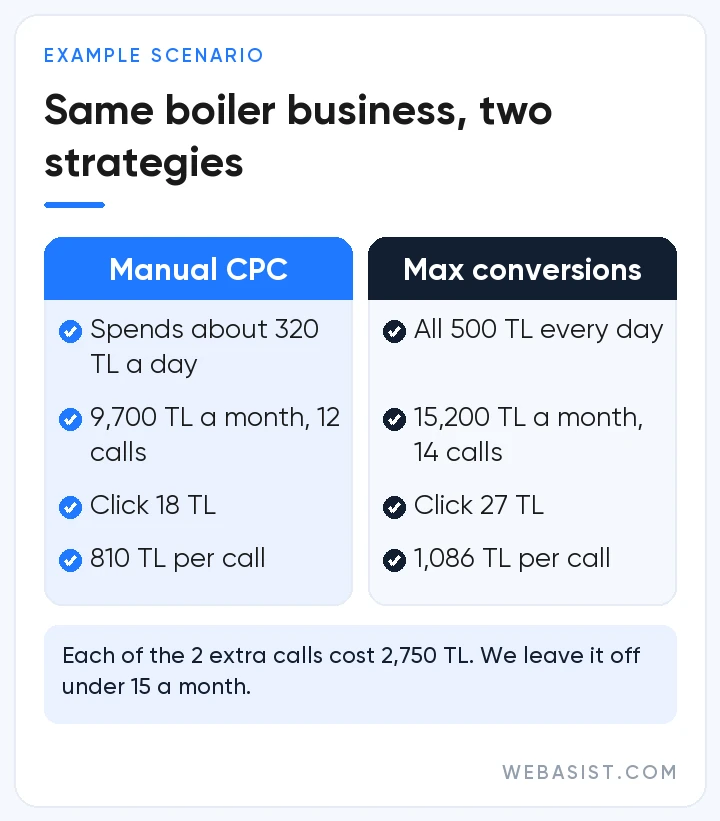
Example scenario: a boiler repair business in Ataşehir on Manual CPC spends an average of 320 TL of a 500 TL daily budget; 9,700 TL a month buys 12 phone calls, 810 TL per call. At the start of the month it switches to "Maximize conversions". The strategy spends the full budget, 500 × 30.4 = 15,200 TL, and the click price climbs from 18 TL to 27 TL. Calls rise to 14, at 1,086 TL per call.
At month end, 5,500 TL more was spent and 2 more calls came in: each extra call cost 2,750 TL. That is not a wrong strategy, it is a strategy switched on too early. Had the same business been getting 40 calls a month, the system would have learned which hours, districts and searches turn into calls and spread the same money more accurately.
Our rule: under 15 conversions a month we either leave this strategy off or put it in a portfolio strategy with a maximum CPC limit. The limit only works in a portfolio and only on Search; plenty of people look for it at campaign level and never find it. "I'll just lower the daily budget" is no fix either: drop the budget to 300 TL and the strategy still spends all 300, up to 600 TL on some days. The full budget rule is in our Google Ads budget planning guide.
How much should target CPA be? Two ways to set a realistic target
You come to Target CPA with two numbers: what you actually pay today and the most you can afford to pay. The starting target is the first; the ceiling is the second. The mistake we see most often in accounts we take over is typing half the ceiling straight into the target; the ad stops getting impressions and "Google Ads doesn't work" follows.
1. Start from the actual CPA
Divide the last 30 days of cost by the "Conversions" column, leaving out the last 3 to 5 days that look incomplete because of conversion lag. Example: 18,000 TL spend, 36 conversions, actual CPA 500 TL. Set the target at 500 TL; Google's suggested value is close to this in most accounts, because it is derived from the same 30-day average. Every two weeks, as long as conversion volume holds, tighten the target by 10%: 500, 450, 405.
2. Work the ceiling out from profit
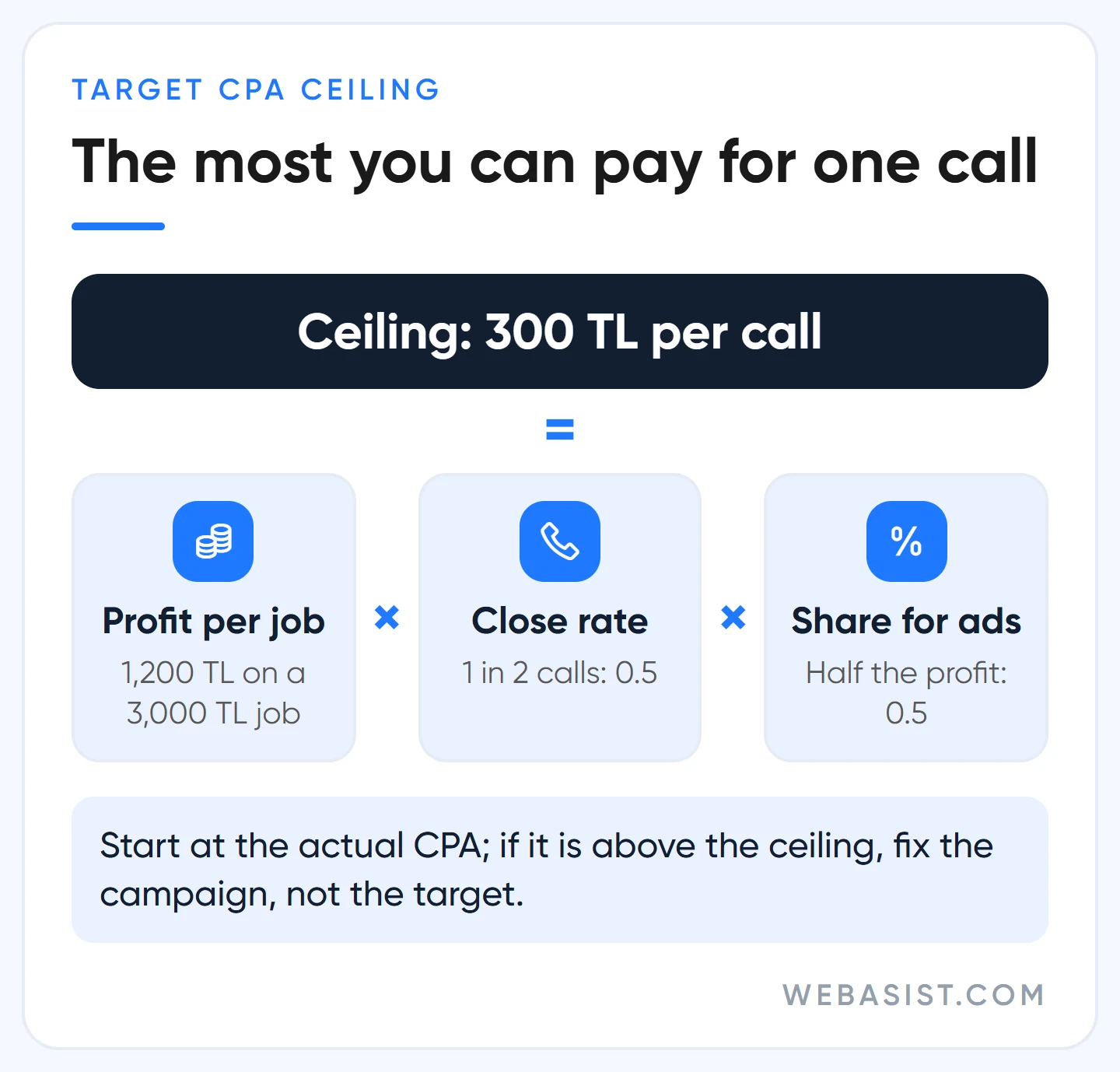
Example scenario, the same boiler business: an average job is 3,000 TL, of which 1,200 TL is profit. One in two calls turns into a job, so a call is worth at most 600 TL of profit. If you are willing to give half of that to advertising, the ceiling is 300 TL. With an actual CPA of 500 TL this campaign is losing money today; the fix is not to force the target down to 300 but to clean up search terms and the landing page first.
There is an important change since 17 August 2026: budget-limited Target CPA campaigns no longer try to beat the target, they optimise consistently to it. A campaign with a 500 TL target that was really converting at 300 TL will drift towards 500 if you do nothing. The target now means "exactly this", not "at most this". Pulling the target down to the recent average on a campaign that has been beating it is your job; Google does not do it for you.
Device adjustments change the target in this strategy, not the bid: +40% for mobile makes the mobile target 700 TL, and -100% switches that device off entirely. Location and time adjustments are ignored under Target CPA; you control it through the target and the budget.
Target ROAS: right for e-commerce, too early under 15 conversions
In a store where baskets range from 300 TL to 30,000 TL, conversion counts mislead; 10 cheap orders bring less revenue than 1 expensive one. That is where Target ROAS comes in: you say "400 TL of revenue for every 100 TL spent" and the target is 400%. On Search and Shopping the prerequisite is at least 15 conversions at the conversion tracking level in the last 30 days, with at least two different values sent.
Work the target back from profit. With a 30% gross margin, break-even ROAS is 100 ÷ 30 = 333%; every sale below that brings revenue and loses money. We start by setting the last 30 days' actual value as the target (the "Conv. value / cost" column × 100) and never go below break-even.
If you are moving from Target CPA, send values for at least 4 weeks first; the Shopping setup is in our Merchant Center article.
What does "bid strategy learning" mean and how long does it last?
The "Learning" status appears after three things: the strategy was just created or reactivated, a strategy setting changed, or campaigns or keywords were added to or removed from it. Bids fluctuate during this period and cost per conversion can rise for a week or two. The length depends on conversion volume and your conversion cycle; Google's current English page says 1 to 2 conversion cycles, while the Turkish translation still carries the old "50 conversions or 3 cycles" wording. What we see: about a week for e-commerce that sells within hours, up to a month for B2B that closes weeks later.
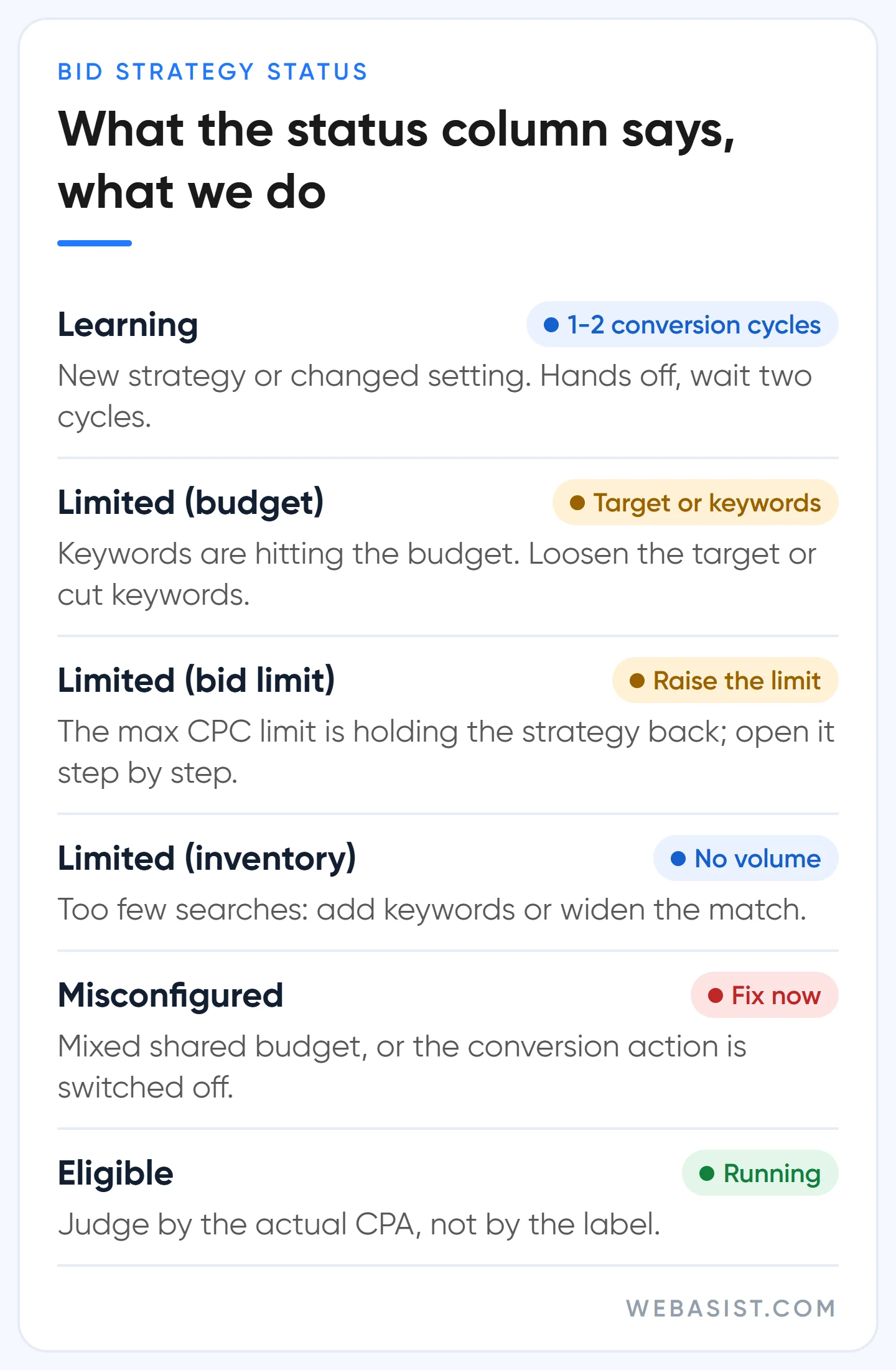
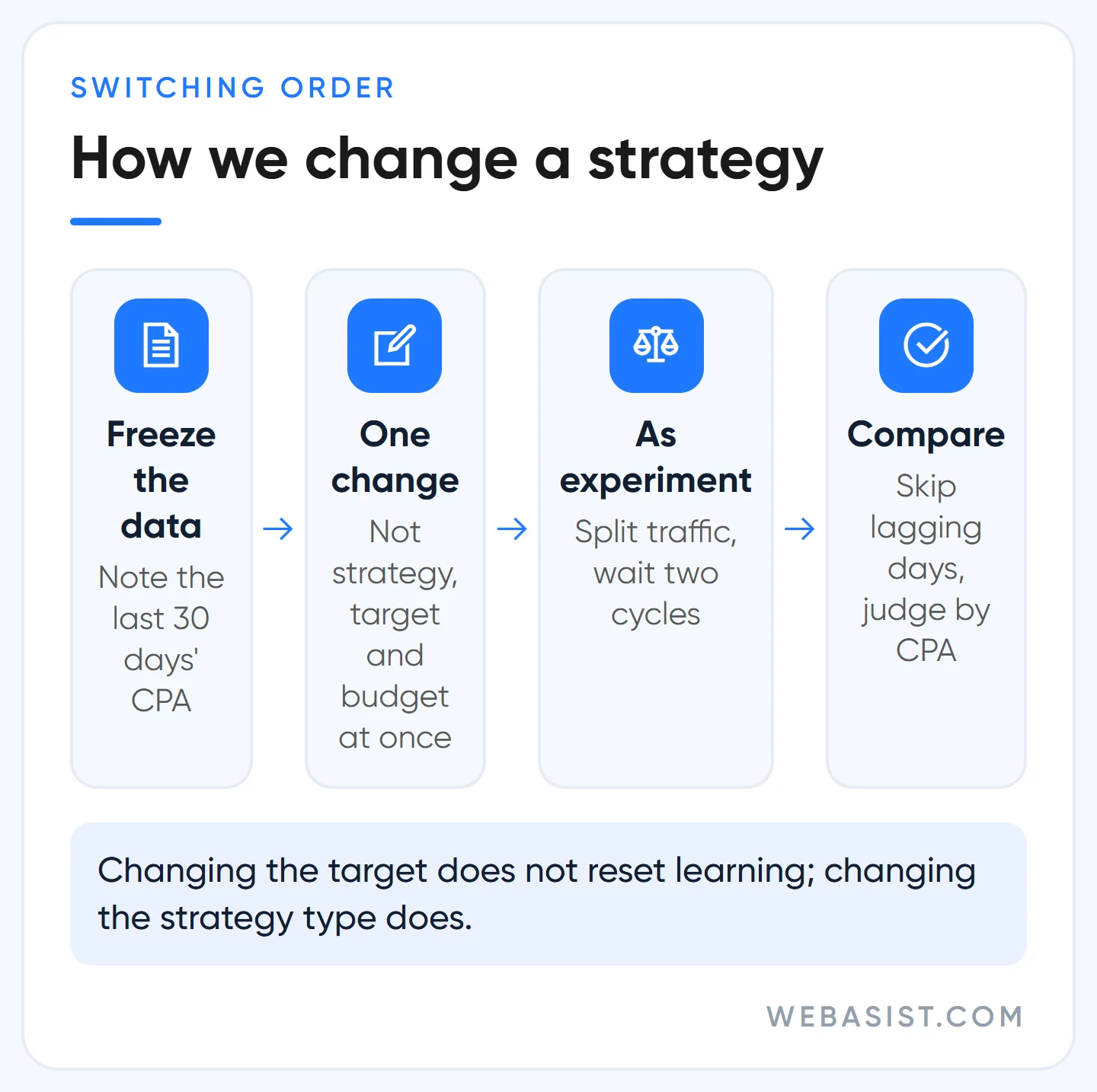
Changing the target does not reset learning. Moving a target CPA from 500 to 450 does not trigger the "Learning" label and does not wipe what the system has learned. Changing the strategy type, the conversion action being bid on or the portfolio structure is a genuine recalibration. Do not stack those three in the same week, and leave the evaluation until at least two full conversion cycles have passed.
The other labels you will see in the status column, and what we do about them:
- Limited (budget): Most keywords are hitting the budget. If the budget will not grow, loosen the target or cut keywords.
- Limited (bid limit): The maximum CPC limit you set is blocking the bid the strategy wants; this is the "bid limit" warning people search for. Raise the limit step by step.
- Limited (inventory): Not enough search volume. Add keywords or widen the match.
- Misconfigured: A "maximize" strategy is sharing a budget with other strategies, or the conversion action being bid on is switched off. Put every campaign on the shared budget into one portfolio.
Google's bidding recommendations: which we accept, which we reject
The Recommendations page and the optimisation score keep asking for two things on bidding: move to Smart Bidding and loosen the target. Both mean more spend; Google sells ad space, nothing surprising there. The score rises when you dismiss a recommendation too, so we never accept a bidding recommendation for the sake of the score.
- "Raise your target CPA" or "lower your target ROAS": We accept it when the suggested figure is below your profit ceiling and lost impression share due to budget is high. Above the ceiling we reject it; the recommendation measures volume, not your profit.
- "Switch to Maximize conversions": Rejected in any account under 15 conversions a month. Above that, we test it in a portfolio with a max CPC limit.
- "Raise your budget": Only when the actual CPA is below the ceiling and the "Lost IS (budget)" column is high. Under "maximize" strategies the budget always runs out anyway, so that column means nothing there.
- Auto-applied recommendations: We switch off the bid strategy and target adjustment types on day one. You cannot run an account where a system changes your target for you.
We went through auto-apply and the other default settings one by one in our account audit article.
Who should not use Smart Bidding?
- Businesses that cannot count conversions: In a service business that does not track calls and WhatsApp, the only thing the system can chase is the form, and that is a small slice of real demand.
- Tight budgets stuck under 15 conversions a month: A 6,000 TL monthly budget at 40 TL a click buys 150 clicks; at 5% that is 7 or 8 leads. No smart strategy can learn from that. Manual CPC and a strict negative keyword list get more done.
- Businesses with a two- or three-week season: School bus registrations, pre-holiday gifts. The season ends before the system learns; use Manual CPC or a portfolio carrying last year's data.
- Brand searches: Conversion is already high, bid maths is unnecessary; Target impression share with a limit is enough. Bidding on a competitor's name is a separate discussion in our competitor brand bidding article.
Four rules we follow when changing strategy
- Freeze the measurement first: Note the cost, conversions and CPA of the 30 days before the change, and check that the conversion actions you will bid on are set to "Primary".
- One change at a time: Strategy, conversion goal and budget never change in the same week.
- As an experiment where possible: Split traffic with "Save as experiment", wait two full conversion cycles and leave the lagging final days out of the comparison.
- Announce short promotions in advance: If a three-day sale will clearly lift conversion rate, enter a seasonality adjustment; the tool is built for events of 1 to 7 days, so do not use it for periods over 14 days. If the tag broke, take those days out of the bidding data with a data exclusion.
If several small campaigns serve the same goal, gather them in one portfolio strategy: the data pools, you reach the 15-conversion threshold faster, and controls such as the max CPC limit only exist there. A portfolio's type cannot be changed later; moving from Target CPA to Target ROAS means a new portfolio. If you are building the campaign from scratch, the order is in our search campaign setup guide.
Frequently Asked Questions
Which bidding strategy should a new Google Ads campaign start with?
If tracking is in place and the budget can carry 15 conversions a month, start with "Maximize conversions" and move to Target CPA after 30 conversions. If the budget cannot carry that, start on Manual CPC and watch click prices and search terms yourself for the first month.
How much should target CPA be?
The actual CPA of the last 30 days, then tightened by 10% every two weeks. Work the ceiling out from the profit a lead leaves: profit per job × the share of calls that become jobs × the share of profit you give to advertising. If the actual CPA is above the ceiling, fix the campaign, not the target.
How many conversions does Smart Bidding need?
Target CPA can technically start without history, but we do not switch it on under 30 conversions in 30 days. The official threshold for Target ROAS on Search and Shopping is 15 conversions in 30 days, and the values need to differ from one another.
Is Manual CPC still worth using in Google Ads?
Yes, and on a small budget it is our first tool. Its drawback is that it cannot use auction-time signals such as query text and browser, and AI Max's search term matching does not work with Manual CPC. Once the data passes 30 conversions, it is time to move to Target CPA.
Conclusion
A bidding strategy is not a setting, it is a data contract: hand Google the decision only when you have conversions to teach it with. Under 30 conversions keep control yourself; above it, work the target out from real profit and type that in, and when a campaign beats its target, lower the target yourself.
We can tell you in 20 minutes whether the strategies in your account match your data level: give us read-only access and we will send a three-line note with the last 30 days' conversion count, actual CPA and strategy statuses. If you want to hand over management, setting up the bidding structure is part of our Google Ads advertising packages; write to us here.
Sources
- About Target CPA bidding: the suggested target derived from the 30-day average, 30-conversion evaluation, device adjustments changing the target.
- Changes to target-based bid strategies: budget-limited campaigns optimised consistently to the target from 17 August 2026.
- Duration of the learning period for campaigns: the three causes of the "Learning" status and the 1 to 2 conversion cycles.
- About Target ROAS bidding: the 15-conversions-in-30-days prerequisite on Search and Shopping.














