


Google Maps Ads: Free Business Profile or Paid Ads?
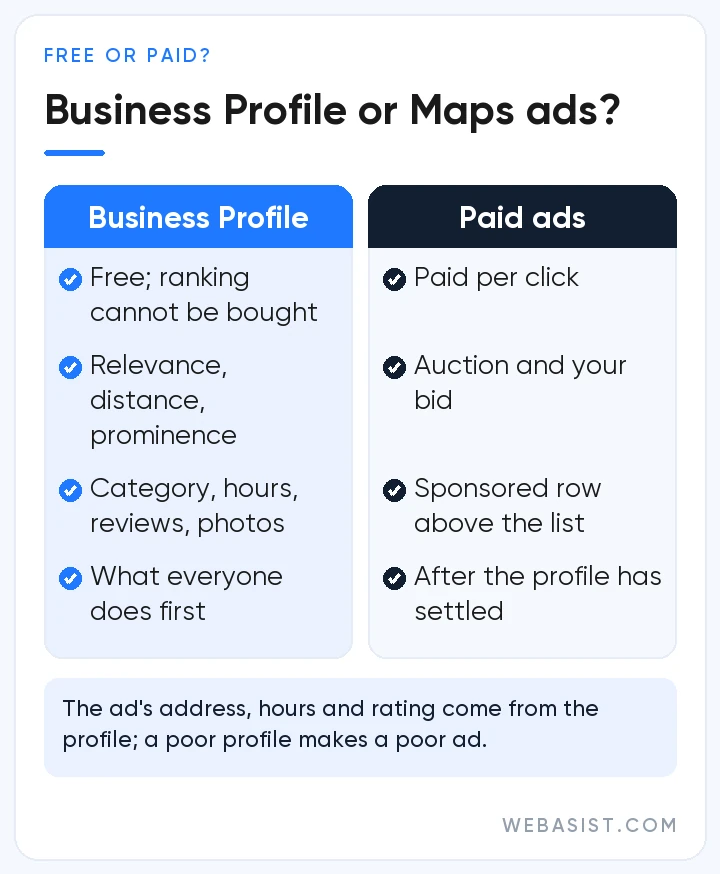
Before talking about Google Maps ads, separate two things: appearing on Maps is free, appearing at the top with a "Sponsored" label costs money. The free part is Google Business Profile; the paid part is run from Google Ads, and there is no separate "Maps campaign". You add your business location to a Search campaign, or open Performance Max for store goals if you have many branches, and the ad shows on Maps too. You pay per click; there is no separate price list for Maps.
Our verdict: if you are a single-location business (hair salon, dental clinic, car service, restaurant), complete your profile first, then open a small Search campaign with your location attached. For businesses with fewer than five locations, we do not open Performance Max for store goals. Below we explain the difference between free and paid, where the ad appears on the map, what you pay for and which setup we choose.
Reaching the top of the map: free Business Profile versus paid ads
You cannot buy the organic ranking on Maps. Google sets that order by relevance, distance and how well known the business is; whoever pays does not move up. The free way up is a complete profile: the right category, opening hours, phone, photos and regular reviews. In the local accounts we take over, the first thing we look at is not the campaign but the profile; they very often have the wrong category or stale hours. The free side of the profile is covered in our free visibility on Google article.
Our position on reviews is simple: do not buy reviews and do not offer discounts in exchange for them. Both break Google Maps content rules; fake reviews get removed and the profile can face restrictions. We recommend sending customers the profile's review link in a short message after the service; you get that link from inside the profile.
An ad adds a separate row above that ranking and places a square pin on the map. If the profile is poor, the ad looks poor, because the address, hours, rating and photos in the ad come straight from the profile. Profile first, ad second; that is the order.
What Google Maps ads look like
There are four formats; two of them you will see often. First, the business card at the top of the results list when someone searches in Maps, labelled "Sponsored", with the matching pin highlighted on the map. All it needs is a location asset (formerly a location extension) linked in your Google Ads account. Second, the square "promoted pin" that appears on the map while someone browses or follows a route; this requires your Business Profile to be linked to Google Ads. In Performance Max for store goals the pin shows your logo; in a Smart campaign, only a generic icon.
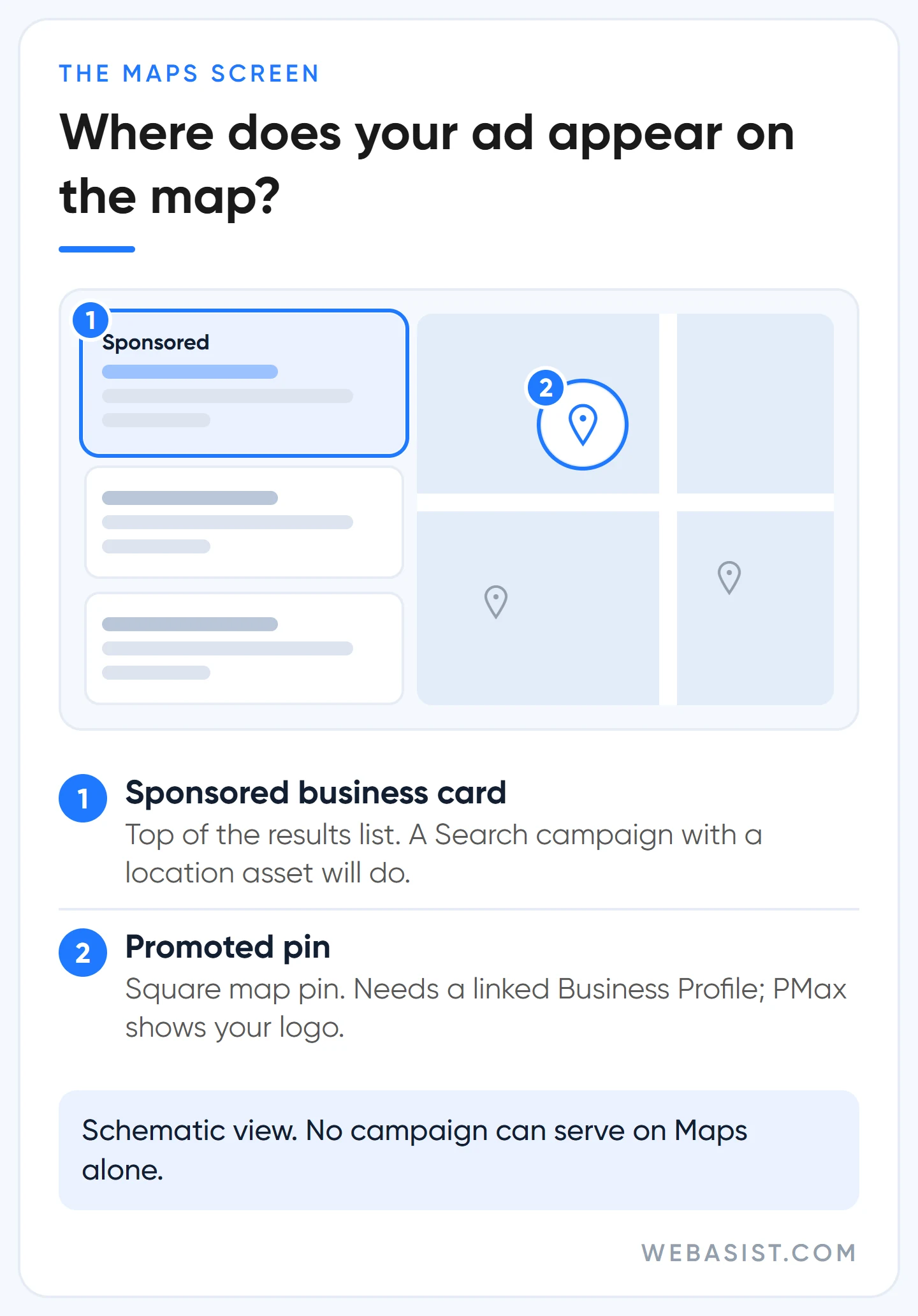
The two less common ones: a suggestion ad shown in autocomplete while the user types (Maps mobile app only), and a placesheet ad embedded in a place's detail page (a store on a mall's page, for example). The important limit: no campaign can serve on Maps alone. A Search campaign with a location attached also shows in Google search; PMax also goes to YouTube and the Display Network. "I only want to appear on the map" cannot be done today.
Google Maps ads cost: what do you pay for?
Maps has no separate rate; the cost per click is whatever your Search campaign pays. In an ad with a location attached, these clicks are charged: clicking the headline through to the site, the "Call", "Directions" and "Website" buttons, and clicking the pin on the map. Even if a person clicks several places in the same ad, you pay for one click; swiping through photos is free. In Performance Max for store goals you pay per thousand views of the logo pin.
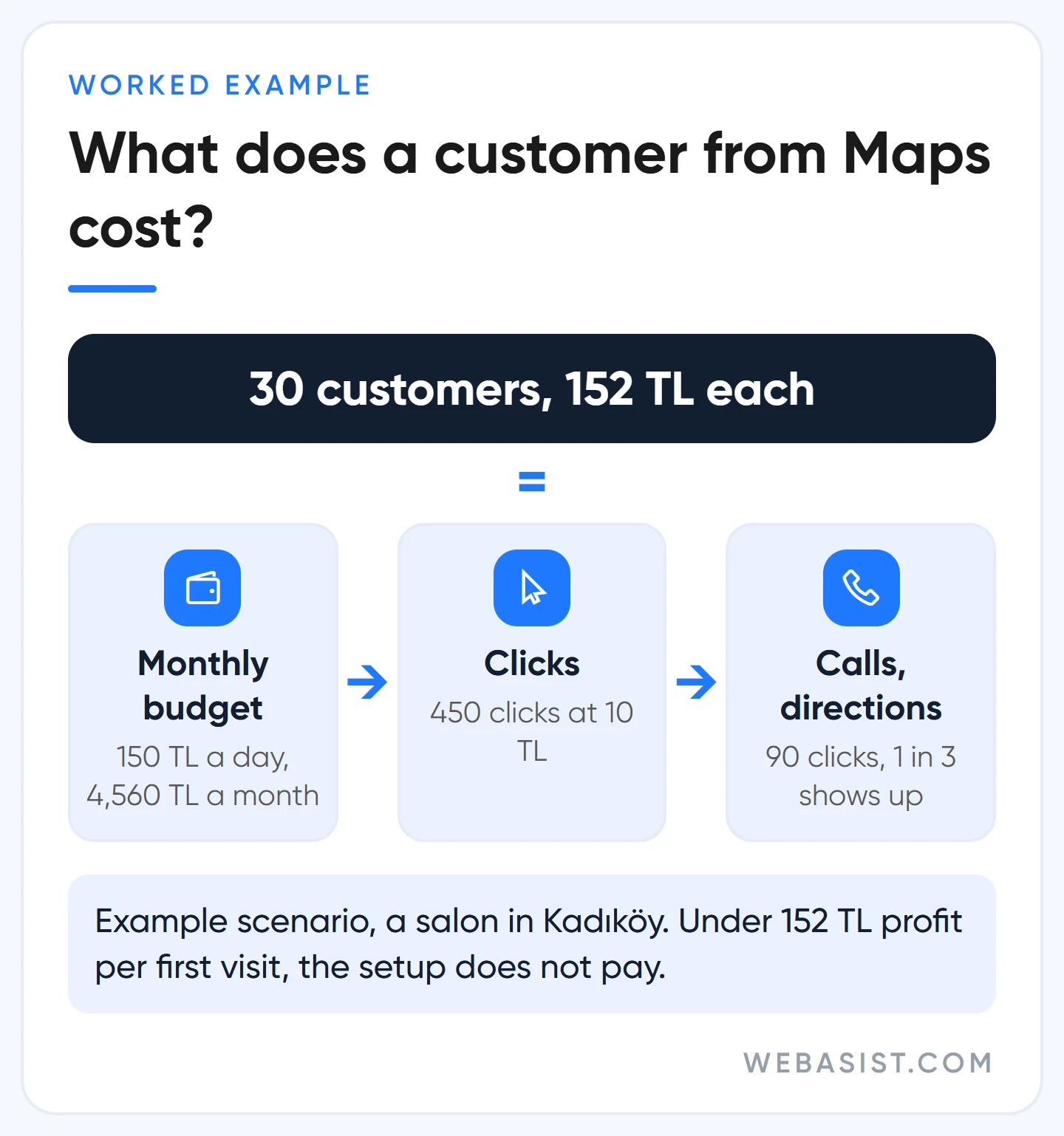
Example scenario, a hair salon in Kadıköy: a daily budget of 150 TL spends at most 150 × 30.4 = 4,560 TL a month. At 10 TL a click that is about 450 clicks a month. If 90 of them are "Call" or "Directions" clicks and one in three turns up, that is 30 new customers a month at 152 TL each. If a customer leaves less than 152 TL of profit on a first visit, this setup does not pay for itself; if more, Maps visibility is one of the cheapest customer sources a local business has. How a click price is formed is explained in our Google Ads pricing article.
One warning: the Business > Advertise flow inside the Maps app drops you into a Smart campaign in five minutes. Google recommends it because it is easy; we do not use it. No keywords, no location option, no conversion control, and your logo does not even show on the pin. Build the ad in the Google Ads interface, in Expert Mode; every local campaign we open is set up there.
Which setup to start with: Search for one location, PMax for many
The decision depends on your locations and your goal. For a business with one or a few locations, our setup is a Search campaign with a location asset: someone types "kadıköy hairdresser" or "car service near me", the ad shows in Google search and at the top of the Maps list, and you control the keywords and the budget. The setup order is in our search campaign setup article, keyword selection in keyword research.
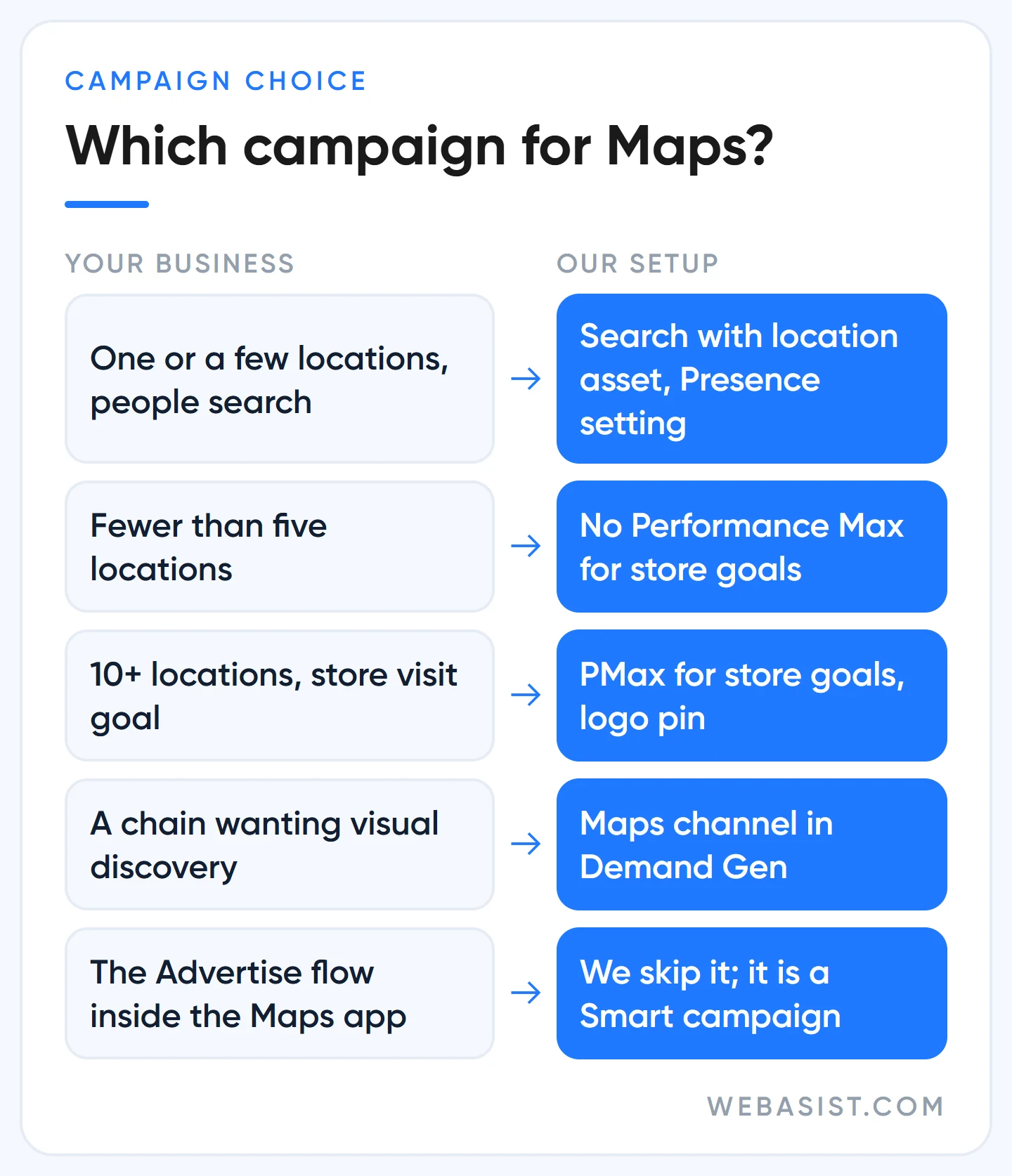
Performance Max for store goals (the "Local store visits and promotions" goal) is for multi-location chains only: Google suggests at least 10 locations for the store visits goal and at least 5 for local actions, and we do not open it below that. This campaign puts your logo on the pin and shows promotions on Maps, but it also spreads the budget to YouTube and the Display Network; when we open it is in our PMax article. In Demand Gen campaigns Maps is now a selectable channel; it is for chains that want to reach people exploring the area with visuals, not for a single-location business. The general comparison of campaign types is in our campaign types article.
Setup: profile, link, location asset and the "Presence" setting
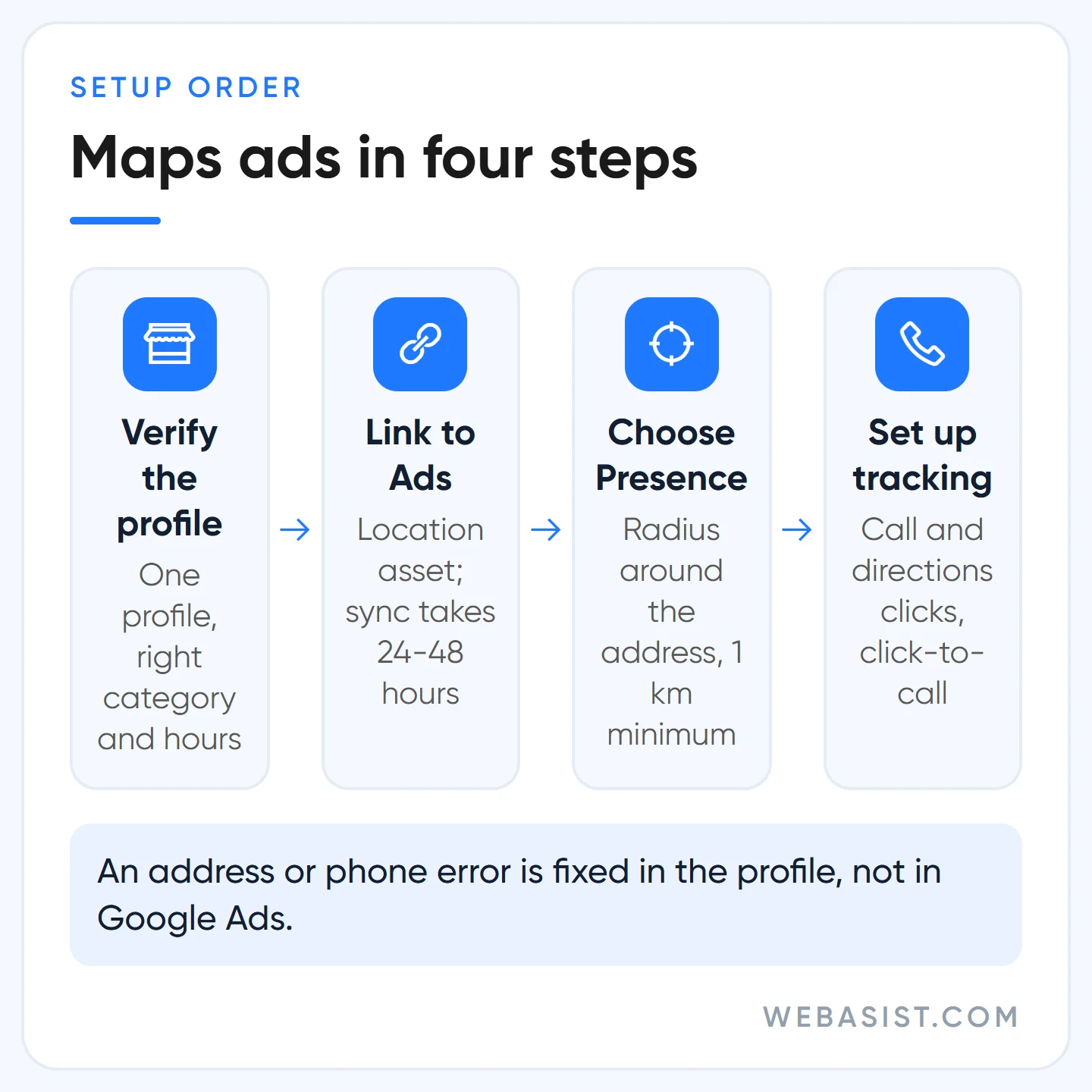
- Verify the profile and remove duplicates. Do not open a second profile for the same business; claim the existing one. If customers do not come to you, remove the address and define service areas, up to 20. A location marked closed does not show in ads.
- Link the profile to Google Ads. In Google Ads, add a Location from the Assets page and choose Business Profile as the source; if the profile sits in another account, a request goes to its manager and no locations arrive until it is approved. Syncing can take 24-48 hours. Fix an address or phone error in the profile, not in Google Ads.
- Narrow the location targeting. The default "presence or interest" option also shows the ad to someone in Ankara searching "Kadıköy hairdresser". We choose "Presence" and target a radius around the address; at least 1 km, as very small radii make the ad serve intermittently.
- Write local keywords. Service plus district ("ataşehir dental clinic"), "near me" phrases, the category name. City-wide keywords carry the budget to other districts.
- Set up measurement. For a local business the result happens on the phone and at the door, not on the website. "Directions" and "Call" clicks are created automatically as local action conversions, and a Search campaign can bid towards directions. Store visit measurement exists in Türkiye but requires account-level thresholds; for a small business it usually never switches on, and we settle for directions and call clicks. Google's forwarding numbers are not available for Turkish numbers, so to count calls we use the click-to-call setup in our conversion tracking article.
To see the Maps effect in reports, open Segment > Click type in the campaign table; "Get directions", "Get location details" and "Mobile clicks-to-call" appear as separate rows. If those rows are empty, your ad is not showing on the map at all.
If your ad is not showing on the map
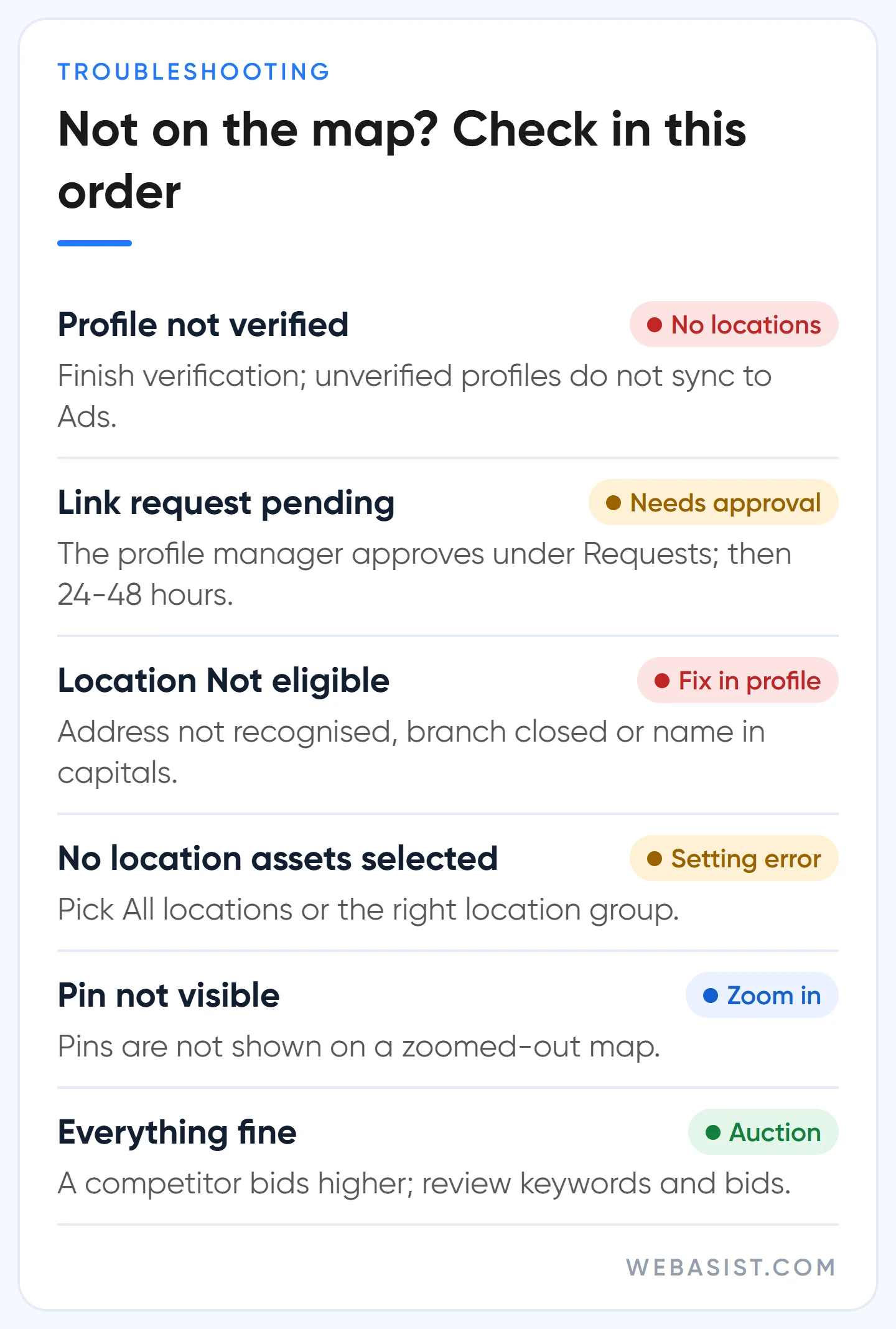
In local accounts, the "we are not on the map" complaint is usually not about the campaign but about location data never reaching the account. Check in order: is the profile verified; has the link request been approved by the profile manager; does the location show as "Eligible" on the Assets page or "Not eligible" (address not recognised, branch closed, name in capitals); is "No location assets" accidentally selected in the campaign. If you are looking for the pin, zoom the map in far enough; pins are not shown on a zoomed-out map. If all of that is fine, what remains is the auction: a competitor bidding higher than you on that search is showing above you.
What we check in the first month after launch
In a local campaign, the biggest drain on the budget is the wrong searches. The keyword "kadıköy hairdresser" can also trigger your ad on searches such as "hairdresser job", "hairdressing supplies" or "hairdressing course". For the first two weeks we open the search terms report every day and add the queries of people who will never walk through your door as negative keywords: job, staff, course, supplies, wholesale. Skip this clean-up and part of the 4,560 TL above goes to people who will never be customers.
The second thing we look at is hours. A click on the "Call" button is charged; a call that comes in while the shop is closed is a customer you paid for and nobody answered. So we use ad scheduling to limit the ad to the hours when someone picks up the phone. For a salon that closes at 21:00, stopping the ad at 20:30 cuts the late-night "Call" clicks nobody will answer.
At the end of week four we do one calculation: we put that month's directions and call clicks next to the number of new customers you saw at the till. Asking people who walk in "how did you find us?" is the cheapest measurement tool for this. When the account shows "Limited by budget", Google recommends raising the budget; in a local account that is not our first move. If the cost per customer is higher than the profit from a first visit, we narrow the keywords and the radius first; if the numbers hold up like the worked example, that is when we raise the budget.
Who should not use it?
- Businesses customers do not visit: e-commerce, software, consulting. Appearing on Maps brings you nothing; put the budget into Search and Shopping.
- Sensitive categories: in categories such as health, religion and children's products, local action and store visit reporting is not provided. A clinic can advertise but cannot count direction clicks; you measure through phone calls instead.
- Businesses with an unverified or duplicate profile: fix the profile first; opening a campaign in that state is wasted spend.
- A single-location business with a monthly budget under 3,000 TL: collect a free profile and reviews first; let the ad come once the profile has settled.
Frequently Asked Questions
Can I advertise only on Google Maps?
No. Every campaign that covers Maps also serves on other Google surfaces. The options most focused on Maps are a Search campaign with a location asset and, for multi-location businesses, Performance Max for store goals.
How much do Google Maps ads cost?
There is no separate fee; you pay the click price of your Search campaign. Directions, call, website and pin clicks are charged, one click per impression. Performance Max for store goals pins are charged per thousand views.
Can I advertise on Maps without a Business Profile?
Partly. Google Ads lets you turn up to 10 of your own locations found on Maps into location assets without a profile, but promoted pins require the profile link. The profile is free anyway; there is no logic in starting without it.
Do I need to advertise to rank higher on Maps?
No. The organic local ranking is set by relevance, distance and prominence and cannot be changed by paying. An ad adds a "Sponsored" row above that list; the two together raise visibility, but neither replaces the other.
Conclusion
What brings customers from Maps is your profile first and your ad second. For a single-location business, a Search campaign with a location asset and the "Presence" setting is enough; Performance Max for store goals is for multi-location chains. You pay per click, and for a local business the cheapest customer in the account often comes from here.
Send us your profile address and the district you serve; we will tell you what needs fixing in the profile before any campaign, and what budget to start with on Maps. Which package covers Maps advertising is on our Google Ads packages page.














