


How to Choose a Google Ads Agency: Fees, Account Ownership, Traps
Short answer: a good Google Ads agency agrees to three things before anything else. The ad account is opened in your name, the ad budget goes from your card straight to Google, and the agency's fee is separate and in writing. If one of the three is missing, the quality of the pitch stops mattering. On the day you part ways, your account, your data or your money stays on the other side of the table.
This article is written by a Google Ads agency in Istanbul, so we are not neutral and we will not pretend to be. We will talk from the inside: how agencies get paid, what a quote should cover, who should hold the account, and how to give an agency access and take it back. Ask us every question on this page too. If an agency cannot give a clear answer, us included, do not work with it.
What does a Google Ads agency do, and do you really need one?
An agency picks the keywords, builds the campaigns, writes the ads, connects sales and lead tracking, and then looks at the account every day. Setup is the visible part. The part that earns money comes after. When we take over an account, the first thing we open is the search terms report. In most of them a slice of the budget has been going to searches that have nothing to do with the business, and nobody had noticed.
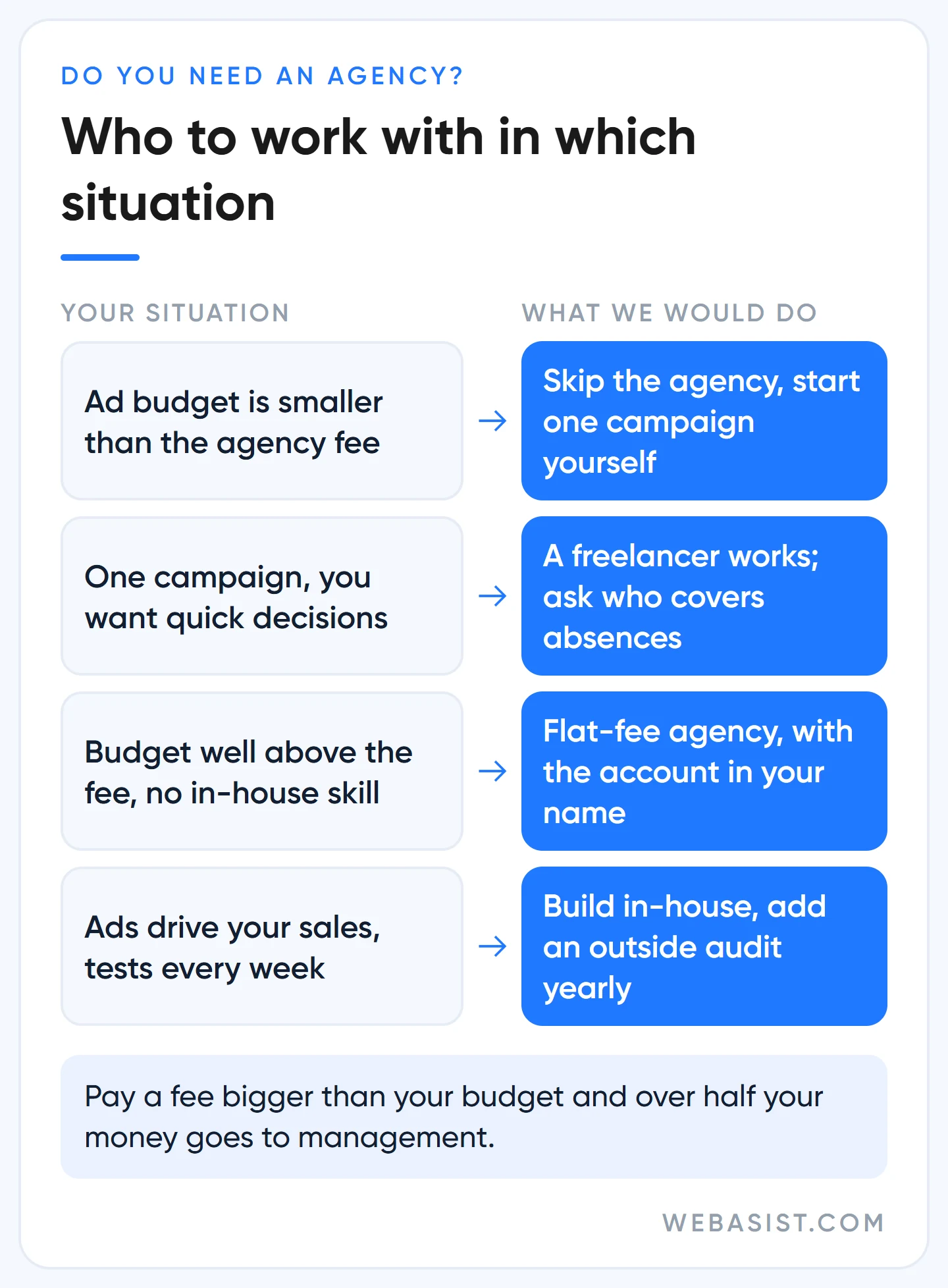
Still, not everyone needs an agency. The decision depends on your budget and on whether someone in-house can look after the account. Find your situation among the four below and act on it.
When should you not hire an agency?
If your monthly ad budget is smaller than the monthly fee an agency would charge, do not hire one. The maths is simple: pay more for management than you spend on ads and over half of every lira you spend goes to management, not to ads. We do not try to sell a package to a business in that position. Put the money into the budget and start with a single search campaign yourself; our search campaign setup guide walks through it.
A freelance Google Ads specialist is a perfectly good choice for a business with one campaign that wants quick decisions. Ask one question: who watches the account while you are on holiday or ill? If the answer is "nobody", your budget spends itself unattended that week.
If advertising sits at the centre of your sales and you launch new products or campaigns every week, training someone in-house costs less in the long run. Even then, have an outsider audit the account once or twice a year. Our account audit guide lists what to look at.
Google Ads management fees: how agencies get paid
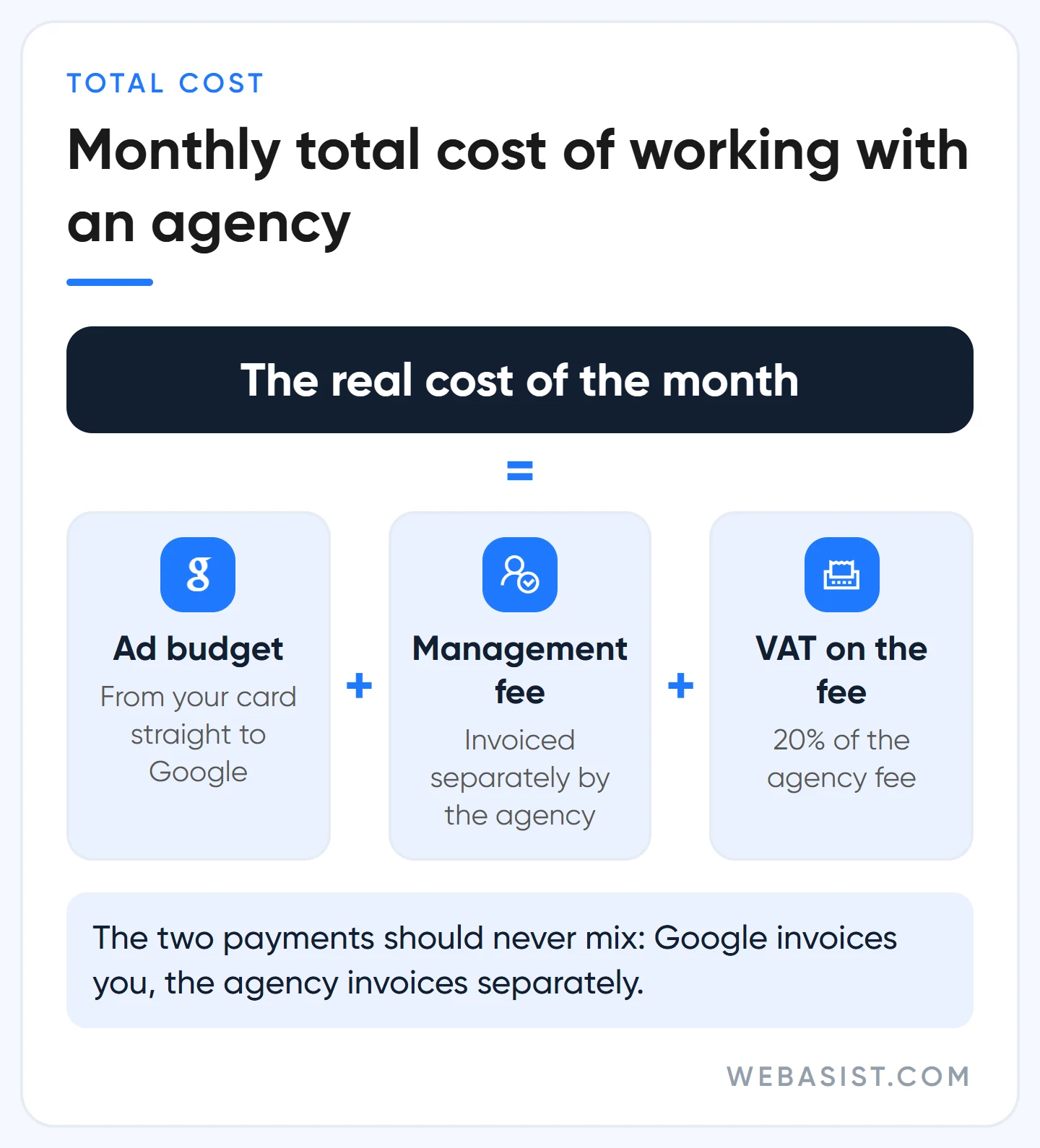
Working with an agency means two separate payments. One is the ad budget that goes to Google, the other pays for the agency's work. In a healthy setup the two never mix: Google invoices you, and the agency invoices you separately. You will meet four fee models in the market.
| Model | How it works | Our take |
|---|---|---|
| Flat monthly fee | The scope is fixed and you pay the same amount every month | This is our model. We earn nothing extra when you raise your budget, so when we say "let's raise it" the reason is data |
| Percentage of spend | The fee is a set share of your monthly ad spend | The agency earns more as you spend more. Read every "let's increase the budget" suggestion in that light; get the minimum fee and the cap in writing |
| Performance based | The fee is tied to sales or leads | It sounds fair, but who counts the conversions? If the agency does, the counter inflates. Tracking has to live in your account |
| All-in single invoice | The agency charges one amount and pays for the ads with its own card | We advise against it. You only know how much reached Google because the agency tells you so |
The logic of the percentage model is this: with the rate unchanged, doubling your budget doubles the agency's fee, although the work has not doubled. Ask in the quote which spend the rate is applied to.
When you add up the total cost, remember the VAT on the agency fee: 20% VAT is added to the monthly figure in the quote. The real cost of the month is the ad budget plus the agency fee plus that VAT. Taxes and extra lines on Google's own invoice are covered in our billing guide, and what a click costs in lira is in our Google Ads pricing guide.
What should a Google Ads management fee include?
Do not compare two quotes on the monthly figure alone. Check whether they cover the same work. The quote should answer these in writing:
- How many campaigns will be managed, and of which type?
- Is conversion tracking setup included in the fee?
- Who writes the ads and produces the images?
- Will the landing page be changed, or will you only get suggestions?
- How often do reports arrive, and who do you talk to?
- Is there a separate setup fee, and how many months is the contract?
Whose name is on the account? Your Google Ads account must stay yours
This is where the most expensive mistake in choosing an agency is made. If the agency creates your account from inside its own manager account (the old name is MCC), the agency automatically becomes the owner of that account. You are just an invited user, and sometimes not even that. When the relationship ends, you are left without an account.
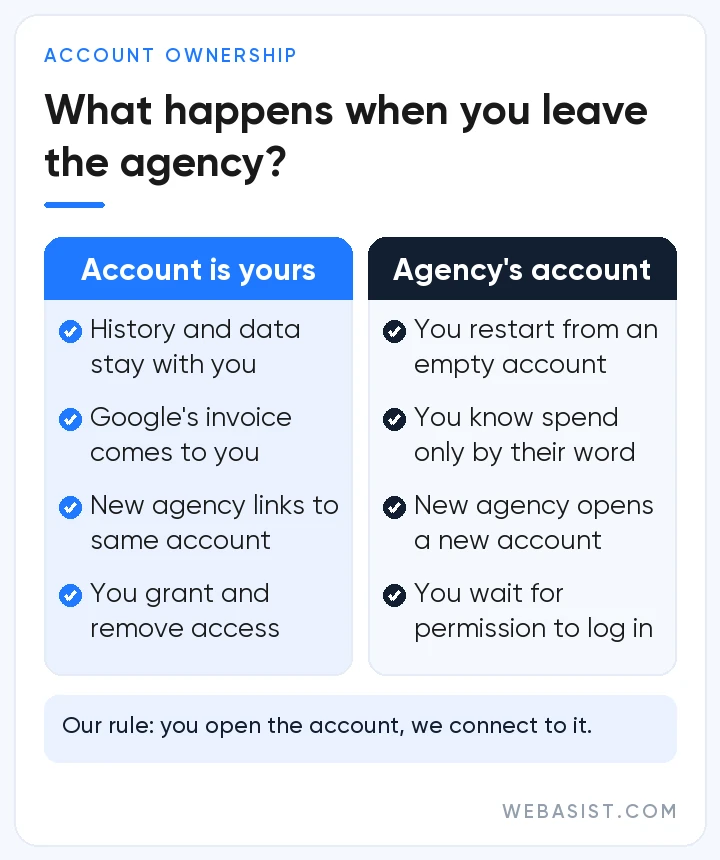
What you lose is not a login. The search terms, conversion history, negative keyword lists and ad tests you have paid for over the years all live inside that account. The new agency starts from an empty account, and you pay the same money a second time until the system gets to know you again.
Our rule is simple: you open the account, we connect to it. Open it with your own company email, and enter your company details and your own card in the payments profile. The traps on the sign-up screen are covered in our Google Ads account setup guide. The same rule goes for Google Analytics, Tag Manager, Merchant Center and your Business Profile; all of them should be in your name.
What if the agency already opened your account?
First ask for Admin access for your own email address. Then check whose name is on the payments profile and add your own card. Once you are an Admin, you can remove the link to the manager account that shows as owner yourself, and the campaign history stays in the account. If the agency will not take that first step and give you Admin access, you have learned what kind of relationship you are in.
How to give an agency access, and how to take it back
Do not give your password to anyone, the agency included. There are two clean ways to grant Google Ads account access. The first is adding a user: you invite a specific person by email address. The second is linking the agency's manager account to your account: you let in the company rather than one person.
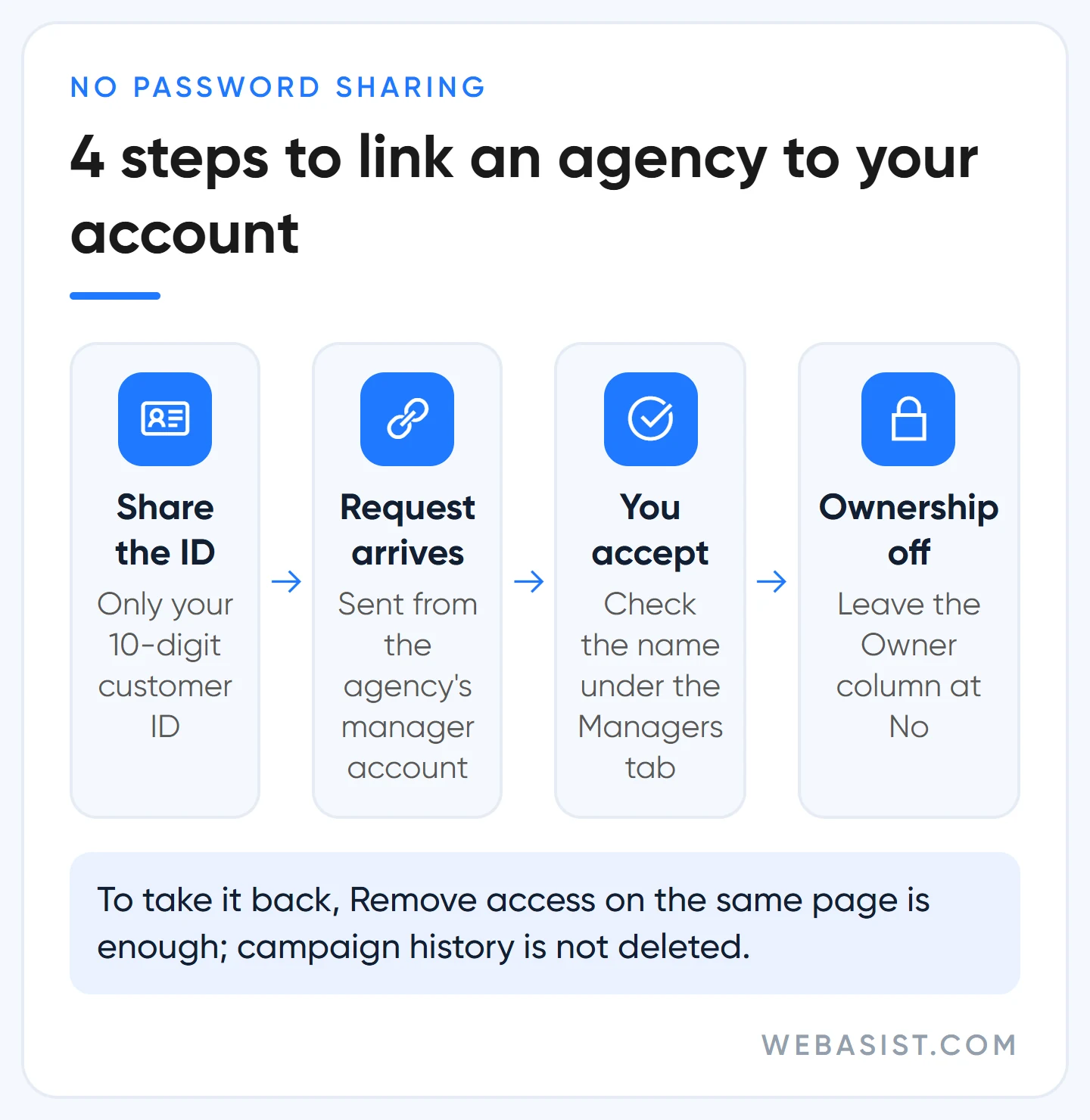
With an agency we prefer the second route. When someone leaves the agency or a new person joins the team, you do not have to do anything; the agency manages its own side. The process has four steps:
- You give the agency only your 10-digit customer ID. Click your profile picture at the top right and it appears under your account name.
- The agency sends you a link request from its manager account.
- You open Admin > Access and security > Managers, check the agency's name on the request and accept it.
- The "Owner" column stays at "No".
If the agency asks for ownership, ask why. Apart from monthly invoicing or a credit line application, day-to-day management does not need it. An owner manager account can add and remove admins in your account, so you should hear a good reason before handing that over.
Adding a user to Google Ads: which access level for whom?
When you invite people, give each the lowest level that lets them do their job:
- Admin: You and a second person you trust. Only this level decides who gets into the account.
- Standard: The specialist who edits campaigns. Can change everything but cannot grant access to anyone.
- Read only: Sees and reports, cannot touch. The right level for an agency preparing a quote and for an auditor.
- Billing: Your accountant. Does not see campaigns, works only on the payment side.
If you are the only Admin and one day you cannot get into that mailbox, the account is orphaned. We ask our clients to keep at least two Admins on the account. There is also a little-known setting: you can put an end date on access when you invite someone. It is ideal for giving an agency two weeks of read-only access while it prepares a quote.
Taking access back when you part ways
On the same page you click "Remove access" next to the user or the manager account, and that is it. Your campaigns and history are not deleted. Before you press the button, check three things, or your ads will quietly break:
- Whose conversion tag is it? If tracking runs on a tag from the agency's manager account, conversions from clicks after the unlink are not recorded. Set up tracking in your own account first; our conversion tracking setup guide covers it.
- Whose remarketing lists are they? Lists shared by the agency stop filling, and ad groups that target them stop running. Build the lists in your own account.
- Who pays? If monthly invoicing runs through the agency's manager account, ads stop when the link is removed. Move the payment setup to your own name first.
What the Google Partner badge shows, and what it does not
The badge shows that an agency meets three conditions: at least half of its strategists are certified, the accounts it manages have spent at least 10,000 US dollars on ads in 90 days, and its manager account has an optimisation score of 70% or more. We are in the Google Partner programme ourselves, so we can speak freely about what the third condition really means.
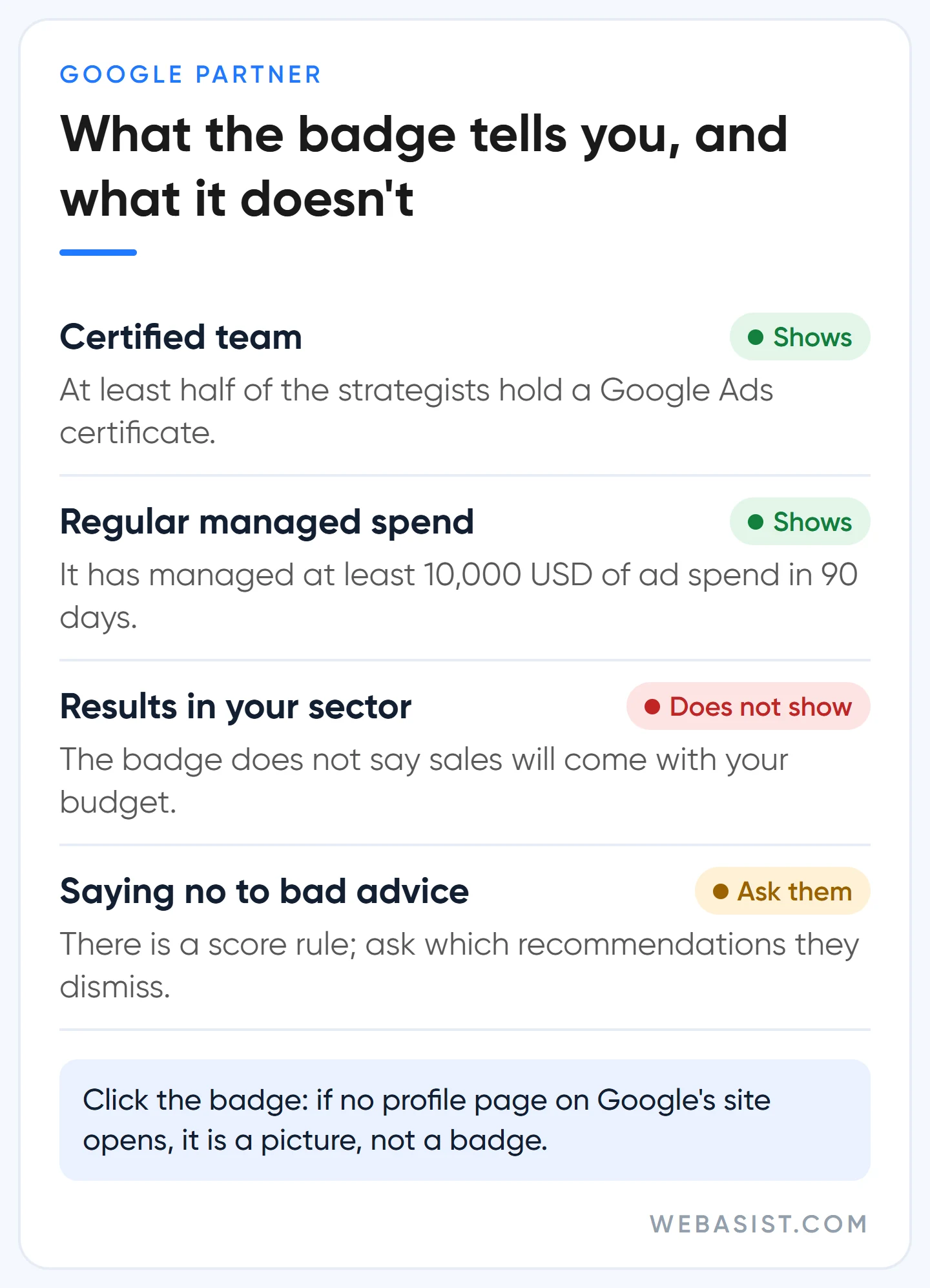
The optimisation score does not measure your profit. It measures how far the account has responded to Google's recommendations. Some of those recommendations help. Others push you to spend more: raise the budget, switch to broad match, launch a new campaign type.
Google also offers to apply these recommendations automatically. Leaving that switched on in a small-budget account is handing the keys to the seller. In the accounts we manage we keep auto-apply off and ask of every recommendation: "does this bring the client sales, or only spend?" One more detail: dismissing a recommendation protects the score as well. So "we had to accept it for our badge" is not a valid excuse; ask your agency which recommendations it dismisses and why.
Checking whether a badge is real is easy. Click the badge on the agency's website; it should take you to a profile page on Google's own site. If the image leads nowhere, it is a picture, not a badge. A small team without a badge may still do good work, because missing the spend threshold does not make an agency bad. In that case the questions below matter even more.
Google Ads agency scams: the tricks we see most often
Some of the businesses that come to us have been burned before. The stories they tell sound very much alike.
"We're calling from Google." Salespeople who introduce themselves as Google staff. A real Google employee can email you from an @google.com address; ask the caller to do that. A Gmail address proves nothing. No Google employee will ask for your password or your verification code.
"Annual keyword package." The offer goes: "top position for 5 keywords for a year, for this many lira." You cannot buy keywords in Google Ads or rent a position for a year. The auction runs again on every search and you pay per click. With this offer a small part of your money goes to ads and you never see the rest again.
"Guaranteed first position." Nobody can guarantee the top spot on every search, and neither can we. Whoever guarantees it is either misleading you or will show you the ad that appears when you search your own company name and say "look, you're first".
Reports by screenshot. You are not allowed into the account, and once a month a glossy PDF arrives. Seeing clicks, impressions and the amount paid to Google with your own eyes is your most basic right. Google's own rule for agencies says the same: cost is shown as charged, without the agency fee mixed in. The full rule is in Google's advertiser guide; if your agency does not follow it, you can file a complaint from that page.
6 questions to ask in the first meeting (ask us too)
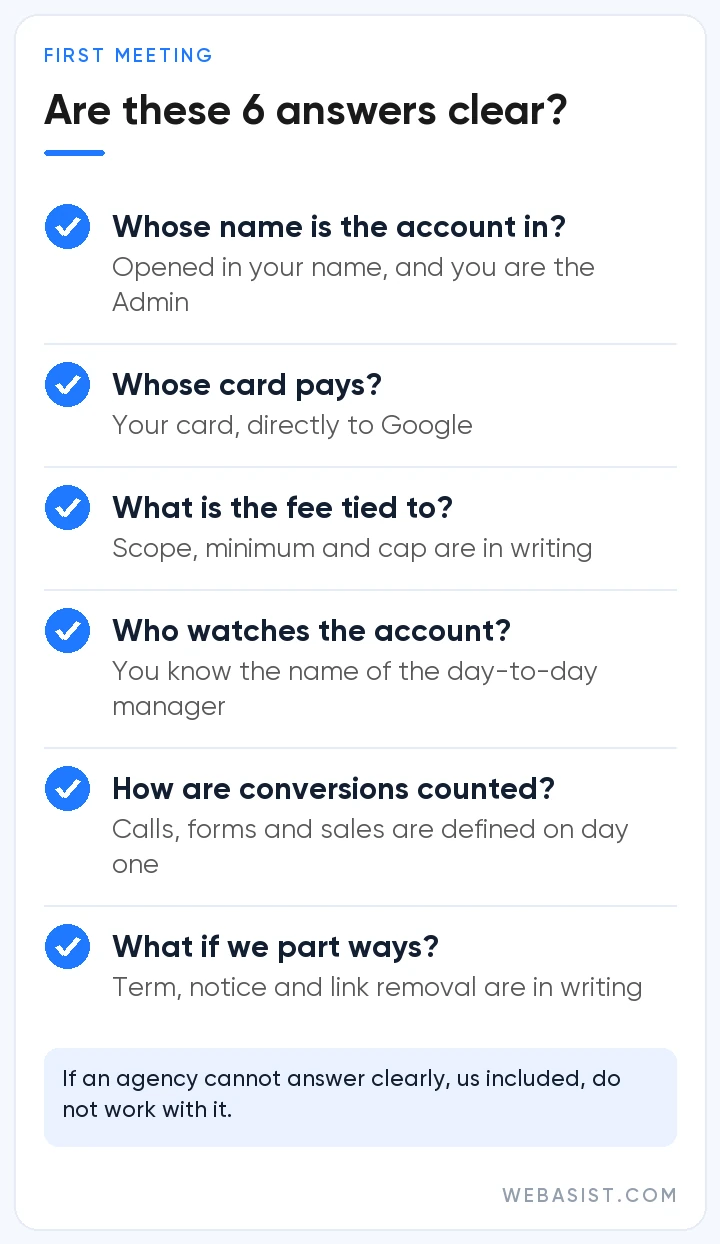
- Whose name will the account be in? The right answer: "Yours, and you will be an Admin." If you sense hesitation, end the meeting.
- Whose card pays for the ads? The right answer: your card, directly to Google.
- What is your fee tied to? If it is a percentage, get the minimum and the cap in writing. If it is flat, get the scope in writing.
- Who will look at my account every day? The person in the sales meeting and the person running the account are often not the same. Get a name.
- How will you measure conversions? "Your clicks went up" is not a result. Agree on day one how calls, forms and sales will be counted.
- What happens if we part ways? Contract length, notice period and removal of the link should be in writing. Show the legal side of the contract to your lawyer.
How we work: our fee model and process
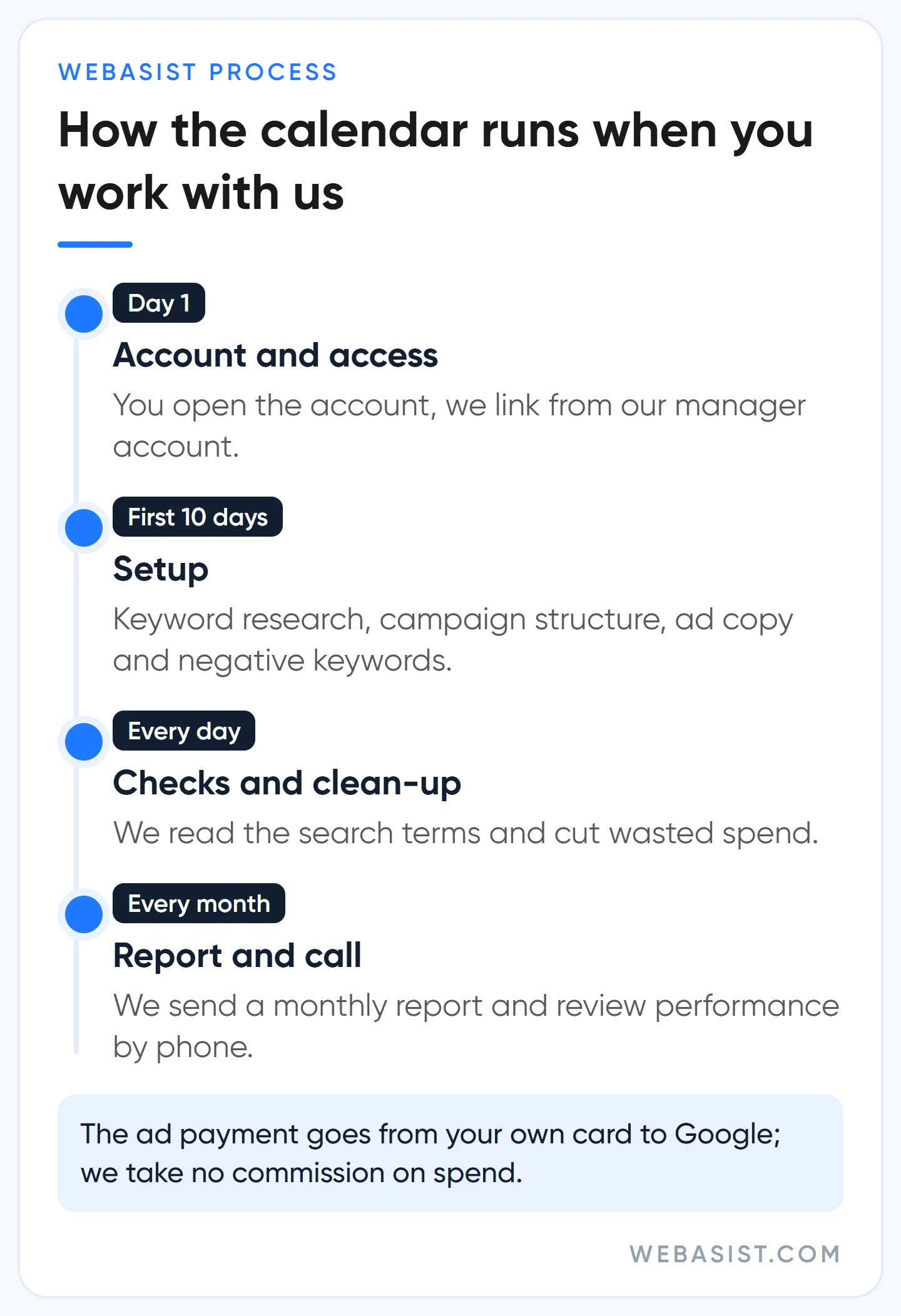
We work on a flat monthly fee and take no commission on your ad spend. The ad payment comes from your own card registered with Google, and Google's invoice reaches you directly every month. Our Google Ads packages page sets out what each package includes. Setup takes about 10 days. After that we look at the account every day, send a report once a month and review performance with you by phone.
Who are we not a fit for? We are expensive for anyone whose monthly ad budget is smaller than our management fee; the reason is above. We are not a fit if you want the agency to cover the ad payment and issue a single invoice, because we do not mix the money. And if you are looking for a first-position guarantee, we are the wrong address.
Frequently Asked Questions
Are the "Google Ads agency phone numbers" in search results Google's own?
No. Almost all of those numbers belong to agencies or middlemen; ours is on our website too. Google's own support channels, and which one works for which job, are covered in our guide to cancelling Google Ads and reaching support.
Do I need a Google Ads manager account myself?
If you have one business and one ad account, no. A manager account is for running several accounts from one login; it is a tool for agencies and for companies with several brands. What you need is to be an Admin-level user in your own account, and that is a different thing.
Can I try two agencies at the same time?
You can, but you will not get a clean result. Two agencies' campaigns compete for the same searches and get in each other's way, so you cannot tell whose work produced what. If you want to compare, try them one after the other inside the same account, so the history is not lost either.
An employee with Admin access has left the company. What should I do?
Sign in with the other Admin and remove that person's access the same day. If there is no other Admin, things get harder: you have to file an account access request with Google, and that can take days. This is exactly why we ask for two Admins on every account.
Conclusion
Choose an agency on three answers, not on its presentation: is the account yours, does the money go straight to Google, is the fee in writing. The rest is team fit and sector knowledge, and you will see that within the first month. If you want to try us, send the six questions above through our contact page and we will answer them in writing. If you already have an account, give us two weeks of read-only access; we will prepare the quote by looking at your account and tell you which package you fall into.














