


How to Cancel Google Ads: Refunds and Customer Service

If Google Ads has charged your card and you did not expect it, do three things in order. Look at the 10-digit number next to "GOOGLE *ADS" on your statement, pause the campaigns in that account, and cancel the account only if you still have money sitting in it. Closing the card or disputing the charge with your bank is not the first move; most of the time it makes things harder.
The short answer to how to cancel a Google Ads account is this: Admin menu > Account settings > Account status > "Cancel my account". Ads stop within 24 hours. If you are looking for a Google Ads customer service phone number in Turkey, Google's line is 0 850 390 2060, but that line exists to help new advertisers set up campaigns; it will not sort out a cancellation or a refund. The route that works is described below.
Google Ads charged my card: first find out which account it is
On your statement the payment shows as "GOOGLE *ADS" followed by a 10-digit number. That number is the customer ID of the ad account that took the money. Sign in to Google Ads and compare it with the number under your profile picture at the top right. What you do next depends on the result.
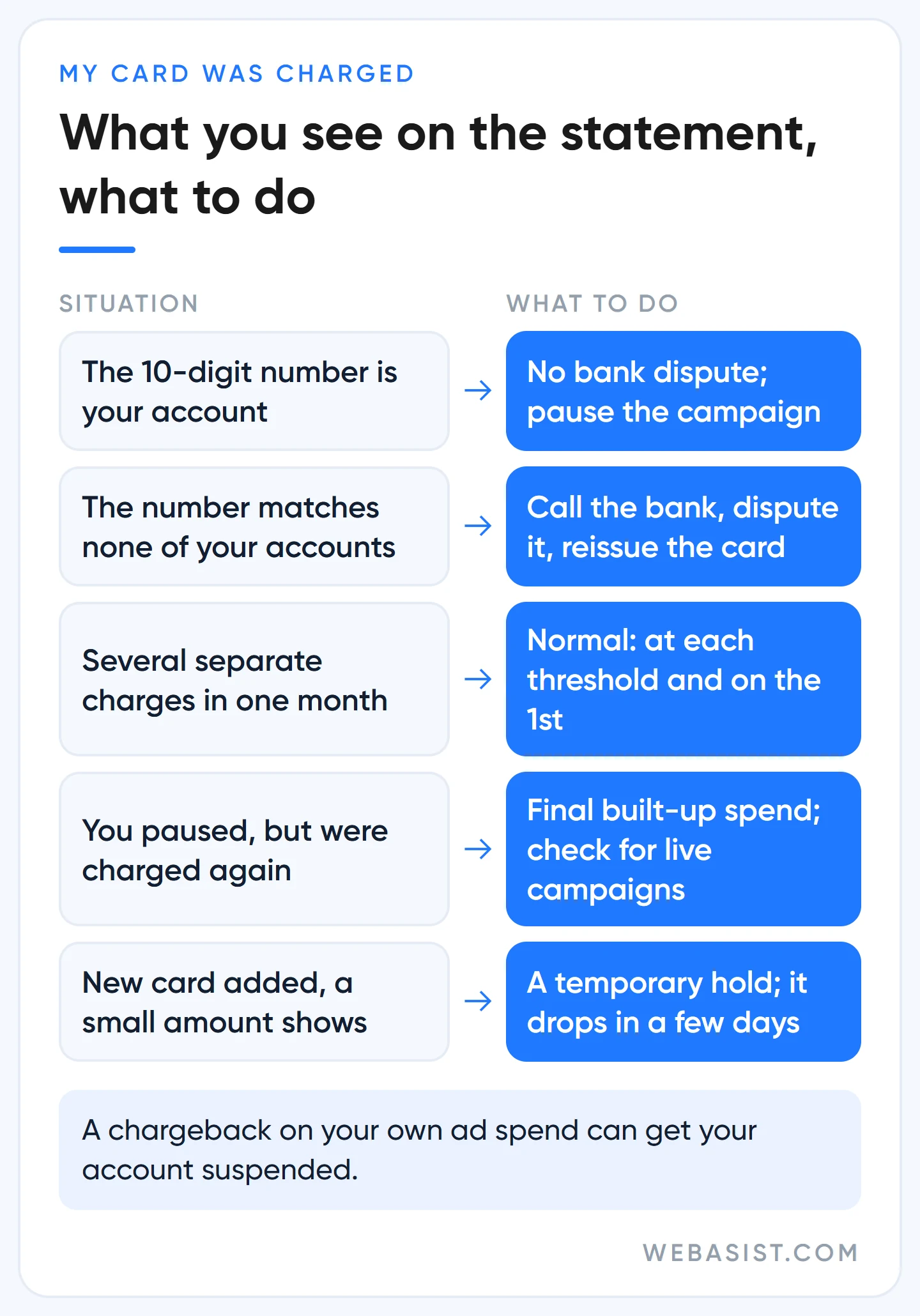
If the number is your account, there is no fraud, only a payment pattern nobody explained to you. Card accounts pay after they spend. Google charges your card every time your spend reaches a threshold, and again on the first day of each month. The threshold rises on its own over time and nobody tells you, so three or four charges in the same month are normal.
If you are thinking "my daily budget was 300 TL and 600 TL went in one day", that is not an error either. The daily budget is an average: up to twice the amount can be spent on a single day, while the monthly total will not exceed 300 × 30.4 = 9,120 TL. The payment pattern is covered in detail in our billing guide, and what a click costs is in our Google Ads pricing guide.
Should you dispute it with the bank?
If the number is your account, no. Ask the bank for a chargeback on your own ad spend and Google may suspend the account, and lifting that suspension will cost you far more time than the amount you are arguing about. If you object to the amount, write to Google, not to the bank. What to do with a suspended account is covered in a separate guide.
If the number matches none of your accounts, the picture flips. Your card is being used in someone else's ad account. Call your bank straight away, dispute the transaction and have the card reissued. Before you decide, check one more thing: is there an agency or a former employee who opened an account on your behalf?
Pause the ads or close the account? Which one to choose, and when
If you want the money to stop leaving today, pause the campaigns. On the Campaigns page, click the green dot next to the campaign name and choose "Pause". Settings and history stay where they are, and three months later you switch it back on with one click.
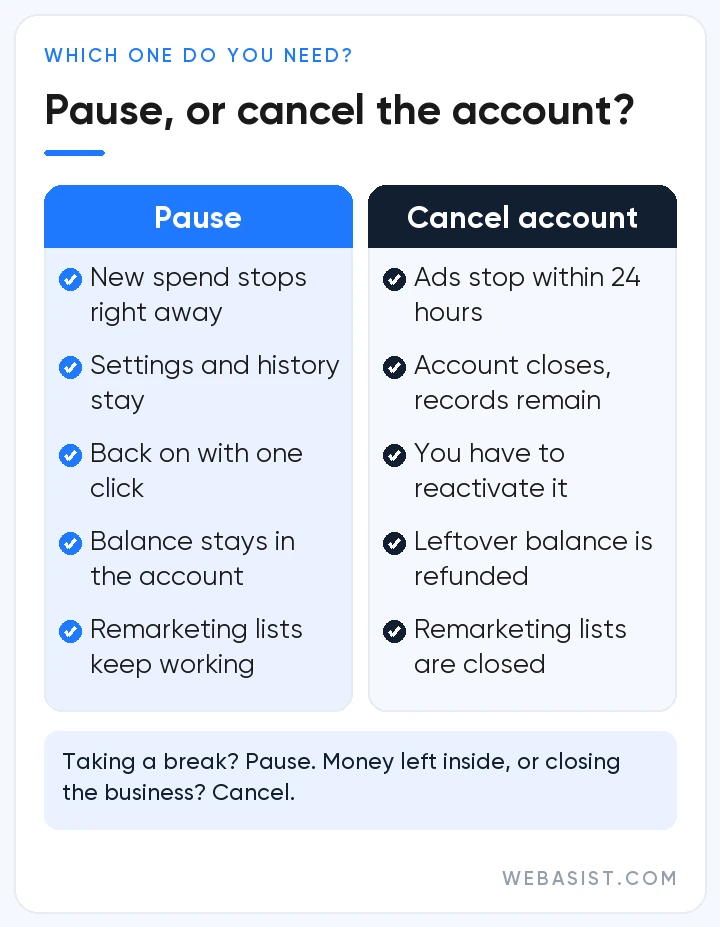
Cancelling the account is a different job. Cancel if you have prepaid money left inside and want it back, or if you have closed the business. If you are only taking a break, do not cancel; you gain nothing, and your remarketing lists are closed on top of it.
I paused the campaign. Why was I charged again?
Because pausing stops new spend; it does not erase what has already built up. The clicks your ads received up to the day you paused are charged at the next threshold or on the first of the month. That is the last charge and nothing follows it. If something does follow, another campaign is still running in the account; the one most often forgotten is that first Smart campaign created in five minutes during sign-up.
Deleting or closing the card will not get you out
This is the mistake we see most. Google does not let you remove the only card on the account; you have to add another payment method first. If you close the card at the bank, the ads keep running, the debt builds up, and when the payment is declined the account goes into arrears. Stop the ads first and touch the card afterwards.
Two more things not to do: do not close your Google payments profile, and do not delete your Google Account. The first permanently erases your transaction history and breaks your payments in other products such as Google Play. The second does not close the ad account; it only locks you out of it.
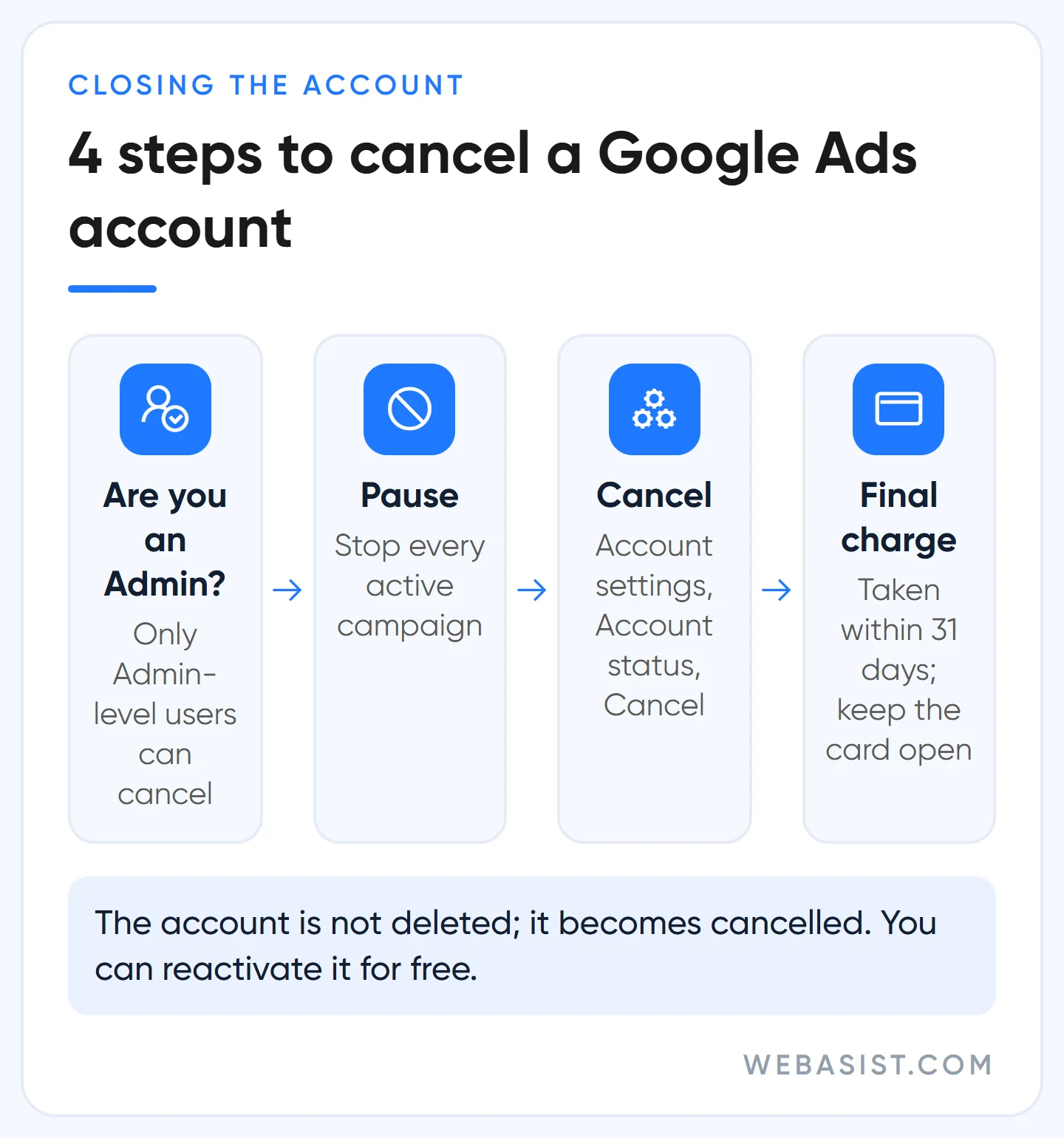
How to cancel a Google Ads account in 4 steps
- Make sure you are an Admin. Only an Admin-level user can cancel the account. If an agency opened the account for you, that power may sit with the agency.
- Pause the campaigns. So that no new spend builds up while the cancellation is processed.
- Cancel. Open Admin menu > Account settings > Account status and click "Cancel my account". In some accounts the same section sits under "Preferences".
- Wait for the final charge. Spend from before the cancellation is collected from your card within 31 days. The card has to stay open until then.
Ads stop within 24 hours. The account is not deleted; it moves to "cancelled" status, and you can still sign in and look at your old data. If you change your mind, "Reactivate my account" on the same screen opens it again at no cost.
If the person who was Admin has left the company and nobody can get in, the job falls to Google support. Have the customer ID, the account's sign-in email and the billing details ready. Of the cancellations we see, this kind takes longest; it is the reason to keep two Admins on an account.
When does a Google Ads refund arrive, and who does not get one?
The bad news first: money spent on clicks does not come back. Most accounts that pay by card after spending have no balance to refund at all, because Google has only charged what you spent. A refund applies when unspent money is sitting in the account: a prepayment you did not use up, or an adjustment Google has credited to you.
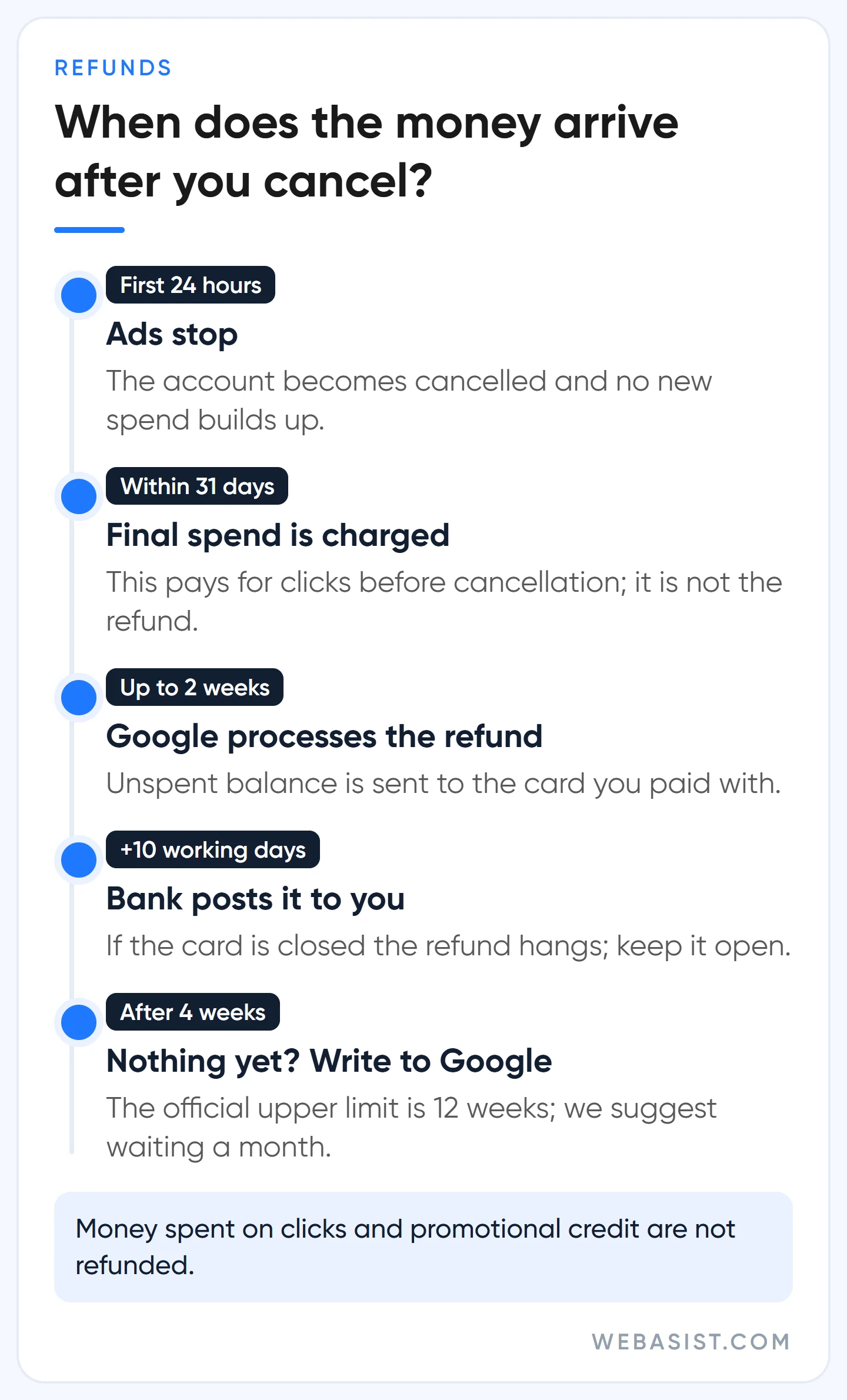
An example: you prepaid 5,000 TL into the account and 3,200 TL of it was spent. When you cancel the account, the remaining 1,800 TL is refunded automatically to the card you paid with. You do not have to fill in a separate form when cancelling.
On timing, Google's own pages do not agree with each other. One says "up to two weeks, plus 10 business days for your bank", another says "4 to 12 weeks". We tell our clients not to expect a refund in under a month. If four weeks have passed and the money has not arrived, it is time to write to Google; you can follow the status under Billing > Summary.
Can you get a refund without closing the account?
In some accounts, yes. If you see "Request a refund" under Billing > Summary, you can ask for the remaining balance without closing the account. If you do not see it, either you have no refundable balance at that moment or cancellation is the only route.
What is not refunded
- Promotional credit. Ad credit that Google gave you does not turn into cash. The conditions are in our promotional credit guide.
- An account in debt. No refund is made while there is an unpaid balance.
- "My competitor clicked" claims. There is no separate refund request for fake clicks; Google deducts what it catches from the invoice itself. What you can do about the ones it misses is in our fake clicks guide.
One more trap: the refund goes to the card you paid with. If you have closed that card, the refund is left hanging and Google asks you for a new bank account. Do not close the card until the refund has arrived.
Google Ads customer service: the phone number and the route that works
The number Google publishes for Turkey is 0 850 390 2060, open on weekdays from 09:00 to 17:00. The number and hours may change, so check Google's own page before you call. At the time of writing (5 October 2026) the page showed these details.
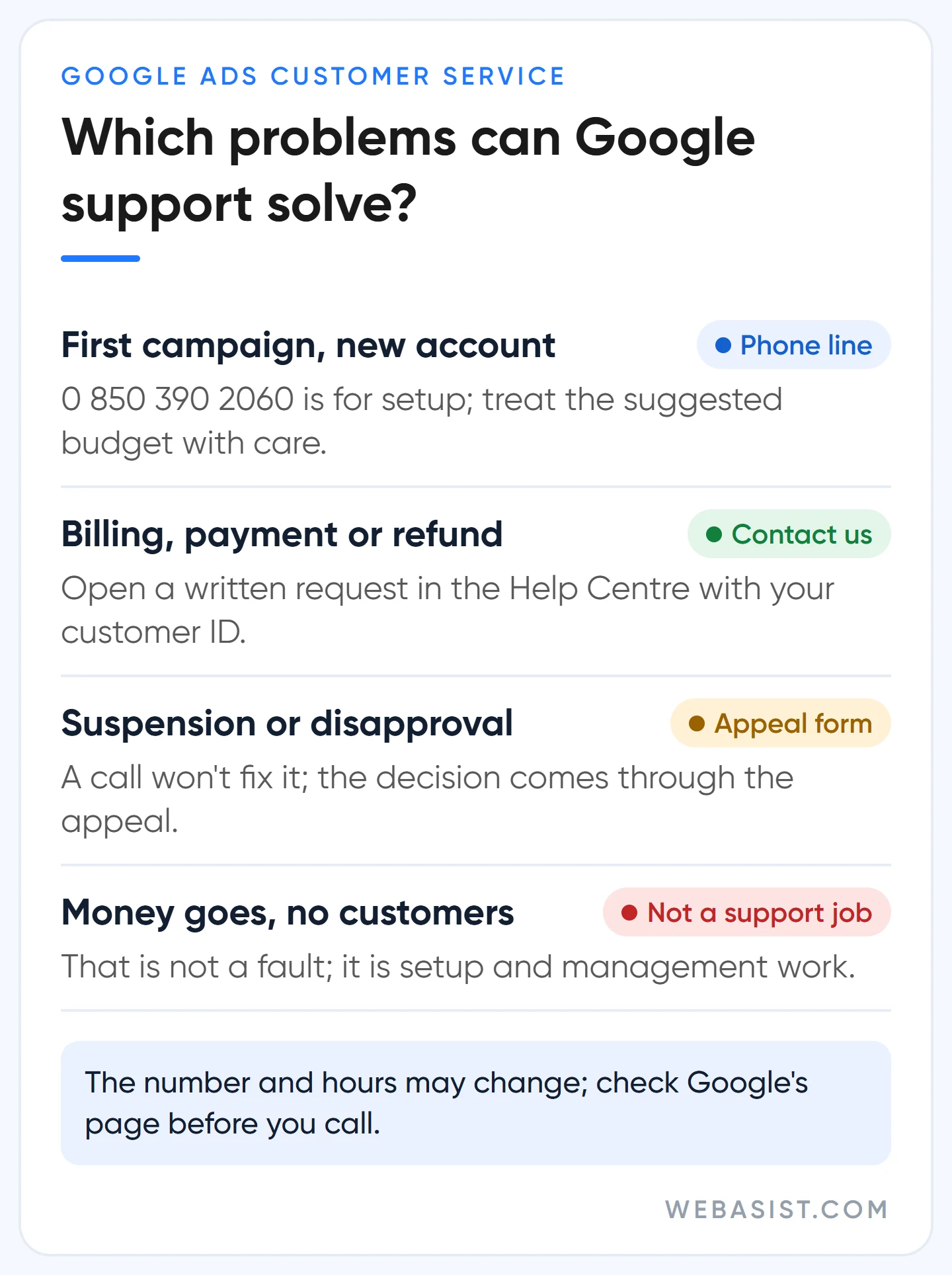
Call it knowing what it is: a sales and setup line. It exists to get a brand-new advertiser's first campaign built, and it is limited to the first 30 days. The same page sends questions about running campaigns to the Help Centre. If your card was charged, your account is suspended or you are waiting for a refund, you will lose time on this line.
If you do call it for setup, one warning. The job of the person on the other end is to get you live. The budget they suggest and the automated settings they switch on are chosen to suit Google's product, not your profit. Do not launch a campaign on that call until something is in place that measures sales or incoming calls.
The route that works for an existing account
In the Google Ads Help Centre, click the "Contact us" button at the bottom of any page and sign in with the email registered on the ad account. After you describe the problem, Google shows the channel that is open for that topic: chat, email or phone. There is no fixed live chat link and no public support email address; we open requests for our own clients the same way.
Do not open the request with "my card was charged". Write three sentences: which account (customer ID), which amount on which date, and why you think it is wrong. Attach a picture of the statement. You will be asked for 2-Step Verification to prove who you are, so keep that phone with you. Requests opened with missing details turn into days of back-and-forth.
Be careful with "Google Ads contact number" results online
Most of the numbers that come up in search results belong to agencies and middlemen, not to Google. Some present themselves outright as "Google support". Google will not call you and ask for your password, your verification code or your card details. Ask the caller to email you from an @google.com address; if they cannot, hang up.
My Google Ads account was hacked, or my card is in a stranger's account
If you see campaigns you do not recognise, budgets multiplied overnight or unfamiliar users in your account, it has been taken over. Speed matters here, because the attacker is running their own ads on your card. Do the following without changing the order:
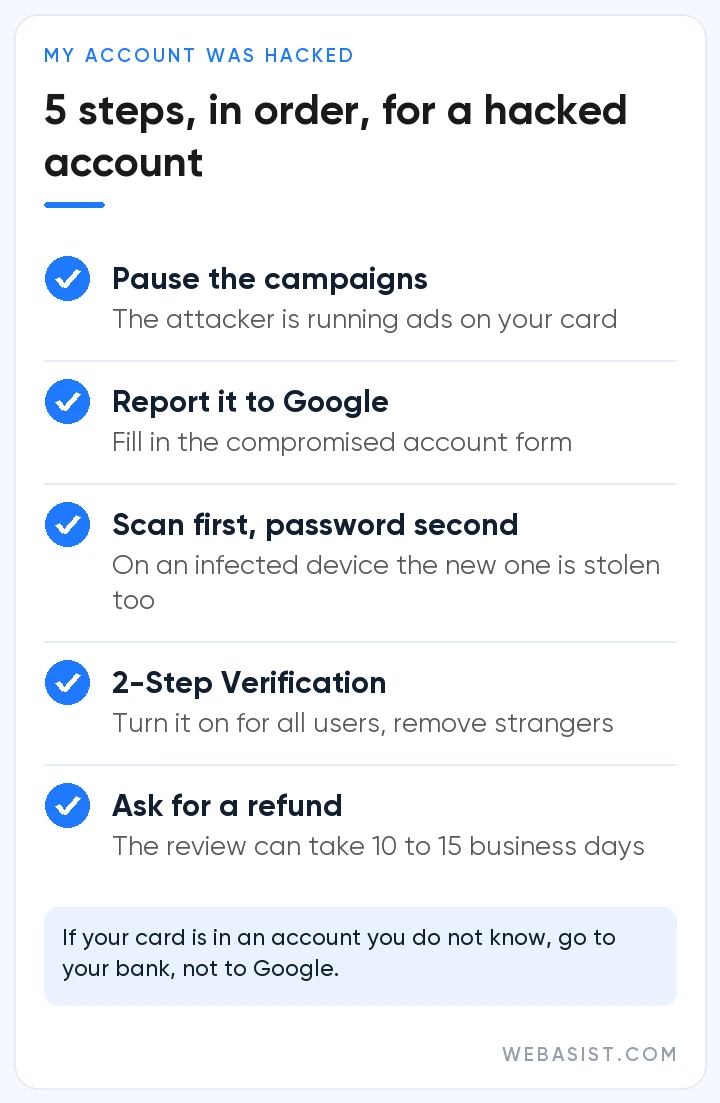
- Pause every active campaign.
- Report it to Google with the "compromised account" form in the Help Centre. Attach screenshots of the users and changes you do not recognise.
- Scan your computer for malware, and change the password only after that. Do it the other way round and the new password is stolen too.
- Turn on 2-Step Verification for all users, and remove unfamiliar users and manager account links.
- Ask for a refund of the unauthorised spend.
If Google confirms the unauthorised spend, it writes the money back to the account as a credit. The review can take 10 to 15 business days, and 2-Step Verification has to be switched on for it.
Before you cancel: is the problem Google Ads, or the setup?
Most businesses that come to us saying "I want to close Google Ads" are not really complaining about advertising. They are complaining about getting nothing back. Money goes out and the phone does not ring. When we open these accounts we mostly see the same picture, and the channel itself is not the problem.
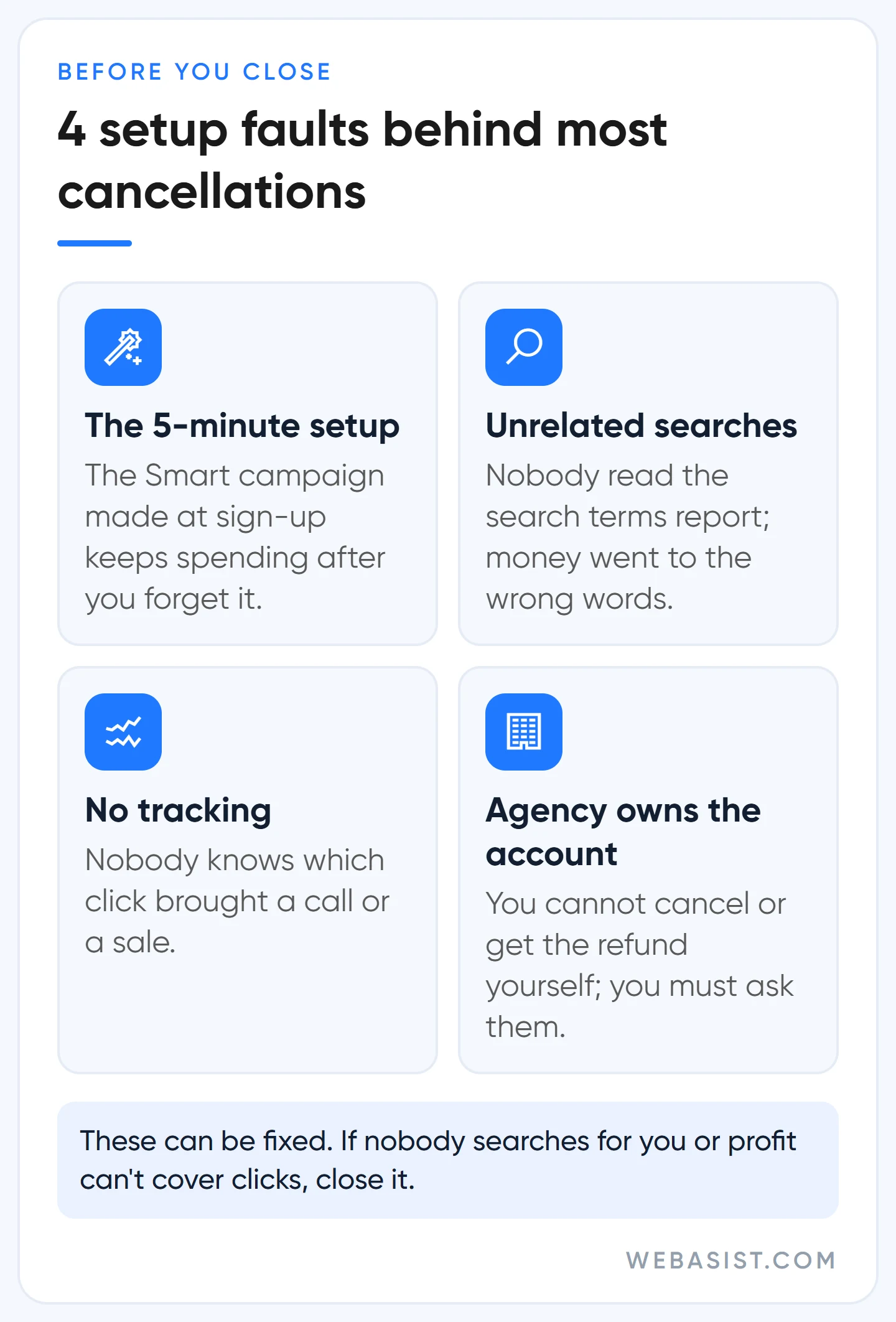
The account was opened in five minutes during sign-up, following Google's prompts. Google recommends that quick setup because it wants you live as soon as possible. It does not serve you: you do not choose the keywords, you cannot fully see which searches you appear on, and no sales tracking has been set up. The money goes, and nobody can say where it went.
So before you press the cancel button, pause the campaigns and look at the search terms report. If your ad has been showing on searches that have nothing to do with your business, the problem is the setup and it can be fixed. What to check is listed in our account audit guide.
When should you really close it? If nobody searches Google for your product or service, if what you earn from one customer does not cover a few clicks, or if you have nobody to look after the ads. In that case closing is the right decision, and we would tell you the same.
If an agency manages your account, check one more thing: whose name is it in? If the account and the card are yours, you take the steps above yourself. If the agency opened the account in its own name, you will have to ask it for both the cancellation and the refund. How to set this up correctly from the start is in our guide to choosing an agency.
Frequently Asked Questions
How do I cancel a Google Ads subscription? Is there a monthly membership fee?
Google Ads has no membership or subscription fee. The money taken from your card is only the cost of clicks on your ads. The moment you pause your campaigns no new charges build up; there is no separate membership to cancel.
Can a Google Ads account be deleted completely?
An account that has finished setup is not deleted; it is cancelled and its records remain. Only draft accounts that never completed setup can be deleted: click your profile picture at the top right and press the bin icon next to the draft in the account list.
How do I remove my card from Google Ads?
You remove it on the Payment methods page in the Billing menu, but not if it is the only card on the account. Add a second payment method first and make it primary. If your aim is to stop money leaving, removing the card does not help; pause the campaigns.
Can I reopen an account I cancelled?
Yes. It opens again with "Reactivate my account" in the Account status section, and you may be asked to verify your payment details. If you then run no ads for three months, Google cancels the account again. Accounts left untouched are also cancelled automatically after 15 months without spend.
I have no account, but Google Ads charged my card. Who do I contact?
Your bank. Your card has been used in an ad account you do not know; dispute the transaction and have the card reissued. Once the bank's notice arrives, Google usually suspends that account.
Conclusion
Pause to stop the money leaving, cancel if you have money left inside, and touch the card last. Do not try to solve it by phone; open a written request and put your customer ID on the first line. If you are closing because you are not getting results, write to us before you press the button and give us read-only access to your account. We will work out which searches the money went to; if you still want to close after that, the steps are above.














